一、安装vue-baidu-map
npm install vue-baidu-map --save
二、全局注册(也可以局部注册,具体参考vue-baidu-map文档)
import Vue from 'vue'
import BaiduMap from 'vue-baidu-map'
Vue.use(BaiduMap, {ak: 'YOUR_APP_KEY'
})
三、页面中使用组件
1.模板中使用组件
<baidu-mapclass="map-wrap":center="mapData.center":zoom="mapData.zoom"@ready="mapHandler"@click="getLocation"><bm-navigation anchor="BMAP_ANCHOR_TOP_LEFT"></bm-navigation><bm-city-list anchor="BMAP_ANCHOR_TOP_RIGHT"></bm-city-list><bm-geolocationanchor="BMAP_ANCHOR_BOTTOM_RIGHT":showAddressBar="true":autoLocation="true"></bm-geolocation></baidu-map>
2.定义数据
data() {return {businessDetail:{}mapData: {center: { lng: 0, lat: 0 },zoom: 13},BMap: null,map: null}},
3.方法事件处理
async mapHandler({ BMap, map }) {if (this.businessId) {await this.getMallBusinessDetail()}this.BMap = BMapthis.map = mapif (this.businessDetail.longitude && this.businessDetail.latitude) {this.mapData.center.lng = this.businessDetail.longitudethis.mapData.center.lat = this.businessDetail.latitude} else {let geolocation = new BMap.Geolocation()await new Promise((resolve) => {geolocation.getCurrentPosition((r) => {this.mapData.center.lng = this.businessDetail.longitude =r.point.lngthis.mapData.center.lat = this.businessDetail.latitude = r.point.latresolve()})})}let marker = new BMap.Marker(new BMap.Point(this.businessDetail.longitude,this.businessDetail.latitude))map.addOverlay(marker)},getLocation(e) {this.businessDetail.longitude = e.point.lngthis.businessDetail.latitude = e.point.latlet BMapGL = this.BMaplet map = this.mapmap.clearOverlays()let marker = new BMapGL.Marker(new BMapGL.Point(e.point.lng, e.point.lat))map.addOverlay(marker)let geoc = new BMapGL.Geocoder()geoc.getLocation(e.point, (rs) => {let addressComp = rs.addressComponentsthis.businessDetail.address =addressComp.province +addressComp.city +addressComp.district +addressComp.street +addressComp.streetNumber})},
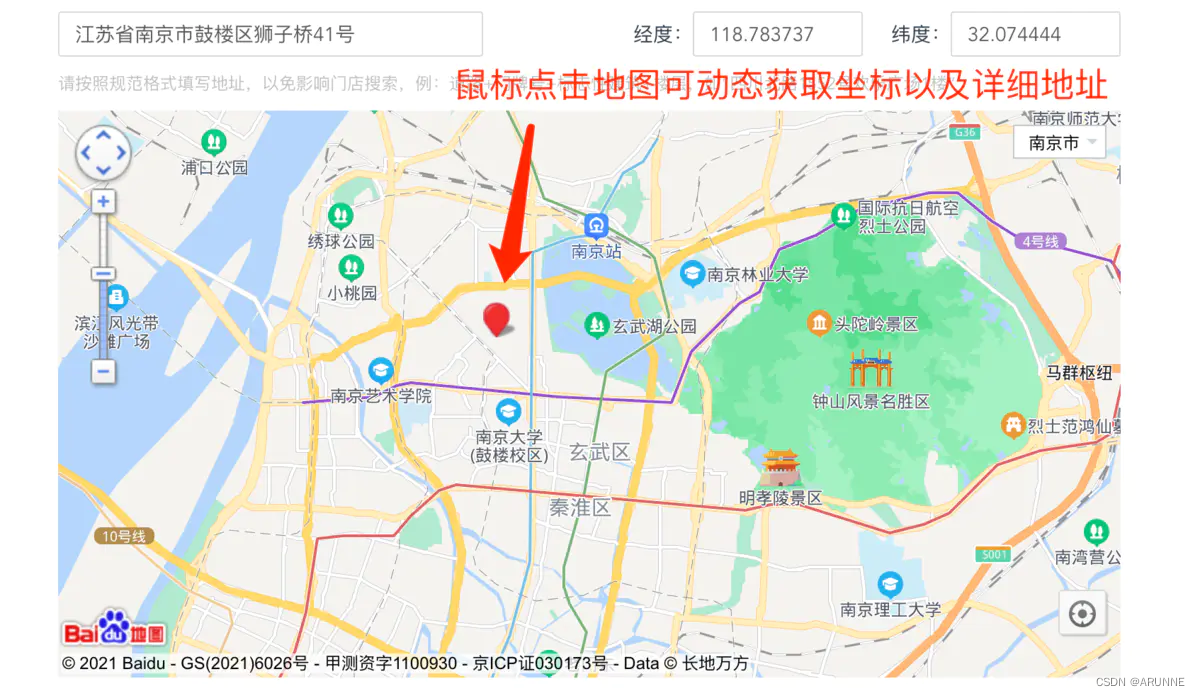
四、效果
本文来自互联网用户投稿,文章观点仅代表作者本人,不代表本站立场,不承担相关法律责任。如若转载,请注明出处。 如若内容造成侵权/违法违规/事实不符,请点击【内容举报】进行投诉反馈!
