React+Redux实现简单的Todolist(增、删、完成、localstorage)
React+Redux实现简单的Todolist(增、删、完成、localstorage)
在初步学习了解React之后,着手开始学习Redux。
Redux对于JavaScript应用而言是一个可预测状态的容器。换言之,它是一个应用数据流框架,而不是传统的像underscore.js或者AngularJs那样的库或者框架。Redux最主要是用作应用状态的管理。简言之,Redux用一个单独的常量状态树(对象)保存这一整个应用的状态,这个对象不能直接被改变。当一些数据变化了,一个新的对象就会被创建(使用actions和reducers)。
1.需求
简易的TodolistDemo要求的功能包括:通过回车与增加按钮对于事件的增加,点击删除按钮的单删功能,点击按钮使事件在完成与未完成间转换,一键删除所有事项,localstorage的本地保存。
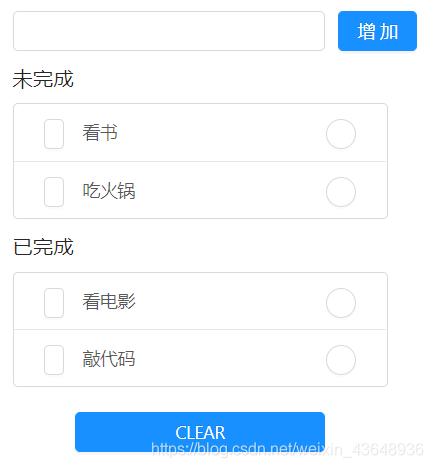
图上左侧方框为事件状态切换按钮,圆形按钮为单删功能按钮
2.UI框架
为了简便在编程过程中的对于Demo的css文件的编写,我们首先引入Ant Design,在antd中也存在许多React的组件,灵活地运用可以节省大量时间并美化界面。
在这个Demo中我们引入三个组件即可
import 'antd/dist/antd.css'
import {Input,Button,List} from "antd";
3.文件组成
由于我们的Demo引入antd所以我们可以不用设立自己的组件库,只需要建立一个Todolist组件即可,另外需要新建单独的store文件夹来存放我们的creatStore以及reducer这部分与Redux相关的js文件。
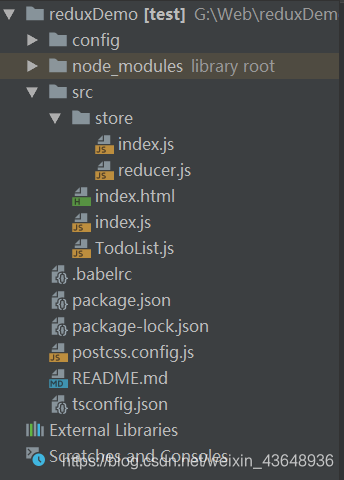
4.TodoList组件
这部分主要是对于总体组件TodoList的编写
- 首先是组件主体
import React,{ Component } from 'react';
import 'antd/dist/antd.css'
import {Input,Button,List} from "antd";
import store from './store/index'class TodoList extends Component{constructor(props){super(props);this.state = store.getState();this.changeInputValue = this.changeInputValue.bind(this);this.storeChange = this.storeChange.bind(this);this.clickBtn = this.clickBtn.bind(this);store.subscribe(this.storeChange);//用以同步数据变化}render() {return(<div><div style={{margin:'10px'}}><Inputvalue={this.state.inputValue}placeholder={this.state.inputValue}style={{width:'250px',marginRight:'10px'}}onChange={this.changeInputValue}onKeyPress={this.enterPress.bind(this)}/><Button type={"primary"} onClick={this.clickBtn}>增加</Button></div><div style={{margin:'10px',width:'300px',position:'relative'}}><h3>未完成</h3><List bordered dataSource={this.state.list} renderItem={(item,index) => (<List.Item><Button size={'small'} style={{float:'left',marginRight:'15px'}} onClick={this.toDone.bind(this,index,item)}/>{item}<Button shape={'circle'} size={'small'} style={{float:'right'}} onClick={this.deleteDoingItem.bind(this,index)}/></List.Item>)}></List></div><div style={{margin:'10px',width:'300px'}}><h3>已完成</h3><List bordered dataSource={this.state.list1} renderItem={(item,index1) => (<List.Item><Button size={'small'} style={{float:'left',marginRight:'15px'}} onClick={this.toDoing.bind(this,index1,item)}/>{item}<Button type={'submit'} shape={'circle'} size={'small'} style={{float:'right'}} onClick={this.deleteDoneItem.bind(this,index1)}/></List.Item>)}></List></div><Button type={"primary"} style={{width:'200px',marginLeft:'60px',marginTop :'10px'}} onClick={this.clearAll.bind(this)}>CLEAR</Button></div>);}- Todolist中所涉及的函数
storeChange(){this.setState(store.getState());//同步数据变化}changeInputValue(e){//监听输入框变化const action = {type : 'changeInput',value : e.target.value};store.dispatch(action);}clickBtn(){//增加按钮const action = {type :'addItem'};store.dispatch(action);}enterPress(ev){//回车增加const action = {type : 'enterPress',key : ev.key};store.dispatch(action);}deleteDoingItem(index){//未完成列表单删const action = {type : 'deleteDoingItem',index};store.dispatch(action);}deleteDoneItem(index1){//已完成列表单删const action = {type : 'deleteDoneItem',index1};store.dispatch(action);}toDone(index,item){//改变未完成事件状态const action = {type : 'toDone',index,item};store.dispatch(action);}toDoing(index1,item){//改变已完成事件状态const action = {type :'toDoing',index1,item};store.dispatch(action);}clearAll(){//删除所有const action = {type : 'clearAll'};store.dispatch(action);}
}export default TodoList;
5.reducer处理相应的action
对于所有在函数中定义的type相应的处理
const defaultState = {inputValue : 'Write Something',list:[],list1:[]
};
export default (state = defaultState,action)=>{//Reducer里面只能接受stateif(action.type === 'changeInput'){let newState = JSON.parse(JSON.stringify(state));//深度拷贝newState.inputValue = action.value;return newState;}if(action.type === 'addItem'){let newState = JSON.parse(JSON.stringify(state));//深度拷贝if(!newState.inputValue.trim()) {alert("输入不可为空");newState.inputValue = '';}else{newState.list.push(newState.inputValue);newState.inputValue = '';}return newState;}if(action.type === 'enterPress'){if(action.key === 'Enter'){let newState = JSON.parse(JSON.stringify(state));//深度拷贝if(!newState.inputValue.trim()) {alert("输入不可为空");newState.inputValue = '';}else{newState.list.push(newState.inputValue);newState.inputValue = '';}return newState;}}if(action.type === 'deleteDoingItem'){let newState = JSON.parse(JSON.stringify(state));//深度拷贝newState.list.splice(action.index,1);return newState;}if(action.type === 'deleteDoneItem'){let newState = JSON.parse(JSON.stringify(state));//深度拷贝newState.list1.splice(action.index,1);return newState;}if(action.type === 'toDone'){let newState = JSON.parse(JSON.stringify(state));//深度拷贝newState.list.splice(action.index,1);newState.list1.push(action.item);return newState;}if(action.type === 'toDoing'){let newState = JSON.parse(JSON.stringify(state));//深度拷贝newState.list1.splice(action.index1,1);newState.list.push(action.item);return newState;}if(action.type === 'clearAll'){let con = confirm("确认删除所有事项");if(con === true){let newState = JSON.parse(JSON.stringify(state));//深度拷贝newState.list.splice(0);newState.list1.splice(0);return newState;}}return state
}
6.Localstorage
在这个demo中是将state通过localstorage保存到本地,通过在页面刷新或者关闭时记录当前的state,再重新打开和加载页面时重新加载保存的state,以下是store代码:
import {createStore} from "redux"import reducer from './reducer'const loadState = () => {try {const serializedState = localStorage.getItem('state');if (serializedState === null) {return undefined;} else {return JSON.parse(serializedState);}} catch (err) {return undefined;}
}let store = createStore(reducer,loadState(),window.__REDUX_DEVTOOLS_EXTENSION__ && window.__REDUX_DEVTOOLS_EXTENSION__(),
);const saveState = (state) => {try {const serializedState = JSON.stringify(state);localStorage.setItem('state', serializedState);} catch (err) {}
};window.onbeforeunload = (e) => {const state = store.getState();saveState(state);
};export default store
总结
这个小demo还有许多方面值得去提升与完善,从界面的美化到功能的完善更值得提高的是变成的模式,相对于demo中写在TodoList组件中的繁琐的action,在以后的编程中可以单独设立一个action库来辅助变成,提高代码的复用性与编程的效率。
本文来自互联网用户投稿,文章观点仅代表作者本人,不代表本站立场,不承担相关法律责任。如若转载,请注明出处。 如若内容造成侵权/违法违规/事实不符,请点击【内容举报】进行投诉反馈!