Android自定义无压缩加载超清大图
自定义无压缩加载超清大图
前言
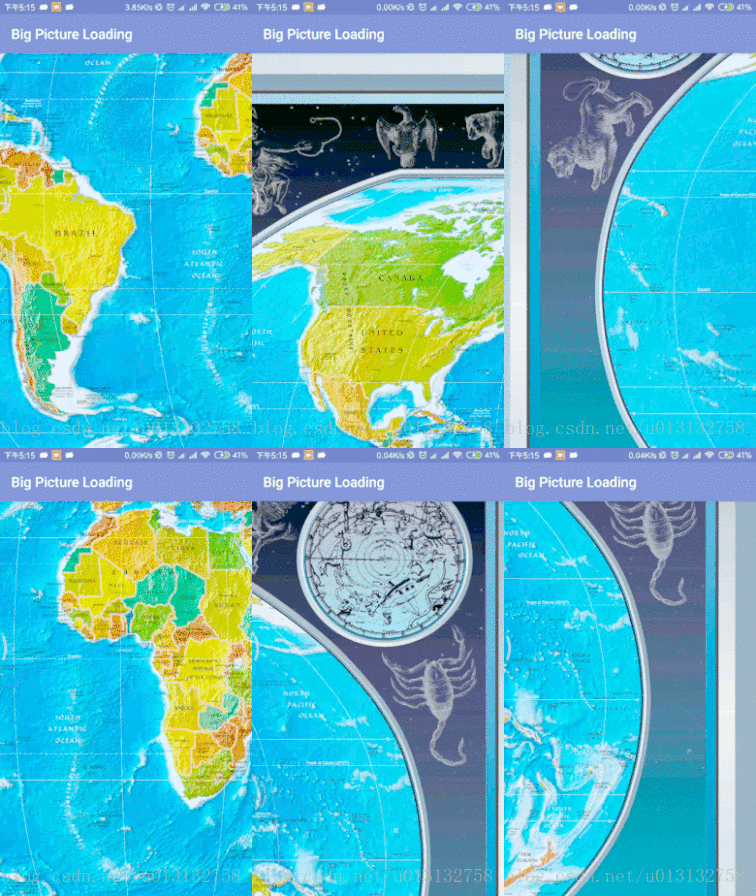
已经很久没有写博客了,前段时间做项目就遇到加载超大图时系统内存溢出,我们一般处理加载图片时OOM的方法都是对图片进行压缩。但是发现手机系统相册是可以打开大图的,今天就分享一波自定义无压缩加载超清大图。
BitmapRegionDecoder
BitmapRegionDecoder用来解码一张图片的某个矩形区域,通常用于加载某个图片的指定区域。通过调用该类提供的一系列newInstance(...)方法可获得BitmapRegionDecoder对象,该类提供的主要构造方法如下:

获取该对象后我们可以通过decodeRegion(rect,mOptions)方法传入需要显示的指定区域,就可以得到指定区域的Bitmap。这个方法的第一个参数就是要显示的矩形区域,第二个参数是BitmapFactory.Options(这个
类是BitmapFactory对图片进行解码时使用的一个配置参数类,其中定义了一系列的public成员变量,每个成员变量代表一个配置参数。)
自定义控件
要自定义这个控件,我们主要分以下几个步骤:
1. 提供一个图片入口
2. 自定义手势监听,通过手势上下左右滑动,更新显示图片的区域
3. 自定义显示指定区域图片,即通过手势滑动传入的区域显示大图在该区域的内容
自定义加载大图控件(LargeImageView)
package com.example.bthvi.bigpictureloading;import android.content.Context;
import android.graphics.Bitmap;
import android.graphics.BitmapFactory;
import android.graphics.BitmapRegionDecoder;
import android.graphics.Canvas;
import android.graphics.Rect;
import android.media.ExifInterface;
import android.os.Build;
import android.support.annotation.Nullable;
import android.support.annotation.RequiresApi;
import android.util.AttributeSet;
import android.view.MotionEvent;
import android.view.View;import java.io.IOException;
import java.io.InputStream;/*** 自定义加载超大图片的View** create by bthvi on 2018/06/29*/
public class LargeImageView extends View {/***用来解码一张图片的某个矩形区域*/private BitmapRegionDecoder mDecoder;/*** 图片的宽度和高度*/private int mImageWidth,mImageHeight;/***绘制图片区域*/private volatile Rect rect = new Rect();/*** 手势监听器*/private MoveGestureDetector moveGestureDetector;/*** 图片解码时的参数配置类*/private static final BitmapFactory.Options mOptions = new BitmapFactory.Options();/*** 图片解码时所用的颜色模式*/static {mOptions.inPreferredConfig = Bitmap.Config.RGB_565;}/*** 构造方法* @param context*/public LargeImageView(Context context) {super(context);initView();}public LargeImageView(Context context, @Nullable AttributeSet attrs) {super(context, attrs);initView();}public LargeImageView(Context context, @Nullable AttributeSet attrs, int defStyleAttr) {super(context, attrs, defStyleAttr);initView();}@Overridepublic boolean onTouchEvent(MotionEvent event){moveGestureDetector.onToucEvent(event);return true;}@Overrideprotected void onDraw(Canvas canvas){Bitmap bm = mDecoder.decodeRegion(rect, mOptions);canvas.drawBitmap(bm, 0, 0, null);}@Overrideprotected void onMeasure(int widthMeasureSpec, int heightMeasureSpec){super.onMeasure(widthMeasureSpec, heightMeasureSpec);int width = getMeasuredWidth();int height = getMeasuredHeight();int imageWidth = mImageWidth;int imageHeight = mImageHeight;//默认直接显示图片的中心区域,可以自己去调节rect.left = imageWidth / 2 - width / 2;rect.top = imageHeight / 2 - height / 2;rect.right = rect.left + width;rect.bottom = rect.top + height;}/*** 初始化*/private void initView() {moveGestureDetector = new MoveGestureDetector(getContext());SimpleMoveGestureDetector simpleMoveGestureDetector = new SimpleMoveGestureDetector(){@Overridepublic boolean onMove(MoveGestureDetector detector){int moveX = (int) detector.getMoveX();int moveY = (int) detector.getMoveY();if (mImageWidth > getWidth()){rect.offset(-moveX,0);checkWidth();invalidate();}if (mImageHeight > getHeight()){rect.offset(0, -moveY);checkHeight();invalidate();}return true;}};moveGestureDetector.setOnMoveGestureListener(simpleMoveGestureDetector);}public void setInputStream(InputStream is){try{mDecoder = BitmapRegionDecoder.newInstance(is, false);BitmapFactory.Options tmpOptions = new BitmapFactory.Options();// Grab the bounds for the scene dimensionstmpOptions.inJustDecodeBounds = true;BitmapFactory.decodeStream(is, null, tmpOptions);/*** 获取图片的宽高*/mImageWidth = mDecoder.getWidth();mImageHeight = mDecoder.getHeight();requestLayout();invalidate();} catch (IOException e){e.printStackTrace();} finally{try{if (is != null) is.close();} catch (Exception e){}}}private void checkWidth() {Rect rect2 = rect;int imageWidth = mImageWidth;if (rect2.right > imageWidth){rect2.right = imageWidth;rect2.left = imageWidth - getWidth();}if (rect2.left < 0){rect2.left = 0;rect2.right = getWidth();}}private void checkHeight(){Rect rect3 = rect;int imageWidth = mImageWidth;int imageHeight = mImageHeight;if (rect3.bottom > imageHeight){rect3.bottom = imageHeight;rect3.top = imageHeight - getHeight();}if (rect3.top < 0){rect3.top = 0;rect3.bottom = getHeight();}}}上述源码的几个主要方法是setInputStream(InputStream),onTouchEvent(MotionEvent),onMeasure(int,int),onDraw(Canvas),下面我们看下这几个方法的主要逻辑:
setInputStream的主要作用是通过传入的图片输入流来获取图片真实的宽和高。onTouchEvent这个方法主要监听我们的手势,通过手势监听回调,在滑动时改变图片显示的区域。onMeasure这个方法是给显示区域的上下左右边届赋值,图片的大小就是显示的大小。onDraw(Canvas)就是根据上面的指定区域拿到bitmap并绘制在自定义控件上。
自定义手势监听(MoveGestureDetector)
package com.example.bthvi.bigpictureloading;import android.content.Context;
import android.graphics.PointF;
import android.view.MotionEvent;
/*** 手势处理* create by bthvi on 2018/06/29*/
public class MoveGestureDetector extends BaseGestureDetector{/*** 当前点*/private PointF mCurrentPointer;/*** 上次触摸点*/private PointF mPrePointer;//仅仅为了减少创建内存private PointF mDeltaPointer = new PointF();//用于记录最终结果,并返回private PointF mExtenalPointer = new PointF();private OnMoveGestureListener mListenter;public MoveGestureDetector(Context context) {super(context);}public void setOnMoveGestureListener(OnMoveGestureListener listener){this.mListenter = listener;}public OnMoveGestureListener getmListenter(){return this.mListenter;}@Overrideprotected void handleInProgressEvent(MotionEvent event) {/*** 这里就是处理多点触控,MotionEvent.ACTION_MASK(0x000000ff)与触摸事件进行逻辑运算and。* 无论多少手指在屏幕上操作,进过逻辑and运算后 都是一个手指*/int actionCode = event.getAction() & MotionEvent.ACTION_MASK;switch (actionCode){case MotionEvent.ACTION_CANCEL:case MotionEvent.ACTION_UP:mListenter.onMoveEnd(this);resetState();break;case MotionEvent.ACTION_MOVE:updateStateByEvent(event);boolean update = mListenter.onMove(this);if (update) {mPreMotionEvent.recycle();mPreMotionEvent = MotionEvent.obtain(event);}break;}}@Overrideprotected void handleStartProgressEvent(MotionEvent event) {int actionCode = event.getAction() & MotionEvent.ACTION_MASK;switch (actionCode){case MotionEvent.ACTION_DOWN:/**防止没收到 UP 或 CANCEL*/resetState();mPreMotionEvent = MotionEvent.obtain(event);updateStateByEvent(event);break;case MotionEvent.ACTION_MOVE:mGestureInProgress = mListenter.onMove(this);break;}}@Overrideprotected void updateStateByEvent(MotionEvent event) {final MotionEvent prev = mPreMotionEvent;mPrePointer = calculateCenterPointer(prev);mCurrentPointer = calculateCenterPointer(event);boolean mSkipThisEvent = prev.getPointerCount() != event.getPointerCount();mExtenalPointer.x = mSkipThisEvent ? 0 : mCurrentPointer.x - mPrePointer.x;mExtenalPointer.y = mSkipThisEvent ? 0 : mCurrentPointer.y - mPrePointer.y;}/*** 计算多指触控中心点* @param event* @return*/private PointF calculateCenterPointer(MotionEvent event) {/*** 触摸点数*/final int count = event.getPointerCount();float x=0,y=0;for (int i = 0; i< count;i++){x += event.getX(i);y += event.getY(i);}x /= count;y /= count;return new PointF(x,y);}public float getMoveX(){return mExtenalPointer.x;}public float getMoveY(){return mExtenalPointer.y;}}
这个类主要有四个方法,他们的作用主要是:
handleInProgressEvent,handleStartProgressEvent处理手势触摸事件,这里我们注意到int actionCode = event.getAction() & MotionEvent.ACTION_MASK;很多同学可能跟我一样会想为啥要这样写呢?首先,我们知道MotionEvent.ACTION_MASK的值为(0x000000ff),我们的触摸事件跟它做逻辑与运算的结果一定会小于它,这里就是将多个手指的触摸事件转为一个手指触摸。calculateCenterPointer这个方法就是计算多个手指在屏幕上的中心位置。updateStateByEvent这个方法主要是更新当前手指的中心位置。
BaseGestureDetector
package com.example.bthvi.bigpictureloading;import android.content.Context;
import android.view.MotionEvent;
/*** 手势处理抽象类* create by bthvi on 2018/06/29*/
public abstract class BaseGestureDetector
{protected boolean mGestureInProgress;protected MotionEvent mPreMotionEvent;protected MotionEvent mCurrentMotionEvent;protected Context mContext;public BaseGestureDetector(Context context){mContext = context;}public boolean onToucEvent(MotionEvent event){if (!mGestureInProgress){handleStartProgressEvent(event);} else{handleInProgressEvent(event);}return true;}protected abstract void handleInProgressEvent(MotionEvent event);protected abstract void handleStartProgressEvent(MotionEvent event);protected abstract void updateStateByEvent(MotionEvent event);protected void resetState(){if (mPreMotionEvent != null){mPreMotionEvent.recycle();mPreMotionEvent = null;}if (mCurrentMotionEvent != null){mCurrentMotionEvent.recycle();mCurrentMotionEvent = null;}mGestureInProgress = false;}}
OnMoveGestureListener
package com.example.bthvi.bigpictureloading;
/*** 手势监听接口* create by bthvi on 2018/06/29*/
public interface OnMoveGestureListener {public boolean onMoveBegin(MoveGestureDetector detector);public boolean onMove(MoveGestureDetector detector);public void onMoveEnd(MoveGestureDetector detector);
}
SimpleMoveGestureDetector
package com.example.bthvi.bigpictureloading;/*** 手势监听接口实现* create by bthvi on 2018/06/29*/
public class SimpleMoveGestureDetector implements OnMoveGestureListener {@Overridepublic boolean onMoveBegin(MoveGestureDetector detector) {return false;}@Overridepublic boolean onMove(MoveGestureDetector detector) {return false;}@Overridepublic void onMoveEnd(MoveGestureDetector detector) {}
}
调用
首先在xml中调用LargeImageView
<LinearLayout xmlns:android="http://schemas.android.com/apk/res/android"xmlns:app="http://schemas.android.com/apk/res-auto"xmlns:tools="http://schemas.android.com/tools"android:layout_width="match_parent"android:layout_height="match_parent"tools:context=".MainActivity"><com.example.bthvi.bigpictureloading.LargeImageView
        android:id="@+id/largeImageView"android:layout_width="match_parent"android:layout_height="match_parent" />LinearLayout>
然后在Activity里面去将图片的输入流设置给LargeImageView
package com.example.bthvi.bigpictureloading;import android.support.v7.app.AppCompatActivity;
import android.os.Bundle;import java.io.IOException;
import java.io.InputStream;/**** create by bthvi on 2018/06/29*/
public class MainActivity extends AppCompatActivity {LargeImageView largeImageView;@Overrideprotected void onCreate(Bundle savedInstanceState) {super.onCreate(savedInstanceState);setContentView(R.layout.activity_main);largeImageView = findViewById(R.id.largeImageView);try {InputStream stream = getAssets().open("world.jpg");largeImageView.setInputStream(stream);} catch (IOException e) {e.printStackTrace();}}
}
最后附上源码地址点击查看源码
特别感谢
Android 高清加载巨图方案 拒绝压缩图片
本文来自互联网用户投稿,文章观点仅代表作者本人,不代表本站立场,不承担相关法律责任。如若转载,请注明出处。 如若内容造成侵权/违法违规/事实不符,请点击【内容举报】进行投诉反馈!