Es全文检索
Es-Springboot整合使用
- 介绍
- es安装
- ik分词
- kibana安装
- springboot部分代码
介绍
最近项目上有个需求,对文件内容进行全文检索,并且高亮显示。首次接触es,作为常见的搜索数据库,检索文字快特点,引入到项目需求,实现具体功能。
本篇文章包括 es 安装、ik分词、kibana安装,及部分代码实现。
系统:
centos x86
版本
springboot父级:2.1.16.RELEASE
es、kibana版本:6.6.2
es安装
- 版本对照图
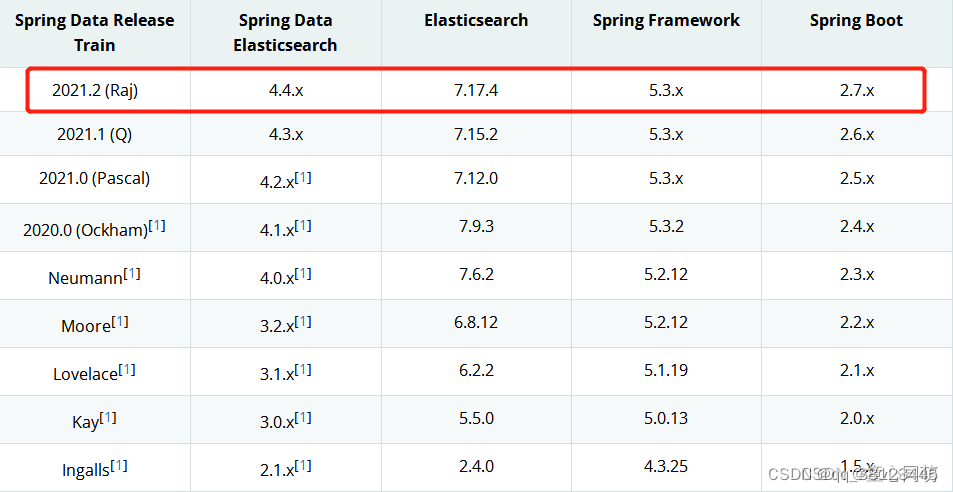
2、下载连接
选择对应的es download版本下载。
3、安装步骤
以我为例:
es 版本 6.6.2 elasticsearch-6.6.2.tar.gz
(1)、上传安装包到服务器到指定目录/data
(2)、解压安装包 tar -zxvf elasticsearch-6.6.2.tar.gz
(3)、重命名mv elasticsearch-6.6.2 elasticsearch
(4)、修改配置文件vim /data/elasticsearch/config/elasticsearch.yml
将 network.host的值改为 0.0.0.0 ,代表允许外网访问
(5)、es不允许root用户启动,故创建普通用户 useradd ‘用户名’ ,设置密码passwd ‘用户名’
(6)、切换用户 su - test。进入 /data/elasticsearch/bin/ 然后输入./elasticsearch启动。一般第一次启动会报错。常见的错误解决方法:
错误一:max virtual memory areas vm.max_map_count [65530] is too low, increase to at least [262144]
解决:vim /etc/sysctl.conf
设置:vm.max_map_count = 262144
生效:sysctl -p
错误二:max number of threads [3795] for user [elastic] is too low, increase to at least [4096]
解决:vim /etc/security/limits.d/20-nproc.conf
设置:test- nproc 65535
错误三:max file descriptors [4096] for elasticsearch process is too low, increase to at least [65536] in elasticsearch log
解决:vim /etc/security/limits.d/20-nproc.conf
设置:test hard nofile 65536, test soft nofile 65536
(7)、再次./elasticsearch启动,如果启动成功。ctrl+c退出,使用后台启动./elasticsearch >/dev/null 2>&1 &
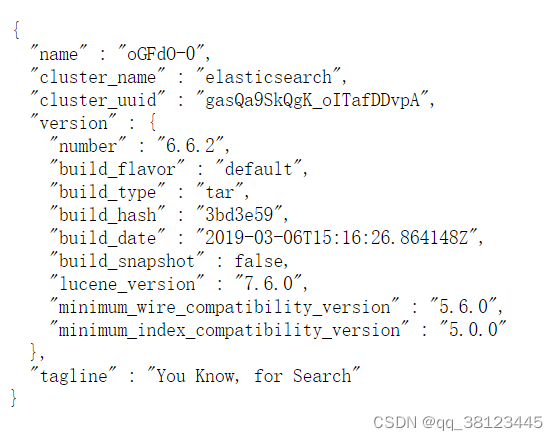
(8)、测试 ip:9200。出现下图示例,则安装成功
ik分词
1、下载
选择对应的ik分词插件
2、引入ik插件
以我为例:
ik 版本 6.6.2 elasticsearch-analysis-ik-6.6.2.zip
(1)、新建目录
cd /data/elasticsearch/plugins
mkdir ik
(2)、上传插件到ik文件夹下
(3)、解压 unzip elasticsearch-analysis-ik-6.6.2.zip
(4)、重启es: ./elasticsearch >/dev/null 2>&1 &
kibana安装
1、下载
选择对应的es download版本下载。
2、安装步骤
以我为例:
kibana 版本 6.6.2 kibana-6.6.2-linux-x86_64.tar.gz
(1)、上传安装包到服务器到指定目录/data
(2)、解压安装包 tar -zxvf kibana-6.6.2-linux-x86_64.tar.gz
(3)、重命名mv kibana-6.6.2-linux-x86_64 kibana
(4)、修改配置文件vim /data/kibana/config/kibana.yml
server.host: “0.0.0.0” 设置0.0.0.0 表达外网访问
elasticsearch.hosts: [“http://127.0.0.1:9200”] 设置es地址 9200是es默认端口。
(5)、进入/data/kibana/bin,启动./kibana >/dev/null 2>&1 &
springboot部分代码
1、设置pom.xml文件
org.springframework.boot spring-boot-starter-parent 2.1.16.RELEASE
org.springframework.boot spring-boot-starter-data-elasticsearch 2、配置application.yml文件
spring:#elasticsearch集群名称,默认的是elasticsearchdata:elasticsearch:cluster-name: elasticsearchcluster-nodes: 192.168.199.129:9300 #9200是图形界面端,9300代码端
3、新建实体对象
/*** @Author jack deng* @Data 2023-02-17 14:01* @Description*/
@Data
@Document(indexName = "file_db", type = "file_tab")
public class FileEs {@Idprivate Long id;//文件类型private String fileType;private String fileName;@Field(type = FieldType.Text,analyzer = "ik_max_word",searchAnalyzer = "ik_max_word")private String fileContent;
}
indexName:索引名,类似于关系型数据库名
type:类型,类似于关系型数据库表
FieldType.Text:文本,最大拆分
FieldType.Keyword: 关键字,不拆分
ik_max_word:分词力度大,查询结果相对不准确
ik_smart:分词力度小,查询结果相对max更精确
analyzer :设置存数据分词颗粒度
searchAnalyzer :设置搜索数据分词颗粒度。
4、新建接口,继承ElasticsearchRepository
/*** @Author jack deng* @Data 2023-02-17 15:06* @Description*/
public interface EsRespository extends ElasticsearchRepository {}
FileEs:为新建的实体对象
5、save 数据示例
@Autowiredprivate EsRespository esRespository;@Autowiredprivate ElasticsearchTemplate elasticsearchTemplate;@RequestMapping("save")public void createIndex() {FileEs fileEs = new FileEs();fileEs.setId(Long.valueOf(5));fileEs.setFileType("doc");fileEs.setFileName("王将军");fileEs.setFileContent("不管你是谁,我是jack deng 不是隔壁老王");esRespository.save(fileEs);}
6、全文检索分词查询数据并高亮显示
@RequestMapping("search")public Object search(String content) {//设置css样式,高亮String pre = "";String post = "";//指定要高亮的字段将其加上头尾标签HighlightBuilder.Field fileContent = new HighlightBuilder.Field("fileContent").preTags(pre).postTags(post);//多查询条件 must 可不断添加条件BoolQueryBuilder queryBuilder = QueryBuilders.boolQuery();//match 分词 trem 不分词queryBuilder.must(QueryBuilders.matchQuery("fileContent", content));//构建高亮查询NativeSearchQuery searchQuery = new NativeSearchQueryBuilder().withQuery(queryBuilder).withHighlightFields(fileContent).build();AggregatedPage fileEs = elasticsearchTemplate.queryForPage(searchQuery, FileEs.class, new EsHighUtils());return fileEs.getContent();}
7、高亮处理类EsHighUtils
package com.example.siwa.controller;import com.alibaba.fastjson.JSON;
import org.elasticsearch.action.search.SearchResponse;
import org.elasticsearch.search.SearchHit;
import org.elasticsearch.search.SearchHits;
import org.elasticsearch.search.fetch.subphase.highlight.HighlightField;
import org.springframework.data.domain.Pageable;
import org.springframework.data.elasticsearch.core.SearchResultMapper;
import org.springframework.data.elasticsearch.core.aggregation.AggregatedPage;
import org.springframework.data.elasticsearch.core.aggregation.impl.AggregatedPageImpl;import java.lang.reflect.Field;
import java.util.ArrayList;
import java.util.Map;/*** @Author jack deng* @Data 2023-02-24 10:57* @Description*/
public class EsHighUtils implements SearchResultMapper {/*searchResponse 封装高亮查询结果集clazz   要封装的es索引对应实体类对象pageable*/@Overridepublic  AggregatedPage mapResults(SearchResponse searchResponse, Class clazz, Pageable pageable) {//获取es搜索数据集合对象SearchHits hits = searchResponse.getHits();//获取高亮搜索后数据的总条数long totalHits = hits.getTotalHits();//搭建存储数据集合对象ArrayList list = new ArrayList<>();//判断高亮结果有数据if(hits.getHits().length > 0){//遍历数据集合for (SearchHit searchHit : hits) {//获取结果集中所有要高亮字段final Map highlightFields = searchHit.getHighlightFields();//把json串转为目标对象T t = JSON.parseObject(searchHit.getSourceAsString(), clazz);//获取目标对象的所有属性Field[] fields = clazz.getDeclaredFields();//遍历属性for (Field field : fields) {//打破私有封装field.setAccessible(true);// 如果高亮的字段和要封装的对象的名字一致则值要重新封装if(highlightFields.containsKey(field.getName())){try {//将查询到的数据进行高亮替换field.set(t,highlightFields.get(field.getName()).fragments()[0].toString());} catch (IllegalAccessException e) {e.printStackTrace();}}}//存入数据集合中list.add(t);}}//返回数据集合,排序对象,集高亮总条数return new AggregatedPageImpl<>(list,pageable,totalHits);}}
本文来自互联网用户投稿,文章观点仅代表作者本人,不代表本站立场,不承担相关法律责任。如若转载,请注明出处。 如若内容造成侵权/违法违规/事实不符,请点击【内容举报】进行投诉反馈!