Lucene:全文检索技术
Lucene:全文检索技术
- 什么是全文检索
- 数据的分类
- 结构化数据:格式固定、长度固定、数据类型固定,例如数据库中的数据
- 非结构化数据:如word、pdf、邮件、html,text格式不固定,长度不固定,数据类型不固定
- 数据的查询
- 结构化数据的查询:sql语句,查询结构化数据的方法,简单,速度快
- 非结构化数据的查询:
- 使用程序把文档读入内存,然后匹配字符串,顺序扫描。
- 把非结构化数据变成结构化数据。进行结构化数据查询。
- 如多个全英文文档,要得到文档中含有指定单词的文档。
- 方法:先根据空格进行字符串拆分,得到一个单词列表,基于单词列表创建一个索引。然后根据索引查询,根据单词和文档对应关系找到文档列表,这个过程叫做全文检索。
- 全文检索:先创建索引然后查询索引的过程叫做全文检索。索引一次创建可以多次使用,表现为每次查询速度很快。
- 全文检索的应用场景
- 搜索引擎:百度、谷歌、搜狗等
- 站内搜索:论坛搜索、微博、文章搜索
- 电商搜索:淘宝搜索、京东搜索
- 只要是有搜索的地方,就可以使用全文检索技术。
- 什么是Lucene
Lucene是一个基于Java开发全文检索开发工具包。
- Lucene实现全文检索的流程
创建索引
获得文档
- 原始文档:要基于哪些数据来进行搜索,那么这些数据就是原始文档
- 获得原始文档技术:
- 搜索引擎:使用爬虫获得原始文档
- 站内搜索:数据库中的数据
构建文档对象:
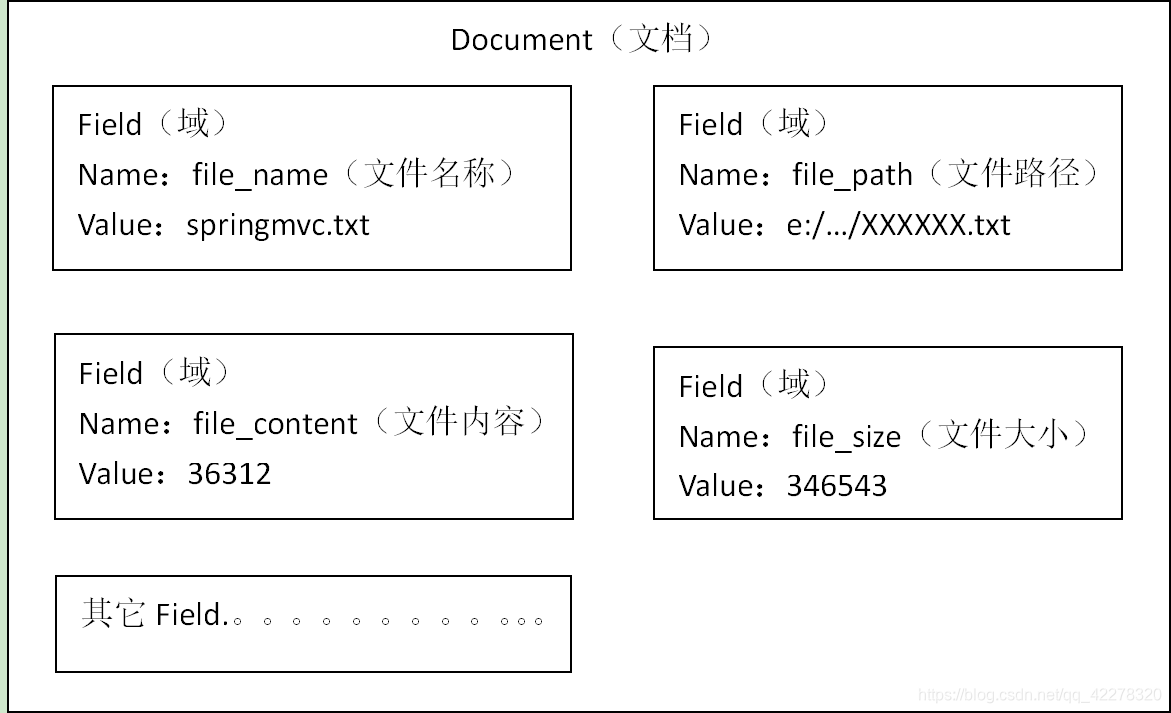
- 对应每个原始文档创建一个Document对象,每个document对象中包含多个域(field),域中保存的就是原始文档数据。域的名称:域的值。即key:value形式。
- 每个文档都有一个唯一的编号,就是文档id。
分析文档:就是分词的过程
根据空格进行字符串拆分,得到一个单词列表
把单词统一转换成小写
去除标点符号
去除停用词(停用词:无意义的词)
注意:每一个关键词都会封装成一个Term对象中。关键词即分析文档分词后的每个单词
Term中包含两部分内容:关键词所在的域,关键词本身
不同的域中拆分出来的相同的关键词是不同的Term。如在文件名称中拆分出的spring和在文件内容中拆分出的spring是不同的Term。
创建索引:基于关键词列表创建一个索引,保存到索引库中。
索引库中包含:
- 索引
- document对象
- 关键词和文档的对应关系
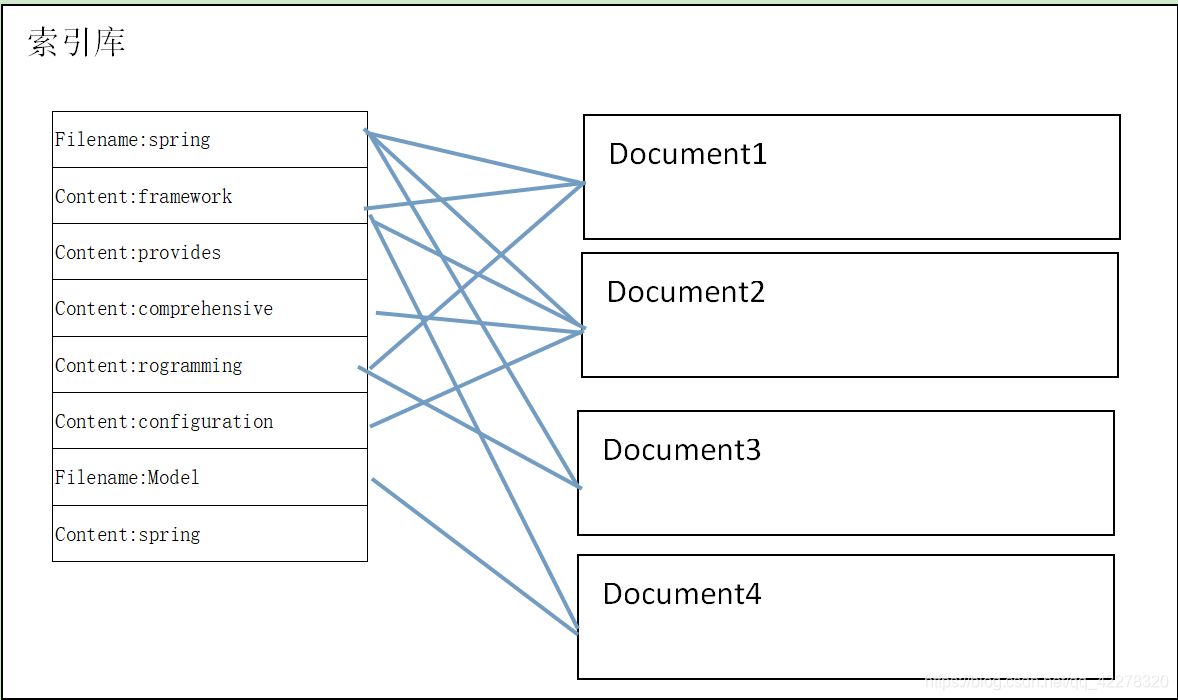
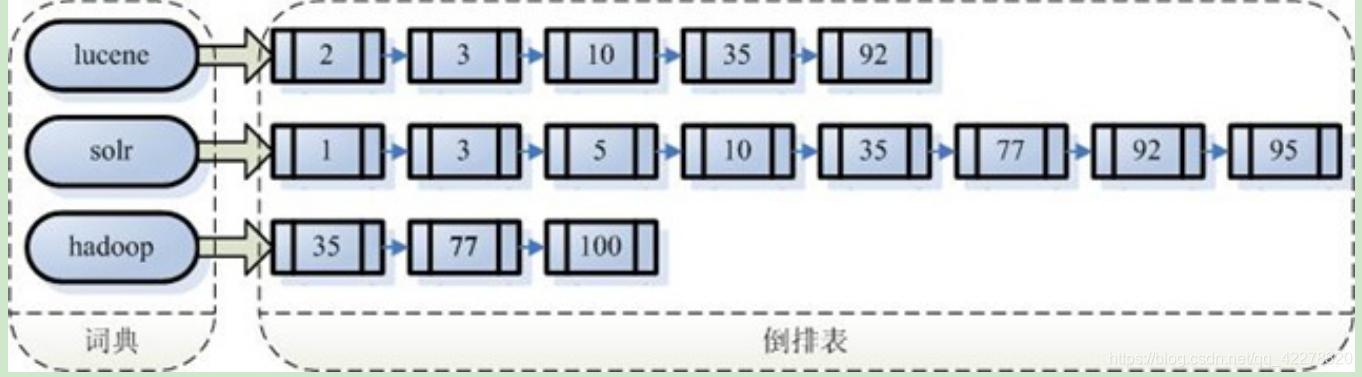
注意:创建索引是对语汇单元索引,通过词语找文档,这种索引的结构叫***倒排索引结构***。
传统方法是根据文件找到该文件的内容,在文件内容中匹配搜索关键字,这种方法是顺序扫描方法,数据量大、搜索慢。
倒排索引结构是根据内容(词语)找文档,如下图:
倒排索引结构也叫反向索引结构,包括索引和文档两部分,索引即词汇表,它的规模较小,而文档集合较大。
查询索引
- 用户查询接口:用户输入查询条件的地方,如百度搜索输入框。
- 把关键词(查询内容)封装成一个查询对象。
- 查询对象包含:
- 要查询的域
- 要查询的关键词
- 执行查询:
- 根据要查询的关键词到对应的域上进行搜索。
- 找到关键词,根据关键词与文档对应关系找到对应文档。
- 渲染结果:根据关键字查询到的文档是文档的id,我们需要根据id找到文档对象,对关键词进行高亮显示,分页处理,最终展示给用户看。
- 入门程序
创建索引
- 搭建环境:下载Lucene:https://lucene.apache.org/ 【Jdk要求:1.8以上】
- 工程搭建:创建一个Java工程
<dependencies><dependency><groupId>org.apache.lucenegroupId><artifactId>lucene-coreartifactId><version>7.4.0version>dependency><dependency><groupId>org.apache.lucenegroupId><artifactId>lucene-analyzers-commonartifactId><version>7.4.0version>dependency><dependency><groupId>commons-iogroupId><artifactId>commons-ioartifactId><version>2.6version>dependency><dependency><groupId>junitgroupId><artifactId>junitartifactId><version>4.12version>dependency><dependency><groupId>org.apache.lucenegroupId><artifactId>lucene-queriesartifactId><version>7.4.0version>dependency>dependencies>
创建索引步骤
- 创建一个Director对象,指定索引库保存的位置
- 基于Directory对象创建一个IndexWriter对象
- 读取磁盘上的文件,对应每个文件创建一个文档对象
- 创建域Filed,存放文件的相关信息
- 创建文档对象,并把域存入文档对象中
- 把文档对象写入索引库
- 关闭indexWriter对象
代码如下:
public void createIndex() throws Exception{//1. 创建一个Director对象,指定索引库保存的位置//把索引库保存在内存:Directory directory = new RAMDirectory();//把索引库保存在磁盘中Directory directory = FSDirectory.open(new File("E:\\Java\\Lucene\\Demo").toPath());//2. 基于Directory对象创建一个IndexWriter对象IndexWriter indexWriter = new IndexWriter(directory,new IndexWriterConfig());//3. 读取磁盘上的文件,对应每个文件创建一个文档对象File dir = new File("D:\\Learn Course\\61.会员版(2.0)-就业课(2.0)-Lucene\\lucene\\02.参考资料\\searchsource");File[] files = dir.listFiles();for (File file: files) {//读取文件名String fileName = file.getName();System.out.println(fileName);//读取文件路径String filePath = file.getPath();//读取文件内容String fileContent = FileUtils.readFileToString(file, "utf-8");//读取文件大小long fileSize = FileUtils.sizeOf(file);//4.创建域Filed,存放文件的相关信息//参数1:域的名称(自定)参数2:域的内容(字符串格式) 参数3:是否存储Field fieldName = new TextField("name",fileName,Field.Store.YES);Field fieldPath = new TextField("path",filePath,Field.Store.YES);Field fieldContent = new TextField("content",fileContent,Field.Store.YES);Field fieldSize = new TextField("size",fileSize+"",Field.Store.YES);//5. 创建文档对象,并把域存入文档对象中Document document = new Document();document.add(fieldName);document.add(fieldPath);document.add(fieldContent);document.add(fieldSize);//5. 把文档对象写入索引库indexWriter.addDocument(document);}//6. 关闭indexWriter对象indexWriter.close();}可使用luke查看索引库 要求:必须Java9
查询索引
- 创建一个Director对象,指定索引库的位置
- 创建一个IndexReader对象
- 创建一个IndexSeacher对象,构造方法中的参数indexReader对象
- 创建一个Query对象,TermQuery
- 执行查询,得到一个TopDocs对象
- 取查询结果的总记录数
- 取文档列表
- 打印文档内容
- 关闭indexReader对象
代码实现:
public void indexRead() throws Exception{//1. 创建一个Director对象,指定索引库的位置Directory directory = FSDirectory.open(new File("E:\\Java\\Lucene\\Demo").toPath());//2. 创建一个IndexReader对象IndexReader indexReader = DirectoryReader.open(directory);//3. 创建一个IndexSeacher对象,构造方法中的参数indexReader对象IndexSearcher indexSearcher = new IndexSearcher(indexReader);//4. 创建一个Query对象,TermQuery(用来指定查询的内容)//Term对象有两部分:所在的域名称:term本身(即要查询的关键字)在这里即要查询关键字为:springQuery query = new TermQuery(new Term("content","spring"));//5. 执行查询,得到一个TopDocs对象//参数1:查询对象,参数2:查询结果返回的最大记录数(自定义)TopDocs topDocs = indexSearcher.search(query, 6);//6. 取查询结果的总记录数//topDocs.totalHits:总命中条数System.out.println("查询的总记录数:"+topDocs.totalHits);//7. 取文档列表ScoreDoc[] scoreDocs = topDocs.scoreDocs;//8. 打印文档内容for (ScoreDoc scoreDoc : scoreDocs) {int doc = scoreDoc.doc;//文档idDocument document = indexSearcher.doc(doc);System.out.println(document.get("name"));System.out.println(document.get("path"));//System.out.println(document.get("content"));System.out.println(document.get("size"));System.out.println("======================================");}//9. 关闭indexReader对象indexReader.close();}
- 分析器:用来分析文档,即分词
默认使用的是标准分析器:StandardAnalyzer .标准分析器对英文分析没用问题,但是不能对中文进行有效分析
查看标准分析器的分析结果
- 使用Analyzer对象的tokenStream方法返回一个TokenStream对象。此对象中 包含了最终分词的结果。
- 实现步骤:
- 创建一个Analyzer对象,StandardAnalyzer对象。
- 使用分析器对象的tokenStream方法获得一个TokenStream对象
- 向TokenStream对象中设置一个引用CharTermAttribute,相当于一个指针。返回的值CharTermAttribute内包含的就是分析结果
- 调用TokenStream对象的reset方法。不调用会报错,用来把指针归于开始位置
- 使用while循环遍历TokenStream对象
- 关闭TokenStream对象。
- 代码实现:
public void testStandardAnalyzer()throws Exception{// 1. 创建一个Analyzer对象,StandardAnalyzer对象。Analyzer analyzer = new StandardAnalyzer();// 2. 使用分析器对象的tokenStream方法获得一个TokenStream对象//参数1:域的名称 参数2:要分析的内容TokenStream tokenStream = analyzer.tokenStream("", "The Spring Framework provides a comprehensive programming and configuration model.");//3. 向TokenStream对象中设置一个引用CharTermAttribute,相当于一个指针。返回的值CharTermAttribute内包含的就是分析结果CharTermAttribute charTermAttribute = tokenStream.addAttribute(CharTermAttribute.class);// 4. 调用TokenStream对象的reset方法。不调用会报错,用来把指针归于开始位置tokenStream.reset();// 5. 使用while循环遍历TokenStream对象while (tokenStream.incrementToken()){System.out.println(charTermAttribute.toString());}// 6. 关闭TokenStream对象。tokenStream.close();}中文分析器:IKAnalyzer的使用方法
- 把IKAnlyzer的jar包添加到工程中
- 把配置文件和扩展词典,以及配置文件添加到工程的classpath下(maven工程则直接加到resouces下)
注意:扩展词典严禁使用windows记事本编辑以保证扩展词典的编码格式是utf-8。而记事本默认保存格式为utf-8BOM。
扩展词典(hotwords.dic):用于添加一些新词,以在分析器分析该词时候,将其作为一个词语看待。
停用词词典(stopwords.dic):无意义的词或者是敏感词汇添加进去,在分析器分析时,会过滤掉这些词。
代码展示
- 扩展词典以及停用词词典的配置文件
<properties> <comment>IK Analyzer 扩展配置comment><entry key="ext_dict">hotword.dic;entry><entry key="ext_stopwords">stopword.dic;entry> properties>
- IKAnlyzer分词测试代码
public void testIKAnlyzer() throws Exception{//        1. 创建一个Analyzer对象,IKAnalyzer对象。Analyzer analyzer = new IKAnalyzer();
//        2. 使用分析器对象的tokenStream方法获得一个TokenStream对象//参数1:域的名称 参数2:要分析的内容TokenStream tokenStream = analyzer.tokenStream("", "传智播客黑马程序员测试非常的好用, 正文 在Reimpot All Maven Porjects时, 如果项目过大, maven依赖过多, 会直接卡在");
//        3. 向TokenStream对象中设置一个引用CharTermAttribute,相当于一个指针。返回的值CharTermAttribute内包含的就是分析结果CharTermAttribute charTermAttribute = tokenStream.addAttribute(CharTermAttribute.class);
//        4. 调用TokenStream对象的reset方法。不调用会报错,用来把指针归于开始位置tokenStream.reset();
//        5. 使用while循环遍历TokenStream对象while (tokenStream.incrementToken()){System.out.println(charTermAttribute.toString());}
//        6. 关闭TokenStream对象。tokenStream.close();}
注意:原本传智播客不是一个词语,因将其手动添加到扩展词典后,在分析时,会将其当作一个词语分析出来。
运行结果:
加载扩展词典:hotword.dic
加载扩展停止词典:stopword.dic
传智播客
黑马
程序员
程序
测试
非常
...
可见会先加载扩展词典以及停用词典。
IKAnlyzer分析器的使用和StandardAnlyzer分析器的使用方式相同。
IKAnalyzer的使用方式
public void createIndex() throws Exception{//1. 创建一个Director对象,指定索引库保存的位置//把索引库保存在内存:Directory directory = new RAMDirectory();//把索引库保存在磁盘中Directory directory = FSDirectory.open(new File("E:\\Java\\Lucene\\Demo").toPath());//2. 基于Directory对象创建一个IndexWriter对象IndexWriterConfig config = new IndexWriterConfig(new IKAnalyzer());IndexWriter indexWriter = new IndexWriter(directory,config);//3. 读取磁盘上的文件,对应每个文件创建一个文档对象File dir = new File("D:\\Learn Course\\61.会员版(2.0)-就业课(2.0)-Lucene\\lucene\\02.参考资料\\searchsource");File[] files = dir.listFiles();for (File file: files) {//读取文件名String fileName = file.getName();//读取文件路径String filePath = file.getPath();//读取文件内容String fileContent = FileUtils.readFileToString(file, "utf-8");//读取文件大小long fileSize = FileUtils.sizeOf(file);//4.创建域Filed,存放文件的相关信息//参数1:域的名称(自定)参数2:域的内容(字符串格式) 参数3:是否存储Field fieldName = new TextField("name",fileName,Field.Store.YES);Field fieldPath = new TextField("path",filePath,Field.Store.YES);Field fieldContent = new TextField("content",fileContent,Field.Store.YES);Field fieldSize = new TextField("size",fileSize+"",Field.Store.YES);//5. 创建文档对象,并把域存入文档对象中Document document = new Document();document.add(fieldName);document.add(fieldPath);document.add(fieldContent);document.add(fieldSize);//5. 把文档对象写入索引库indexWriter.addDocument(document);}//6. 关闭indexWriter对象indexWriter.close();}注意:
- IKAnlyzer分析器的使用和StandardAnlyzer分析器的使用方式相同。仅仅是在IndexWriterConfig中指定了IK分析器。原来没用指定,则默认使用的是StandardAnlyzer分析器。
- 查询索引方式完全相同。
- 索引库的维护(对索引库中文档的增删改操作)
Filed域的属性
是否分析:是否对域的内容进行分词处理。前提是我们要对域的内容进行查询。
是否索引:将Field分析后的词或整个Field值进行索引,只有索引方可搜索到。
比如:商品名称、商品简介分析后进行索引,订单号、身份证号不用分析但也要索引,这些将来都要作为查询条件。
是否存储:将Field值存储在文档中,存储在文档中的Field才可以从Document中获取
比如:商品名称、订单号,凡是将来要从Document中获取的Field都要存储。
是否存储的标准:是否要将内容展示给用户
Field类 数据类型 Analyzed是否分析 Indexed是否索引 Stored是否存储 说明 StringField(FieldName, FieldValue,Store.YES)) 字符串 N Y N/Y 这个Field用来构建一个字符串Field,但是不会进行分析,会将整个串存储在索引中,比如(订单号,姓名等) 是否存储在文档中用Store.YES或Store.NO决定 LongPoint(String name, long… point) Long型 Y Y N 可以使用LongPoint、IntPoint等类型存储数值类型的数据。让数值类型可以进行索引。但是不能存储数据,如果想存储数据还需要使用StoredField。 StoredField(FieldName, FieldValue) 重载方法,支持多种类型 N N Y 这个Field用来构建不同类型Field 不分析,不索引,但要Field存储在文档中 TextField(FieldName, FieldValue, Store.NO) 或 TextField(FieldName, reader) 字符串或流 Y Y N/Y 如果是一个Reader, lucene猜测内容比较多,会采用Unstored的策略 修改域后代码
//4.创建域Filed,存放文件的相关信息//参数1:域的名称(自定)参数2:域的内容(字符串格式) 参数3:是否存储Field fieldName = new TextField("name",fileName,Field.Store.YES);Field fieldPath = new StringField("path",filePath,Field.Store.YES);Field fieldContent = new TextField("content",fileContent,Field.Store.YES);//将Long型数据使用LongPoint域,但是不会存储,无法取出。只做运算使用Field fieldSizeValue = new LongPoint("size",fileSize);//使用StoreField域对Long型数据进行存储。取得时候即可取出Field fieldSizeStore = new StoredField("size",fileSize);//5. 创建文档对象,并把域存入文档对象中Document document = new Document();document.add(fieldName);document.add(fieldPath);document.add(fieldContent);document.add(fieldSizeValue);document.add(fieldSizeStore);...索引库中添加文档
public void addDocument() throws Exception {//索引库存放路径Directory directory = FSDirectory.open(new File("D:\\temp\\index").toPath());IndexWriterConfig config = new IndexWriterConfig(new IKAnalyzer());//创建一个indexwriter对象IndexWriter indexWriter = new IndexWriter(directory, config);//创建一个Document对象Document document = new Document();//向document对象中添加域。//不同的document可以有不同的域,同一个document可以有相同的域。document.add(new TextField("filename", "新添加的文档", Field.Store.YES));document.add(new TextField("content", "新添加的文档的内容", Field.Store.NO));//LongPoint创建索引document.add(new LongPoint("size", 1000l));//StoreField存储数据document.add(new StoredField("size", 1000l));//不需要创建索引的就使用StoreField存储document.add(new StoredField("path", "d:/temp/1.txt"));//添加文档到索引库indexWriter.addDocument(document);//关闭indexwriterindexWriter.close();
}
索引库的删除
- 删除全部索引:删除所有的文档
public void deleteAllIndex() throws Exception {IndexWriter indexWriter = getIndexWriter();//删除全部索引indexWriter.deleteAll();//关闭indexwriterindexWriter.close();}注意:将索引目录的索引信息全部删除,直接彻底删除,无法恢复。慎用!
- 指定查询条件删除:删除包含指定 关键字的所有文档
public void deleteIndexByQuery() throws Exception {IndexWriter indexWriter = getIndexWriter();//创建一个查询条件Query query = new TermQuery(new Term("filename", "apache"));//根据查询条件删除indexWriter.deleteDocuments(query);//关闭indexwriterindexWriter.close();}
- 修改索引库:原理:先删除包含指定查询关键字的所有文档后添加新创建的文档。
public void updateIndex() throws Exception {IndexWriter indexWriter = getIndexWriter();//创建一个新的Document对象Document document = new Document();//向document对象中添加域。//不同的document可以有不同的域,同一个document可以有相同的域。document.add(new TextField("filename", "要更新的文档", Field.Store.YES));document.add(new TextField("content", " Lucene 简介 Lucene 是一个基于 Java 的全文信息检索工具包," +"它不是一个完整的搜索应用程序,而是为你的应用程序提供索引和搜索功能。",Field.Store.YES));indexWriter.updateDocument(new Term("content", "java"), document);//关闭indexWriterindexWriter.close();
}
- 索引库的查询
使用Query的子类
- TermQuery:根据关键词进行查询,需要指定要查询的域及要查询的关键词
- LongPoint.newRangeQuery()方法执行范围查询
- 注意:如果是Long类型的,就使用LongPoint,如果是Int,则使用IntPoint。
package com.itlearn.lucene;import org.apache.lucene.document.LongPoint;
import org.apache.lucene.index.DirectoryReader;
import org.apache.lucene.index.IndexReader;
import org.apache.lucene.search.*;
import org.apache.lucene.store.FSDirectory;
import org.apache.lucene.document.Document;
import org.junit.Before;
import org.junit.Test;import java.io.File;public class LuceneQuery {private IndexReader indexReader;private IndexSearcher indexSearcher;@Beforepublic void init() throws Exception{indexReader = DirectoryReader.open(FSDirectory.open(new File("E:\\Java\\Lucene\\Demo").toPath()));indexSearcher = new IndexSearcher(indexReader);}public void printResult(Query query) throws Exception{//执行查询,得到总记录条数TopDocs topDocs = indexSearcher.search(query, 10);//输出总记录条数System.out.println("总记录条数"+topDocs.totalHits);//取文档列表ScoreDoc[] scoreDocs = topDocs.scoreDocs;//遍历文档列表,得到文档信息for (ScoreDoc scoreDoc : scoreDocs) {//取出文档idint docId = scoreDoc.doc;//根据文档id取出文档Document document = indexSearcher.doc(docId);//获取文档相关信息System.out.println(document.get("name"));System.out.println(document.get("path"));System.out.println(document.get("size"));//System.out.println(document.get("content"));System.out.println("================");}indexReader.close();}@Testpublic void testRangeQuery() throws Exception{//创建一个query对象,查询size大小在0-100之间的所有文档Query query = LongPoint.newRangeQuery("size",0l,100l);printResult(query);}
}
QueryParser进行查询:原理:先对查询条件进行分词,再根据分词之后的结果进行查询
注意:使用QueryParser需要导入jar包:lucene-queryparser-7.4.0.jar
public void testQueryParser() throws Exception {IndexSearcher indexSearcher = getIndexSearcher();//创建queryparser对象//第一个参数默认搜索的域//第二个参数就是分析器对象QueryParser queryParser = new QueryParser("content", new IKAnalyzer());Query query = queryParser.parse("Lucene是java开发的");//执行查询printResult(query, indexSearcher);
}private void printResult(Query query, IndexSearcher indexSearcher) throws Exception {//执行查询TopDocs topDocs = indexSearcher.search(query, 10);//共查询到的document个数System.out.println("查询结果总数量:" + topDocs.totalHits);//遍历查询结果for (ScoreDoc scoreDoc : topDocs.scoreDocs) {Document document = indexSearcher.doc(scoreDoc.doc);System.out.println(document.get("filename"));//System.out.println(document.get("content"));System.out.println(document.get("path"));System.out.println(document.get("size"));}//关闭indexreaderindexSearcher.getIndexReader().close();
}
到的document个数
System.out.println("查询结果总数量:" + topDocs.totalHits);//遍历查询结果for (ScoreDoc scoreDoc : topDocs.scoreDocs) {Document document = indexSearcher.doc(scoreDoc.doc);System.out.println(document.get("filename"));//System.out.println(document.get("content"));System.out.println(document.get("path"));System.out.println(document.get("size"));}//关闭indexreaderindexSearcher.getIndexReader().close();}```
本文来自互联网用户投稿,文章观点仅代表作者本人,不代表本站立场,不承担相关法律责任。如若转载,请注明出处。 如若内容造成侵权/违法违规/事实不符,请点击【内容举报】进行投诉反馈!