JAVA汽车租赁系统(GUI、连接数据库mysql)
java设计并实现一个汽车租赁系统
开发环境:eclipse,navicat,mysql(8.0)
一、功能结构图: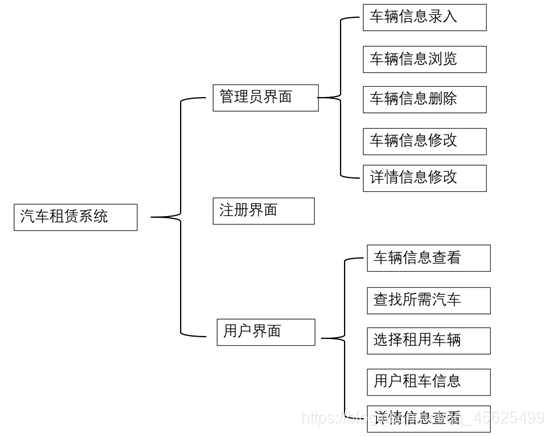
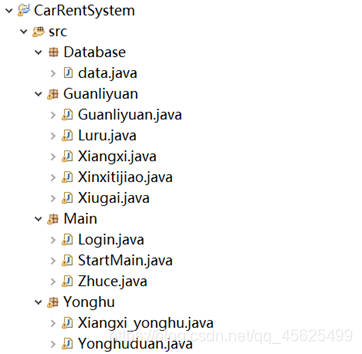
二、类设计
管理员类、数据库类、主类、用户类
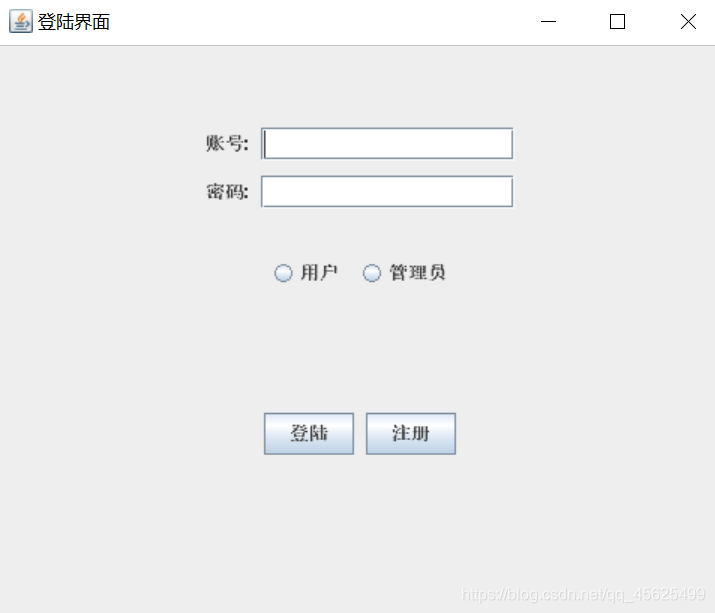
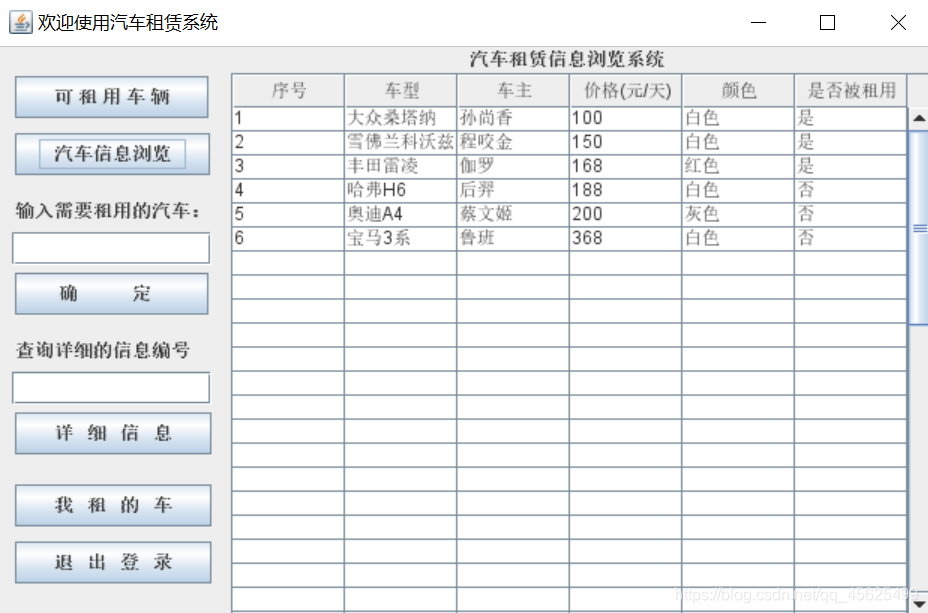
三、界面设计
四、数据库表
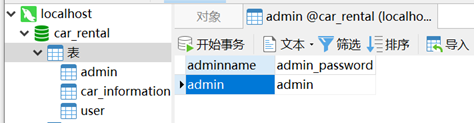
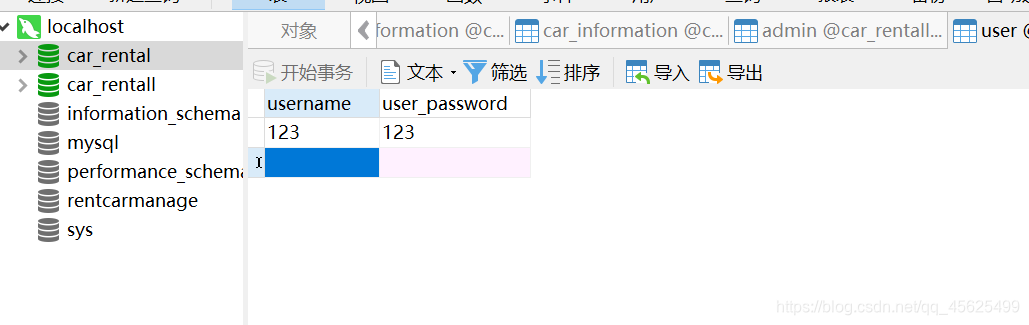
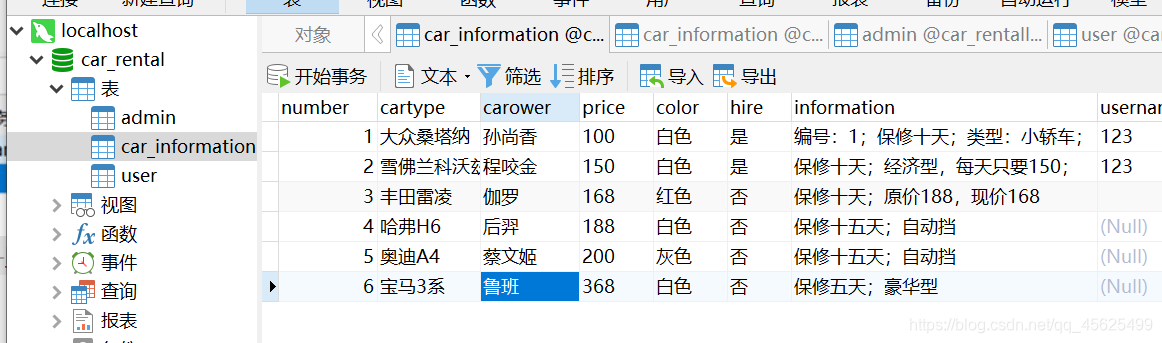
五、测试
管理员登录:
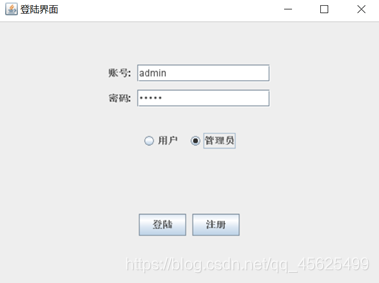
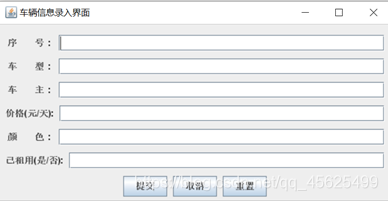
信息录入:
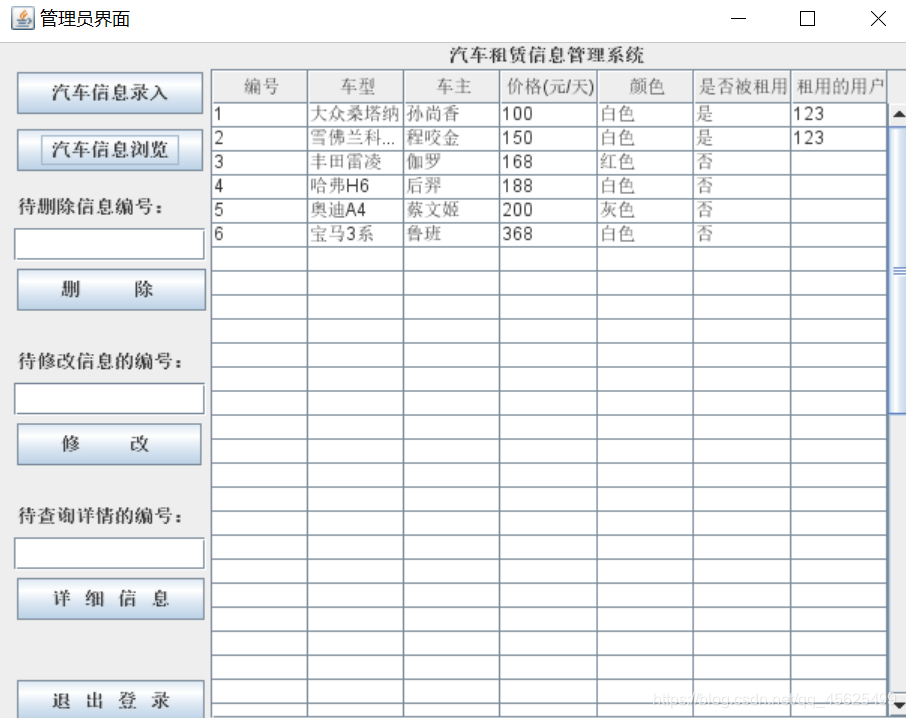
信息浏览:
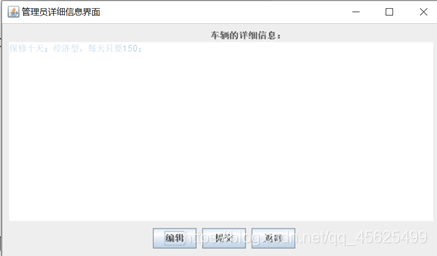
查看详细信息:
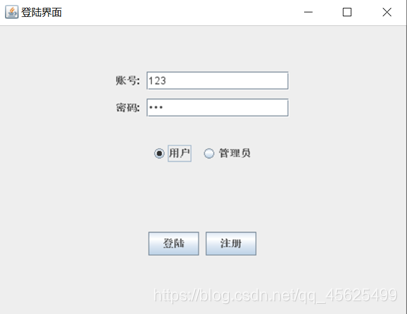
用户登录:
用户查看汽车信息:
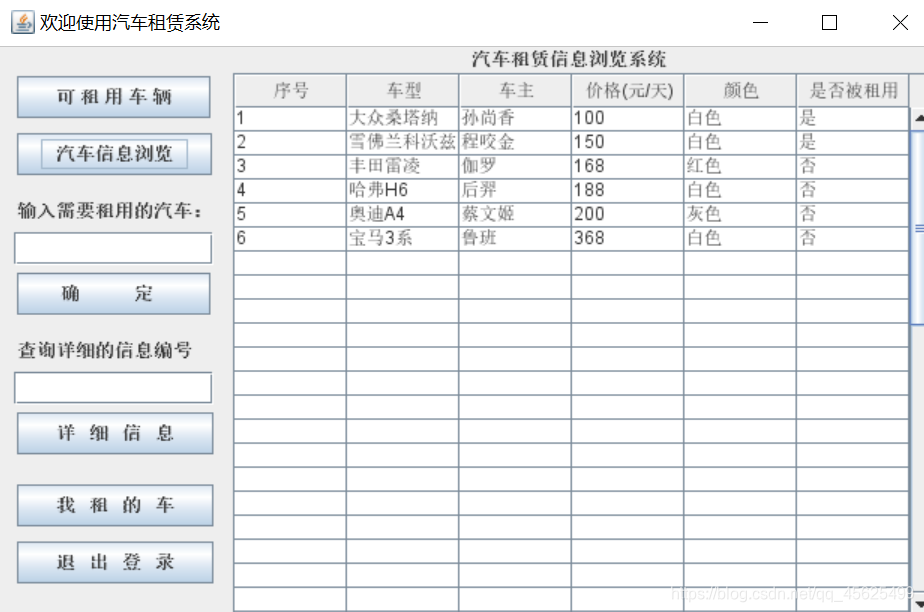
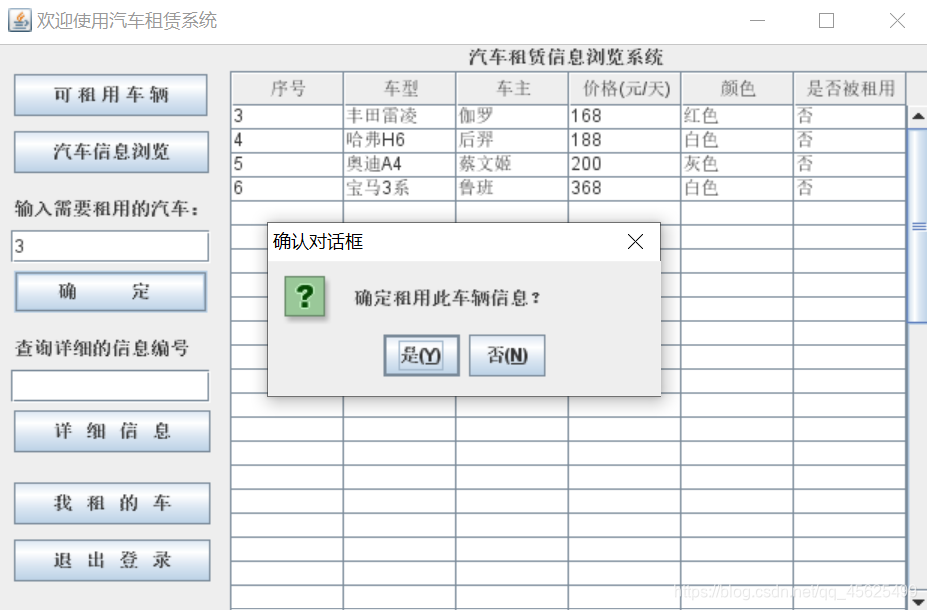
用户租用车辆:

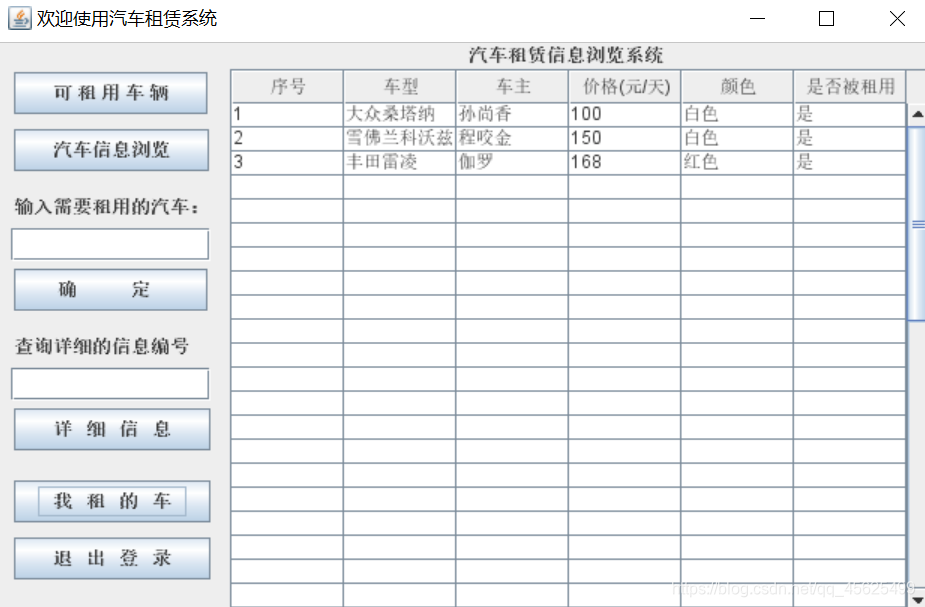
用户查看自己所租车辆:
data:
package Database;public class data {public static String UrlString = "jdbc:mysql://localhost:3306/car_rental?useSSL=false&serverTimezone=UTC&characterEncoding=UTF-8";public static String User = "root";public static String password = "123456";
}
Login:
package Main;import java.awt.FlowLayout;import java.awt.HeadlessException;
import java.awt.event.ActionEvent;
import java.awt.event.ActionListener;
import java.sql.Connection;
import java.sql.DriverManager;
import java.sql.ResultSet;
import java.sql.SQLException;
import java.sql.Statement;import javax.swing.Box;
import javax.swing.ButtonGroup;
import javax.swing.JButton;
import javax.swing.JFrame;
import javax.swing.JLabel;
import javax.swing.JOptionPane;
import javax.swing.JPasswordField;
import javax.swing.JRadioButton;
import javax.swing.JTextField;import Database.data;
import Guanliyuan.Guanliyuan;
import Yonghu.Yonghuduan;
public class Login extends JFrame implements ActionListener{JTextField zhanghao_field;JPasswordField mima_field;JRadioButton yonghu_radioButton,guanliyuan_radioButton;JButton login_button,zhuce_button;Box box1,box2,box3,box4,basebBox;//账号,密码,两个radiobutton,两个按钮都是用行式盒子布局。 basebox用列式把他们包裹起来。Connection con = null;Statement stmt = null;ResultSet rs = null;public Login(){setLayout(new FlowLayout());init();setVisible(true);
//		setDefaultCloseOperation(JFrame.EXIT_ON_CLOSE);setBounds(500, 200, 500, 500);setTitle("登陆界面");}void init(){box1 = Box.createHorizontalBox();box1.add(new JLabel("账号:"));box1.add(Box.createHorizontalStrut(8));zhanghao_field = new JTextField(15);box1.add(zhanghao_field);//登陆界面 账号和输入框的一行box2 = Box.createHorizontalBox();box2.add(new JLabel("密码:"));box2.add(Box.createHorizontalStrut(8));mima_field = new JPasswordField(15);box2.add(mima_field);//登陆界面密码和输入框的一行box3 = Box.createHorizontalBox();ButtonGroup group = new ButtonGroup();yonghu_radioButton = new JRadioButton("用户");group.add(yonghu_radioButton);yonghu_radioButton.addActionListener(this);box3.add(yonghu_radioButton);box3.add(Box.createHorizontalStrut(8));guanliyuan_radioButton = new JRadioButton("管理员");group.add(guanliyuan_radioButton);guanliyuan_radioButton.addActionListener(this);box3.add(guanliyuan_radioButton);//登陆界面 单选框box4 = Box.createHorizontalBox();login_button = new JButton("登陆");login_button.addActionListener(this);box4.add(login_button);box4.add(Box.createHorizontalStrut(8));zhuce_button = new JButton("注册");zhuce_button.addActionListener(this);box4.add(zhuce_button);//登陆界面两个按钮basebBox = Box.createVerticalBox();basebBox.add(Box.createVerticalStrut(50));basebBox.add(box1);basebBox.add(Box.createVerticalStrut(10));basebBox.add(box2);basebBox.add(Box.createVerticalStrut(30));basebBox.add(box3);basebBox.add(Box.createVerticalStrut(80));basebBox.add(box4);//把4个盒子放一个大盒子add(basebBox);	}public void connDB() { // 连接数据库try {Class.forName("com.mysql.cj.jdbc.Driver");//注册驱动} catch (ClassNotFoundException e) {e.printStackTrace();}try {//创建连接con = DriverManager.getConnection(data.UrlString, data.User, data.password);} catch (SQLException e) {e.printStackTrace();}}public void closeDB() // 关闭连接{try {stmt.close();con.close();} catch (SQLException e) {e.printStackTrace();}}@Overridepublic void actionPerformed (ActionEvent e) {Object source = e.getSource();String username = null;String adminname = null;String admin_password = null;String user_password = null;if (source == login_button)//如果点击的是登陆按钮,就会判断radiobutton选择的是什么,做出相应的响应{if(!yonghu_radioButton.isSelected()&&!guanliyuan_radioButton.isSelected())//radiobutton没选择{JOptionPane.showMessageDialog(null, "请选择身份!");}else if (zhanghao_field.getText().equals("") || mima_field.getText().equals("")){// 判断是否输入了用户名和密码JOptionPane.showMessageDialog(null, "登录名和密码不能为空!");} else {this.connDB();try{stmt = con.createStatement();} catch (SQLException e2){e2.printStackTrace();}if(guanliyuan_radioButton.isSelected())//如果选择的是管理员的按钮{	try {String sql ="select * from admin where adminname ='"+zhanghao_field.getText()+"'";rs = stmt.executeQuery(sql);if(rs.next()){adminname = rs.getString(1);admin_password = rs.getString(2);if(!mima_field.getText().equals(admin_password)){JOptionPane.showMessageDialog(null, "密码错误!");mima_field.setText("");}else {this.dispose();new Guanliyuan(false);}}else{JOptionPane.showMessageDialog(null, "此账号没有管理员权限!");zhanghao_field.setText("");mima_field.setText("");}							} catch (HeadlessException e1) {e1.printStackTrace();} catch (SQLException e1) {e1.printStackTrace();}	}else //选择的是user按钮{try {String sql ="select * from user where username ='"+zhanghao_field.getText()+"'";rs = stmt.executeQuery(sql);if(rs.next()){username = rs.getString(1);user_password = rs.getString(2);if(!mima_field.getText().equals(user_password)){JOptionPane.showMessageDialog(null, "密码错误!");mima_field.setText("");		}else {this.dispose();new Yonghuduan(zhanghao_field.getText());}}else{JOptionPane.showMessageDialog(null, "不存在此账号,请注册!");zhanghao_field.setText("");mima_field.setText("");}							} catch (HeadlessException e1) {e1.printStackTrace();} catch (SQLException e1) {e1.printStackTrace();}}}}else if(source == zhuce_button){this.dispose();new Zhuce();}}
}
写在最后
源代码链接:点击这里
本文来自互联网用户投稿,文章观点仅代表作者本人,不代表本站立场,不承担相关法律责任。如若转载,请注明出处。 如若内容造成侵权/违法违规/事实不符,请点击【内容举报】进行投诉反馈!