android蓝牙开发的一个小Dome
**
BluetoothAdapter 蓝牙适配器,即该类里面包含了蓝牙使用中常用到的一些API。 BroadcastReceiver
广播接收者,不难猜测,蓝牙设备开启或者关闭、搜索到周边设备就要来通知应用,那么Android系统就会以广播的方式来通知。
BluetoothDevice
蓝牙设备,即一个相当于蓝牙设备的类,实现了Parcelable接口,用于Android的IPC通信机制。里面实在广播时发送的蓝牙的相关信息:蓝牙名称,地址,类型和uuid等。
**
界面展示:
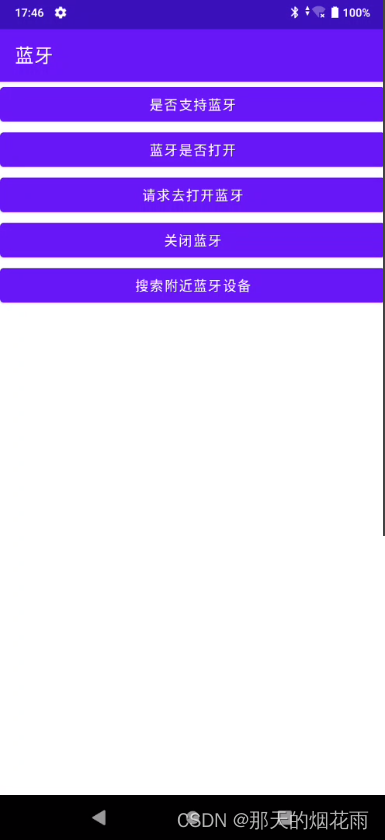
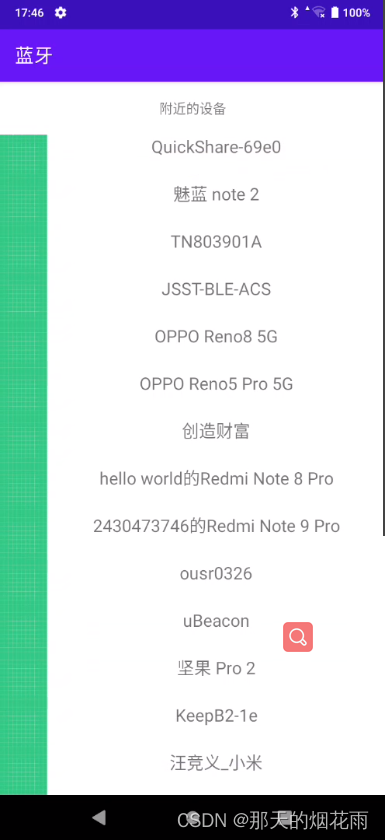
这个是目录结构
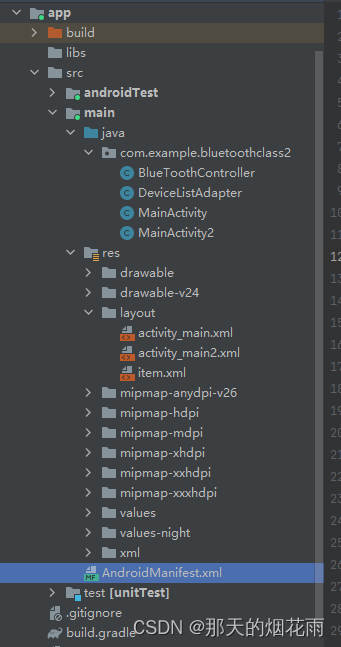
首先是蓝牙模块的控制层
BlueToothController
package com.example.bluetoothclass2;import android.app.Activity;
import android.bluetooth.BluetoothAdapter;
import android.bluetooth.BluetoothDevice;
import android.content.Context;
import android.content.Intent;import java.util.ArrayList;
import java.util.List;/*** 蓝牙适配器**/
public class BlueToothController {private BluetoothAdapter mAdapter;public BluetoothAdapter getAdapter() {return mAdapter;}public BlueToothController(){mAdapter = BluetoothAdapter.getDefaultAdapter();}/*** 是否支持蓝牙*/public boolean isSupportBlueTooth(){if (mAdapter!= null){return true;}else {return false;}}public boolean getBlueToothStatus(){assert (mAdapter!=null);return mAdapter.isEnabled();}/*** 打开蓝牙* @param activity* @param requestCode*/public void turnOnBlueTooth(Activity activity, int requestCode){Intent intent = new Intent(BluetoothAdapter.ACTION_REQUEST_ENABLE);activity.startActivityForResult(intent, requestCode);}
//    /**
//     * 打开蓝牙可见性
//     */
//    public void enableVisibily(Context context){
//        Intent intent = new Intent(BluetoothAdapter.ACTION_REQUEST_DISCOVERABLE);
//        intent.putExtra(BluetoothAdapter.EXTRA_DISCOVERABLE_DURATION,300);
//        context.startActivity(intent);
//    }/*** 打开蓝牙可见性* @param context*/public void enableVisibly(Context context) {Intent discoverableIntent = newIntent(BluetoothAdapter.ACTION_REQUEST_DISCOVERABLE);discoverableIntent.putExtra(BluetoothAdapter.EXTRA_DISCOVERABLE_DURATION, 300);context.startActivity(discoverableIntent);}/*** 查找设备*/public void findDevice() {assert (mAdapter != null);mAdapter.startDiscovery();}/*** 关闭蓝牙*/public void turnOffBlueTooth() {mAdapter.disable();}/*** 获取已绑定设备*/public List<BluetoothDevice> getBondedDeviceList(){return new ArrayList<>(mAdapter.getBondedDevices());}}
然后是是适配器
DeviceListAdapter
package com.example.bluetoothclass2;import android.bluetooth.BluetoothDevice;
import android.view.LayoutInflater;
import android.view.View;
import android.view.ViewGroup;
import android.widget.TextView;import androidx.annotation.NonNull;
import androidx.recyclerview.widget.RecyclerView;import java.util.List;public class DeviceListAdapter extends RecyclerView.Adapter<DeviceListAdapter.ViewHolder> {private List<BluetoothDevice> devices;public DeviceListAdapter(List<BluetoothDevice> devices) {this.devices = devices;}@NonNull@Overridepublic ViewHolder onCreateViewHolder(@NonNull ViewGroup parent, int viewType) {View inflate = LayoutInflater.from(parent.getContext()).inflate(R.layout.item, parent, false);ViewHolder viewHolder = new ViewHolder(inflate);return viewHolder;}@Overridepublic void onBindViewHolder(@NonNull ViewHolder holder, int position) {BluetoothDevice bluetoothDevice = devices.get(position);holder.title.setText(bluetoothDevice.getName());}@Overridepublic int getItemCount() {return devices != null ? devices.size() : 0;}class ViewHolder extends RecyclerView.ViewHolder {private TextView title;public ViewHolder(@NonNull View itemView) {super(itemView);title = itemView.findViewById(R.id.name);}}
}
这个MainActivity主要负责第一个界面的功能内容
package com.example.bluetoothclass2;import androidx.annotation.Nullable;
import androidx.appcompat.app.AppCompatActivity;import android.bluetooth.BluetoothAdapter;
import android.content.BroadcastReceiver;
import android.content.Context;
import android.content.Intent;
import android.content.IntentFilter;
import android.os.Bundle;
import android.view.View;
import android.widget.Button;
import android.widget.Toast;public class MainActivity extends AppCompatActivity {private static final int REQUEST_COOE =0;private BlueToothController mController= new BlueToothController();private Toast mToast;private Button button;private BroadcastReceiver receiver =new BroadcastReceiver() {@Overridepublic void onReceive(Context context, Intent intent) {int state =intent.getIntExtra(BluetoothAdapter.EXTRA_STATE,-1);switch (state){case BluetoothAdapter.STATE_OFF:showToast("STATE_OFF");break;case BluetoothAdapter.STATE_ON:showToast("STATE_ON");break;case BluetoothAdapter.STATE_TURNING_ON:showToast("STATE_TURNING_ON");case BluetoothAdapter.STATE_TURNING_OFF:showToast("STATE_TURNING_OFF");break;default:showToast("Unkown STATE");break;}}};@Overrideprotected void onCreate(Bundle savedInstanceState) {super.onCreate(savedInstanceState);setContentView(R.layout.activity_main);IntentFilter filter =new IntentFilter(BluetoothAdapter.ACTION_STATE_CHANGED);registerReceiver(receiver,filter);button=(Button) findViewById(R.id.bt_ss);button.setOnClickListener(new View.OnClickListener() {@Overridepublic void onClick(View view) {Intent intent = new Intent(MainActivity.this,MainActivity2.class);startActivity(intent);}});}public void isSupportBlueTooth(View view){boolean ret =mController.isSupportBlueTooth();showToast("support Bluetooth?"+ret);}public void isBlueToothEnable(View view){boolean ret=mController.getBlueToothStatus();showToast("Bluetooth enable?"  +ret);}public void requestTurnOnBlueTooth(View view){mController.turnOnBlueTooth(this, REQUEST_COOE);}public void turnOffBlueTooth(View view){mController.turnOffBlueTooth();}private void showToast(String text){if (mToast==null){mToast=Toast.makeText(this,text,Toast.LENGTH_SHORT);}else {mToast.setText(text);}mToast.show();}@Overrideprotected void onActivityResult(int requestCode, int resultCode, @Nullable Intent data) {super.onActivityResult(requestCode, resultCode, data);if (resultCode==RESULT_OK){showToast("打开成功");}else {showToast("打开失败");}}
}
MainActivity2负责扫描附近蓝牙设备
package com.example.bluetoothclass2;import android.Manifest;
import android.bluetooth.BluetoothAdapter;
import android.bluetooth.BluetoothDevice;
import android.content.BroadcastReceiver;
import android.content.Context;
import android.content.Intent;
import android.content.IntentFilter;
import android.os.Bundle;import android.util.Log;
import android.view.Menu;
import android.view.MenuItem;
import android.view.View;
import android.widget.AdapterView;
import android.widget.ListView;
import android.widget.Toast;import androidx.annotation.NonNull;
import androidx.annotation.Nullable;
import androidx.appcompat.app.AppCompatActivity;
import androidx.recyclerview.widget.LinearLayoutManager;
import androidx.recyclerview.widget.RecyclerView;import java.util.ArrayList;
import java.util.Collections;
import java.util.List;
import java.util.Map;
import java.util.concurrent.ConcurrentHashMap;public class MainActivity2 extends AppCompatActivity {private BluetoothAdapter bluetoothAdapter;private static final String TAG = "MainActivity";private Map<String, BluetoothDevice> deviceMap = new ConcurrentHashMap<>();private RecyclerView recyclerView = null;private RecyclerView.Adapter adapter = null;private final BroadcastReceiver receiver = new BroadcastReceiver() {public void onReceive(Context context, Intent intent) {String action = intent.getAction();if (BluetoothDevice.ACTION_FOUND.equals(action)) {BluetoothDevice device = intent.getParcelableExtra(BluetoothDevice.EXTRA_DEVICE);if (!deviceMap.containsKey(device.getAddress())) {deviceMap.put(device.getAddress(), device);if (device.getName() != null && !"".equals(device.getName())){devices.add(device);adapter.notifyDataSetChanged();}}}}};private List<BluetoothDevice> devices = Collections.synchronizedList(new ArrayList<>());private void registerBroadcast() {IntentFilter filter = new IntentFilter(BluetoothDevice.ACTION_FOUND);registerReceiver(receiver, filter);}@Overrideprotected void onDestroy() {super.onDestroy();unregisterReceiver(receiver);}@Overrideprotected void onCreate(Bundle savedInstanceState) {super.onCreate(savedInstanceState);setContentView(R.layout.activity_main2);registerBroadcast();permissionGet();bluetoothAdapter = BluetoothAdapter.getDefaultAdapter();if (bluetoothAdapter == null) {Toast.makeText(this, "This device doesn't support Bluetooth",Toast.LENGTH_LONG).show();}if (bluetoothAdapter.isEnabled()) {// 如果蓝牙功能已开启if (bluetoothAdapter.isDiscovering()) {// 如果正在执行“发现设备”操作bluetoothAdapter.cancelDiscovery();}if (bluetoothAdapter.startDiscovery()) {Toast.makeText(this, "正在扫描", Toast.LENGTH_SHORT).show();}}recyclerView = findViewById(R.id.list);recyclerView.setLayoutManager(new LinearLayoutManager(this));adapter = new DeviceListAdapter(devices);recyclerView.setAdapter(adapter);}private void permissionGet() {requestPermissions(new String[]{Manifest.permission.ACCESS_COARSE_LOCATION,Manifest.permission.ACCESS_FINE_LOCATION,Manifest.permission.ACCESS_BACKGROUND_LOCATION}, 200);}@Overridepublic void onRequestPermissionsResult(int requestCode, @NonNull String[] permissions, @NonNull int[] grantResults) {super.onRequestPermissionsResult(requestCode, permissions, grantResults);Log.d(TAG, "onRequestPermissionsResult: " + requestCode);for (int i = 0; i < permissions.length; i++) {Log.d("permission", permissions[i] + "  is  " + grantResults[i]);if (grantResults[i] == -1) {Toast.makeText(this, "请为应用授权" + permissions[i], Toast.LENGTH_SHORT).show();}}}@Overrideprotected void onActivityResult(int requestCode, int resultCode, @Nullable Intent data) {super.onActivityResult(requestCode, resultCode, data);}
}
界面文件
<LinearLayout xmlns:android="http://schemas.android.com/apk/res/android"xmlns:app="http://schemas.android.com/apk/res-auto"xmlns:tools="http://schemas.android.com/tools"android:layout_width="match_parent"android:layout_height="match_parent"android:orientation="vertical"tools:context=".MainActivity"><Buttonandroid:id="@+id/is_support_blue_tooth"android:layout_width="match_parent"android:layout_height="wrap_content"android:onClick="isSupportBlueTooth"android:text="是否支持蓝牙" /><Buttonandroid:id="@+id/is_blue_tooth_enable"android:layout_width="match_parent"android:layout_height="wrap_content"android:onClick="isBlueToothEnable"android:text="蓝牙是否打开" /><Buttonandroid:id="@+id/turn_on_blue_tooth"android:layout_width="match_parent"android:layout_height="wrap_content"android:onClick="requestTurnOnBlueTooth"android:text="请求去打开蓝牙" /><Buttonandroid:id="@+id/turn_off_blue_tooth"android:layout_width="match_parent"android:layout_height="wrap_content"android:onClick="turnOffBlueTooth"android:text="关闭蓝牙" /><Buttonandroid:id="@+id/bt_ss"android:layout_width="match_parent"android:layout_height="wrap_content"android:text="搜索附近蓝牙设备" />
LinearLayout>
<androidx.constraintlayout.widget.ConstraintLayout xmlns:android="http://schemas.android.com/apk/res/android"xmlns:app="http://schemas.android.com/apk/res-auto"xmlns:tools="http://schemas.android.com/tools"android:layout_width="match_parent"android:layout_height="match_parent"android:orientation="vertical"tools:context=".MainActivity2"><androidx.appcompat.widget.Toolbarapp:layout_constraintTop_toTopOf="parent"app:layout_constraintLeft_toLeftOf="parent"android:id="@+id/toolBar"android:layout_width="match_parent"android:layout_height="wrap_content"><TextViewandroid:layout_gravity="center"android:text="附近的设备"android:layout_width="wrap_content"android:layout_height="wrap_content">TextView>androidx.appcompat.widget.Toolbar><androidx.recyclerview.widget.RecyclerViewapp:layout_constraintTop_toBottomOf="@id/toolBar"app:layout_constraintLeft_toLeftOf="parent"app:layout_constraintVertical_weight="1"app:layout_constraintBottom_toBottomOf="parent"android:id="@+id/list"android:layout_width="match_parent"android:layout_height="0dp">androidx.recyclerview.widget.RecyclerView>
androidx.constraintlayout.widget.ConstraintLayout>
<androidx.constraintlayout.widget.ConstraintLayout xmlns:android="http://schemas.android.com/apk/res/android"xmlns:app="http://schemas.android.com/apk/res-auto"android:layout_width="match_parent"android:layout_height="wrap_content"><ImageViewandroid:src="@drawable/ic_launcher_background"android:id="@+id/icon"android:layout_width="50dp"android:layout_height="50dp"app:layout_constraintLeft_toLeftOf="parent"app:layout_constraintTop_toTopOf="parent">ImageView><TextViewandroid:id="@+id/name"android:layout_width="0dp"android:layout_height="match_parent"android:textSize="18sp"android:text="aa"android:textAlignment="center"app:layout_constraintHorizontal_weight="1"app:layout_constraintLeft_toRightOf="@id/icon"app:layout_constraintRight_toRightOf="parent"app:layout_constraintTop_toTopOf="parent">TextView>
androidx.constraintlayout.widget.ConstraintLayout>
AndroidManifest.xml文件
<manifest xmlns:android="http://schemas.android.com/apk/res/android"xmlns:tools="http://schemas.android.com/tools"package="com.example.bluetoothclass2"><uses-permission android:name="android.permission.BLUETOOTH"/><uses-permission android:name="android.permission.BLUETOOTH_ADMIN"/><uses-permission android:name="android.permission.ACCESS_COARSE_LOCATION" /><uses-permission android:name="android.permission.ACCESS_FINE_LOCATION" /><uses-permission android:name="android.permission.ACCESS_BACKGROUND_LOCATION">uses-permission><uses-permission android:name="android.permission.BLUETOOTH_CONNECT" /><uses-permission android:name="android.permission.BLUETOOTH_SCAN" /><applicationandroid:allowBackup="true"android:dataExtractionRules="@xml/data_extraction_rules"android:fullBackupContent="@xml/backup_rules"android:icon="@mipmap/ic_launcher"android:label="蓝牙"android:roundIcon="@mipmap/ic_launcher_round"android:supportsRtl="true"android:theme="@style/Theme.BlueToothClass2"tools:targetApi="31"><activityandroid:name=".MainActivity"android:exported="true"><intent-filter><action android:name="android.intent.action.MAIN" /><category android:name="android.intent.category.LAUNCHER" />intent-filter>activity><activity android:name=".MainActivity2"/>application>manifest>
这样就可以了,希望可以给学习安卓蓝牙开发的小伙伴一些帮助。
本文来自互联网用户投稿,文章观点仅代表作者本人,不代表本站立场,不承担相关法律责任。如若转载,请注明出处。 如若内容造成侵权/违法违规/事实不符,请点击【内容举报】进行投诉反馈!