毕业设计 单片机红外成像仪设计与实现
文章目录
- 1 简介
- 2 项目简介
- 3 主要器件
- 3.1 MLX90640红外摄像头模块
- 3.1.1 模块特性
- 3.1.2相关参数
- 3.1.2 应用场景
- 3.1.3 接口说明(以接入 MCU 为例):
- 4 实现效果
- 4.1 STM32+LCD 图像显示
- 4.2 Arduino+ESP32+LCD 图像显示
- 4.3 树莓派 HDMI 显示屏显示
- 5 部分相关驱动代码
- 6 最后
1 简介
Hi,大家好,学长今天向大家介绍一个非常非常炫酷的单片机项目
基于单片机红外成像仪
大家可用于 课程设计 或 毕业设计
2 项目简介
红外热成像仪听起来是不是很酷、很高大尚? 它们可以清晰的显示出电路,发动机,管道,房屋隔热中的热量,可以用于消防,医学,法医,环境科学,搜索和救援,能量监测,化学反应,检测野生生物,检测侵入者中的热量。 它还能做什么? 在您的房子中找到最冷的地方? 微调超频游戏机中的冷却系统? 调查是否有人坐在您的躺椅上? 但是不幸的是这个相机的价格一直使它离我们遥不可及……直到现在。
Adafruit MLX90640红外热像仪突破性解决方案,使低分辨率热成像的成本大幅降低到大众能接受的程度。 它可以检测55度或110度视野内的32 x 24像素温度网格。 借助Adafruit的一些额外功能,您可以将它变成自己的微型热像仪。
3 主要器件
3.1 MLX90640红外摄像头模块
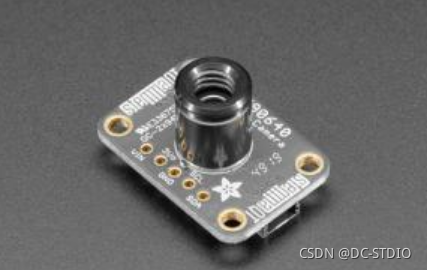
该传感器包含24x32的红外热传感器阵列。 连接到微控制器(或Raspberry Pi)后,它将通过I2C返回768个独立红外温度读数的数组。 就像那些很酷的热像仪一样,但是它紧凑而简单,易于集成。
3.1.1 模块特性
该块一款红外热像仪模块,32×24 像素,I2C 接口通信,兼容 3.3V/5V 电平,支持 Raspberry Pi、
Arduino 等主控。
我采用 MLX90640 远红外热传感器阵列,可精确检测特定区域和温度范围内的目标物体,
尺寸小巧,可方便集成到各种工业或智能控制应用中。
- 采用 MLX90640 远红外热传感器阵列,32×24 像素
- 支持 I2C 接口通信,可设置为快速模式(速率可达 1MHz)
- 噪声等效温差(NETD)仅为 0.1K RMS@1Hz 刷新率,噪声性能好
- 板载电平转换电路,可兼容 3.3V/5V 的工作电平
3.1.2相关参数
- 工作电压:3.3V/5V
- 工作电流:<23mA
- 通信接口:I2C (地址为 0x33)
- 视场角(水平视角×垂直视角):
- MLX90640-D55 Thermal Camera:55°×35° (角度小,适合远距离测量)
- MLX90640-D110 Thermal Camera:110°×75° (角度大,适合近距离测量)
- 工作温度:-40℃~85℃
- 目标温度:-40℃~300℃
- 检测精度:±1℃
- 刷新速率:0.5Hz~64Hz (可编程设置)
- 产品尺寸:28mm×16 mm
- 固定孔尺寸:2.0mm
3.1.2 应用场景
- 高精度非接触性物体温度检测
- 红外热像仪、红外测温仪
- 智能家居、智能楼宇、智能照明
- 工业温度控制、安防、入侵/移动检测
3.1.3 接口说明(以接入 MCU 为例):
- VCC:接 3.3V
- GND:接 GND
- SDA:接 MCU.I2C 数据线
- SCL:接 MCU.I2C 时钟线
4 实现效果
4.1 STM32+LCD 图像显示
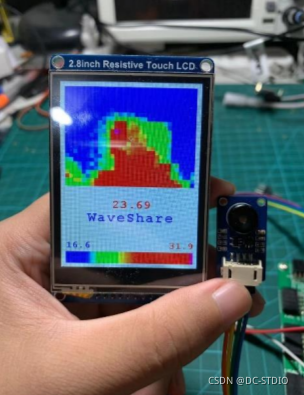
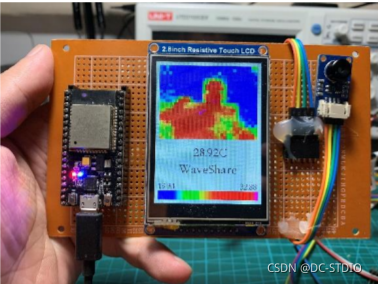
4.2 Arduino+ESP32+LCD 图像显示
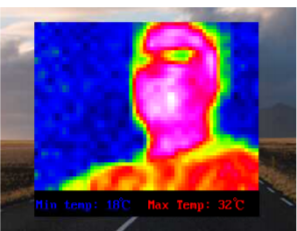
4.3 树莓派 HDMI 显示屏显示
5 部分相关驱动代码
#include
#include "Adafruit_Arcada.h"
Adafruit_MLX90640 mlx;
Adafruit_Arcada arcada;#if !defined(USE_TINYUSB)#warning "Compile with TinyUSB selected!"
#endifFile myFile;float mlx90640To[768]; // Here we receive the float vals acquired from MLX90640#define DE_BOUNCE 200// Wait this many msec between button clicks
#define MENU_LEN 12// Number of total available menu choices
#define MENU_ROWS 9// Number of menu lines that can fit on screen
#define MENU_VPOS 6
#define GRAY_33 0x528A
#define BOTTOM_DIR "MLX90640"
#define DIR_FORMAT "/dir%05d"
#define BMP_FORMAT "/frm%05d.bmp"
#define CFG_FLNAME "/config.ini"
#define MAX_SERIAL 999// BMP File Header, little end first, Photoshop ver.
const PROGMEM uint8_t BmpPSPHead[14] = {0x42, 0x4D, // "BM" in hex0x38, 0x09, 0x00, 0x00, // File size, 23600x00, 0x00, // reserved for app data 10x00, 0x00, // reserved for app data 20x36, 0x00, 0x00, 0x00 // Offset of first pixel, 54
};// BMP 24-bit DIB Header, little end first, Photoshop ver.
const PROGMEM uint8_t DIBHeadPSP1[40] = {0x28, 0x00, 0x00, 0x00, // Header size, 400x20, 0x00, 0x00, 0x00, // pixel width, 320x18, 0x00, 0x00, 0x00, // pixel height, 240x01, 0x00, // color planes, 10x18, 0x00, // bits per pixel, 240x00, 0x00, 0x00, 0x00, // Compression method, 0==none0x00, 0x00, 0x00, 0x00, // Raw bitmap data size, dummy 00x12, 0x0B, 0x00, 0x00, // Pixels per meter H, 28340x12, 0x0B, 0x00, 0x00, // Pixels per meter V, 28340x00, 0x00, 0x00, 0x00, // Colors in palette, 0==default 2^n0x00, 0x00, 0x00, 0x00 // Number of important colors, 0
};// BMP file data, 2 byte padding
const PROGMEM uint8_t PSPpad[2] = {0x00, 0x00};//Byte arrays of bitmapped icons, 16 x 12 px:
const PROGMEM uint8_t battIcon[] = {
0x0f, 0x00, 0x3f, 0xc0, 0x20, 0x40, 0x20, 0x40, 0x20, 0x40, 0x20, 0x40,
0x20, 0x40, 0x20, 0x40, 0x20, 0x40, 0x20, 0x40, 0x20, 0x40, 0x3f, 0xc0};const PROGMEM uint8_t camIcon[] = {
0x01, 0xe0, 0x61, 0x20, 0xff, 0xf0, 0x80, 0x10, 0x86, 0x10, 0x89, 0x10,
0x90, 0x90, 0x90, 0x90, 0x89, 0x10, 0x86, 0x10, 0x80, 0x10, 0xff, 0xf0};const PROGMEM uint8_t SDicon[] = {
0x0f, 0xe0, 0x1f, 0xe0, 0x3c, 0x60, 0x78, 0x60, 0x70, 0x60, 0x60, 0x60,
0x60, 0x60, 0x60, 0x60, 0x6f, 0x60, 0x60, 0x60, 0x7f, 0xe0, 0x7f, 0xe0};const PROGMEM uint8_t snowIcon[] = {
0x15, 0x00, 0x4E, 0x40, 0xC4, 0x60, 0x75, 0xC0, 0x9F, 0x20, 0x0E, 0x00,
0x0E, 0x00, 0x9F, 0x20, 0x75, 0xC0, 0xC4, 0x60, 0x4E, 0x40, 0x15, 0x00};uint8_t pixelArray[2304]; // BMP image body, 32 pixels * 24 rows * 3 bytes// Some global values that several functions will use, including
// 5 floats to append to the BMP pixel data:
// coldest pixel, coldest color, center temp, hottest color, hottest pixel
float sneakFloats[5] = {3.1415926, 0.0, -11.7, 98.6, -12.34}; // Test values that get overwritten
uint16_t highAddr = 0, lowAddr = 0; // Append the pixel addresses, toouint16_t backColor, lowPixel, highPixel, buttonRfunc = 1,emissivity = 95, frameRate = 4,thermRange = 0, paletteNum = 1, colorPal[256], // Array for color palettesnextDirIndex = 0, nextBMPindex = 0, nextBMPsequence = 1; // These keep count of SD files and dirs, 0==error
uint32_t deBounce = 0, buttonBits = 0;
boolean mirrorFlag = false, celsiusFlag = false, markersOn = true,screenDim = false, smoothing = false, showLastCap = false,save1frame = false, recordingInProg = false, buttonActive = false;
float battAverage = 0.0, colorLow = 0.0, colorHigh = 100.0; // Values for managing color range
volatile boolean clickFlagMenu = false, clickFlagSelect = false; // Volatiles for timer callback handlingsetup()函数首先执行,每次启动仅执行一次。 它的工作是初始化系统,从Arcada代码及其将控制的板载硬件开始,例如屏幕和按钮等。然后一组测试确定闪存是否准备好接收新的BMP文件。void setup()
{if (!arcada.arcadaBegin()) { // Start TFT and fill with black// Serial.print("Failed to begin");while (1);}arcada.filesysBeginMSD(); // Set up SD or QSPI flash as an external USB drivearcada.displayBegin(); // Activate TFT screenarcada.display->setRotation(1); // wide orientationarcada.display->setTextWrap(false);arcada.setBacklight(255); // Turn on backlightbattAverage = arcada.readBatterySensor();Serial.begin(115200);
// while(!Serial); // Wait for user to open terminalSerial.println("MLX90640 IR Array Example");if(arcada.filesysBegin()){ // Initialize flash storage, begin setting up indices for saving BMPsif(!arcada.exists(BOTTOM_DIR)) { // Is base "MLX90640" directory absent?if(arcada.mkdir(BOTTOM_DIR)) // Can it be added?nextDirIndex = nextBMPindex = 1; // Success, prepare to store numbered files & dirs} else { // "MLX90640" directory exists, can we add files | directories?// Get the number of the next unused serial directory pathnextDirIndex = availableFileNumber(1, BOTTOM_DIR + String(DIR_FORMAT));// and the next unused serial BMP namenextBMPindex = availableFileNumber(1, BOTTOM_DIR + String(BMP_FORMAT));}} // By now each global index variable is either 0 (no nums available), or the next unclaimed serial num
6 最后
本文来自互联网用户投稿,文章观点仅代表作者本人,不代表本站立场,不承担相关法律责任。如若转载,请注明出处。 如若内容造成侵权/违法违规/事实不符,请点击【内容举报】进行投诉反馈!
