JavaSwing 船只停靠管理可视化(三)
JavaSwing 船只停靠管理可视化(一)
JavaSwing 船只停靠管理可视化(二)
JavaSwing 船只停靠管理可视化(三)
JavaSwing 船只停靠管理可视化(四)
JavaSwing 船只停靠管理可视化(五)
项目源码 :https://github.com/Wo-com/ShipPort
如果觉得不错的话就在GitHub里面给个Star吧
JavaSwing 船只停靠管理可视化,功能选项卡实现,通过继承JPanel添加功能。
MainUI 为项目框架。Pane为选项卡,选项卡实现具体的功能。
项目界面结构:
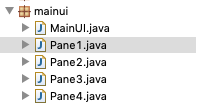
Mainui 源代码:
import java.awt.EventQueue;
import javax.swing.JFrame;
import javax.swing.JPanel;
import java.awt.BorderLayout;
import javax.swing.JTabbedPane;
import javax.swing.JLabel;public class MainUI {public static JFrame frame;/*** Launch the application.*/public static void main(String[] args) {EventQueue.invokeLater(new Runnable() {public void run() {try {new MainUI();} catch (Exception e) {e.printStackTrace();}}});}/*** Create the application.*/public MainUI() {initialize();}/*** Initialize the contents of the frame.*/private void initialize() {frame = new JFrame("船只停靠管理可视化");frame.setBounds(100, 100, 840, 500);frame.setDefaultCloseOperation(JFrame.EXIT_ON_CLOSE);frame.setVisible(true);JPanel panel = new JPanel();frame.getContentPane().add(panel, BorderLayout.NORTH);JLabel label = new JLabel("欢迎使用,本管理系统,没有使用任何框架,界面可随意拖动,界面与数据操作分离方便修改");panel.add(label);JTabbedPane tabbedPane = new JTabbedPane(JTabbedPane.TOP);frame.getContentPane().add(tabbedPane, BorderLayout.CENTER);Pane1 panel_1 = new Pane1();tabbedPane.addTab("泊位管理", null, panel_1, null);panel_1.setLayout(null);//清空布局
        Pane2 panel_2 = new Pane2();tabbedPane.addTab("船只管理", null, panel_2, null);panel_2.setLayout(null);//清空布局
        Pane3 panel_3 = new Pane3();tabbedPane.addTab("停靠指定", null, panel_3, null);panel_3.setLayout(null);//清空布局
        Pane4 panel_4 = new Pane4();tabbedPane.addTab("查看甘特图", null, panel_4, null);panel_4.setLayout(null);//清空布局
        }}
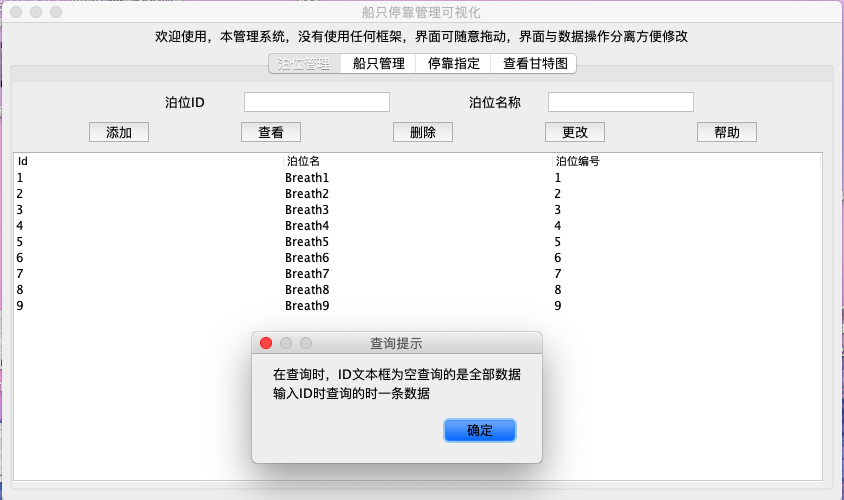
Pane1效果图:实现对泊位的增删改查
Pane1源码:
import java.awt.event.ActionEvent;
import java.awt.event.ActionListener;
import java.awt.event.ComponentAdapter;
import java.awt.event.ComponentEvent;
import java.sql.ResultSet;
import javax.swing.JButton;
import javax.swing.JLabel;
import javax.swing.JOptionPane;
import javax.swing.JPanel;
import javax.swing.JScrollPane;
import javax.swing.JTable;
import javax.swing.JTextField;import consql.Dao;public class Pane1 extends JPanel{private static final long serialVersionUID = 1L;Pane1(){System.out.println("面板1被调用");initialize();}private void initialize() {Dao db = new Dao();db.connSQL();JLabel lblNewLabel_1 = new JLabel("泊位ID");lblNewLabel_1.setBounds(81, 32, 61, 16);        //初始位置this.add(lblNewLabel_1);JTextField textField = new JTextField();textField.setBounds(190, 27, 130, 26);            //初始位置this.add(textField);textField.setColumns(10);JLabel lblNewLabel_2 = new JLabel("泊位名称");lblNewLabel_2.setBounds(81, 73, 61, 16);        //初始位置this.add(lblNewLabel_2);JTextField textField_1 = new JTextField();textField_1.setBounds(190, 65, 130, 26);        //初始位置this.add(textField_1);textField_1.setColumns(10);JButton btnNewButton = new JButton("添加");btnNewButton.setBounds(44, 101, 55, 58);        //初始位置this.add(btnNewButton);JButton btnNewButton_1 = new JButton("查看");btnNewButton_1.setBounds(145, 103, 61, 58);        //初始位置this.add(btnNewButton_1);JButton btnNewButton_2 = new JButton("删除");btnNewButton_2.setBounds(259, 103, 61, 58);        //初始位置this.add(btnNewButton_2);JButton btnNewButton_3 = new JButton("更改");btnNewButton_3.setBounds(345, 65, 78, 29);        //初始位置this.add(btnNewButton_3);JButton btnNewButton_4 = new JButton("帮助");btnNewButton_4.setBounds(362, 101, 61, 58);        //初始位置this.add(btnNewButton_4);JScrollPane scrollPane = new JScrollPane();scrollPane.setBounds(0, 100, 570, 200);//    scrollPane.setHorizontalScrollBarPolicy( JScrollPane.HORIZONTAL_SCROLLBAR_ALWAYS);    //水平滚动条//    scrollPane.setVerticalScrollBarPolicy( JScrollPane.VERTICAL_SCROLLBAR_ALWAYS);        //垂直滚动条this.add(scrollPane); btnNewButton.addActionListener(new ActionListener()//添加按钮
                {public void actionPerformed(ActionEvent e4){try{    String id = textField.getText();        // 取得用文本框IDString name = textField_1.getText();        // 取得用name if((id.length()==0)||(name.length()==0)){JOptionPane.showMessageDialog(null,"插入数据为空成功","插入数据失败",JOptionPane.PLAIN_MESSAGE); }else{//获取行数String sqlline = "select * from port";ResultSet rs = db.selectSQL(sqlline);rs.last() ; int row = rs.getRow()+1; rs.beforeFirst();//光标回滚  获取行数  光标回滚
                                   String sql1 = "insert into port(id,name,num_add) values("+id+",'"+name+"','"+row+"')";boolean tf;tf=db.insertSQL(sql1);if (tf){JOptionPane.showMessageDialog(null,"插入id:"+id+" 泊位:"+name+" 成功","插入数据",JOptionPane.PLAIN_MESSAGE); }else{JOptionPane.showMessageDialog(null,"插入id:"+id+" 泊位:"+name+" 失败","插入数据",JOptionPane.PLAIN_MESSAGE); }}                      System.out.println("添加执行完成");}catch(Exception e1){System.out.println("面板1,查询出错");}}});btnNewButton_1.addActionListener(new ActionListener()//查询按钮
                {public void actionPerformed(ActionEvent e4){try{    String id = textField.getText();        // 取得用文本框IDString[] columnNames = { "Id", "泊位名","泊位编号"}; String sql2;if (id.length()==0){sql2 = "select * from port";}else{sql2 = "select * from port where id='"+id+"'";}ResultSet rs = db.selectSQL(sql2);rs.last() ; int row = rs.getRow(); rs.beforeFirst();//光标回滚  获取行数  光标回滚String data[][]  =new String[row][3];                      row=0;while(rs.next()){data[row][0]=rs.getString(1);data[row][1]=rs.getString(2);int num=rs.getInt(3);data[row][2]=String.valueOf(num);   row++;}                      JTable table = new JTable(data, columnNames);  scrollPane.setViewportView(table);                        System.out.println("查询"+row+"行,完成查询");}catch(Exception e1){System.out.println("面板1,查询出错");}}});btnNewButton_2.addActionListener(new ActionListener()//监听删除泊位
                  {public void actionPerformed(ActionEvent e4){try{String id = textField.getText();// 取得用IDString sql3 = "delete from port where id='"+id+"';";boolean dl;dl=db.deleteSQL(sql3);if (dl){JOptionPane.showMessageDialog(null,"删除id:"+id+"成功","删除数据",JOptionPane.PLAIN_MESSAGE); }else{JOptionPane.showMessageDialog(null,"删除id:"+id+"失败","删除数据",JOptionPane.PLAIN_MESSAGE); }System.out.println("面板1 删除完成");}catch(Exception e1){System.out.println("面板1 删除出错");}}});btnNewButton_3.addActionListener(new ActionListener()//    数据修改
                  {public void actionPerformed(ActionEvent e4){try{    String id = textField.getText();            // 取得用IDString name = textField_1.getText();        // 取得用nameif (name.length()!=0){                        //修改nameString sql = "update port set name='"+name+"' where id='"+id+"';";boolean na;na=db.updateSQL(sql);if (na){JOptionPane.showMessageDialog(null,"更改名字成功","更新数据",JOptionPane.PLAIN_MESSAGE); }else{JOptionPane.showMessageDialog(null,"更改名字失败","更新数据",JOptionPane.PLAIN_MESSAGE); }}System.out.print("面板1 更新完成");}catch(Exception e1){System.out.print("面板1 更新出错");}}});btnNewButton_4.addActionListener(new ActionListener()//    提示帮助
                  {public void actionPerformed(ActionEvent e4){try{    JOptionPane.showMessageDialog(null,"在查询时,ID文本框为空查询的是全部数据\n输入ID时查询的时一条数据","查询提示",JOptionPane.PLAIN_MESSAGE); System.out.print("面板1 帮助完成");}catch(Exception e1){System.out.print("面板1 帮助出错");}}});int between=11;                                    //定义分段this.addComponentListener(new ComponentAdapter() {//拖动窗口监听public void componentResized(ComponentEvent e) {  int width=MainUI.frame.getWidth();        //获取窗口宽度int height=MainUI.frame.getHeight();    //获取窗口高度
                lblNewLabel_1.setBounds(width/between*2, 10, width/between, 20);textField.setBounds(width/between*3, 10, width/between*2, 20);lblNewLabel_2.setBounds(width/between*6, 10, width/between, 20);textField_1.setBounds(width/between*7, 10, width/between*2, 20);btnNewButton.setBounds(width/between*1, 40, 60, 20);btnNewButton_1.setBounds(width/between*3,40, 60, 20);btnNewButton_2.setBounds(width/between*5, 40, 60, 20);btnNewButton_3.setBounds(width/between*7, 40, 60, 20);btnNewButton_4.setBounds(width/between*9, 40, 60, 20);scrollPane.setBounds(0, 70, width-30,height-170);}  }); }}
Pane2 效果图:实现对船只的增删改查。

Pane2源码:
import java.awt.event.ActionEvent;
import java.awt.event.ActionListener;
import java.awt.event.ComponentAdapter;
import java.awt.event.ComponentEvent;
import java.sql.ResultSet;
import java.sql.Timestamp;
import javax.swing.JButton;
import javax.swing.JLabel;
import javax.swing.JOptionPane;
import javax.swing.JPanel;
import javax.swing.JScrollPane;
import javax.swing.JSplitPane;
import javax.swing.JTable;
import javax.swing.JTextField;
import javax.swing.JTextPane;import consql.Dao;public class Pane2 extends JPanel{private static final long serialVersionUID = 1L;Pane2(){System.out.println("面板2被调用");initialize();}private void initialize() {Dao db = new Dao();db.connSQL();JSplitPane splitPane = new JSplitPane();splitPane.setOrientation(JSplitPane.VERTICAL_SPLIT);splitPane.setDividerLocation(300);this.add(splitPane);JSplitPane splitPane_1 = new JSplitPane();splitPane_1.setDividerLocation(300);//splitPane_1.setEnabled(false);//竖条 不可拖动
        splitPane.setLeftComponent(splitPane_1);JPanel panel = new JPanel();splitPane_1.setLeftComponent(panel);panel.setLayout(null);JLabel lblid = new JLabel("船只ID");lblid.setBounds(6, 25, 61, 16);panel.add(lblid);JLabel label = new JLabel("船只名称");label.setBounds(6, 70, 61, 16);panel.add(label);JLabel label_1 = new JLabel("到达时间");label_1.setBounds(6, 115, 61, 16);panel.add(label_1);JLabel label_2 = new JLabel("离开时间");label_2.setBounds(6, 160, 61, 16);panel.add(label_2);JLabel label_3 = new JLabel("停靠偏好");label_3.setBounds(6, 205, 61, 16);panel.add(label_3);JTextField textField = new JTextField();textField.setBounds(80, 20, 200, 26);panel.add(textField);textField.setColumns(10);JTextField textField_1 = new JTextField();textField_1.setBounds(80, 65, 200, 26);panel.add(textField_1);textField_1.setColumns(10);JTextField textField_2 = new JTextField();textField_2.setBounds(80, 110, 200, 26);panel.add(textField_2);textField_2.setColumns(10);JTextField textField_3 = new JTextField();textField_3.setBounds(80, 155, 200, 26);panel.add(textField_3);textField_3.setColumns(10);JTextField textField_4 = new JTextField();textField_4.setBounds(80, 200, 200, 26);panel.add(textField_4);textField_4.setColumns(10);JTextPane textPane = new JTextPane();textPane.setText("提示:\n1、在查询时,ID文本框为空查询的是全部数据\n\t输入ID时查询的时一条数据 \n\n2、输入时间格式:2019-06-08 01:12:11");textPane.setBounds(6, 238, 270, 100);panel.add(textPane);JScrollPane scrollPane = new JScrollPane();splitPane_1.setRightComponent(scrollPane);JPanel panel_2 = new JPanel();splitPane.setRightComponent(panel_2);JButton btnNewButton = new JButton("船只添加");panel_2.add(btnNewButton);JButton btnNewButton_1 = new JButton("船只删除");panel_2.add(btnNewButton_1);JButton btnNewButton_2 = new JButton("船只修改");panel_2.add(btnNewButton_2);JButton btnNewButton_3 = new JButton("船只查询");panel_2.add(btnNewButton_3);JButton btnNewButton_4 = new JButton("操作帮助");panel_2.add(btnNewButton_4);btnNewButton.addActionListener(new ActionListener()//添加
                  {public void actionPerformed(ActionEvent e4){try{    String id = textField.getText();        // 取得用IDString name = textField_1.getText();    // 取得用nameString arrive = textField_2.getText();    // 取得用arrive_timeString leave = textField_3.getText();        // 取得用leave_timeString perfer = textField_4.getText();    // 取得偏好//SimpleDateFormat sdf = new SimpleDateFormat("yyyy-MM-ddhh:mm:ss[]");    if((id.length()==0)||(name.length()==0)||(arrive.length()==0)||(leave.length()==0)||(perfer.length()==0)){JOptionPane.showMessageDialog(null,"插入数据为空","插入数据失败",JOptionPane.PLAIN_MESSAGE); }else{Timestamp ar =  java.sql.Timestamp.valueOf(arrive);Timestamp lv =  java.sql.Timestamp.valueOf(leave);String sql1 = "insert into ship values('"+id+"','"+name+"','"+ar+"','"+lv+"','"+perfer+"','')";boolean tf;tf=db.insertSQL(sql1);if (tf){JOptionPane.showMessageDialog(null,"插入id:"+id+" 泊位:"+name+" 成功","插入数据",JOptionPane.PLAIN_MESSAGE); }else{JOptionPane.showMessageDialog(null,"插入id:"+id+" 泊位:"+name+" 失败","插入数据",JOptionPane.PLAIN_MESSAGE); }}System.out.print("添加");}catch(Exception e1){System.out.print("确认添加,出错");}}});btnNewButton_1.addActionListener(new ActionListener()//删除
                  {public void actionPerformed(ActionEvent e4){try{String id = textField.getText();// 取得用IDif (id.length()==0){//
                                    JOptionPane.showMessageDialog(null,"输入为空","请输入数据",JOptionPane.PLAIN_MESSAGE); }else{String sql3 = "delete from ship where id='"+id+"';";boolean dl;dl=db.deleteSQL(sql3);if (dl){JOptionPane.showMessageDialog(null,"删除id:"+id+"成功","删除数据",JOptionPane.PLAIN_MESSAGE); }else{JOptionPane.showMessageDialog(null,"删除id:"+id+"失败","删除数据",JOptionPane.PLAIN_MESSAGE); }}System.out.print("面板2 删除");}catch(Exception e1){System.out.print("面板2 删除,出错");}}});btnNewButton_2.addActionListener(new ActionListener()//修改
                  {public void actionPerformed(ActionEvent e4){try{    String id = textField.getText();            // 取得用IDString name = textField_1.getText();        // 取得用nameString arrive = textField_2.getText();        // 取得用arrive_timeString leaves = textField_3.getText();        // 取得用leave_timeString perfer = textField_4.getText();        // 取得偏好
                                System.out.print("id="+id+"name="+name+"arrive="+arrive+"leave"+leaves+"perfer"+perfer);//2012-12-12 01:12:11if (name.length()!=0){//修改nameSystem.out.print("--name修改--");String sql = "update ship set name='"+name+"' where id='"+id+"';";boolean na;na=db.updateSQL(sql);if (na){JOptionPane.showMessageDialog(null,"更改名字成功","更新数据",JOptionPane.PLAIN_MESSAGE); }else{JOptionPane.showMessageDialog(null,"更改名字失败","更新数据",JOptionPane.PLAIN_MESSAGE); }}if (arrive.length()!=0){//修改到达时间System.out.print("--arrive修改--");String sql ="update ship set arrive='"+arrive+"' where id='"+id+"';";db.updateSQL(sql);}//为什么不用leave字段! leave字段不能更新数据库if (leaves.length()!=0){//修改leave时间System.out.print("--leaves修改--");String sql ="update ship set leaves='"+leaves+"' where id='"+id+"';";db.updateSQL(sql);}if (perfer.length()!=0){//修改偏好位置System.out.print("--prefer修改--");String sql = "update ship set perfer='"+perfer+"' where id='"+id+"';";db.updateSQL(sql);}System.out.print("面板2 修改");}catch(Exception e1){System.out.print("面板2 修改,出错");}}});btnNewButton_3.addActionListener(new ActionListener()//查询按钮
                {public void actionPerformed(ActionEvent e4){try{    String id = textField.getText();            // 取得用ID
                            String[] columnNames = { "Id", "泊位名","到达时间","离开时间","偏好位置","停靠位置"}; String sql2;if (id.length()==0){sql2 = "select * from ship";}else{sql2 = "select * from ship where id='"+id+"'";}ResultSet rs = db.selectSQL(sql2);rs.last() ; int row = rs.getRow(); rs.beforeFirst();//光标回滚  获取行数  光标回滚String data[][]  =new String[row][6];                      row=0;while(rs.next()){data[row][0]=rs.getString(1);data[row][1]=rs.getString(2);data[row][2]=rs.getString(3);data[row][3]=rs.getString(4);data[row][4]=rs.getString(5);data[row][5]=rs.getString(6);row++;}                      JTable table = new JTable(data, columnNames);  table.getColumnModel().getColumn(0).setPreferredWidth(30);//设置列宽度比例table.getColumnModel().getColumn(1).setPreferredWidth(30);table.getColumnModel().getColumn(2).setPreferredWidth(120);table.getColumnModel().getColumn(3).setPreferredWidth(120);table.getColumnModel().getColumn(4).setPreferredWidth(30);table.getColumnModel().getColumn(5).setPreferredWidth(30);scrollPane.setViewportView(table);                        System.out.println("面板2查询ship"+row+"行,完成查询");}catch(Exception e1){System.out.println("面板2查询ship,查询出错");}}});btnNewButton_4.addActionListener(new ActionListener()//帮助
                  {public void actionPerformed(ActionEvent e4){try{JOptionPane.showMessageDialog(null,"在修改数据时 ID不能为空,其他数据可以选填","修改提示",JOptionPane.PLAIN_MESSAGE); System.out.print("面板2 帮助");}catch(Exception e1){System.out.print("面板2 帮助,出错");}}});this.addComponentListener(new ComponentAdapter() {//拖动窗口监听public void componentResized(ComponentEvent e) {  int width=MainUI.frame.getWidth();        //获取窗口宽度int height=MainUI.frame.getHeight();    //获取窗口高度splitPane.setBounds(0, 0, width-20, height);splitPane.setDividerLocation(height-140);    }  }); }}
Pane3效果图:实现对船只的自动指定和手动指定。

Pane3 源码:
import java.awt.BorderLayout;
import java.awt.event.ActionEvent;
import java.awt.event.ActionListener;
import java.awt.event.ComponentAdapter;
import java.awt.event.ComponentEvent;
import java.sql.ResultSet;
import javax.swing.JButton;
import javax.swing.JLabel;
import javax.swing.JOptionPane;
import javax.swing.JPanel;
import javax.swing.JScrollPane;
import javax.swing.JSplitPane;
import javax.swing.JTable;
import javax.swing.JTextField;import consql.Dao;
import tool.Appoint;public class Pane3 extends JPanel{private static final long serialVersionUID = 1L;Pane3(){System.out.println("面板3被调用");initialize();}private void initialize() {Dao db = new Dao();db.connSQL();JSplitPane splitPane = new JSplitPane();splitPane.setOrientation(JSplitPane.VERTICAL_SPLIT);splitPane.setDividerLocation(80);//水平条this.add(splitPane, BorderLayout.CENTER);JSplitPane splitPane_1 = new JSplitPane();splitPane.setRightComponent(splitPane_1);JPanel panel = new JPanel();splitPane.setLeftComponent(panel);panel.setLayout(null);JLabel lblid = new JLabel("船只ID");lblid.setBounds(6, 19, 61, 16);panel.add(lblid);JLabel lblid_1 = new JLabel("泊位号");lblid_1.setBounds(237, 19, 61, 16);panel.add(lblid_1);JTextField textField = new JTextField();textField.setBounds(74, 14, 130, 26);panel.add(textField);textField.setColumns(10);JTextField textField_1 = new JTextField();textField_1.setBounds(310, 14, 130, 26);panel.add(textField_1);textField_1.setColumns(10);JButton button = new JButton("查询船只");button.setBounds(6, 58, 102, 29);panel.add(button);JButton button_1 = new JButton("查询港口");button_1.setBounds(120, 58, 117, 29);panel.add(button_1);JButton button_2 = new JButton("手动指定");button_2.setBounds(247, 58, 117, 29);panel.add(button_2);JButton button_3 = new JButton("自动指定");button_3.setBounds(366, 58, 117, 29);panel.add(button_3);JButton button_4 = new JButton("指定帮助");button_3.setBounds(366, 58, 117, 29);panel.add(button_4);JScrollPane scrollPane = new JScrollPane();//添加带滚动条的容器在左下
        splitPane_1.setLeftComponent(scrollPane);JScrollPane scrollPane_1 = new JScrollPane();//添加带滚动条的容器在右下
        splitPane_1.setRightComponent(scrollPane_1);button.addActionListener(new ActionListener() {//查询船只public void actionPerformed(ActionEvent e) {try{    String id = textField.getText();            // 取得用ID
                    String[] columnNames = { "Id", "泊位名","到达时间","离开时间","偏好位置","停靠位置"}; String sql2;if (id.length()==0){sql2 = "select * from ship";}else{sql2 = "select * from ship where id='"+id+"'";}ResultSet rs = db.selectSQL(sql2);rs.last() ; int row = rs.getRow(); rs.beforeFirst();//光标回滚  获取行数  光标回滚String data[][]  =new String[row][6];                      row=0;while(rs.next()){data[row][0]=rs.getString(1);data[row][1]=rs.getString(2);data[row][2]=rs.getString(3);data[row][3]=rs.getString(4);data[row][4]=rs.getString(5);data[row][5]=rs.getString(6);row++;}                      JTable table = new JTable(data, columnNames);  table.getColumnModel().getColumn(0).setPreferredWidth(25);//设置列宽度比例table.getColumnModel().getColumn(1).setPreferredWidth(25);table.getColumnModel().getColumn(2).setPreferredWidth(120);table.getColumnModel().getColumn(3).setPreferredWidth(120);table.getColumnModel().getColumn(4).setPreferredWidth(20);table.getColumnModel().getColumn(5).setPreferredWidth(20);scrollPane.setViewportView(table);                        //将表格添加到容器        System.out.println("面板3查询ship"+row+"行,完成查询");}catch(Exception e1){System.out.println("面板3查询ship,查询出错");}}});button_1.addActionListener(new ActionListener() {//查询港口public void actionPerformed(ActionEvent e) {try{    String id = textField_1.getText();            // 取得用ID
                    String[] columnNames = { "泊位名","泊位号"}; String sql2;if (id.length()==0){sql2 = "select * from port";}else{sql2 = "select * from ship where id='"+id+"'";}ResultSet rs = db.selectSQL(sql2);rs.last() ; int row = rs.getRow(); rs.beforeFirst();//光标回滚  获取行数  光标回滚String data[][]  =new String[row][2];                      row=0;while(rs.next()){data[row][0]=rs.getString(2);int num=rs.getInt(3);data[row][1]=String.valueOf(num);   row++;}                       JTable table = new JTable(data, columnNames);      scrollPane_1.setViewportView(table); //将表格添加到容器    System.out.println("面板3查询port"+row+"行,完成查询");}catch(Exception e1){System.out.println("面板3查询port,查询出错");}}});button_2.addActionListener(new ActionListener()//手动指定
                  {public void actionPerformed(ActionEvent e4){String shipid = textField.getText();            // 取得用IDString portid = textField_1.getText();    if ((shipid.length()==0)||(portid.length()==0)){//
                                  JOptionPane.showMessageDialog(null,"输入为空","请输入ID",JOptionPane.PLAIN_MESSAGE); }else{Appoint hand=new Appoint();boolean tf= hand.human_appoint(shipid, portid);if (tf){JOptionPane.showMessageDialog(null,"指定位置:"+shipid+"成功","指定位置",JOptionPane.PLAIN_MESSAGE); }else{JOptionPane.showMessageDialog(null,"指定位置:"+shipid+"失败","指定位置",JOptionPane.PLAIN_MESSAGE); }}}});button_3.addActionListener(new ActionListener()//自动指定
                  {public void actionPerformed(ActionEvent e4){String shipid = textField.getText();            // 取得用IDif (shipid.length()==0){//
                                  JOptionPane.showMessageDialog(null,"输入为空","请输入ID",JOptionPane.PLAIN_MESSAGE); }else{Appoint hand=new Appoint();boolean tf= hand.auto_appoint(shipid);if (tf){JOptionPane.showMessageDialog(null,"指定位置:"+shipid+"成功","指定位置",JOptionPane.PLAIN_MESSAGE); }else{JOptionPane.showMessageDialog(null,"指定位置:"+shipid+"失败","指定位置",JOptionPane.PLAIN_MESSAGE); }}}});button_4.addActionListener(new ActionListener()//帮助
                  {public void actionPerformed(ActionEvent e4){JOptionPane.showMessageDialog(null,"手动指定位置,要输入船只ID和泊位号,手动指定可能导致时间冲突。\n 自动指定输入ID即可 自动指定 不会出现时间冲突","指定位置",JOptionPane.PLAIN_MESSAGE); }});int between=11;    this.addComponentListener(new ComponentAdapter() {//拖动窗口监听public void componentResized(ComponentEvent e) {  int width=MainUI.frame.getWidth();        //获取窗口宽度int height=MainUI.frame.getHeight();    //获取窗口高度splitPane.setBounds(0, 0, width-20, height);lblid.setBounds(width/between*2, 10, width/between, 20);textField.setBounds(width/between*3, 10, width/between*2, 20);lblid_1.setBounds(width/between*6, 10, width/between, 20);textField_1.setBounds(width/between*7, 10, width/between*2, 20);button.setBounds(width/between*1, 40, 60, 20);button_1.setBounds(width/between*3,40, 60, 20);button_2.setBounds(width/between*5, 40, 60, 20);button_3.setBounds(width/between*7, 40, 60, 20);button_4.setBounds(width/between*9, 40, 60, 20);splitPane_1.setDividerLocation(width/11*7);    //垂直条  黄金比例splitPane.setBounds(0, 0, width-20, height-90);}  }); }}
Pane4 效果图:应用java实现甘特图

Pane4 源码:
import java.awt.Color;
import java.awt.Dimension;
import java.awt.event.ActionEvent;
import java.awt.event.ActionListener;
import java.awt.event.ComponentAdapter;
import java.awt.event.ComponentEvent;
import java.sql.ResultSet;
import javax.swing.JButton;
import javax.swing.JEditorPane;
import javax.swing.JLabel;
import javax.swing.JOptionPane;
import javax.swing.JPanel;
import javax.swing.JScrollPane;
import javax.swing.JTextField;
import consql.Dao;
import tool.DateFormat;public class Pane4 extends JPanel{private static final long serialVersionUID = 1L;Pane4(){System.out.println("面板4被调用");initialize();}private void initialize() {Dao db = new Dao();db.connSQL();DateFormat da=new DateFormat();JLabel label = new JLabel("起始时间");label.setBounds(20, 16, 61, 16);this.add(label);JTextField textField = new JTextField();textField.setBounds(93, 11, 130, 26);this.add(textField);textField.setColumns(10);JLabel label_1 = new JLabel("结束时间");label_1.setBounds(235, 16, 61, 16);this.add(label_1);JTextField textField_1 = new JTextField();textField_1.setBounds(291, 11, 130, 26);this.add(textField_1);textField_1.setColumns(10);JButton btnNewButton = new JButton("查询");btnNewButton.setBounds(423, 11, 50, 29);this.add(btnNewButton);JButton btn = new JButton("帮助");btn.setBounds(473, 11, 50, 29);this.add(btn);JScrollPane scrollPane = new JScrollPane();scrollPane.setBounds(17, 60, 404, 185);this.add(scrollPane);btnNewButton.addActionListener(new ActionListener()//查询
                  {public void actionPerformed(ActionEvent e4){JPanel panel = new JPanel();String text1=textField.getText();String text2=textField_1.getText();String min_time=null;String max_time=null;int line_height=35;                                      //行高int star=100;                                            //时段图 左距try{//绘制 每条港口信息String min_sql="select  min(arrive) from portship;";String max_sql="select  max(leaves) from portship;";ResultSet rs_min=db.selectSQL(min_sql);if(rs_min.first()) {                                //第一行 min_time=rs_min.getString(1);System.out.println("最小时间"+rs_min.getString(1));}ResultSet rs_max=db.selectSQL(max_sql);if(rs_max.first()) {    max_time=rs_max.getString(1);                    //第一行 System.out.println("最大时间"+rs_max.getString(1));}int  width=da.dateDiff(min_time, max_time)+star;    //绘图窗口宽度
                          String sql1 = "select * from port";ResultSet rs1=db.selectSQL(sql1);rs1.last() ; int portrow = rs1.getRow(); rs1.beforeFirst();//光标回滚  获取行数  光标回滚
                      panel.setPreferredSize(new Dimension(width, portrow*line_height));//设置宽度显示滚动条panel.setLayout(null);while(rs1.next()){String name=rs1.getString(2);                //取得数据表里面的 name(泊位名)int line=rs1.getInt(3);                //取得数据表里面的 num_add (行号)     行号用于绘图JLabel lblOne = new JLabel(name);lblOne.setForeground(new Color(0, 0, 0));lblOne.setBounds(18, line*line_height-10, 61, 16);            //整体往下移动10的距离
                              panel.add(lblOne);}//绘制空的填充 防止查询为空 遗留数据显示JEditorPane editorPane1 = new JEditorPane();editorPane1.setEditable(false);editorPane1.setBackground(new Color(238,238,238));editorPane1.setBounds(star,line_height-13, width-star,  portrow*line_height-13);panel.add(editorPane1,3);String sql3 = null;    if((text1.length()==0)&&(text2.length()!=0)){//[ ,y] 查询起始到 y时段段sql3="select * from portship where leaves<='"+text2+"'";System.out.println("[ ,y]");textField.setText(min_time);}else if((text1.length()!=0)&&(text2.length()==0)){//[x,] 查询x到 结束时段段sql3="select * from portship where arrive>='"+text1+"'";System.out.println("[x, ]");textField_1.setText(max_time);    }else if((text1.length()!=0)&&(text2.length()!=0)){//[x,y] 查询x到 y时段段sql3="select * from portship where arrive>='"+text1+"'and leaves<='"+text2+"'";System.out.println("[x,y]");//设置文本框内容}else if((text1.length()==0)&&(text2.length()==0)){sql3="select * from portship";textField.setText(min_time);                    //设置文本框内容textField_1.setText(max_time);                    //设置文本框内容
                          }System.out.println("sql  "+sql3);ResultSet rs3=db.selectSQL(sql3);while(rs3.next()){                        //绘制甘特图
                              String artime=rs3.getString(3);String lvtime=rs3.getString(4);int port=rs3.getInt(5);int hour=da.dateDiff(artime, lvtime);//长度int dwstr=da.dateDiff(min_time, artime);JEditorPane editorPane = new JEditorPane();editorPane.setEditable(false);editorPane.setBackground(new Color(0, 191, 255));editorPane.setBounds(star+dwstr, port*line_height-13, hour, 20);panel.add(editorPane,3);//放在后面第一层
}scrollPane.setViewportView(panel);//绘制完成再添加,不然就会不显示}catch(Exception sss){System.out.println("查询港口名Sql出错");}}});btn.addActionListener(new ActionListener()//帮助监听
                  {public void actionPerformed(ActionEvent e4){JOptionPane.showMessageDialog(null,"无输入查询                     [min,max]\n输入起始时间查询            [  x  , max]\n输入结束时间查询            [min,  y  ]\n输入起始和结束时间查询  [  x  ,  y  ]\n","指定位置",JOptionPane.PLAIN_MESSAGE); }});int between=15;    this.addComponentListener(new ComponentAdapter() {//拖动窗口监听public void componentResized(ComponentEvent e) {  int width=MainUI.frame.getWidth();        //获取窗口宽度int height=MainUI.frame.getHeight();    //获取窗口高度scrollPane.setBounds(0, 40, width-23, height-140);label.setBounds(width/between*1, 10, width/between, 20);textField.setBounds(width/between*2, 10, width/between*3, 20);label_1.setBounds(width/between*5, 10, width/between, 20);textField_1.setBounds(width/between*6, 10, width/between*3, 20);btnNewButton.setBounds(width/between*9, 10, width/between*2, 20);btn.setBounds(width/between*11, 10, width/between*2, 20);}  }); }}
界面部分介绍完成,接下来介绍工具类 JavaSwing 船只停靠管理可视化(四)
转载于:https://www.cnblogs.com/easyidea/p/11025543.html
本文来自互联网用户投稿,文章观点仅代表作者本人,不代表本站立场,不承担相关法律责任。如若转载,请注明出处。 如若内容造成侵权/违法违规/事实不符,请点击【内容举报】进行投诉反馈!