SpringBoot整合Hbase
简介
当单表数据量过大的时候,关系性数据库会出现性能瓶颈,这时候我们就可以用NoSql,比如Hbase就是一个不错的解决方案。接下来是用Spring整合Hbase的实际案例,且在最后会给出整合中可能会出现的问题,以及解决方案。这里我是用本地Windows的IDEA,与局域网的伪分布Hbase集群做的连接,其中Hbase集群包括的组件有:Jdk1.8、Hadoop2.7.6、ZooKeeper3.4.10、Hbase2.0.1,因为这里只是开发环境,所以做一个伪分布的就好,之后部署的时候再按生产环境要求来即可
整合步骤
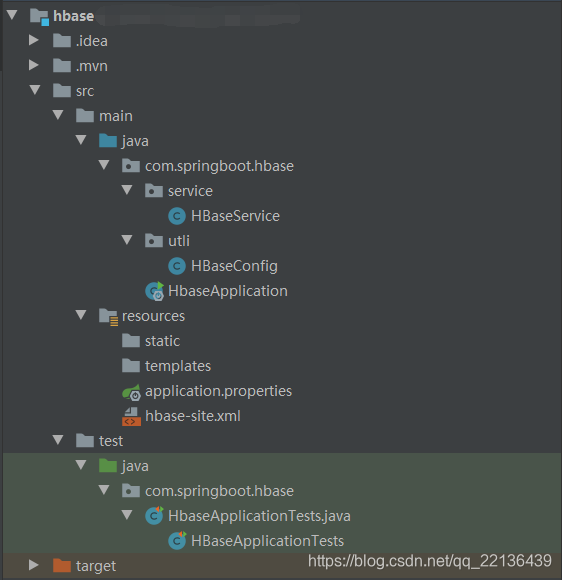
目录结构
pom.xml
这里要导入Hbase连接所需要包,需要找和你Hbase版本一致的包
org.apache.hbase hbase-client 2.0.1
hbase-site.xml
我是用的配置文件连接方法,这个配置文件你在hbase的安装目录下的conf目录就可以找到,然后你直接把它复制到项目的resources目录下就好,当然你也可以用application.properties配置文件外加注入和代码的方式代替这个配置文件
HBaseConfig.java
这里因为只需连接Hbase就没连接Hadoop,如果要连接Hadoop,Windows下还要下载winutils.exe工具,后面会介绍
@Configuration
public class HBaseConfig {@Beanpublic HBaseService getHbaseService() {//设置临时的hadoop环境变量,之后程序会去这个目录下的\bin目录下找winutils.exe工具,windows连接hadoop时会用到//System.setProperty("hadoop.home.dir", "D:\\Program Files\\Hadoop");//执行此步时,会去resources目录下找相应的配置文件,例如hbase-site.xmlorg.apache.hadoop.conf.Configuration conf = HBaseConfiguration.create();return new HBaseService(conf);}
}
HBaseService.java
这是做连接后的一些操作可以参考之后自己写一下
public class HBaseService {private Logger log = LoggerFactory.getLogger(HBaseService.class);/*** 管理员可以做表以及数据的增删改查功能*/private Admin admin = null;private Connection connection = null;public HBaseService(Configuration conf) {try {connection = ConnectionFactory.createConnection(conf);admin = connection.getAdmin();} catch (IOException e) {log.error("获取HBase连接失败!");}}/*** 创建表 create , {NAME => , VERSIONS => }*/public boolean creatTable(String tableName, List columnFamily) {try {//列族column familyList cfDesc = new ArrayList<>(columnFamily.size());columnFamily.forEach(cf -> {cfDesc.add(ColumnFamilyDescriptorBuilder.newBuilder(Bytes.toBytes(cf)).build());});//表 tableTableDescriptor tableDesc = TableDescriptorBuilder.newBuilder(TableName.valueOf(tableName)).setColumnFamilies(cfDesc).build();if (admin.tableExists(TableName.valueOf(tableName))) {log.debug("table Exists!");} else {admin.createTable(tableDesc);log.debug("create table Success!");}} catch (IOException e) {log.error(MessageFormat.format("创建表{0}失败", tableName), e);return false;} finally {close(admin, null, null);}return true;}/*** 查询所有表的表名*/public List getAllTableNames() {List result = new ArrayList<>();try {TableName[] tableNames = admin.listTableNames();for (TableName tableName : tableNames) {result.add(tableName.getNameAsString());}} catch (IOException e) {log.error("获取所有表的表名失败", e);} finally {close(admin, null, null);}return result;}/*** 遍历查询指定表中的所有数据*/public Map> getResultScanner(String tableName) {Scan scan = new Scan();return this.queryData(tableName, scan);}/*** 通过表名及过滤条件查询数据*/private Map> queryData(String tableName, Scan scan) {// Map> result = new HashMap<>();ResultScanner rs = null;//获取表Table table = null;try {table = getTable(tableName);rs = table.getScanner(scan);for (Result r : rs) {// 每一行数据Map columnMap = new HashMap<>();String rowKey = null;// 行键,列族和列限定符一起确定一个单元(Cell)for (Cell cell : r.listCells()) {if (rowKey == null) {rowKey = Bytes.toString(cell.getRowArray(), cell.getRowOffset(), cell.getRowLength());}columnMap.put(//列限定符Bytes.toString(cell.getQualifierArray(), cell.getQualifierOffset(), cell.getQualifierLength()),//列族Bytes.toString(cell.getValueArray(), cell.getValueOffset(), cell.getValueLength()));}if (rowKey != null) {result.put(rowKey, columnMap);}}} catch (IOException e) {log.error(MessageFormat.format("遍历查询指定表中的所有数据失败,tableName:{0}", tableName), e);} finally {close(null, rs, table);}return result;}/*** 为表添加或者更新数据*/public void putData(String tableName, String rowKey, String familyName, String[] columns, String[] values) {Table table = null;try {table = getTable(tableName);putData(table, rowKey, tableName, familyName, columns, values);} catch (Exception e) {log.error(MessageFormat.format("为表添加 or 更新数据失败,tableName:{0},rowKey:{1},familyName:{2}", tableName, rowKey, familyName), e);} finally {close(null, null, table);}}private void putData(Table table, String rowKey, String tableName, String familyName, String[] columns, String[] values) {try {//设置rowkeyPut put = new Put(Bytes.toBytes(rowKey));if (columns != null && values != null && columns.length == values.length) {for (int i = 0; i < columns.length; i++) {if (columns[i] != null && values[i] != null) {put.addColumn(Bytes.toBytes(familyName), Bytes.toBytes(columns[i]), Bytes.toBytes(values[i]));} else {throw new NullPointerException(MessageFormat.format("列名和列数据都不能为空,column:{0},value:{1}", columns[i], values[i]));}}}table.put(put);log.debug("putData add or update data Success,rowKey:" + rowKey);table.close();} catch (Exception e) {log.error(MessageFormat.format("为表添加 or 更新数据失败,tableName:{0},rowKey:{1},familyName:{2}",tableName, rowKey, familyName), e);}}/*** 根据表名获取table*/private Table getTable(String tableName) throws IOException {return connection.getTable(TableName.valueOf(tableName));}/*** 关闭流*/private void close(Admin admin, ResultScanner rs, Table table) {if (admin != null) {try {admin.close();} catch (IOException e) {log.error("关闭Admin失败", e);}if (rs != null) {rs.close();}if (table != null) {rs.close();}if (table != null) {try {table.close();} catch (IOException e) {log.error("关闭Table失败", e);}}}}
}
HBaseApplicationTests.java
@RunWith(SpringJUnit4ClassRunner.class)
@SpringBootTest
class HBaseApplicationTests {@Resourceprivate HBaseService hbaseService;//测试创建表@Testpublic void testCreateTable() {hbaseService.creatTable("test_base", Arrays.asList("a", "back"));}//测试加入数据@Testpublic void testPutData() {hbaseService.putData("test_base", "000001", "a", new String[]{"project_id", "varName", "coefs", "pvalues", "tvalues","create_time"}, new String[]{"40866", "mob_3", "0.9416","0.0000", "12.2293", "null"});hbaseService.putData("test_base", "000002", "a", new String[]{"project_id", "varName", "coefs", "pvalues", "tvalues","create_time"}, new String[]{"40866", "idno_prov", "0.9317","0.0000", "9.8679", "null"});hbaseService.putData("test_base", "000003", "a", new String[]{"project_id", "varName", "coefs", "pvalues", "tvalues","create_time"}, new String[]{"40866", "education", "0.8984","0.0000", "25.5649", "null"});}//测试遍历全表@Testpublic void testGetResultScanner() {Map> result2 = hbaseService.getResultScanner("test_base");System.out.println("-----遍历查询全表内容-----");result2.forEach((k, value) -> {System.out.println(k + "--->" + value);});}
}
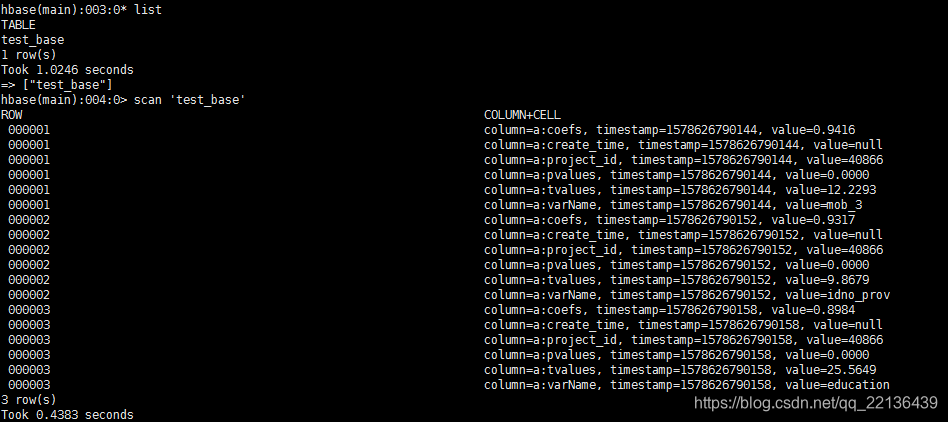
运行结果
Hbase数据库查询结果
IDEA的遍历结果

报错与解决方案
报错一

解决方案:
这是参数配置的有问题,如果你是用hbase-site.xml配置文件配置的参数,那么检查它,用代码配置就检查代码参数
报错二
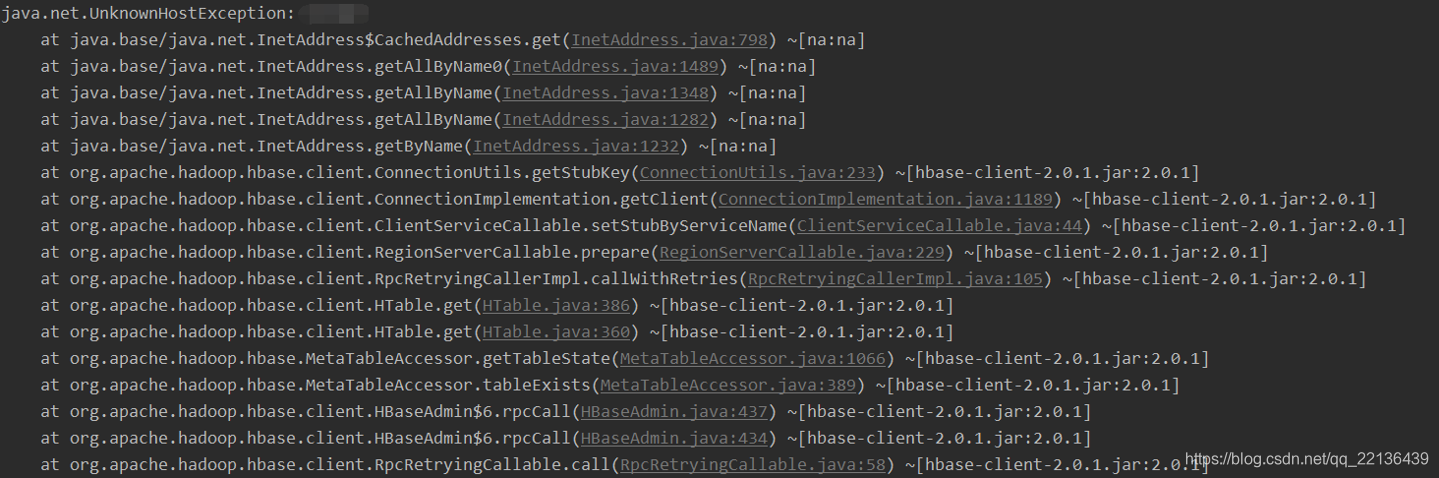
解决方案:
更改windows本地hosts文件,C:\Windows\System32\drivers\etc\hosts,添加Hbase服务所在主机地址与主机名称,这里你如果保存不了hosts文件,把它拉出到桌面改好再拉回即可
报错三
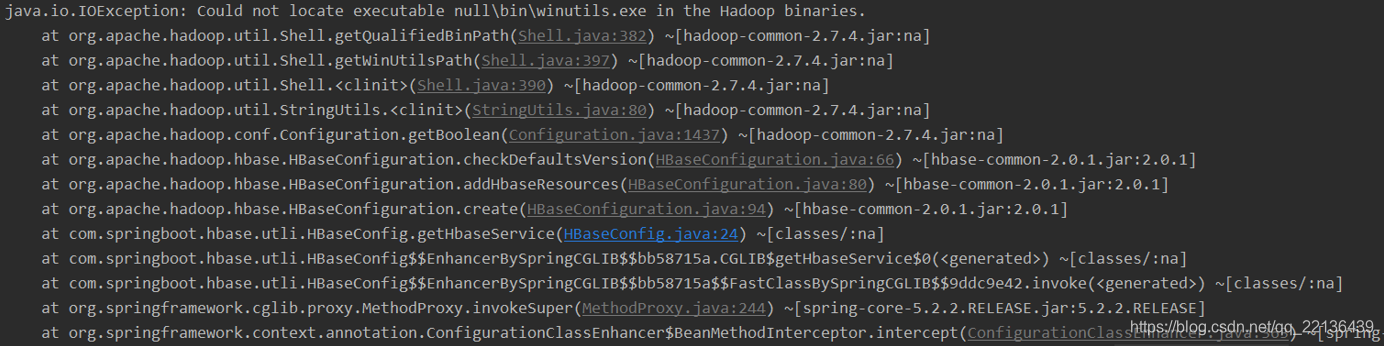
解决方案:
这是因为在Windows下连接Hadoop需要一个叫Winutils.exe的工具,并且从源代码可知,它会去读你Windows下的环境变量,如果你不想在本地设置,可以用方法System.setProperty()设置实时环境变量,另外,如果你只用Hbase,其实这个报错并不影响你使用Hbase服务
代码地址
https://github.com/xiaoxiamo/SpringBoot_HBase
本文来自互联网用户投稿,文章观点仅代表作者本人,不代表本站立场,不承担相关法律责任。如若转载,请注明出处。 如若内容造成侵权/违法违规/事实不符,请点击【内容举报】进行投诉反馈!
