Unity_2D游戏_对屏幕外物体箭头指示

先给出效果
箭头指示的效果

^ ^

  • 基本思路
  • 三种方法
    • 四边对应的四区域判定
    • ★横轴纵轴对角线八分区域★
    • 根据角度与屏幕矩形取比例

基本思路

箭头指示由两点组成,首先是定位,其次是旋转。旋转不是问题,所以主要思考如何定位
最直接想到的思路:想象屏幕外物体和屏幕中心有一条连线,然后这条交点,就是定位点了。所以只需确认这条连线与屏幕矩形的哪一条边相交,再求这个定位点在连线上的比例。
初中学的相似三角形就可以解决它了。
直观思路

三种方法

四边对应的四区域判定

最早想到的是,直接根据物体的坐标来判断边。
当物体在区域外时,继续以下判断:
[屏幕左下角是(0,0)]
当y在0~height[屏幕高度]之间时,看x是小于0还是大于width[屏幕宽度],这就两个区域了。
当x在0~width之间时,看y是小于0还是大于height。
四个角咋办?就被我漏了,只能直接定位到角落。

M1

可以注意到,在角落有一个很突兀的跳动。死角

代码:

    /// /// 得到【屏幕外物体位置到屏幕中心的连线】与屏幕边界的交点,无法过渡四角。/// /// 物体X坐标/// 物体Y坐标/// 屏幕宽度/// 屏幕高度/// private static Vector2 CalculateIntersection(float x, float y, float width, float height){Vector2 position = new Vector2();if (CheckInView(x, y, width, height)){position.x = x;position.y = y;}if (0 <= y && y <= height){if (x < 0){position.x = 0;position.y = height / 2 + (y - (height / 2)) * (width / 2) / (width / 2 - x);}else if (x > width){position.x = width;position.y = height / 2 + (y - (height / 2)) * (width / 2) / (x - width / 2);}}else if (0 <= x && x <= width){if (y < 0){position.y = 0;position.x = width / 2 + (x - (width / 2)) * (height / 2) / (height / 2 - y);}else if (y > height){position.y = height;position.x = width / 2 + (x - (width / 2)) * (height / 2) / (y - height / 2);}}else//四角当如何?{position.x = x < 0 ? 0 : width;position.y = y < 0 ? 0 : height;}return position;}

★横轴纵轴对角线八分区域★

那么就需要处理好四个角。用高宽比得到对角线斜率之后[camera自带的属性aspect可以提供宽高比],用物体和中心连线的斜率与之对比,那么就可以进一步区分。
当然,使用的位置赋值公式还是没变。
M2
这种方法效果是最好的,相当的丝滑。
看看现在的角落:
丝滑
代码:

 /// /// 得到【屏幕外物体位置到屏幕中心的连线】与屏幕边界的交点,无死角。/// /// 物体X坐标/// 物体Y坐标/// 屏幕宽度/// 屏幕高度/// private static Vector2 CalculateIntersectionBetter(float x, float y, float width, float height){Vector2 position = new Vector2();if (CheckInView(x, y, width, height)){position.x = x;position.y = y;return position;}float aspectRatio = height / width;float relativeY = y - height / 2;float relativeX = x - width / 2;float k = relativeY / CommonParameter.GetSafeFloatDivisor(relativeX);//GetSafeFloatDivisor : return value = value == 0 ? 0.01f : value;/** *                    |*           2        |        3*                    |*                    |*                    |*    1               |               4*                    |*                    |*————————————————————|————————————————————h/2*                    |*                    |*    8               |               5*                    |*                    |*                    |*           7        |        6*                    |*                   w/2* ** 8=1  2=3  4=5  6=7*/if (y > height / 2){if (x < width / 2){if (-aspectRatio < k)   //1{position.x = 0;position.y = height / 2 + (y - (height / 2)) * (width / 2) / (width / 2 - x);}else                    //2{position.x = width / 2 + (x - (width / 2)) * (height / 2) / (y - height / 2);position.y = height;}}else{if (aspectRatio < k)    //3{position.x = width / 2 + (x - (width / 2)) * (height / 2) / (y - height / 2);position.y = height;}else                    //4{position.x = width;position.y = height / 2 + (y - (height / 2)) * (width / 2) / (x - width / 2);}}}else{if (x > width / 2){if (-aspectRatio < k)   //5{position.x = width;position.y = height / 2 + (y - (height / 2)) * (width / 2) / (x - width / 2);}else                    //6{position.y = 0;position.x = width / 2 + (x - (width / 2)) * (height / 2) / (height / 2 - y);}}else{if (aspectRatio < k)    //7{position.y = 0;position.x = width / 2 + (x - (width / 2)) * (height / 2) / (height / 2 - y);}else                    //8{position.x = 0;position.y = height / 2 + (y - (height / 2)) * (width / 2) / (width / 2 - x);}}}return position;}

其实仍然是四区域的四种赋值,但是因为斜率的符号问题…以我的水平只能用这种粗暴的方法了。
要套三层if else,其实我是拒绝的。可惜没水平做到以不降低效率的方式简化代码,这里层层二分已经很快了。

根据角度与屏幕矩形取比例

另辟蹊径:我想着,屏幕这四周这个矩形的周长是固定的,那么按照角度来定位到矩形的不同位置,是不是也可以呢?
M3
然后我写了一下

        float C = 2 * (width + height);float angle = Vector3.SignedAngle(Vector3.right, direction, Vector3.forward);float ratio = angle / 360f;float L = ratio * C;

效果是这样的:
方式3
整体效果看起来没大问题,只是箭头定位点没那么准。角度转换到线段上,这个变化并不是很平滑。
代码:

/// /// 利用物体位置所在角度和屏幕周长比例,/// 得到【屏幕外物体位置到屏幕中心的连线】/// 与屏幕边界的交点/// /// 物体X坐标/// 物体Y坐标/// 屏幕宽度/// 屏幕高度/// 有一些误差private static Vector2 CalculateIntersectionByPerimeter(float x, float y, float width, float height){Vector2 position = new Vector2();Vector3 direction = new Vector2(x - width / 2, y - height / 2).normalized;/** ▷ w + h / 2        2             ▷ h / 2 *   |————————————————|————————————————|*   |                |                |*   |               +90               |*   |                |                |*  1|        +       |       +        |*   |                |                |*   |                |                |*   |                |                |* ——|——————180———————|————————0———————|————h/2 3  *   |                |                |*   |                |                |*   |                |                |*  5|       -        |       -        |*   |                |                |*   |               -90               |*   |                |                |*   |————————————————|————————————————|* ▷ -h / 2 - w        w/2           ▷ -h / 2 *  0,0               4**/float C = 2 * (width + height);//AXIS做大拇指,四指从from转到to,其实就是叉乘。  这是左手系。 正的Z是向里的。  float angle = Vector3.SignedAngle(Vector3.right, direction, Vector3.forward);float ratio = angle / 360f;float L = ratio * C;if (width + height / 2 <= L && L < C / 2)            //1{position.x = 0;position.y = C / 2 - L + height / 2;}else if (height / 2 <= L && L < width + height / 2)  //2{position.x = width + height / 2 - L;position.y = height;}else if (-height / 2 <= L && L < height / 2)         //3{position.x = width;position.y = L + height / 2;}else if (-height / 2 - width <= L && L < -height / 2)//4{position.x = L + width + height / 2;position.y = 0;}else if (-C / 2 <= L && L < -height / 2 - width)     //5{position.x = 0;position.y = -C / 2 - L + height / 2;}return position; ;}

下面是整个类的代码,因为篇幅问题,上面的三个方法就不再重复了。

using UnityEngine;
using UnityEngine.UI;public class DrawArrowForOutOfSight : MonoBehaviour
{public Transform arrow;public Transform root;private static Transform s_arrow;private static Transform canvasTransform;private static Transform arrowObject;private void Awake(){s_arrow = Component.FindObjectOfType<DrawArrowForOutOfSight>().arrow;canvasTransform = Component.FindObjectOfType<DrawArrowForOutOfSight>().root;}private void FixedUpdate(){Vector3 objectPosition = Camera.main.ViewportToWorldPoint(new Vector3(Input.mousePosition.x / Screen.width, Input.mousePosition.y / Screen.height, 0f));arrowObject= DrawArrow(arrowObject, objectPosition);}/// /// 在Canvas设置指向屏幕外部物体的箭头,返回此箭头对象。/// /// 箭头对象/// 目标物体的位置public static Transform DrawArrow(Transform arrowObject, Vector3 objectPosition){Vector2 objectScreenPoint = Camera.main.WorldToScreenPoint(objectPosition);if (!CheckInView(objectScreenPoint.x, objectScreenPoint.y, Screen.width, Screen.height)){Vector2 arrowPosition = CalculateIntersectionBetter(objectScreenPoint.x, objectScreenPoint.y, Screen.width, Screen.height);Vector3 direction = (arrowPosition - new Vector2(Screen.width / 2, Screen.height / 2)).normalized;if (arrowObject == null){arrowObject = Instantiate(s_arrow, arrowPosition, Quaternion.AngleAxis(Vector3.SignedAngle(Vector3.up, direction, Vector3.forward), Vector3.forward), canvasTransform);}else{arrowObject.gameObject.SetActive(true);arrowObject.position = arrowPosition;arrowObject.rotation = Quaternion.AngleAxis(Vector3.SignedAngle(Vector3.up, direction, Vector3.forward), Vector3.forward);}}else if (arrowObject != null){arrowObject.gameObject.SetActive(false);}return arrowObject;}public static bool SetArrowColor(Transform arrowObject, Color color){if (arrowObject == null) return false;arrowObject.GetComponent<Image>().color = color;return true;}/// /// 确认目标是否在视野内/// /// 物体X坐标/// 物体Y坐标/// 屏幕宽度/// 屏幕高度private static bool CheckInView(float x, float y, float width, float height){return x > 0 && x < width && y > 0 && y < height;}private static Vector2 CalculateIntersection(float x, float y, float width, float height){}private static Vector2 CalculateIntersectionBetter(float x, float y, float width, float height){}private static Vector2 CalculateIntersectionByPerimeter(float x, float y, float width, float height){}
}

这里的FixedUpdate是为了用鼠标指针来演示。

使用的时候,需求对象类内直接调用静态方法,传入信息就可以了,但对象类要多持有一个Transform变量。如:

public class Planet : CelestialBodyBase
{private Transform arrowObject;private bool isArrowUpdated;void OnEnable(){isArrowUpdated = false;}void FixedUpdate(){arrowObject = DrawArrowForOutOfSight.DrawArrow(arrowObject, transform.position);if (!isArrowUpdated){isArrowUpdated = DrawArrowForOutOfSight.SetArrowColor(arrowObject, gameObject.GetComponent<SpriteRenderer>().color);}}

我是把这个类的脚本挂到场景object上,然后放一个箭头预制体进去。
ArrowRoot是一个空物体,以免Hierarchy太乱。
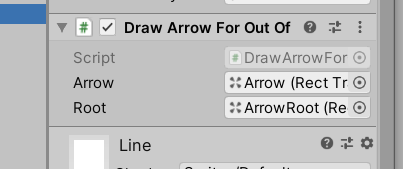
挂载1


本文来自互联网用户投稿,文章观点仅代表作者本人,不代表本站立场,不承担相关法律责任。如若转载,请注明出处。 如若内容造成侵权/违法违规/事实不符,请点击【内容举报】进行投诉反馈!

相关文章

立即
投稿

微信公众账号

微信扫一扫加关注

返回
顶部