QGraphicsItem画空心图形
用QGraphicsItem类族画出的图形通常都是一个区域(实心的),比如画个圆或者画个矩形。那如果想画个矩形框或者圆形框呢?可以用如下方法,直接上代码
头文件
#include
#include
#include
#include namespace Ui {
class Widget;
}class MyRectItem : public QGraphicsRectItem
{
public:MyRectItem(const QRectF &rect, QGraphicsItem *parent = 0);MyRectItem(qreal x, qreal y, qreal w, qreal h, QGraphicsItem *parent = 0);void paint(QPainter *painter, const QStyleOptionGraphicsItem *option, QWidget *widget);QPainterPath shape() const;protected:void hoverEnterEvent(QGraphicsSceneHoverEvent *event);void hoverLeaveEvent(QGraphicsSceneHoverEvent *event);private:bool isHovered;
};class MyEllipseItem : public QGraphicsEllipseItem
{
public:MyEllipseItem(const QRectF &rect, QGraphicsItem *parent = 0);MyEllipseItem(qreal x, qreal y, qreal w, qreal h, QGraphicsItem *parent = 0);QRectF boundingRect() const;void paint(QPainter *painter, const QStyleOptionGraphicsItem *option, QWidget *widget);QPainterPath shape() const;protected:void hoverEnterEvent(QGraphicsSceneHoverEvent *event);void hoverLeaveEvent(QGraphicsSceneHoverEvent *event);private:bool isHovered;QRectF rect;
};
源文件
#include
#include MyRectItem::MyRectItem(const QRectF &rect, QGraphicsItem *parent): QGraphicsRectItem(rect, parent)
{this->isHovered = false;setFlag(QGraphicsItem::ItemIsSelectable);setAcceptHoverEvents(true);
}MyRectItem::MyRectItem(qreal x, qreal y, qreal w, qreal h, QGraphicsItem *parent): QGraphicsRectItem(x, y, w, h, parent)
{this->isHovered = false;setFlag(QGraphicsItem::ItemIsSelectable);setAcceptHoverEvents(true);
}void MyRectItem::paint(QPainter *painter, const QStyleOptionGraphicsItem *option, QWidget *widget)
{QPen pen;if (this->isSelected()){pen.setColor(Qt::red);}else{pen.setColor(Qt::green);}if (this->isHovered){pen.setWidth(4);}else{pen.setWidth(2);}painter->setPen(pen);painter->drawRect(this->boundingRect());
}QPainterPath MyRectItem::shape() const
{QPainterPath temp;temp.addRect(this->boundingRect());QPainterPathStroker pathStroker;QPainterPath path = pathStroker.createStroke(temp);return path;
}void MyRectItem::hoverEnterEvent(QGraphicsSceneHoverEvent *event)
{this->isHovered = true;prepareGeometryChange();
}void MyRectItem::hoverLeaveEvent(QGraphicsSceneHoverEvent *event)
{this->isHovered = false;prepareGeometryChange();
}MyEllipseItem::MyEllipseItem(const QRectF &rect, QGraphicsItem *parent): QGraphicsEllipseItem(rect, parent)
{this->isHovered = false;setFlag(QGraphicsItem::ItemIsSelectable);setAcceptHoverEvents(true);this->rect = rect;
}MyEllipseItem::MyEllipseItem(qreal x, qreal y, qreal w, qreal h, QGraphicsItem *parent): QGraphicsEllipseItem(x, y, w, h, parent)
{this->isHovered = false;setFlag(QGraphicsItem::ItemIsSelectable);setAcceptHoverEvents(true);this->rect.setX(x);this->rect.setY(y);this->rect.setWidth(w);this->rect.setHeight(h);
}QRectF MyEllipseItem::boundingRect() const
{return this->rect;
}void MyEllipseItem::paint(QPainter *painter, const QStyleOptionGraphicsItem *option, QWidget *widget)
{QPen pen;if (this->isSelected()){pen.setColor(Qt::red);}else{pen.setColor(Qt::green);}if (this->isHovered){pen.setWidth(4);}else{pen.setWidth(2);}painter->setPen(pen);painter->drawEllipse(this->rect);
}QPainterPath MyEllipseItem::shape() const
{QPainterPath temp;temp.addEllipse(this->boundingRect());QPainterPathStroker pathStroker;QPainterPath path = pathStroker.createStroke(temp);return path;
}void MyEllipseItem::hoverEnterEvent(QGraphicsSceneHoverEvent *event)
{this->isHovered = true;prepareGeometryChange();
}void MyEllipseItem::hoverLeaveEvent(QGraphicsSceneHoverEvent *event)
{this->isHovered = false;prepareGeometryChange();
}
程序中包括一个矩形类和一个椭圆形类,选中会变色,悬停会变粗。
通过实现shape函数,使用QPainterPathStroker来画图形的外框,这样画出的图像就是空心的。
测试代码:
在scene上添加图形:
MyRectItem *itemRect = new MyRectItem(10, 10, 100, 100);
scene->addItem(itemRect);
MyRectItem *item2 = new MyRectItem( 20, 20, 120, 120);
scene->addItem(item2);MyEllipseItem *item3 = new MyEllipseItem(30, 30, 50, 50);
scene->addItem(item3);MyEllipseItem *item4 = new MyEllipseItem(50, 50, 100, 80);
scene->addItem(item4);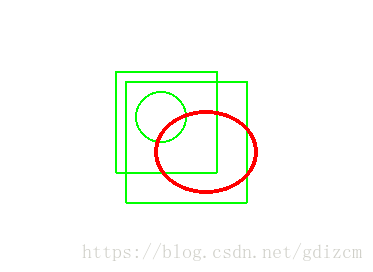
如图所示,鼠标划过时,框内图形可以选中也可以点击。
本文来自互联网用户投稿,文章观点仅代表作者本人,不代表本站立场,不承担相关法律责任。如若转载,请注明出处。 如若内容造成侵权/违法违规/事实不符,请点击【内容举报】进行投诉反馈!