Dynamics 365 隐藏实体列表界面的显示图表和打开仪表板按钮
有的客户会要求系统上线前把不需要的按钮全部隐藏,因为他们不想用户去随便乱点,比如停用和禁用按钮,如果功能上没用到就需要隐藏,这两个是能通过Ribbon工具操作的,但有些按钮是无法用Ribbon来实现的。比如这里提到的显示图表和打开仪表板的按钮。
因为这两个按钮在每个实体列表的list上都有,所以我们可以在应用功能区实现

在应用功能区加一个按钮,默认隐藏
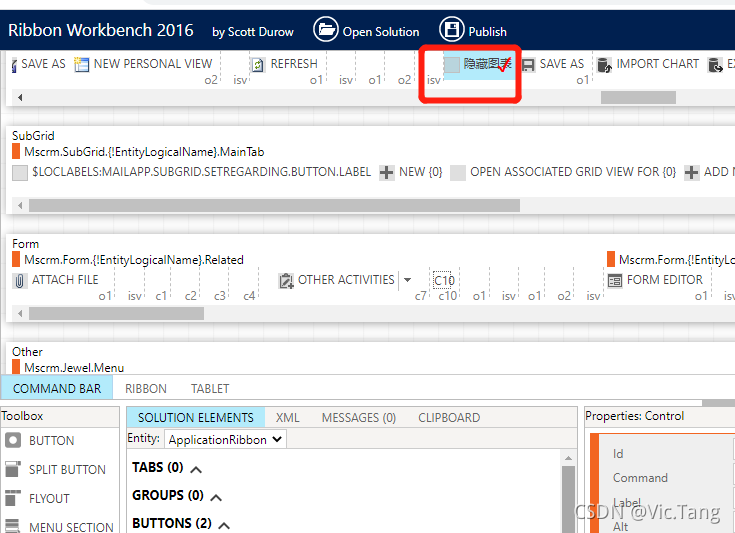
每次加载时执行如下代码,当执行完成以后会清除不会继续执行
HideListChartEnable: function () {
var hideButtonInter = setInterval(function () {var showChartPaneButton = window.parent.document.getElementById("ShowChartPane");var openEntityDashboard = window.parent.document.getElementById("OpenEntityDashboard");if (showChartPaneButton != null && openEntityDashboard != null) {showChartPaneButton.style.display = "none";openEntityDashboard.style.display = "none";clearInterval(hideButtonInter);} else if (showChartPaneButton != null) {showChartPaneButton.style.display = "none";clearInterval(hideButtonInter);}}, 100);return false;
}
本文来自互联网用户投稿,文章观点仅代表作者本人,不代表本站立场,不承担相关法律责任。如若转载,请注明出处。 如若内容造成侵权/违法违规/事实不符,请点击【内容举报】进行投诉反馈!