微信小程序:歌曲、视频、动画播放
js定时函数1 setTimeout(()=>{},1000); setTimeout间隔多少秒执行一次
js定时函数2 setInterval(() => {}, interval); setInterval间隔多少秒反复执行
取消定时函数clearInterval(你给定时函数的命名);
音乐播放
视频播放
效果
一开始计时动画进入主页,可以播放音乐,第二页可以播放视频
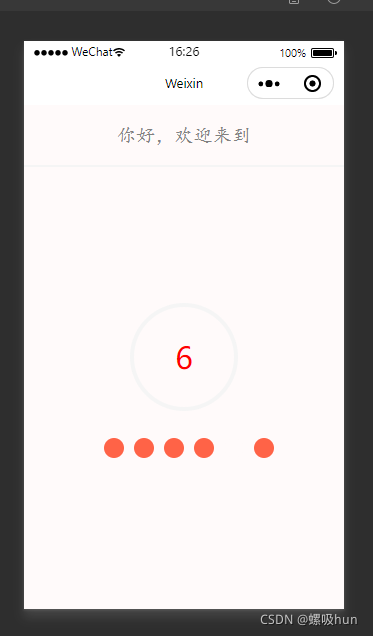

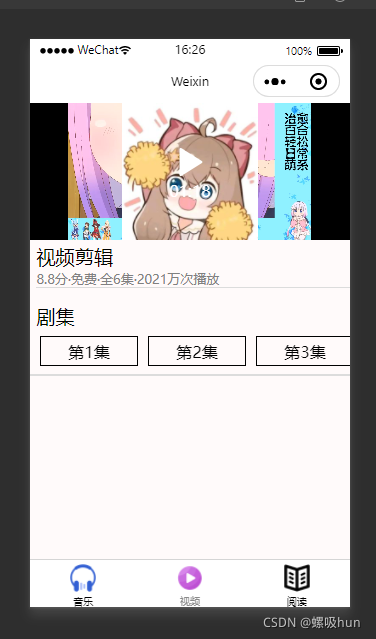
代码
app.json
{"pages": ["pages/start/start","pages/music/music","pages/videoinfo/videoinfo","pages/main/main","pages/readbook/readbook","pages/one/one","pages/index/index","pages/logs/logs","pages/playmusic/playmusic"],"window": {"backgroundTextStyle": "light","navigationBarBackgroundColor": "#fff","navigationBarTitleText": "Weixin","navigationBarTextStyle": "black"},"style": "v2","sitemapLocation": "sitemap.json","tabBar": {"selectedColor": "#8a8a8a","list": [{"pagePath": "pages/music/music","text": "音乐","iconPath": "pages/images/music1.png","selectedIconPath": "pages/images/music2.png"},{"pagePath": "pages/videoinfo/videoinfo","text": "视频","iconPath": "pages/images/sp1.png","selectedIconPath": "pages/images/sp2.png"},{"pagePath": "pages/readbook/readbook","text": "阅读","iconPath": "pages/images/rb1.png","selectedIconPath": "pages/images/rb2.png"}]}}start.js
// pages/start/start.js
Page({/*** 页面的初始数据*/data: {num:10,currentIndex:0,str:"你好,欢迎来到我的频道",index:1,text:""},/*** 生命周期函数--监听页面加载*/onLoad: function (options) {//js定时函数1  setTimeout(()=>{},1000); setTimeout间隔多少秒执行一次//js定时函数2 setInterval(() => {}, interval); setInterval间隔多少秒反复执行let  an=setInterval(() => {let  num1=this.data.num-1;console.log("现在的数的值是:"+num1);//改变这个值姚赋值给data中的numthis.setData({num:num1});//num1被减去1,得到0的应该跳转页面let  newIndex=++this.data.currentIndex;console.log(newIndex);this.setData({currentIndex:newIndex%6});if(num1==0){//取消定时函数clearInterval(an);// wx.navigateTo({//   url: '../main/main',// }]wx.switchTab({url: '../music/music',})}}, 1000);let an1= setInterval(() => {let  text=this.data.str.substr(0,this.data.index);console.log(text);this.setData({text:text});// //判断到这个字符串的最后,不再执行++操作// console.log(this.data.index);// console.log(this.data.str.length);if(this.data.index==this.data.str.length){clearInterval(an1);}this.data.index++;}, 500);},/*** 生命周期函数--监听页面初次渲染完成*/onReady: function () {},/*** 生命周期函数--监听页面显示*/onShow: function () {},/*** 生命周期函数--监听页面隐藏*/onHide: function () {},/*** 生命周期函数--监听页面卸载*/onUnload: function () {},/*** 页面相关事件处理函数--监听用户下拉动作*/onPullDownRefresh: function () {},/*** 页面上拉触底事件的处理函数*/onReachBottom: function () {},/*** 用户点击右上角分享*/onShareAppMessage: function () {}
})
start.wxml
{{text}} {{num}} start.wxss
/* pages/start/start.wxss */
.pageview{width: 100%;height: 100vh;background-color: snow;display: flex;justify-content: center;align-items: center;}
.numview{width: 100px;height: 100px;border-radius: 50%;border:4px  solid whitesmoke;display: flex;justify-content: center;align-items: center;font-size: 30px;color: red;}
.bottomview{width: 100%;height: 12%;position: fixed;bottom:26%;/* bottom: 0px;left: 0px; border-top: 2px  solid whitesmoke; */display: flex;justify-content: center;align-items: center;
}
.boxview{width: 20px;height: 20px;border-radius: 50%;margin-left: 10px;
}
.bg1{background-color: snow;
}
.bg2{background-color: tomato;
}
.topview{width: 100%;height: 12%;position: fixed;top: 0px;left: 0px;border-bottom: 2px  solid  whitesmoke;display: flex;justify-content: center;align-items: center;font-size: larger;font-family: 楷体;color:grey;}
music.js
// pages/music/music.js
Page({/*** 页面的初始数据*/data: {musicdata:[],text:"你喜欢听歌嘛",index:0,loadtext:"",musicObj:{},flag:false},clickitem(event){let   itemObj=event.currentTarget.dataset.item;console.log(itemObj);this.setData({musicObj:itemObj,flag:true});//1.跳转页面播放//  wx.navigateTo({//    url: '../playmusic/playmusic?musicobj='+JSON.stringify(itemObj),//  })},/*** 生命周期函数--监听页面加载*/onLoad: function (options) {let an= setInterval(()=>{let  operatorIndex=++this.data.index;let  str=this.data.text.substr(0,operatorIndex);if(operatorIndex==this.data.text.length){clearInterval(an);}this.setData({index:operatorIndex,loadtext:str});},300);wx.showLoading({title: '正在加载音乐',})//延时3秒请求python  FastAPI的音乐服务setTimeout(()=>{wx.request({url: '你的内网穿透到Python服务器的地址/loadmusic',success:(resp)=>{let  datas=resp.data;console.log(datas);wx.hideLoading();this.setData({musicdata:datas});}});},3000);},/*** 生命周期函数--监听页面初次渲染完成*/onReady: function () {},/*** 生命周期函数--监听页面显示*/onShow: function () {},/*** 生命周期函数--监听页面隐藏*/onHide: function () {},/*** 生命周期函数--监听页面卸载*/onUnload: function () {},/*** 页面相关事件处理函数--监听用户下拉动作*/onPullDownRefresh: function () {},/*** 页面上拉触底事件的处理函数*/onReachBottom: function () {},/*** 用户点击右上角分享*/onShareAppMessage: function () {}
})
music.wxml
{{loadtext}} {{item.name}} {{item.author}} >
music.wxss
/* pages/music/music.wxss */
.pageview{width: 100%;height: 100vh;background-color: snow;
}
.topview{width: 100%;height: 12%;background-color: gray;display: flex;justify-content: center;align-items: center;position: fixed;top:0px;left: 0px;
}
.tv{font-family: 楷体;font-size: 28px;color: snow;
}
.musicview{width: 100%;height: 88%;background-color: snow;position: relative;top:12%;left: 0px;}
.scrollview{width: 100%;height: 100%;
}
.listview{width: 100%;height: 18%;border-bottom: 2px  solid  gainsboro;display: flex;
}
.box5{width:45%;height: 45%;color: grey;flex: 1;/* border:1px  solid  paleturquoise; */display: flex;justify-content: space-evenly;align-items: center;
}
.box1{margin-left: 5%;flex: 1;/* border:1px  solid  paleturquoise; */display: flex;justify-content: left;align-items: center;}
.box4{flex:4;margin-left: 2%;}
.box2{flex: 3;/* border:1px  solid  palevioletred; */display: flex;justify-content: left;align-items: center;color: black;/* font-weight: bold; */font-size: larger;font-family: 楷体;
}
.box3{flex: 3;/* border:1px  solid  cadetblue; */display: flex;justify-content: left;align-items: center;color: grey;/* font-size: small; */font-family: 楷体;}
.cimg{width: 23%;height: 75%;border-radius: 10px;
}
.bottomview{width: 100%;height: 12%;position:fixed;bottom:0px;left: 0px;display: flex;justify-content: center;}
videoinfo.js
// pages/videoinfo/videoinfo.js
Page({/*** 页面的初始数据*/data: {lists:[],videoInfo:{}},clickvideo(event){let  clickObj=event.currentTarget.dataset.item;console.log(clickObj);this.setData({videoInfo:clickObj});},/*** 生命周期函数--监听页面加载*/onLoad: function (options) {wx.request({url: '你内网穿透到Python服务器的地址/loadvideo',success:(resp)=>{let  videos=resp.data;console.log(videos);this.setData({lists:videos});}})},/*** 生命周期函数--监听页面初次渲染完成*/onReady: function () {},/*** 生命周期函数--监听页面显示*/onShow: function () {},/*** 生命周期函数--监听页面隐藏*/onHide: function () {},/*** 生命周期函数--监听页面卸载*/onUnload: function () {},/*** 页面相关事件处理函数--监听用户下拉动作*/onPullDownRefresh: function () {},/*** 页面上拉触底事件的处理函数*/onReachBottom: function () {},/*** 用户点击右上角分享*/onShareAppMessage: function () {}
})
videoinfo.wxml
视频剪辑 8.8分·免费·全6集·2021万次播放 剧集 第{{index+1}}集
videoinfo.wxss
/* pages/videoinfo/videoinfo.wxss */
.pageview{width: 100%;height: 100vh;background-color: snow ;
}
.videoview{width: 100%;height: 30%;
}
.hview{width: 100%;height: 10%;border-bottom: 2px  solid   gainsboro;display: flex;align-items: center;
}
.scrollview{width: 100%;height: 70%;white-space: nowrap;}
.box{display: inline-block;width: 30%;height: 90%;border:1px  solid  black;margin-left: 10px;
}
.innerbox{width: 100%;height: 100%;display: flex;justify-content: center;align-items: center;
}
.a1{margin-left: 2%;font-size: larger;
}
.a2{margin-top: 1px;margin-left: 2%;font-size: small;margin-bottom: 5%;color: grey;border-bottom: 1px  solid   gainsboro;
}
.a3{margin-left: 2%;font-size: larger;
}
server.py
#来自于fastapi文件导入FastAPI  类
from fastapi  import  FastAPI
import   uvicorn#创建FastAPI对象
app=FastAPI()nginxpath="你内网穿透到nginx的地址"@app.get("/")
def  index():print("执行index方法")return {"msg":"欢迎使用python最快的框架fastapi"}@app.get("/query")
def  query():print("执行query方法")lists=["one","two","three"]return lists@app.get("/loadindex")
def  loadIndexView():print("执行loadIndexView方法")#1.轮播图swiperdatas=[nginxpath+"img/a1.png",nginxpath+"img/a2.png",nginxpath +"/img/a3.png",]#2.轮播图的指示器的颜色color="blue"#3.水平滚动视图菜单menudatas=[{"img":"http://127.0.0.1:8030/img/a1.jpg","text":"生活"},{"img":"http://127.0.0.1:8030/img/a2.jpg","text":"情商"},{"img":"http://127.0.0.1:8030/img/a3.jpg","text":"智商"},{"img":"http://127.0.0.1:8030/img/a4.jpg","text":"博爱"},{"img":"http://127.0.0.1:8030/img/a5.jpg","text":"沟通"},{"img":"http://127.0.0.1:8030/img/a6.jpg","text":"乐趣"},{"img":"http://127.0.0.1:8030/img/a7.jpg","text":"运动"},{"img":"http://127.0.0.1:8030/img/a8.jpg","text":"直播"},{"img":"http://127.0.0.1:8030/img/a9.jpg","text":"文章"}]#4.垂直滚动的功能视图griddatas=[{"img":"http://127.0.0.1:8030/img/d0.png","text":"第01个"},{"img":"http://127.0.0.1:8030/img/d1.png","text":"第02个"},{"img":"http://127.0.0.1:8030/img/d2.png","text":"第03个"},{"img":"http://127.0.0.1:8030/img/d3.png","text":"第04个"},{"img":"http://127.0.0.1:8030/img/d4.png","text":"第05个"},{"img":"http://127.0.0.1:8030/img/d5.png","text":"第06个"},{"img":"http://127.0.0.1:8030/img/d6.png","text":"第07个"},{"img":"http://127.0.0.1:8030/img/d7.png","text":"第08个"},{"img":"http://127.0.0.1:8030/img/d8.png","text":"第09个"},{"img":"http://127.0.0.1:8030/img/d9.png","text":"第10个"},{"img":"http://127.0.0.1:8030/img/d10.png","text":"第11个"},{"img":"http://127.0.0.1:8030/img/d11.png","text":"第12个"},{"img":"http://127.0.0.1:8030/img/d12.png","text":"第13个"},{"img":"http://127.0.0.1:8030/img/d13.png","text":"第14个"},{"img":"http://127.0.0.1:8030/img/d14.png","text":"第15个"},{"img":"http://127.0.0.1:8030/img/d15.png","text":"第16个"},{"img":"http://127.0.0.1:8030/img/d16.png","text":"第17个"},{"img":"http://127.0.0.1:8030/img/d17.png","text":"第18个"},{"img":"http://127.0.0.1:8030/img/d18.png","text":"第19个"},{"img":"http://127.0.0.1:8030/img/d19.png","text":"第20个"},{"img":"http://127.0.0.1:8030/img/d20.png","text":"第21个"},{"img":"http://127.0.0.1:8030/img/d21.png", "text": "第22个"}]return  {"sdatas":swiperdatas,"color":color,"menus":menudatas,"griddatas":griddatas}@app.get("/loadmusic")
def   loadMusic():print("加载音乐信息")musicdatas=[{"img":nginxpath+"/img/a1.jpg","name":"歌曲一","author":"李一","url":nginxpath+"/audio/a0.mp3"},{"img": nginxpath + "/img/a2.jpg", "name": "歌曲二", "author": "李二", "url": nginxpath + "/audio/a0.mp3"},{"img": nginxpath + "/img/a3.jpg", "name": "歌曲三", "author": "李三", "url": nginxpath + "/audio/a1.mp3"},{"img": nginxpath + "/img/a4.jpg", "name": "歌曲四", "author": "李四", "url": nginxpath + "/audio/a2.mp3"},{"img": nginxpath + "/img/a5.jpg", "name": "歌曲五", "author": "李五", "url": nginxpath + "/audio/a3.mp3"}]return   musicdatas@app.get("/loadvideo")
def   loadVideo():print("加载视频信息")videodatas=[{"img": nginxpath + "/img/a1.jpg", "url": nginxpath + "/video/a1.mp4"},{"img": nginxpath + "/img/a1.jpg", "url": nginxpath + "/video/a1.mp4"},{"img": nginxpath + "/img/a1.jpg", "url": nginxpath + "/video/a1.mp4"}]return   videodatasif __name__=="__main__":uvicorn.run(app="server:app",host="0.0.0.0",port=8050,reload=True)
本文来自互联网用户投稿,文章观点仅代表作者本人,不代表本站立场,不承担相关法律责任。如若转载,请注明出处。 如若内容造成侵权/违法违规/事实不符,请点击【内容举报】进行投诉反馈!