基于Python爬虫+K-means机器学习算法今日热点新闻推荐系统——热点推荐、热词呈现及个性化分析(含全部工程源码)
目录
- 前言
- 总体设计
- 系统整体结构图
- 系统流程图
- 运行环境
- Python 环境
- Pycharm 环境
- 相关库下载
- 模块实现
- 1. 数据爬取
- 2. 新闻处理与聚类
- 3. 新闻推荐
- 系统测试
- 1. 数据准备
- 2. 文本聚类
- 3. 热点新闻推荐
- 工程源代码下载
- 其它资料下载

前言
本项目基于网络爬虫技术,用于爬取新闻网站上的新闻文章。通过对这些文章进行中文分词和特征提取,我们可以构建一个相似的新闻集合。
首先,我们使用网络爬虫技术自动从多个新闻网站抓取新闻文章。然后,对这些文章进行中文分词,将文章切分成独立的词语。接下来,我们使用特征提取方法,将每篇文章表示为一个向量,以便后续的聚类操作。
通过使用K-means算法,我们可以对这些新闻文章进行聚类。K-means算法将相似的文章归为同一类别,形成热点聚集。这样,我们可以根据聚类结果,提取出热点主题,推荐相关的新闻给用户。
除了热点推荐,我们还可以进行热词呈现和个性化分析。通过对文章中的词频进行统计,我们可以提取出热门的关键词,形成热词呈现。同时,我们可以根据用户的历史阅读记录和喜好,进行个性化分析,为用户推荐更符合其兴趣的新闻。
这个项目具有很高的实用性和用户体验。通过新闻推荐功能,用户可以快速获取到感兴趣的新闻内容,同时也可以发现与自己兴趣相关的热点话题。这将大大提升用户的阅读体验和信息获取效率。
总体设计
本部分包括系统整体结构图和系统流程图。
系统整体结构图
系统整体结构如图所示。
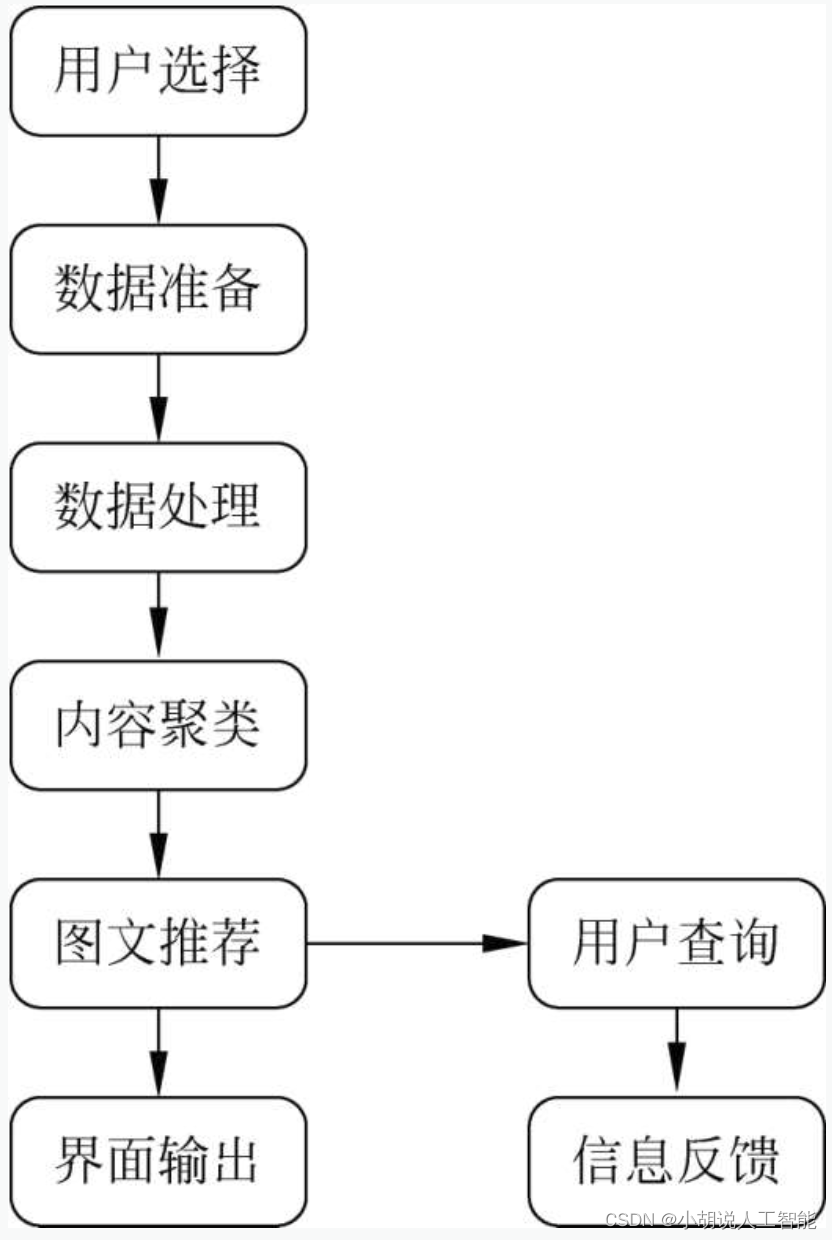
系统流程图
系统流程如图所示。

运行环境
本部分包括 Python 环境、Pycharm 环境与相关库(matplotlib/sklearn)下载。
Python 环境
需要Python 3.6及以上配置。在Windows环境下载Anaconda完成Python所需的配置,下载地址为https://www.anaconda.com/。也可下载虚拟机在Linux环境下运行代码。
Pycharm 环境
需要PyCharm Community版本,在JetBrains官方网站获取,下载地址为https://www.jetbrains.com/pycharm/download。根据提示完成安装步骤。启动PyCharm,选择Licenseserver,在激活服务器地址输入https://jetlicense.nss.im/,单击Activate完成激活。
相关库下载
Python中相关库(如matplotlib/sklearn)均不能直接下载,需通过Windows命令行下载。
pip install matplotlib
pip install scikit-learn
模块实现
本项目包括3个模块:数据爬取、新闻处理与聚类、新闻推荐,下面分别介绍各模块的功能及相关代码。
1. 数据爬取
该模块为“爬取分析.py”文件,可爬取指定新闻网站、指定日期新闻并保存在指定的系统目录文件夹下。在本程序中,可以选择是否对人民日报网站、网易社会新闻、百度新闻网站进行新闻爬取。相关代码如下:
import bs4
import os
import requests
import re
import time
from urllib import request
from bs4 import BeautifulSoup#引入“爬取.py”所需要的所有库def fetchUrl_RMRB(url):'''功能:访问 人民日报url 的网页,获取网页内容并返回参数:目标网页的 url返回:目标网页的 html 内容'''headers = {'accept': 'text/html,application/xhtml+xml,application/xml;q=0.9,image/webp,image/apng,*/*;q=0.8','user-agent': 'Mozilla/5.0 (Windows NT 10.0; WOW64) AppleWebKit/537.36 (KHTML, like Gecko) Chrome/68.0.3440.106 Safari/537.36',}r = requests.get(url, headers=headers)r.raise_for_status()r.encoding = r.apparent_encodingreturn r.textdef getPageList_RMRB(year, month, day):'''功能:获取人民日报当天报纸的各版面的链接列表参数:年,月,日'''url = 'http://paper.people.com.cn/rmrb/html/' + year + '-' + month + '/' + day + '/nbs.D110000renmrb_01.htm'#在人民日报版面目录的链接中,“/year-month/day/” 表示日期,后面的 “_01” 表示这是第一版面的链接。html = fetchUrl_RMRB(url)bsobj = bs4.BeautifulSoup(html, 'html.parser')pageList = bsobj.find('div', attrs={'id': 'pageList'}).ul.find_all('div', attrs={'class': 'right_title-name'})linkList = []'''根据html分析可知,版面目录存放在一个id = “pageList” 的div标签下,class = “right_title1” 或 “right_title2” 的 div 标签中,每一个 div 表示一个版面'''for page in pageList:link = page.a["href"]url = 'http://paper.people.com.cn/rmrb/html/' + year + '-' + month + '/' + day + '/' + linklinkList.append(url)return linkListdef getTitleList_RMRB(year, month, day, pageUrl):'''功能:获取报纸某一版面的文章链接列表参数:年,月,日,该版面的链接'''html = fetchUrl_RMRB(pageUrl)bsobj = bs4.BeautifulSoup(html, 'html.parser')titleList = bsobj.find('div', attrs={'id': 'titleList'}).ul.find_all('li')'''使用同样的方法,我们可以知道,文章目录存放在一个id = “titleList” 的div标签下的ul标签中,其中每一个li标签表示一篇文章'''linkList = []for title in titleList:tempList = title.find_all('a')#文章的链接就在li标签下的a标签中for temp in tempList:link = temp["href"]if 'nw.D110000renmrb' in link:#筛选出文章链接抓取,去除版面其他无关内容的链接url = 'http://paper.people.com.cn/rmrb/html/' + year + '-' + month + '/' + day + '/' + linklinkList.append(url)return linkListdef getContent_RMRB(html):'''功能:解析人民日报HTML 网页,获取新闻的文章内容参数:html 网页内容'''bsobj = bs4.BeautifulSoup(html, 'html.parser')# 获取文章'''内容进入文章内容页面之后,由网页分析知正文部分存放在 id = “ozoom” 的 div 标签下的 p 标签里。'''pList = bsobj.find('div', attrs={'id': 'ozoom'}).find_all('p')content = ''for p in pList:content += p.text + '\n'resp = contentreturn respdef saveFile_RMRB(content, path, filename):'''功能:将文章内容 content 保存到本地文件中参数:要保存的内容,路径,文件名'''# 如果没有该文件夹,则自动生成if not os.path.exists(path):os.makedirs(path)# 保存文件with open(path + filename, 'w', encoding='utf-8') as f:f.write(content)def download_RMRB(year, month, day, destdir):'''功能:爬取《人民日报》网站 某年 某月 某日 的新闻内容,并保存在 指定目录下参数:年,月,日,文件保存的根目录'''pageList = getPageList_RMRB(year, month, day)for page in pageList:titleList = getTitleList_RMRB(year, month, day, page)for url in titleList:# 获取新闻文章内容html = fetchUrl_RMRB(url)content = 'URL:'+url+ '\n' +getContent_RMRB(html)bsobj = bs4.BeautifulSoup(html, 'html.parser')title = bsobj.h3.text + bsobj.h1.text + bsobj.h2.text#剔除title的可能对识别造成影响的字符title = title.replace(':', '')title = title.replace('"', '')title = title.replace('|', '')title = title.replace('/', '')title = title.replace('\\', '')title = title.replace('*', '')title = title.replace('<', '')title = title.replace('>', '')title = title.replace('?', '')title = title.replace('.', '')# 生成保存的文件路径及文件名path = destdir + '/'fileName =title + '.txt'# 保存文件saveFile_RMRB(content, path, fileName)def fetchUrl_WY(url):'''功能:访问 网易社会url 的网页,获取网页内容并返回参数:目标网页的 url返回:目标网页的 html 内容'''headers = {'accept': 'text/html,application/xhtml+xml,application/xml;q=0.9,image/webp,image/apng,*/*;q=0.8','user-agent': 'Mozilla/5.0 (Windows NT 10.0; WOW64) AppleWebKit/537.36 (KHTML, like Gecko) Chrome/68.0.3440.106 Safari/537.36',}r = requests.get(url, headers=headers)r.raise_for_status()r.encoding = r.apparent_encodingreturn r.textdef download_WY(title, url, year, month, day):'''功能:爬取网易社会网站某一URL当日的新闻内容,并保存在指定目录下参数:新闻标题,抓取的URL,年,月,日'''html = fetchUrl_WY(url)bsobj = bs4.BeautifulSoup(html, 'html.parser')title = title.replace(':', '')title = title.replace('"', '')title = title.replace('|', '')title = title.replace('/', '')title = title.replace('\\', '')title = title.replace('*', '')title = title.replace('<', '')title = title.replace('>', '')title = title.replace('?', '')title = title.replace('.', '')#获取新闻的时间来源 class='post_time_source'time = bsobj.find('div', class_='post_time_source').text#获取新闻正文内容tag = bsobj.find('div', class_='post_text').textfile_name = r'F:\今日新闻\\' + title + '.txt'file = open(file_name, 'w', encoding='utf-8')tag = tag.replace(' ', '')content = 'URL:' + url + '\n' + '发布时间:' + time + '\n' + tag#写入文件file.write(content)def downloads_WY():'''功能:爬取网易社会网站所有种子URL(URL数组)下的新闻内容,并保存在指定目录下参数:无'''urls = ['http://temp.163.com/special/00804KVA/cm_shehui.js?callback=data_callback','http://temp.163.com/special/00804KVA/cm_shehui_02.js?callback=data_callback','http://temp.163.com/special/00804KVA/cm_shehui_03.js?callback=data_callback']'''网易新闻的标题及内容是使用js异步加载的,单纯的下载网页源代码是没有标题及内容的我们可以在Network的js中找到我们需要的内容'''for url in urls:req = request.urlopen(url)res = req.read().decode('gbk')pat1 = r'"title":"(.*?)",'pat2 = r'"tlink":"(.*?)",'m1 = re.findall(pat1, res)news_title = []for i in m1:news_title.append(i)m2 = re.findall(pat2, res)news_url = []for j in m2:news_url.append(j)for i in range(0, len(news_url)):download_WY(news_title[i], news_url[i], year, month, day)def fetchUrl_BD(url, headers): #爬取百度news所有urlurlsss = []r = requests.get(url, headers=headers).textsoup = BeautifulSoup(r,'lxml')for i in soup.find_all('h3'):  #文章标题存放在 h3 标签中urlsss.append(i.a.get('href'))return urlsssdef getContent_BD(urls,headers,year,month,day): #对抓取到的百度新闻连接的内容的操作#先检查是否存在该文件夹if os.path.exists('F:/今日新闻/'):passelse:os.mkdir('F:/今日新闻/')for q in urls:try:time.sleep(2)#定时抓取r = requests.get(q, headers=headers).textsoup = BeautifulSoup(r,'lxml')for i in soup.find('div', class_="article-title"): #每章的标题if os.path.exists('F:/今日新闻/' +i.get_text() +'.txt'): #检查是否已存在该文件continue#内容已经抓取过并存在文件夹中,不必再抓取else:for i in soup.find('div', class_="article-title"): #每章的标题title = i.get_text().replace(':', '')title = title.replace('"', '')title = title.replace('|', '')title = title.replace('/', '')title = title.replace('\\', '')title = title.replace('*', '')title = title.replace('<', '')title = title.replace('>', '')title = title.replace('?', '')title = title.replace('.', '')f = open('F:/今日新闻/' +title +'.txt','w',encoding='utf-8')for i in soup.find_all('div', class_="article-source article-source-bjh"): #发布日期aas =  i.find(class_="date").get_text()aad =  i.find(class_="time").get_text()aaf = 'URL:%s'%qf.write(aaf + '\n')f.write(aas)f.write(aad + '\n')for i in soup.find_all('div', class_="article-content"): #每章的内容f.write(i.get_text())f.close()except Exception as result:#处理异常抓取的情况,使程序继续爬取其他网页continuedef download_BD():#下载百度新闻的内容以文件形式保存headers = {'User-Agent': 'Mozilla/5.0 (Windows NT 10.0; WOW64) AppleWebKit/537.36 (KHTML, like Gecko) Chrome/72.0.3626.121 Safari/537.36'}url = 'https://news.baidu.com/widget?id=AllOtherData&channel=internet&t=1554738238830'getContent_BD(fetchUrl_BD(url,headers), headers,year,month,day)if __name__ == '__main__':'''主函数:程序入口'''# 爬取指定日期的新闻newsDate = input('请输入要爬取的日期(格式如 20200101 ):')year = newsDate[0:4]month = newsDate[4:6]day = newsDate[6:8]#对想爬取收集的网站进行选择flag_RMRB = input('是否爬取人民日报?是-1 否-0:')if flag_RMRB == '1':download_RMRB(year,month,day, 'F:/今日新闻')print("人民日报爬取完成!" )flag_WY = input('是否爬取网易社会新闻?是-1 否-0:')if flag_WY == '1':downloads_WY()print('网易社会抓取完成!')flag_BD = input('是否爬取百度新闻?是-1 否-0:')if flag_BD == '1':download_BD()print('百度新闻抓取完成!')
2. 新闻处理与聚类
该模块包括分类预备.py和分类.py文件。在分类预备文件中,对爬取的每篇新闻进行除汉字外的字符过滤,并创建分类文件夹;在分类文件中,对所有新闻进行分词、停用词过滤后使用TF-IDF矢量器将其转换为词频矩阵,根据K-means进行聚类并输出结果,生成分类之后的文件。
1)分类预备
分类预备的功能为:通过停用词表过滤新闻中除汉字外的所有字符,对中文分词进行分类;创建分类文件的保存路径,便于不同新闻归类保存。相关代码如下:
import os
import re
'''
“分类预备.py”程序 功能1:过滤新闻中除中文外所有字符,便于进行分类中的中文分词
功能2:创建分类文件的保存路径,便于进行分类不同类别新闻归类保存
'''path1='F:\\今日新闻\\过滤'
if os.path.exists(path1):path1 = 'F:\\今日新闻\\过滤'
else:os.makedirs(path1)
path='F:\\今日新闻'
dirs = os.listdir(path)
for fn in dirs:                            # 循环读取路径下的新闻文件并筛选输出if os.path.splitext(fn)[1] == ".txt":   # 筛选txt文件print(fn)inputs = open(os.path.join('F:\\','今日新闻',fn), 'r',encoding='UTF-8')  # 加载要处理的文件的路径guolv = open(path + '\\' + '过滤\\' + fn, 'w', encoding='UTF-8')for eachline in inputs:eachline = re.sub(u"([^\u4e00-\u9fa5])","",eachline)#只保留汉字字符guolv.write(eachline)guolv.close()for i in range(0,50): #创建分类文件的保存路径,便于进行分类不同类别新闻归类保存if os.path.exists('F:/今日新闻/分类/'+'label_'+str(i)+'/'):passelse:os.makedirs('F:/今日新闻/分类/'+'label_'+str(i)+'/')
2)TF-IDF矢量化
词频(term frequency, TF)指某一个给定的词语在文件中出现的频率。这个数字是对词数(termcount)的归一化,防止偏向长的文件。
如果某个词或短语在一篇文章中出现频率较高,而在其他文章中很少出现,则认为该词或者短语具有很好的类别区分能力,适合分类。
反文档频率(inverse document frequency,IDF)是一个词语重要性的度量。某一特定词语的IDF,可以由总文件数目除以包含该词语文件的数目,商取10为底的对数得到。
计算TF与IDF的乘积。某词语在特定文件内的高出现频率,以及该词语在整个文件集合中的低出现频率,可以产生高权重的TF-IDF。因此,TF-IDF倾向于过滤掉常见的词语。相关代码如下:
from __future__ import print_function
from sklearn.feature_extraction.text import TfidfVectorizer
from sklearn.feature_extraction.text import CountVectorizer
from sklearn import feature_extraction
from os import listdir
import matplotlib.pyplot as plt
from sklearn.cluster import KMeans, MiniBatchKMeans
import jieba
import os
import re
import shutil
import globlabels = []#用于存储所有文本标题
def loadDataset():'''导入文本数据集,建立语料库'''all_file = listdir('F:/今日新闻/过滤')corpus = []typetext = open('C:/Users/Yoshine/Desktop/stop.txt',encoding='UTF-8')#加载停用词表texts = ['\u3000','\n','']for word in typetext:word = word.strip()texts.append(word)for i in range(0,len(all_file)):filename = all_file[i]filelabel = filename.split('.')[0]labels.append(filelabel)#所有文本标题file_add = 'F:/今日新闻/过滤/' + filenamedoc = open(file_add,encoding='utf-8').read()data = jieba.cut(doc)#对打开的文本进行分词data_adj=""delete_word = []for item in data:#运用停用词表进行过滤if item not in texts:data_adj= data_adj+item + ' 'else:delete_word.append(item)corpus.append(data_adj)return corpusdef transform(dataset, n_features=1000):'''将文本数据转化为词频矩阵'''vectorizer = TfidfVectorizer(max_df=0.5, max_features=n_features, min_df=2, use_idf=True)X = vectorizer.fit_transform(dataset)return X, vectorizer
3)K-means聚类算法
本部分包括聚类标准和K值选取两项内容。
(1) 聚类标准
使用TF-IDF算法,找出每篇文章中的若干关键词(本项目采用10个),合并成一个集合,计算每篇文章相对于该集合的词频(为避免文章长度的影响,使用相对词频)。生成两篇文章各自的词频向量,计算两个向量的余弦相似度,值越大表示相似度越高。相关代码如下:
def train(X, vectorizer, true_k=10, minibatch=False, showLable=False):# 使用采样数据还是原始数据训练k-means,if minibatch:km = MiniBatchKMeans(n_clusters=true_k, init='k-means++', n_init=1,init_size=1000, batch_size=1000, verbose=False)else:km = KMeans(n_clusters=true_k, init='k-means++', max_iter=300, n_init=1,verbose=False)km.fit(X)y = km.fit_predict(X)for i in range(true_k):label_i=[]fileNames = glob.glob('F:/今日新闻/分类/label_' + str(i)+'/'+r'\*')for filename in fileNames:os.remove(filename)#清除原分类文件夹下的文件for j in range(0,len(y)):if y[j]==i:label_i.append(labels[j])title = labels[j]shutil.copy('F:/今日新闻/'+title+'.txt','F:/今日新闻/分类/label_' + str(i)+'/'+title+'.txt')#把符合分类条件的文本复制入对应分类文件夹print('label_'+str(i)+':'+str(label_i)+'\n')if showLable:print("Top terms per cluster:")order_centroids = km.cluster_centers_.argsort()[:, ::-1]terms = vectorizer.get_feature_names()#分类后文本中心词print(vectorizer.get_stop_words())for i in range(true_k):print("Cluster %F:" % i, end=' ')#输出类名for ind in order_centroids[i, :10]:print(' %s' % terms[ind], end='')#输出该类文本的前10个中心词print()result = list(km.predict(X))print('Cluster distribution:')print(dict([(i, result.count(i)) for i in result]))#输出分类组成,即每一类的文本个数return -km.score(X)
(2)K值选取
使用轮廓系数法求出所有样本的系数,再求平均值得到平均轮廓系数。
平均轮廓系数的取值范围为[-1,1],且簇内样本的距离越近,簇间样本距离
越远,平均轮廓系数越大,聚类效果越好,平均轮廓系数最大的K便是最佳
聚类数。相关代码如下:
def test():'''测试选择最优参数'''dataset = loadDataset()print("%d documents" % len(dataset))X, vectorizer = transform(dataset, n_features=500)true_ks = []scores = []#依次对不同k取值进行测试得到其轮廓系数,保存每次结果并以曲线图呈现for i in range(3, 80, 1):sl = 0for j in range(0,10):#对每个k值进行多次kmeans聚类,得到轮廓系数的平均值score = train(X, vectorizer, true_k=i) / len(dataset)sl = sl + scoreprint(i, score)true_ks.append(i)scores.append(sl/10)#画图plt.figure(figsize=(8, 4))plt.plot(true_ks, scores, label="error", color="red", linewidth=1)plt.xlabel("n_features")plt.ylabel("error")plt.legend()plt.show()
3. 新闻推荐
本部分包括热点新闻推荐、新闻热词推荐和个性化推荐。
1)热点新闻推荐
在“推荐.py”文件中,对已经分类好的每个文件夹再次分词、过滤、向量化,比较每类文件夹中的新闻数及发布时间,利用指数衰减公式计算权值得到热度最大的新闻并输出推荐结果。相关代码如下:
import os
import math
import linecache
import re
import codecs
import time
import jieba
from jieba import analyse
from collections import Counterimport matplotlib.pyplot as plt
from wordcloud import WordClouddef fenci(txtPath):with codecs.open(txtPath, 'r', 'utf8') as f:txt = f.read()seg_list = jieba.cut(txt)# 创建停用词liststopwords = [line.strip() for line in open('C:/Users/Yoshine/Desktop/stop.txt', 'r', encoding='utf-8').readlines()]clean_list = []for word in seg_list:if word not in stopwords:if ord(word[0]) > 127:if word != '\t':clean_list.append(word)return clean_listdef tf(seg_list):dic_value = {}for word in seg_list:if len(word) > 1 and word != '\r\n':if not dic_value.get(word):dic_value[word] = [1, 0]else:dic_value[word][0] += 1return dic_valuedef idf(filePath, dic_value):N = 0  # 文章篇数idf = 0files = os.listdir(filePath)for file in files:N += 1for word in dic_value:df = 0for file in files:# 读入每个txt文件txtPath = filePath + '/' + filewith codecs.open(txtPath, 'r', 'utf8') as f:txt = f.read()# 判断该词是否在txt中出现if re.findall(word, txt, flags=0):df += 1if df:idf = N / dfdic_value[word][1] = idfreturn dic_valuedef weight(dic_value):w_value = {}weight = 0for key in dic_value:weight = dic_value[key][0] * dic_value[key][1]w_value[key] = weightreturn w_valuedef cos(w1_value, w2_value):w_mul = 0w1_exp = 0w2_exp = 0cos = 0fenzi = 0for word in w1_value:if word in w2_value:w_mul += float(w2_value[word])w1_exp += math.pow(1, 2)w2_exp += math.pow(w2_value[word], 2)fenzi = (math.sqrt(w1_exp) * math.sqrt(w2_exp))if fenzi:cos = w_mul / (math.sqrt(w1_exp) * math.sqrt(w2_exp))return cosdef similarity(filePath, standard):files = os.listdir(filePath)stan_list = jieba.cut(standard)w1_value = tf(stan_list)sim = {}for file in files:txtPath = filePath + '/' + fileseg_list = fenci(txtPath)tf_value = tf(seg_list)dic_value = idf(filePath, tf_value)w2_value = weight(dic_value)cos_value = cos(w1_value, w2_value)sim[file] = cos_valuesim_sort = sorted(sim.items(), key=lambda item: item[1], reverse=True)i = 0for ns_name in sim_sort:if i < 3:real_name = re.sub(".txt", "", ns_name[0])real_name = "    " + real_nameprint(real_name)else:breaki += 1def hot_news(filePath):# 对类中的每篇新闻操作files = os.listdir(filePath)  # 得到文件夹下的所有文件名称Atime = [0] * 50  # 记录每小时内的新闻数i = -1a = 0.8for file in files:  # 遍历文件夹i = (i+1) % 12 + 12if not os.path.isdir(file):  # 判断是否为文件夹,不是文件夹就打开# txt_judge = linecache.getline(filePath + "\\" + file, 2).strip()# if re.match('发布时间', txt_judge):news = linecache.getline(filePath + "\\" + file, 3).strip()if re.findall(r'[0-9]+-[0-9]+-[0-9]+', news, flags=0):date_string = re.findall(r'[0-9]+-[0-9]+-[0-9]+', news, flags=0)# print(date_string)time_string = re.findall(r'[0-9]+:[0-9]+:[0-9]+', news, flags=0)# print(time_string)news_time_string = date_string[0] + " " + time_string[0]# print(news_time_string)news_time = int(time.mktime(time.strptime(news_time_string, "%Y-%m-%d %H:%M:%S")))now_data = '2020-03-25 00:00:00'now = int(time.mktime(time.strptime(now_data, "%Y-%m-%d %H:%M:%S")))delta = now - news_timem, s = divmod(delta, 60)h, m = divmod(m, 60)Atime[h] = int(Atime[h]) + 1else:Atime[i] = int(Atime[i]) + 1else:continue# 指数衰减公式i = 0weight = 0while i < 50:weight = weight + a * math.pow((1 - a), i) * Atime[i]i += 1return weight
2)新闻热词推荐
在推荐文件中,将新闻分为距离当前时间较远的旧新闻和距离当前时间较近的新新闻,之后分别统计新新闻中词语频率和旧新闻中词语频率,利用贝叶斯公式计算词语热度并排序,以云图的方式输出得到热词图。相关代码如下:
def hotwords(filePath):value = Counter()tf_value = {}for root, dirs, files in os.walk(filePath): # dirs 不能去掉for file in files:txtPath = os.path.join(root, file)seg_list = fenci(txtPath)judge = time_judge(txtPath)if judge == 2:for new in seg_list:if len(new) > 1 and new != '\r\n':if not tf_value.get(new):tf_value[new] = [0, 1]else:tf_value[new][1] += 1# print("这是新词")# print(tf_value[new])else:for old in seg_list:if len(old) > 1 and old != '\r\n':if not tf_value.get(old):tf_value[old] = [1, 0]else:tf_value[old][0] += 1# print("这是旧词")# print(tf_value[old])for key in tf_value:if tf_value[key][0] == 0:continueresult = tf_value[key][1] / (tf_value[key][1] + tf_value[key][0])value[key] = resulttext1 = ""for (k, v) in value.most_common(12):text1 = text1 + " " + kwc = WordCloud(background_color="white", # 设置背景为白色,默认为黑色collocations=False, font_path='C:/Windows/Fonts/SimHei.ttf', width=1400, height=1400, margin=2).generate(text1.lower())# 为云图去掉坐标轴plt.axis("off")# 画云图,显示# plt.show(wc)# 保存云图wc.to_file("C:/Users/Yoshine/Desktop/wordcloud.png")
3)个性化推荐
在“推荐.py”文件中,根据用户提供的关键词,对爬取到的所有新闻进行相似度比较,匹配得到用户感兴趣的新闻并输出相关度最高的3个新闻作为推荐结果。相关代码如下:
def interet(filePath):print("请输入你感兴趣的新闻话题:")words = input()w1_value = {}w1_value[words] = 1files = os.listdir(filePath)sim = {}news_name = []for root, dirs, files in os.walk(filePath): # dirs 不能去掉for file in files:txtPath = os.path.join(root, file)seg_list = fenci(txtPath)tf_value = tf(seg_list)dic_value = idf(root, tf_value)w2_value = weight(dic_value)cos_value = cos(w1_value, w2_value)sim[file] = cos_valuesim_sort = sorted(sim.items(), key=lambda item: item[1], reverse=True)i = 0for ns_name in sim_sort:if i < 3:real_name = re.sub(".txt", "", ns_name[0])news_name.append(real_name)print(i+1, '、', news_name[i])else:breaki += 1
系统测试
本部分包括数据准备、文本聚类、热点新闻推荐、热词呈现、个性化推荐各模块的测试结果。
1. 数据准备
运行界面如图所示,输入日期,选择是否对3个网站进行新闻爬取。

根据用户的选择爬取新闻并保存,如图所示。
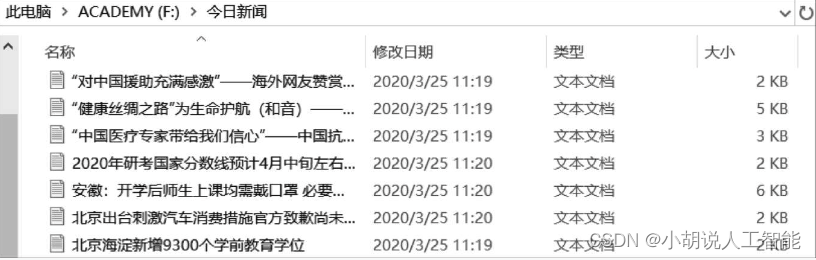
分类预备,主要是过滤新闻中除汉字外的所有字符,如图所示。
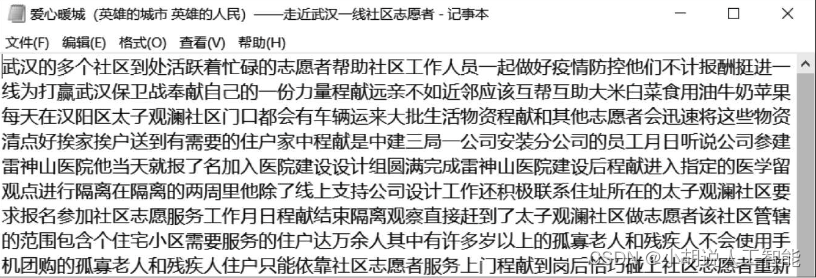
2. 文本聚类
遍历得到K值与对应轮廓系数折线,如图所示。
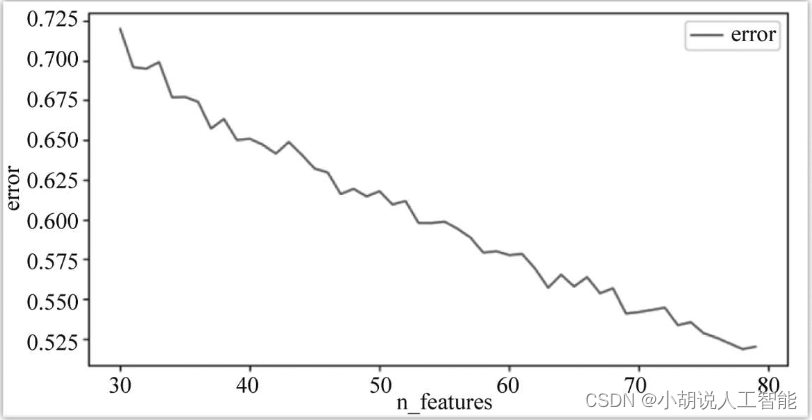
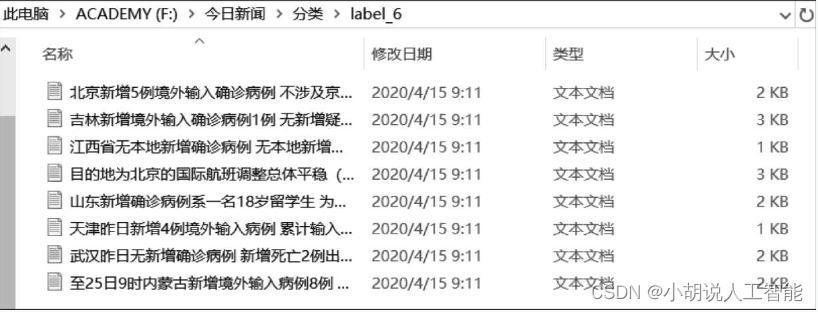
观察折线图,选取拐点的值(K=47) 作为最优K参数,并记录此时的轮廓系数作为结果输出控制的判定条件:只有当轮廓系数小于该值(0.617)时,分类才有效。下面是在最优参数K=47下进行K means聚类的结果,下图为其中一个分类。
3. 热点新闻推荐
分类后进行热度计算并按照热度推荐新闻,推荐结果为热度最高的10个类名以及该类下相关度最高的3篇新闻。多类新闻如图1所示,热词以云图的形式展示,如图2所示。


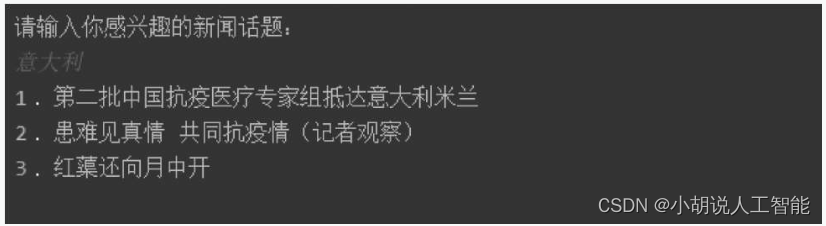
用户可以输入自己感兴趣的新闻话题,获得3篇相关新闻推荐。输入关键词“意大利”,结果如图所示。
工程源代码下载
详见本人博客资源下载页
其它资料下载
如果大家想继续了解人工智能相关学习路线和知识体系,欢迎大家翻阅我的另外一篇博客《重磅 | 完备的人工智能AI 学习——基础知识学习路线,所有资料免关注免套路直接网盘下载》
这篇博客参考了Github知名开源平台,AI技术平台以及相关领域专家:Datawhale,ApacheCN,AI有道和黄海广博士等约有近100G相关资料,希望能帮助到所有小伙伴们。
本文来自互联网用户投稿,文章观点仅代表作者本人,不代表本站立场,不承担相关法律责任。如若转载,请注明出处。 如若内容造成侵权/违法违规/事实不符,请点击【内容举报】进行投诉反馈!