Redis封装工具类
文章目录
- Redis封装工具类
- 1、导入依赖
- 2、配置文件
- 3、Redis序列化配置
- 4、Redis封装工具类
- 5、测试
- 6、运行结果
上篇文章详细讲解了 SpringBoot整合Redis:
https://blog.csdn.net/weixin_45737330/article/details/127219470
这篇文章我们来讲解:
Redis封装工具类
1、导入依赖
<dependency><groupId>org.springframework.bootgroupId><artifactId>spring-boot-starter-data-redisartifactId>
dependency><dependency><groupId>org.springframework.bootgroupId><artifactId>spring-boot-starter-testartifactId>
dependency>
<dependency><groupId>com.alibabagroupId><artifactId>fastjsonartifactId><version>1.2.48version>
dependency>
2、配置文件
spring:redis:#如果是本地连接的话,使用127.0.0.1host: 110.41.20.61port: 6379#我这边配置了密码,一般是没有密码的(可忽略)password: 1234563、Redis序列化配置
package com.jin.config;import org.springframework.context.annotation.Bean;
import org.springframework.context.annotation.Configuration;
import org.springframework.data.redis.connection.RedisConnectionFactory;
import org.springframework.data.redis.core.RedisTemplate;
import org.springframework.data.redis.serializer.RedisSerializer;import java.net.UnknownHostException;//固定模板,拿去直接使用@Configuration
public class RedisConfig {@Beanpublic RedisTemplate<String, Object> redisTemplate(RedisConnectionFactory redisConnectionFactory) throws UnknownHostException {// 将template 泛型设置为 4、Redis封装工具类
package com.jin.utils;import org.springframework.data.redis.core.RedisTemplate;
import org.springframework.stereotype.Component;
import org.springframework.util.CollectionUtils;import javax.annotation.Resource;
import java.util.Collection;
import java.util.concurrent.TimeUnit;/*** Redis工具类* @author   Huangliniao* @since    2022-05-07* @version  1.0*/
@Component
public class RedisUtil {@Resourceprivate RedisTemplate<String, Object> redisTemplate;/*** 存放Object到指定的key* @param key* @param value* @return*/public boolean set(String key, Object value) {try {redisTemplate.opsForValue().set(key, value);return true;} catch (Exception e) {e.printStackTrace();return false;}}/*** 存放Object到指定的key,并指定时效时间* @param key* @param value* @param time 单位为秒* @return*/public boolean set(String key, Object value, long time) {try {if (time > 0) {redisTemplate.opsForValue().set(key, value, time, TimeUnit.SECONDS);} else {set(key, value);}return true;} catch (Exception e) {e.printStackTrace();return false;}}/*** 获取指定key的值* @param key* @return*/public Object get(String key) {return key == null ? null : redisTemplate.opsForValue().get(key);}/*** 删除key* @param key*/@SuppressWarnings("unchecked")public void del(String... key) {if (key != null && key.length > 0) {if (key.length == 1) {redisTemplate.delete(key[0]);} else {redisTemplate.delete((Collection<String>) CollectionUtils.arrayToList(key));}}}/*** 指定key的过期时间* @param key* @param time 单位为秒* @return*/public boolean expire(String key, long time) {try {if (time > 0) {redisTemplate.expire(key, time, TimeUnit.SECONDS);}return true;} catch (Exception e) {e.printStackTrace();return false;}}/*** 获取key的过期时间,单位为秒* @param key* @return 返回-1表示没有指定时效时间*/public long getExpire(String key) {return redisTemplate.getExpire(key, TimeUnit.SECONDS);}/*** 是否存在key* @param key* @return true-存在,false-不存在*/public boolean hasKey(String key) {try {return redisTemplate.hasKey(key);} catch (Exception e) {e.printStackTrace();return false;}}/*** 递增* @param key* @param delta* @return*/public long incr(String key, long delta) {if (delta < 0) {throw new RuntimeException("递增因子必须大于0");}return redisTemplate.opsForValue().increment(key, delta);}/*** 递减* @param key* @param delta* @return*/public long decr(String key, long delta) {if (delta < 0) {throw new RuntimeException("递减因子必须大于0");}return redisTemplate.opsForValue().increment(key, -delta);}}
5、测试
import com.jin.utils.RedisUtil;
import org.junit.jupiter.api.Test;
import org.springframework.beans.factory.annotation.Autowired;
import org.springframework.boot.test.context.SpringBootTest;
import org.springframework.data.redis.core.RedisTemplate;@SpringBootTest
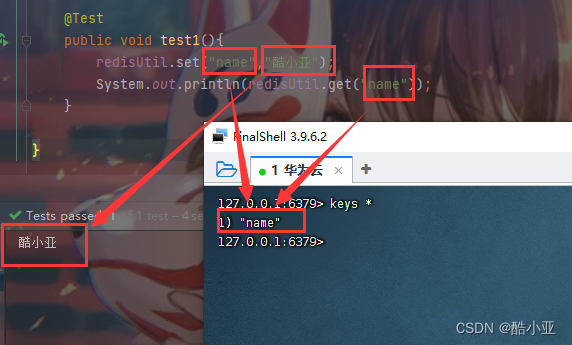
public class MyTest {@Autowiredprivate RedisTemplate redisTemplate;@Autowiredprivate RedisUtil redisUtil;@Testpublic void test1(){redisUtil.set("name","酷小亚");System.out.println(redisUtil.get("name"));}
}
6、运行结果
本文来自互联网用户投稿,文章观点仅代表作者本人,不代表本站立场,不承担相关法律责任。如若转载,请注明出处。 如若内容造成侵权/违法违规/事实不符,请点击【内容举报】进行投诉反馈!