时间的转换 格式化
1,在原型链上添加方法:
Date.prototype.format = function(fmt) { var o = { "M+" : this.getMonth()+1,                 //月份 "d+" : this.getDate(),                    //日 "h+" : this.getHours(),                   //小时 "m+" : this.getMinutes(),                 //分 "s+" : this.getSeconds(),                 //秒 "q+" : Math.floor((this.getMonth()+3)/3), //季度 "S"  : this.getMilliseconds()             //毫秒 }; if(/(y+)/.test(fmt)) {fmt=fmt.replace(RegExp.$1, (this.getFullYear()+"").substr(4 - RegExp.$1.length)); }for(var k in o) {if(new RegExp("("+ k +")").test(fmt)){fmt = fmt.replace(RegExp.$1, (RegExp.$1.length==1) ? (o[k]) : (("00"+ o[k]).substr((""+ o[k]).length)));}}return fmt;
}

2,方法的使用
一:比如我们可以这样调用下:
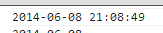
var time1 = new Date().format("yyyy-MM-dd hh:mm:ss");
console.log(time1);
运行如下:
二:也可以转换成 ”年月日”的格式
var time2 = new Date().format("yyyy-MM-dd");
console.log(time2);
运行如下:

三:将指定的日期转换为"年月日"的格式,代码如下:
var oldTime = (new Date("2012/12/25 20:11:11")).getTime();
var curTime = new Date(oldTime).format("yyyy-MM-dd");
console.log(curTime);
运行如下:

四 :将 "时间戳" 转换为 "年月日" 的格式.
比如如下代码:
var da = 1402233166999;
da = new Date(da);
var year = da.getFullYear()+'年';
var month = da.getMonth()+1+'月';
var date = da.getDate()+'日';
console.log([year,month,date].join('-'));
运行如下:

转载于:https://www.cnblogs.com/prettyY/p/6564268.html
本文来自互联网用户投稿,文章观点仅代表作者本人,不代表本站立场,不承担相关法律责任。如若转载,请注明出处。 如若内容造成侵权/违法违规/事实不符,请点击【内容举报】进行投诉反馈!