python 爬虫 破猫眼票房字体加密反爬策略
首先,打来猫眼票房排行榜发现这几个数据都是加密的,用xpath提取text()会是空的或者乱码,
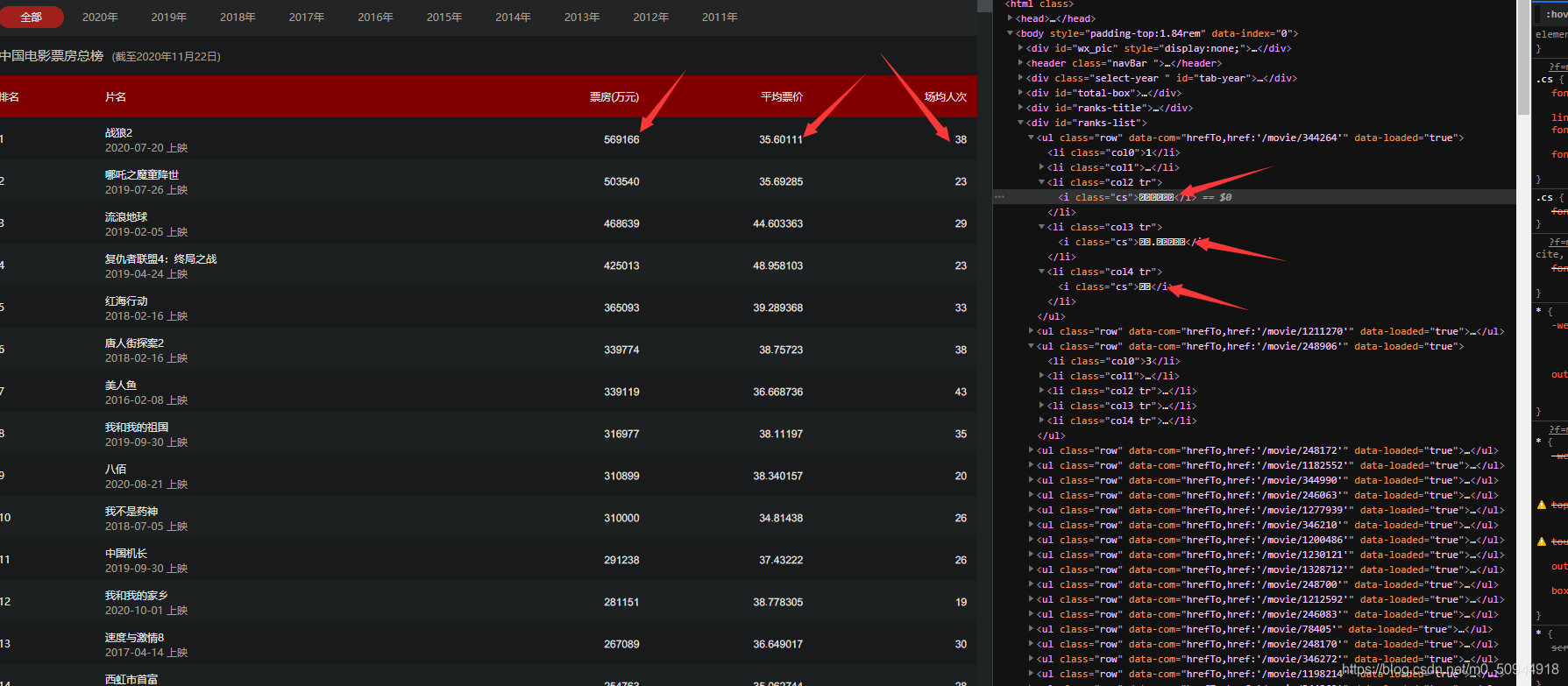
思路:
首先在源码中找到加密的字体文件,(像这种加密字体一般是通过加载本体字体库文件上传到前端,数字才能显示出来,一半字体文件也会加载到源码中)。
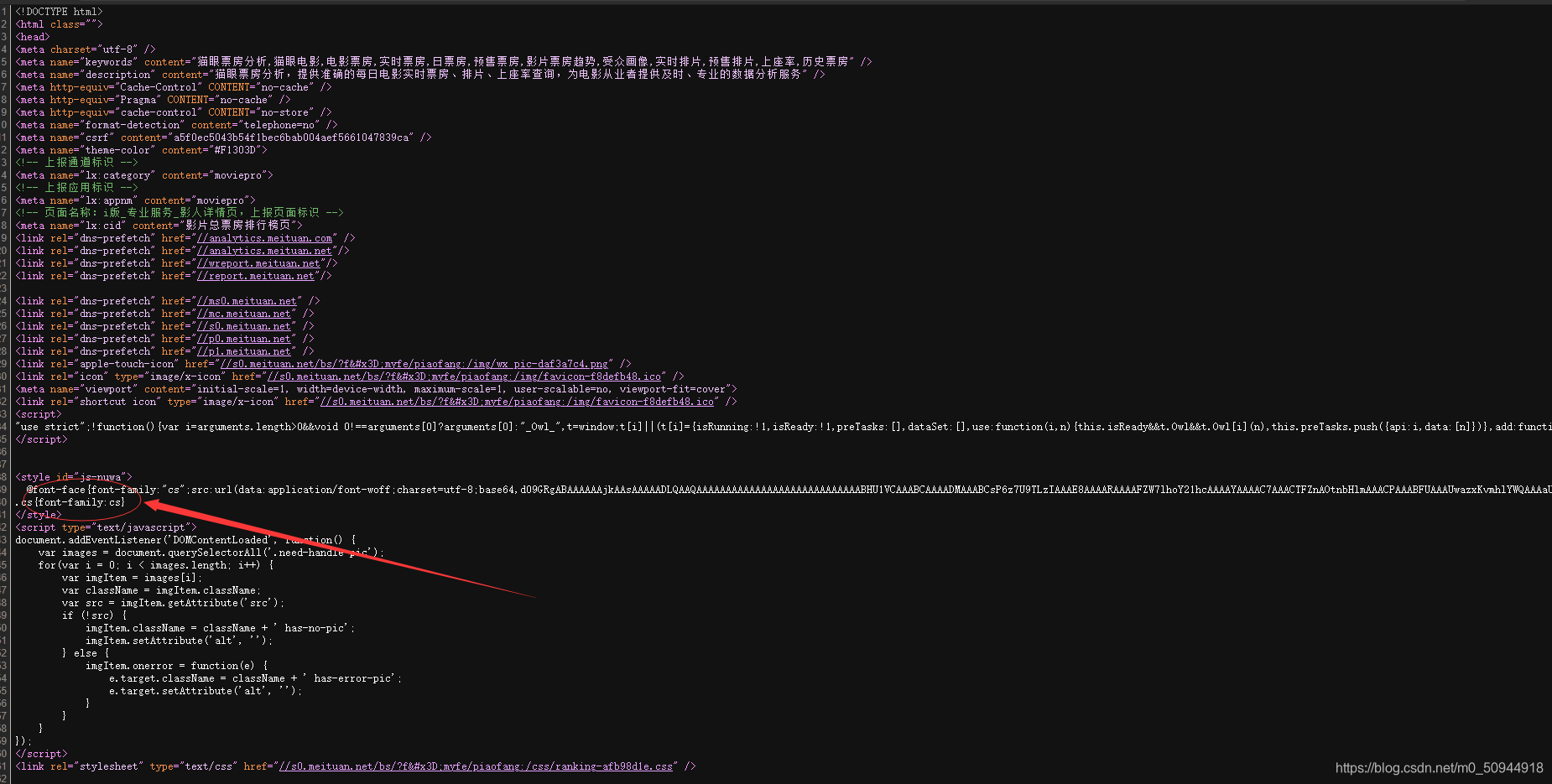
在通过字体编码解码模块对字体文件进行编码解码操作,
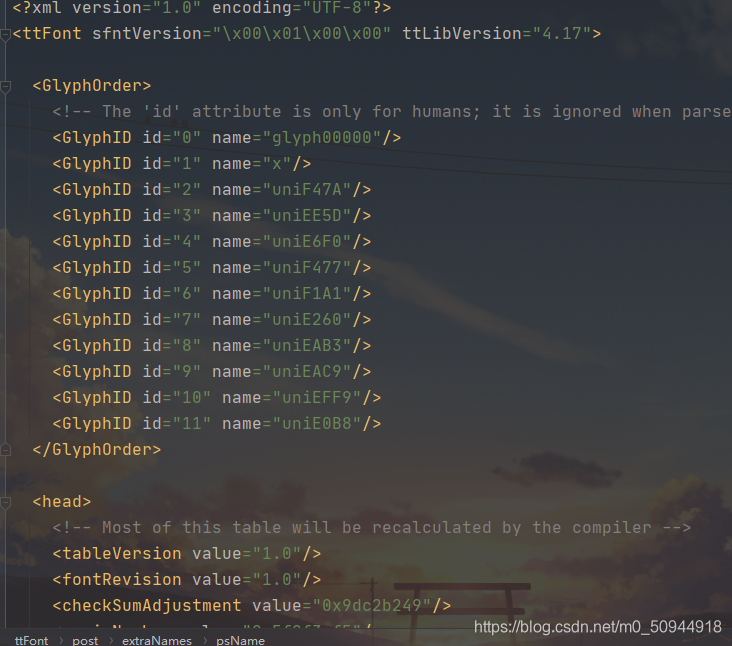
可以得到一对映射关系,这里看的不是很明白,可以借助High-Logic FontCreator软件看明白
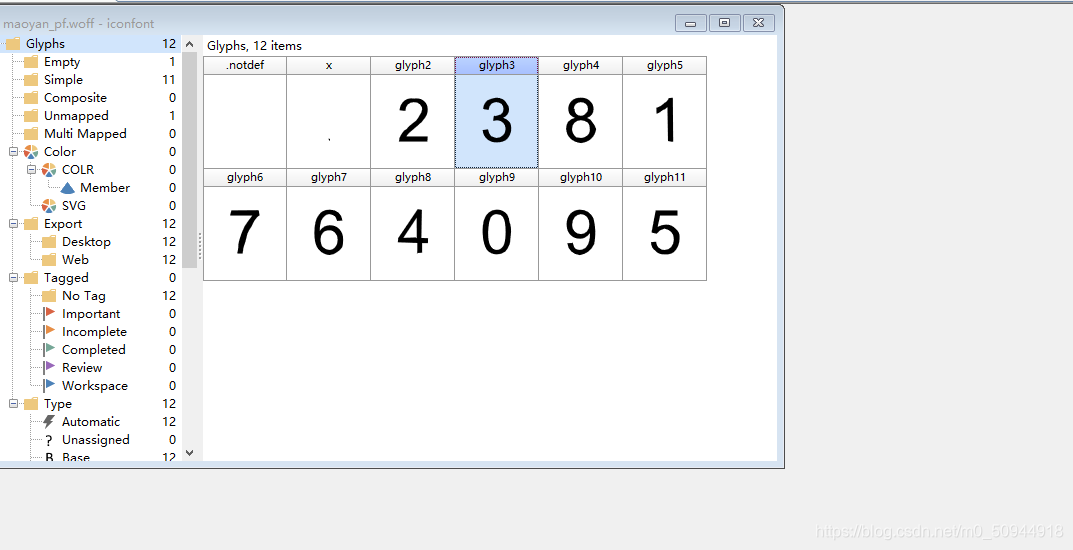
然后简历一个初始的字典映射:
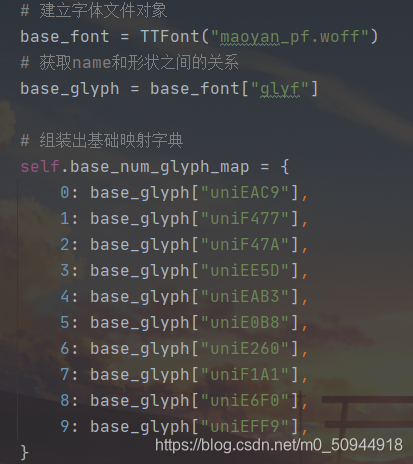
因为每次刷新页面这个字体库文件都会变化,所以需要每次把字体库正则提取出来进行保存再对比数据文字的坐标进行比对
定义新方法font_map对新字体进行映射,这里用到了一个 knn 算法(K近邻)的思想,因为每次请求得到的都是新的字体,所以本次请求的字体与上次请求的字体坐标会有微差,但不管怎么变,这个字肯定不可能变成别的字,所以我们只有得到本次请求的字体坐标与基础的映射字典里的字体坐标进行对比就能,然后取出最接近的值,那么肯定就是我们想要的值了
然后打印发现这个列表不能遍历,也不能用join方法转成字符串,只能用str()配合eval()方法进行替换
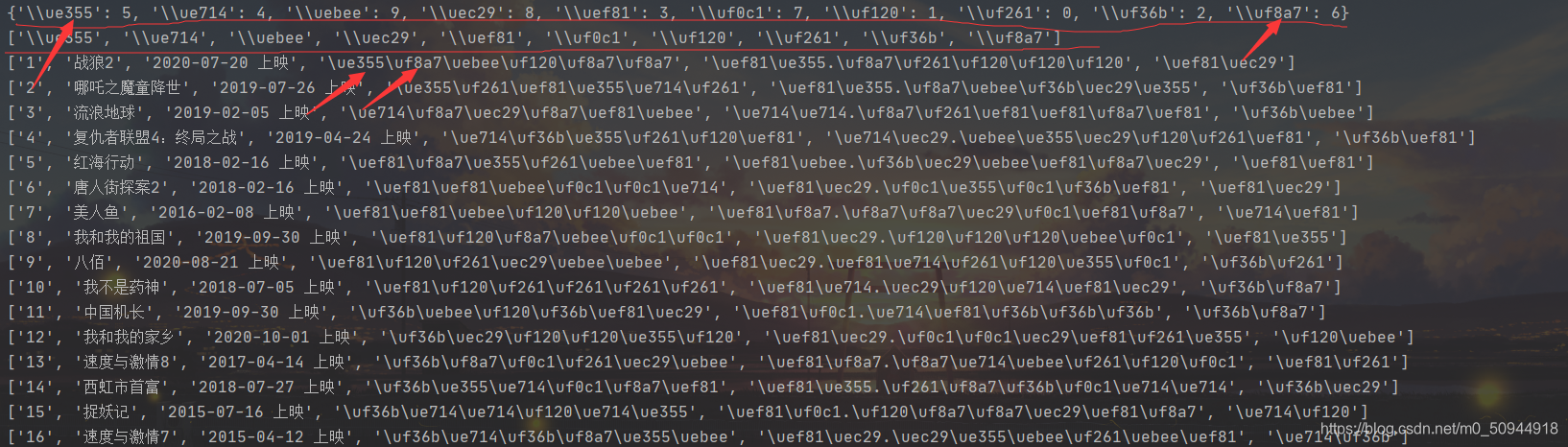
最后替换的结果为:
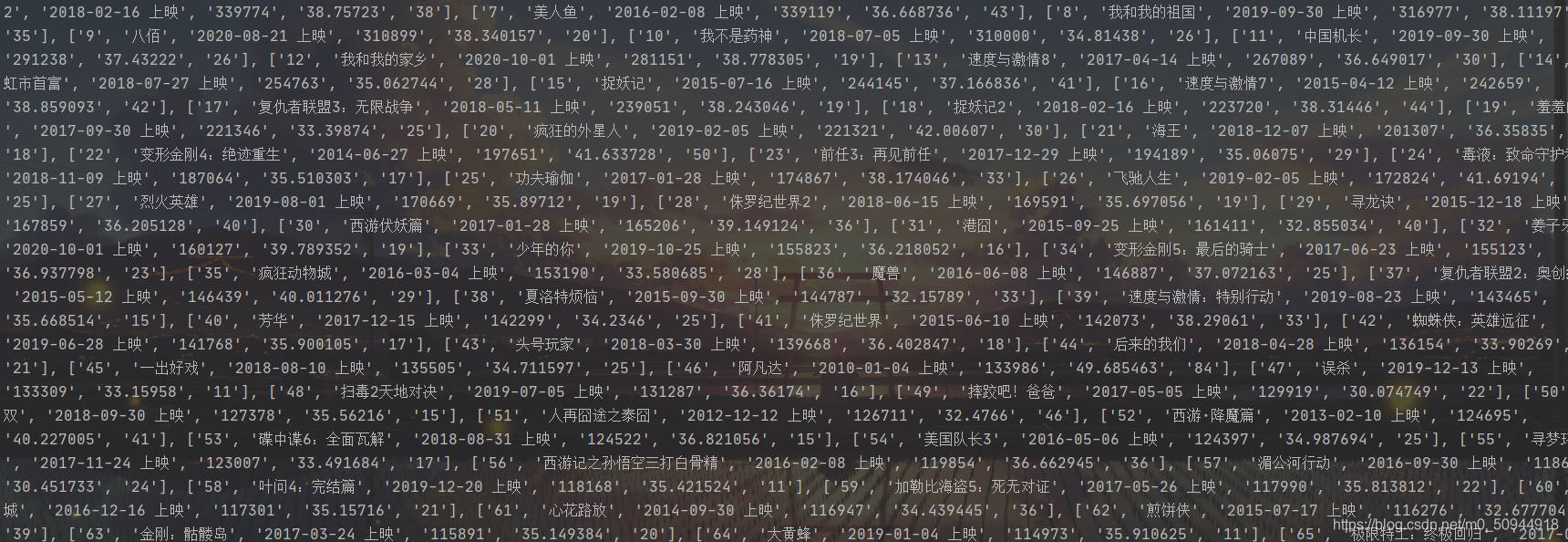
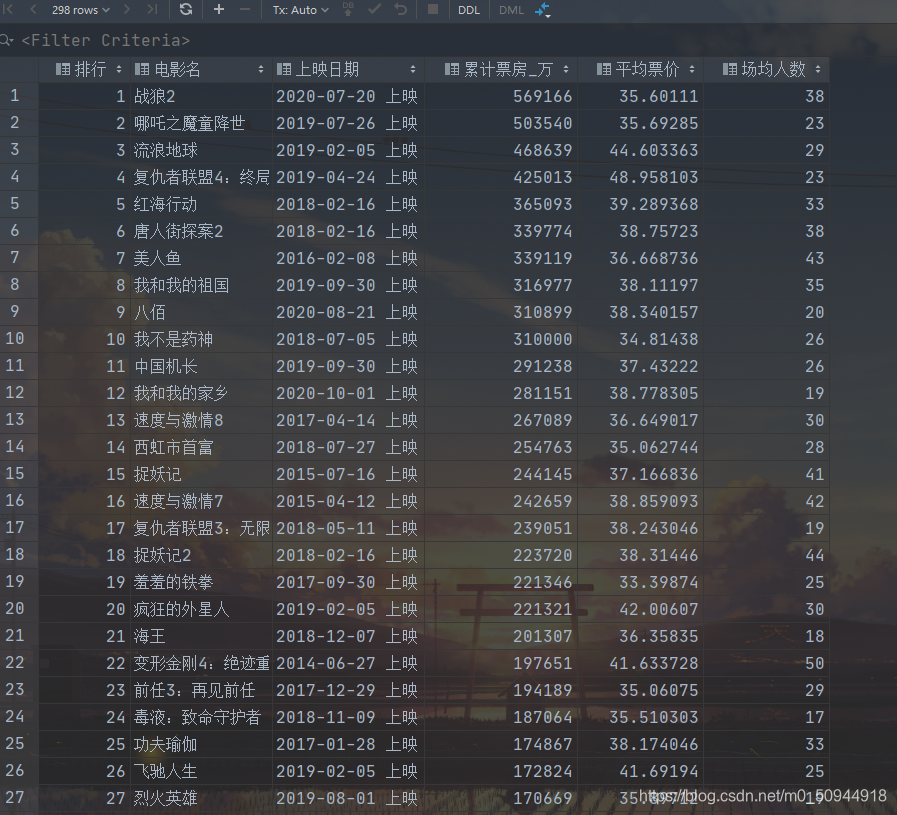
好了,最后保存在数据库中就完工啦:
代码实现:
#!/usr/bin/env python
# -*- coding: utf-8 -*-
# @Time    : 2020/11/22 17:31
# @Author  : huni
# @File    : 票房排行榜.py
# @Software: PyCharmimport requests
from fontTools.ttLib import TTFont
from lxml import etree
import re
import base64
import sqlite3class MYSpider(object):"""爬取猫眼总票房页面"""def __init__(self):# 请求urlself.url = 'https://piaofang.maoyan.com/rankings/year'# 请求头self.headers = {"User-Agent": "Mozilla/5.0 (iPhone; CPU iPhone OS 11_0 like Mac OS X) AppleWebKit/604.1.38 (KHTML, like Gecko)  Version/11.0 Mobile/15A372 Safari/604.1",}# 建立字体文件对象base_font = TTFont("maoyan_pf.woff")# 获取name和形状之间的关系base_glyph = base_font["glyf"]# 组装出基础映射字典self.base_num_glyph_map = {0: base_glyph["uniEAC9"],1: base_glyph["uniF477"],2: base_glyph["uniF47A"],3: base_glyph["uniEE5D"],4: base_glyph["uniEAB3"],5: base_glyph["uniE0B8"],6: base_glyph["uniE260"],7: base_glyph["uniF1A1"],8: base_glyph["uniE6F0"],9: base_glyph["uniEFF9"],}self.new_num_glyph_map = {}self.code_list = []def decryption_font(self, encryption_font):"""字体解密保存"""# 使用bs64进行解码b = base64.b64decode(encryption_font)# 打开文件保存字体文件with open('maoyan_pf_new.woff', 'wb') as f:f.write(b)def font_map(self):"""对字体生成新的映射"""# 生成当前字体文件的对象font = TTFont('maoyan_pf_new.woff')font.saveXML('maoyan_pf_new.xml')  # 将ttf文件生成xml文件并保存到本地# 获取当前字体的code和name映射code_name_cmap2 = font.getBestCmap()# 获取当前字体的字形name_glyph_map = font['glyf']# 遍历当前字体的code和namefor code, name in code_name_cmap2.items():# 判断是否是无用的数据if name == "x":continue# 通过name取出当前字体的所有字形坐标current_glyph = name_glyph_map[name]num_diff = dict()# 遍历基础字形字典,取出对应的映射数字和坐标for num, glyph in self.base_num_glyph_map.items():# 定义一个变量用来记录当前所有坐标的最小差值diff = 0# 遍历当前字形字典,取出所有坐标for coor1 in current_glyph.coordinates:# 定义一个列表用来保存当前最小差值的所有差值coor_diff_list = list()for coor2 in glyph.coordinates:coor_diff_list.append(abs(coor1[0] - coor2[0]) + abs(coor1[1] - coor2[1]))diff += min(coor_diff_list)# 组成当前字体的映射字典num_diff[num] = diff# 取出对应的映射num = min(num_diff, key=num_diff.get)# code = str(hex(code)).replace("0", "&#", 1) + ";"# 将默认映射替换成想要的样式code = str(hex(code)).replace("0x", r"\u", 1)self.code_list.append(code)# print(code, num)# 将新字体的映射组成字典保存self.new_num_glyph_map[code] = numdef run(self):"""开始爬取"""# 发送请求response = requests.get(url=self.url, headers=self.headers)# print(response.text)# 转换成lxml对象进行xpath提取html = etree.HTML(response.text)# 获取字体加密# 提取style标签里面的内容encryption_font = html.xpath("//*[@id='js-nuwa']/text()")# 使用正则提取想要的加密字体ex = re.compile(r"base64,(.*?)\)",re.S)encryption_font = re.findall(ex, ''.join(encryption_font))[0]# 调用方法对字体进行解密self.decryption_font(encryption_font)# 对新字体进行映射self.font_map()# 获取详情ul_list = html.xpath('//*[@id="ranks-list"]/ul')# print(ul_list)# 调用方法获取票房信息all_info_list = self.get_info(ul_list)#定义保存数据库路径dbpath = '猫眼总票房.db'#初始化数据库方法self.init_db(dbpath)#保存到数据库self.saveDatadb(dbpath,all_info_list)def get_info(self, ul_list):"""获取票房信息"""all_info_list = []for tr in ul_list:i = []top = tr.xpath('./li[1]/text()')[0]             #排名cname = tr.xpath('./li[2]/p[1]/text()')[0]      #电影名ptime = tr.xpath('./li[2]/p[2]/text()')[0]      #上映日期almony = tr.xpath('./li[3]/i/text()')[0]        #总票房price = tr.xpath('./li[4]/i/text()')[0]         #平均票价people = tr.xpath('./li[5]/i/text()')[0]        #场均人数i.append(top)i.append(cname)i.append(ptime)i.append(almony)i.append(price)i.append(people)j = str(i)              #这里把列表转成字符串,方便下面的元素替换print(i)for word in self.code_list:if word in j:j = j.replace(word,str(self.new_num_glyph_map[word]))m = list(eval(j))       #这里使用eval()方法再把字符串转成原来的列表形式,方便储存到数据库all_info_list.append(m)# print(all_info_list)return all_info_list# 初始化数据库,创建表def init_db(self,dbpath):sql1 = '''drop table if exists 内地票房排行榜'''  # 删除原来的数据表sql2 = '''create table if not exists 内地票房排行榜(排行 numeric ,电影名 varchar ,上映日期 varchar,累计票房_万 numeric ,平均票价 numeric ,场均人数 numeric )'''  # 创建数据表conn = sqlite3.connect(dbpath)cursor = conn.cursor()cursor.execute(sql1)cursor.execute(sql2)conn.commit()conn.close()# 数据保存到数据库def saveDatadb(self,dbpath, all_info_list):self.init_db(dbpath)conn = sqlite3.connect(dbpath)cur = conn.cursor()for data in all_info_list:for index in range(len(data)):data[index] = '"' + str(data[index]) + '"'  # replace intosql = '''insert into 内地票房排行榜(排行,电影名,上映日期,累计票房_万,平均票价,场均人数)values(%s)''' % ",".join(data)# print(sql)cur.execute(sql)conn.commit()cur.close()conn.close()if __name__ == '__main__':my = MYSpider()my.run()print('爬取成功!')
本文来自互联网用户投稿,文章观点仅代表作者本人,不代表本站立场,不承担相关法律责任。如若转载,请注明出处。 如若内容造成侵权/违法违规/事实不符,请点击【内容举报】进行投诉反馈!