微信小程序开发之圆形菜单 仿建行圆形菜单
建行APP首页有个圆形菜单.仿了个玩具出来.
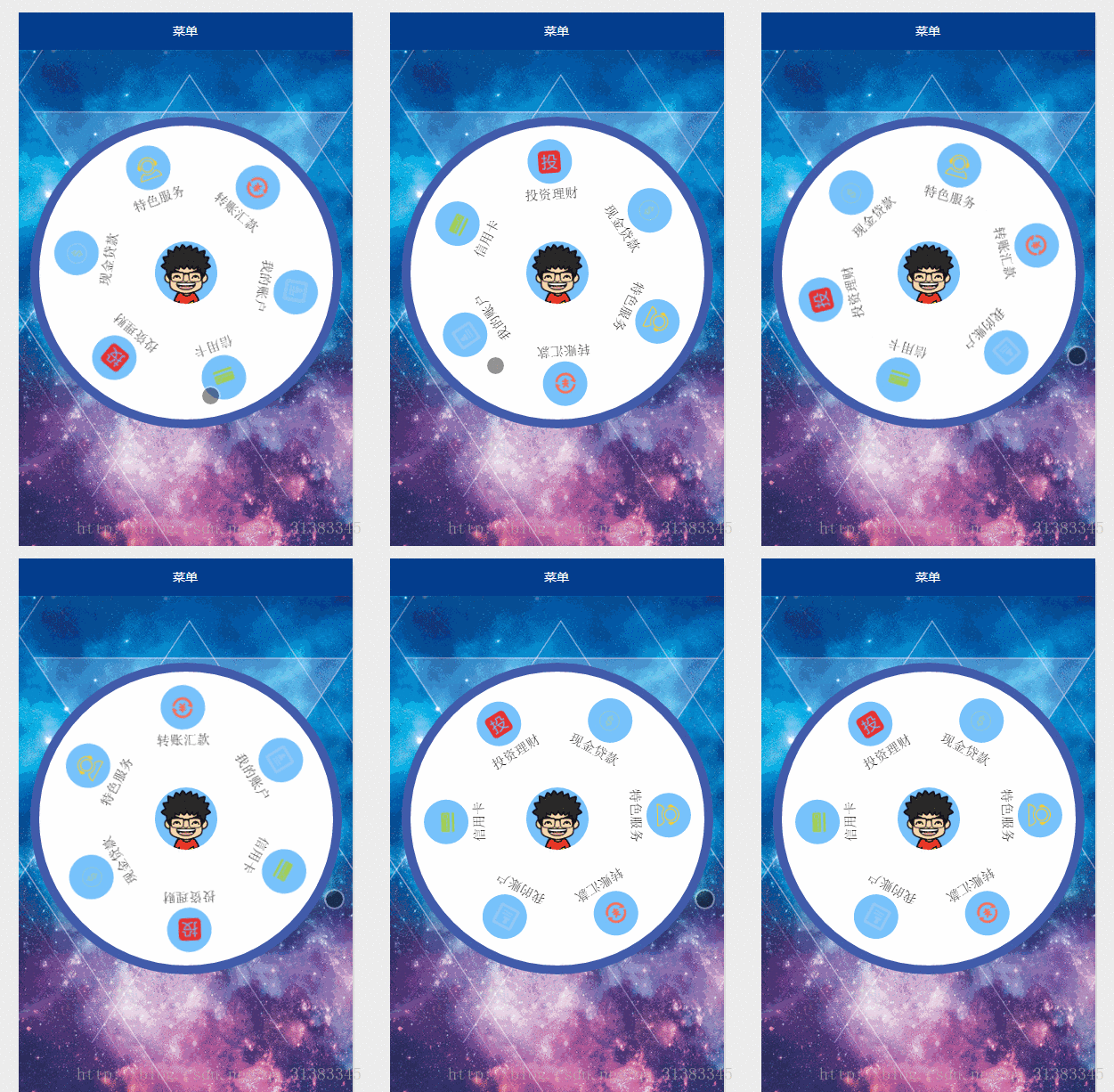
功能介绍:
1.一个圆形背景.六个item菜单.中间是微信用户的头像;
2.触摸滚动.速度较小时,随手指滚动,手指抬起,滚动停止;速度较大时,随手指滚动,手指抬起,还会自动滚动一段时间;
CSDN微信小程序开发-专栏,欢迎关注!
相关技术:
1.微信小程序开发之大转盘 仿天猫超市抽奖
2.微信小程序之仿微信漂流瓶
3.微信小程序开发之视频播放器 Video 弹幕 弹幕颜色自定义
4.微信小程序开发之录音机 音频播放 动画 (真机可用)
5.微信小程序开发之麦克风动画 帧动画 放大 淡出
上一张真机截图:
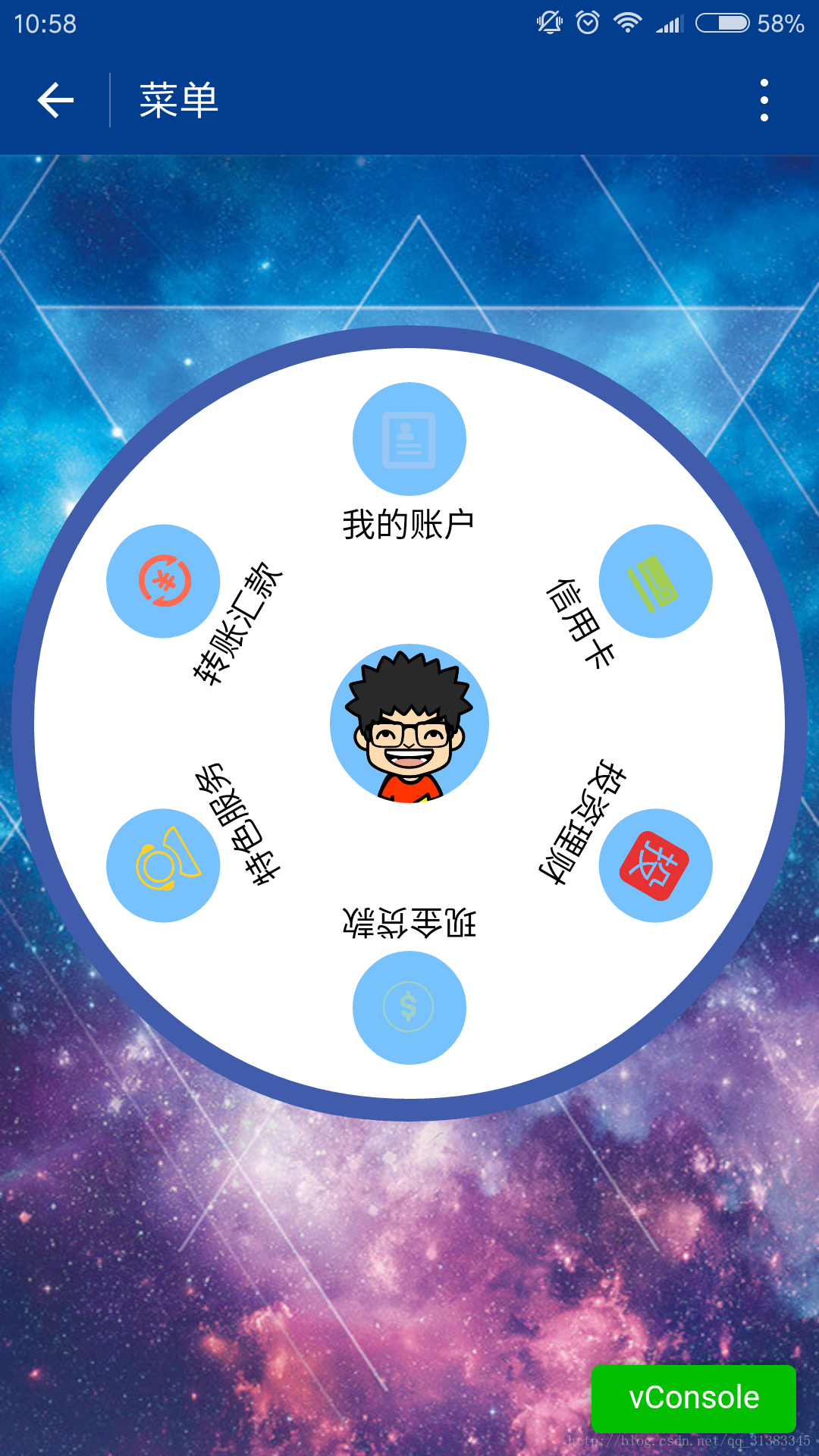
上代码:
1.index.js
var app = getApp()
Page({data: {userInfo: {},menuList: {},//菜单集合animationData: {},startPoint: {},//触摸开始dotPoint: {},//圆点坐标startAngle: 0,//开始角度tempAngle: 0,//移动角度downTime: 0,//按下时间upTime: 0,//抬起时间// isRunning: false,//正在滚动},onLoad: function () {var that = this//调用应用实例的方法获取全局数据app.getUserInfo(function (userInfo) {//更新数据that.setData({userInfo: userInfo,})})wx.getSystemInfo({success: function (res) {var windowWidth = res.windowWidth * 0.5;that.setData({//圆点坐标,x为屏幕一半,y为半径与margin-top之和,px//后面获取的触摸坐标是px,所以这里直接用px.dotPoint: { clientX: windowWidth, clientY: 250 }})}})},onReady: function (e) {var that = this;app.menuConfig = {menu: [{ 'index': 0, 'menu': '我的账户', 'src': '../images/account.png' },{ 'index': 1, 'menu': '信用卡', 'src': '../images/card.png' },{ 'index': 2, 'menu': '投资理财', 'src': '../images/investment.png' },{ 'index': 3, 'menu': '现金贷款', 'src': '../images/loan.png' },{ 'index': 4, 'menu': '特色服务', 'src': '../images/service.png' },{ 'index': 5, 'menu': '转账汇款', 'src': '../images/transfer.png' }]}// 绘制转盘var menuConfig = app.menuConfig.menu,len = menuConfig.length,menuList = [],degNum = 360 / len  // 文字旋转 turn 值for (var i = 0; i < len; i++) {menuList.push({ deg: i * degNum, menu: menuConfig[i].menu, src: menuConfig[i].src });console.log("menu:" + menuConfig[i].menu)}that.setData({menuList: menuList});},// 菜单拖动的三个方法buttonStart: function (e) {this.setData({startPoint: e.touches[0]})var x = this.data.startPoint.clientX - this.data.dotPoint.clientX;var y = this.data.startPoint.clientY - this.data.dotPoint.clientY;var startAngle = Math.asin(y / Math.hypot(x, y)) * 180 / Math.PI;this.setData({startAngle: startAngle})},buttonMove: function (e) {//获取滑动时的时间var downTime = Date.now();this.setData({downTime: downTime})var that = this;var endPoint = e.touches[e.touches.length - 1]//根据触摸位置计算角度var x = endPoint.clientX - this.data.dotPoint.clientX;var y = endPoint.clientY - this.data.dotPoint.clientY;var moveAngle = Math.asin(y / Math.hypot(x, y)) * 180 / Math.PIvar quadrant = 1;if (x >= 0) {quadrant = y >= 0 ? 4 : 1;} else {quadrant = y >= 0 ? 3 : 2;}var tempAngle = 0;// 如果是一、四象限,则直接end角度-start角度,角度值都是正值  if (quadrant == 1 || quadrant == 4) {tempAngle += moveAngle - this.data.startAngle;} else// 二、三象限,色角度值是负值  {tempAngle += this.data.startAngle - moveAngle;}var menuConfig = app.menuConfig.menu;var menuList = [];for (var i = 0; i < this.data.menuList.length; i++) {menuList.push({ deg: this.data.menuList[i].deg + tempAngle, menu: menuConfig[i].menu, src: menuConfig[i].src });}this.setData({menuList: menuList})//重置开始角度this.setData({startPoint: e.touches[e.touches.length - 1]})var endX = this.data.startPoint.clientX - this.data.dotPoint.clientX;var endY = this.data.startPoint.clientY - this.data.dotPoint.clientY;var startAngle = Math.asin(endY / Math.hypot(endX, endY)) * 180 / Math.PI;this.setData({startAngle: startAngle,tempAngle: tempAngle})},buttonEnd: function (e) {// 计算,每秒移动的角度 var that = this;var upTime = Date.now();var angleSpeed = this.data.tempAngle * 1000 / (upTime - this.data.downTime);if (Math.abs(angleSpeed) < 100) {//速度小于100时,停止滚动return} else {//速度大于100时,自动滚动if (angleSpeed > 0) {if (angleSpeed > 500) angleSpeed = 500var animationRun = wx.createAnimation({duration: 2000,//ease-out结束时减速timingFunction: 'ease-out'})that.animationRun = animationRunanimationRun.rotate(angleSpeed).step()that.setData({animationData: animationRun.export(),})}else {if (angleSpeed < -500) angleSpeed = -500angleSpeed = Math.abs(angleSpeed);var animationRun = wx.createAnimation({duration: 2000,// ease-out结束时减速timingFunction: 'ease-out'})that.animationRun = animationRunanimationRun.rotate(-angleSpeed).step()that.setData({animationData: animationRun.export(),})}}}
})
2.index.wxml
<view class="circle-out"><view class="circle-in"><image class="userinfo-avatar" src="{{userInfo.avatarUrl}}">image><view class="menu-list" catchtouchmove="buttonMove" catchtouchstart="buttonStart" catchtouchend="buttonEnd"><view class="menu-item" wx:for="{{menuList}}" wx:key="unique" animation="{{animationData}}"><view class="menu-circle-item" style="-webkit-transform: rotate({{item.deg}}deg);" data-menu="{{item.menu}}"><image class="image-style" src="{{item.src}}">image>view><view class="menu-circle-text-item" style="-webkit-transform: rotate({{item.deg}}deg);"><text class="text-style">{{item.menu}}text>view>view>view>view>
view>
3.index.wxss
page {background-image: url('http://ac-ejx0nsfy.clouddn.com/ac767407f474e1c3970a.jpg');background-attachment: fixed;background-repeat: no-repeat;background-size: cover;
}.circle-out {margin: 75px auto;position: relative;width: 350px;height: 350px;border-radius: 50%;background-color: #415cab;
}.userinfo-avatar {width: 70px;height: 70px;border-radius: 50%;position: absolute;top: 0;bottom: 0;left: 0;right: 0;margin: auto;
}/**子控件的透明度等于父控件透明度*子控件透明度,父控件的opacity设置后,
所以子控件opacity设置为1依然无效,必须分离开
*/.circle-in {position: absolute;width: 330px;height: 330px;border-radius: 50%;top: 0;bottom: 0;left: 0;right: 0;margin: auto;background-color: #fff;
}/**菜单*/.menu-list {position: absolute;left: 0;top: 0;width: inherit;height: inherit;
}.menu-item {position: absolute;left: 0;top: 0;width: 100%;height: 100%;font-weight: 500;
}.menu-circle-item {-webkit-transform-origin: 50% 150px;transform-origin: 50% 150px;margin: 0 auto;margin-top: 15px;position: relative;height: 50px;width: 50px;background-color: #77c2fc;text-align: center;border-radius: 50%;
}.image-style {height: 25px;width: 25px;color: #f00;margin: 12.5px auto;
}.text-style {margin: 5px auto;font-size: 15px;
}/***/.menu-circle-text-item {-webkit-transform-origin: 50% 100px;transform-origin: 50% 100px;margin: 0 auto;position: relative;height: 25px;width: auto;text-align: center;
}
js注释补充:
获取手指抬起时的角速度
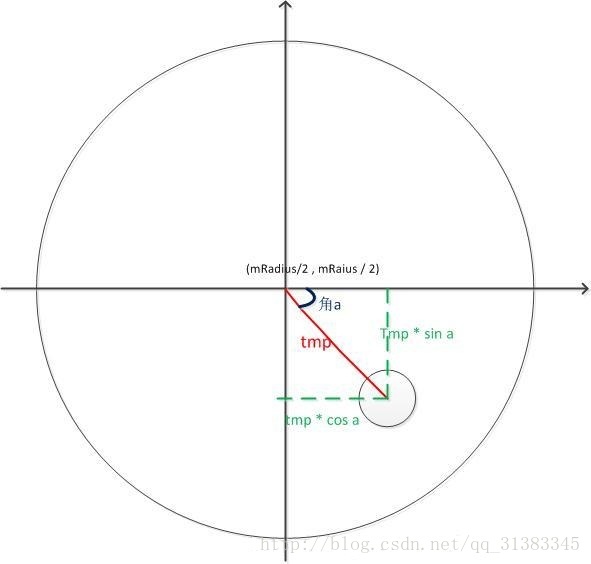
1.获取角度.借图说话.
Math.sqrt( x * x + y * y )是斜边长,乘以 sin a 就是 y 的长度;
获取a的角度:Math.asin(y / Math.hypot(x, y) ;
[ hypot是x * x + y * y ]
2.根据角度差计算角速度
var angleSpeed = this.data.tempAngle * 1000 / (upTime - this.data.downTime);
3.当角速度小于100的时候触摸滑动停止,不自动滚动;大于100时,自动滚动.我这里用动画,有个问题:很难把握动画持续时间和速度的关系.总感觉不够流畅.我表示不能忍.
4.分象限的问题.看看代码就知道了.主要是根据up时的触摸点相对于圆点的X轴差值来计算.大于0就是一四象限.小于0就是二三象限.
说是个玩具,肯定是有原因:
1.目前真机跑不起来.
2.滚动卡顿.
有解决的同学私信我.谢谢.
微信小程序开发之圆形菜单 仿建行圆形菜单 demo源码下载
我的博客,欢迎交流批评!
本文来自互联网用户投稿,文章观点仅代表作者本人,不代表本站立场,不承担相关法律责任。如若转载,请注明出处。 如若内容造成侵权/违法违规/事实不符,请点击【内容举报】进行投诉反馈!