实现layui table筛选框记忆功能
使用layui table的筛选功能.选完之后呢,关掉浏览器再打开或者换个页面再打开的时候,选择就白选了.我们想要它还能记忆上次选择的
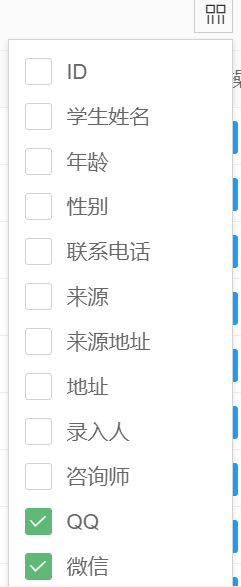
实现: 记忆的数据可以存到数据库,可以存到本地缓存
本案例放入本地缓存的方式
使用 MutationObserver 实现监控点击事件.
由于筛选的跳窗是点开后后加的代码,所以一般的事件onclick是触发不到的… 就是点击筛选按钮,此时加载跳出框代码, 也就在此是注册onclik 点击事件是不行的. 如果早注册事件,早于页面元素注册,也是抓不到事件滴.页面还没渲染出来,早早的注册了页面里边的点击事件,后来页面渲染出来后,点击是无法响应的,有个先后顺序.
经过控制台点击按钮分析页面代码等等操作
layui.use(['layer', 'form', 'table','jquery'], function(){var table = layui.table;var $ = layui.jquery;//引入jqueryvar form = layui.form;var layer = layui.layer;var cols=[[{type: 'checkbox', fixed: 'left'},{field: 'id', title: 'ID', width:80, sort: true, fixed: 'left',align : 'center'},{field: 'stuName', title: '学生姓名', width:100,align : 'center'},{field: 'age', title: '年龄', width:80,align : 'center'},{field: 'sex', title: '性别', width:80,align : 'center'},{field: 'phone', title: '联系电话', width:150,align : 'center'}]]intCols();function  intCols(){for (var i=0;i<cols[0].length;i++){if(cols[0][i].field!=undefined){let localfield='test'+cols[0][i].field;let hidevalue =window.localStorage.getItem(localfield);if(hidevalue==='false'){cols[0][i].hide=false;}else if(hidevalue==='true'){cols[0][i].hide=true;}}}}//第一个实例table.render({elem: '#demo',toolbar : '#toolbarDemo'//开启头部栏工具,url: 请求路径,page: true //开启分页,method : 'POST',id:'idTest',defaultToolbar: ['filter', 'exports', 'print'],cols: cols});// 选择需要观察变动的节点const targetNode =document.getElementsByClassName('layui-table-tool');//document.getElementById('some-const targetNode1 =document.getElementsByClassName('layui-table-tool-self')[0];//document.getElementById('some-id');//  console.log(targetNode);//  console.log(targetNode1);
// 观察器的配置(需要观察什么变动)const config = { attributes: true, childList: true, subtree: true };// 当观察到变动时执行的回调函数const callback = function(mutationsList, observer) {console.log(mutationsList);//  console.log(observer);// Use traditional 'for loops' for IE 11for(let mutation of mutationsList) {if (mutation.type === 'childList') {// console.log('A child node has been added or removed');}else if (mutation.type === 'attributes') {console.log(mutation.target.innerText);//先根据innertext 列名称 对cols 进行field 查询,查到field 可以找到本地缓存的字段,约定,本地缓存的命名规则为表名字母缩写_加field名组成,防止冲突var field="";for (var i=0;i<cols[0].length;i++){if(cols[0][i].title===mutation.target.innerText)  //标题相同 则取field{field=cols[0][i].field;break;}}if(field!==""){// 组装缓存keylet localkey='test'+field;//判断value值if(mutation.target.classList[2]!=undefined) //说明2: "layui-form-checked"  复选框是已选择的,说明此列是在表中显示的{window.localStorage.setItem(localkey,false);}else  //没被选择,说明此列不在table中显示{window.localStorage.setItem(localkey,true);}}}}};// 创建一个观察器实例并传入回调函数const observer = new MutationObserver(callback);
// 以上述配置开始观察目标节点observer.observe(targetNode1, config);});
本文来自互联网用户投稿,文章观点仅代表作者本人,不代表本站立场,不承担相关法律责任。如若转载,请注明出处。 如若内容造成侵权/违法违规/事实不符,请点击【内容举报】进行投诉反馈!