openMV使用---找到图像中的圆形
主要想实现一个功能,就是找到图像中固定大小的圆形,然后将其标记出来。
openmv给的示例程序中有相关程序,今天主要对该程序进行讲解,并改进。
import sensor, image, timesensor.reset()#重启摄像头
#设置为彩色, 颜色格式为RGB565
# 也就是说,颜色存储 红色(5位),绿色(6位), 蓝色(5位)
# sensor.GRAYSCALE: 灰度,每个像素8位。
sensor.set_pixformat(sensor.RGB565) # grayscale is faster
#设置图像的大小
#就是你拍摄的画面的长和宽分别是多少个像素点
#sensor.QQQQCIF: 22x18
#sensor.QQQCIF: 44x36
#sensor.QQCIF: 88x72
#sensor.QCIF: 176x144
#sensor.CIF: 352x288
#sensor.QQQQSIF: 22x15
#sensor.QQQSIF: 44x30
#sensor.QQSIF: 88x60
#sensor.QSIF: 176x120
#sensor.SIF: 352x240
#sensor.QQQQVGA: 40x30
#sensor.QQQVGA: 80x60
#sensor.QQVGA: 160x120
#sensor.QVGA: 320x240
#sensor.VGA: 640x480
#sensor.HQQQQVGA: 40x20
#sensor.HQQQVGA: 80x40
#sensor.HQQVGA: 160x80
#sensor.HQVGA: 240x160
#sensor.HVGA: 480x320
#sensor.LCD: 128x160 (for use with the lcd shield)
#sensor.QQVGA2: 128x160 (for use with the lcd shield)
#sensor.B40x30: 160x120 (for use with image.find_displacement)
#sensor.B64x32: 160x120 (for use with image.find_displacement)
#sensor.B64x64: 160x120 (for use with image.find_displacement)
#sensor.SVGA: 800x600 (only in JPEG mode for the OV2640 sensor)
#sensor.SXGA: 1280x1024 (only in JPEG mode for the OV2640 sensor)
#sensor.UXGA: 1600x1200 (only in JPEG mode for the OV2640 sensor)sensor.set_framesize(sensor.QQVGA)#表示拍摄画面的大小为160×120像素
#因为sensor参数设定之后, 图像质量不稳定, 要过一段时间。 跳过n张照片,在更改
#设置后,跳过一些帧,等待感光元件变稳定。这里是跳过2000毫秒
sensor.skip_frames(time = 2000)
#创建一个时钟对象来追踪FPS
#FPS是测量用于保存、显示动态视频的信息数量。通俗来讲就是指每秒变化的画面数。
clock = time.clock()
while(True):clock.tick() #每次循环更新时钟# 拍摄一张照片,snapshot()函数返回一个image对象#lens_corr函数用于非鱼眼畸变矫正,默认设置参数为1.8,#然后根据图像情况进行调整img = sensor.snapshot().lens_corr(1.8)# threshold:设置要找到圆的个数,阈值越大,表示要找的圆越少#`x_margin`, `y_margin`, and `r_margin`:控制相似圆的合并,就是说多大范围的圆,#将其认为是同一个圆。#r_min, r_max, and r_step:控制圆的大小范围,就是说我想找半径在这个范围内的圆for c in img.find_circles(threshold = 2000, x_margin = 10, y_margin = 10, r_margin = 10,r_min = 2, r_max = 100, r_step = 2):img.draw_circle(c.x(), c.y(), c.r(), color = (255, 0, 0))print(c)print("FPS %f" % clock.fps())
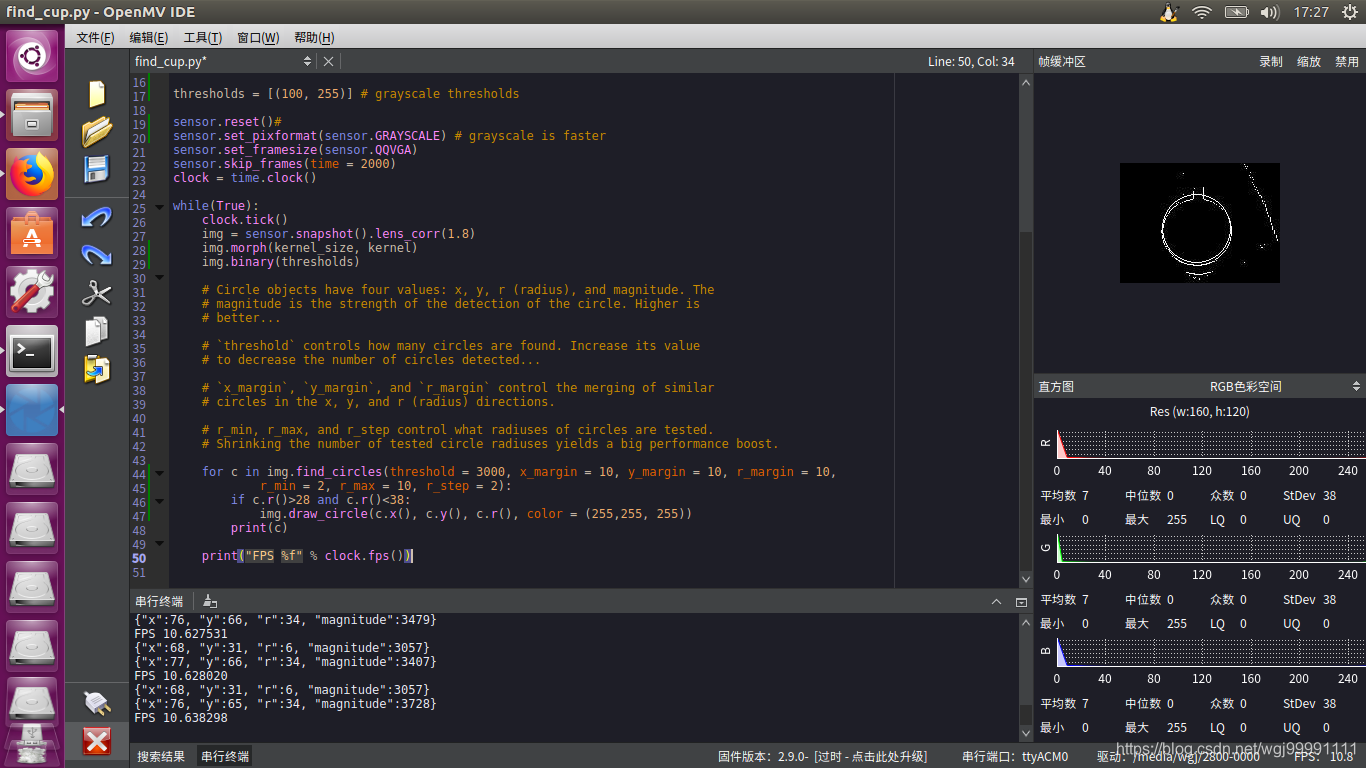
以上代码效果不是很好,添加边缘增强滤波,以及使用灰度图像之后,效果好很多。
import sensor, image, timekernel_size = 1 # kernel width = (size*2)+1, kernel height = (size*2)+1
kernel = [-1, -1, -1,\-1, +8, -1,\-1, -1, -1]thresholds = [(100, 255)] # grayscale thresholdssensor.reset()#
sensor.set_pixformat(sensor.GRAYSCALE) # grayscale is faster
sensor.set_framesize(sensor.QQVGA)
sensor.skip_frames(time = 2000)
clock = time.clock()while(True):clock.tick()img = sensor.snapshot().lens_corr(1.8)img.morph(kernel_size, kernel)img.binary(thresholds)# Circle objects have four values: x, y, r (radius), and magnitude. The# magnitude is the strength of the detection of the circle. Higher is# better...# `threshold` controls how many circles are found. Increase its value# to decrease the number of circles detected...# `x_margin`, `y_margin`, and `r_margin` control the merging of similar# circles in the x, y, and r (radius) directions.# r_min, r_max, and r_step control what radiuses of circles are tested.# Shrinking the number of tested circle radiuses yields a big performance boost.for c in img.find_circles(threshold = 3000, x_margin = 10, y_margin = 10, r_margin = 10,r_min = 2, r_max = 10, r_step = 2):if c.r()>28 and c.r()<38:img.draw_circle(c.x(), c.y(), c.r(), color = (255,255, 255))print(c)print("FPS %f" % clock.fps())
本文来自互联网用户投稿,文章观点仅代表作者本人,不代表本站立场,不承担相关法律责任。如若转载,请注明出处。 如若内容造成侵权/违法违规/事实不符,请点击【内容举报】进行投诉反馈!