仪表盘
因为echarts无法满足我的项目需求,然后找到了
http://justgage.com/ 特别好 nice
Customize style
效果如下
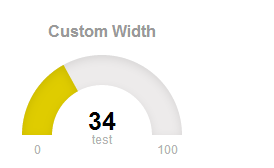
可配置参数如下id :                    string              元素的ID container element id
title :                 string              仪表盘的标题 gauge title text
titleFontColor :        string              仪表盘标题的字体颜色 color title text
value :                 int                 仪表盘的值 value gauge is showing
valueFontColor :        string              仪表盘值的字体颜色 color of value text
min :                   int                 仪表盘的最小值 minimum value
max :                   int                 仪表盘的最大值 maximum value
showMinMax :            bool                是否展示仪表盘的最大最小值 hide or display min and max values
gaugeWidthScale :       float               仪表盘管道的宽度 width of the gauge element
gaugeColor :            string              仪表盘管道的颜色 background color of gauge element
label :                 string              仪表盘值下的文字 text to show below value
showInnerShadow :       bool                是否显示内阴影 whether to display inner shadow
shadowOpacity :         float               阴影透明度 shadow opacity, values 0 ~ 1
shadowSize :            int                 阴影的大小 inner shadow size
shadowVerticalOffset :  int                 阴影偏移量 how much is shadow offset from top
levelColors :           array of strings    设置颜色数组如levelColors: ["#00fff6","#ff00fc","#1200ff"],则将数值均匀分成三段,从小到大依次匹配颜色数组中的值  colors of indicator, from lower to upper, in hex format
levelColorsGradient :   bool                是否使用渐进的或基于扇区的颜色变化 use gradual or sector-based color change
labelFontColor :        string              仪表盘值下文字的字体颜色color of label showing label under value
startAnimationTime :    int                 动画开始时间 length of initial load animation
startAnimationType :    string              动画类型 type of initial animation (linear, >, <, <>, bounce)
refreshAnimationTime :  int                 刷新动画的时间 length of refresh animation
refreshAnimationType :  string              刷新动画的类型 type of refresh animation (linear, >, <, <>, bounce)
原文:https://blog.csdn.net/craryprimitiveman/article/details/22166557
本文来自互联网用户投稿,文章观点仅代表作者本人,不代表本站立场,不承担相关法律责任。如若转载,请注明出处。 如若内容造成侵权/违法违规/事实不符,请点击【内容举报】进行投诉反馈!