iOS GPUImage研究一:图片滤镜
本片介绍关于图片滤镜的研究:xoxo_x 著
本文参考:https://github.com/BradLarson/GPUImage#gpuimage
下载地址:
https://github.com/BradLarson/GPUImage/tree/master/examples/iOS/SimpleImageFilter
| 步骤 | 内容 |
|---|---|
| 第一步 | 创建预览View 即必须的GPUImageView |
| 第二步 | 创建对象 即我们要用到的GPUImagePicture |
| 第三步 | 创建滤镜 即这里我们使用的 GPUImageSobelEdgeDetectionFilter |
| 第四步 | 设置纹理尺寸 添加滤镜 addTarget 并开始处理 |
效果如下:
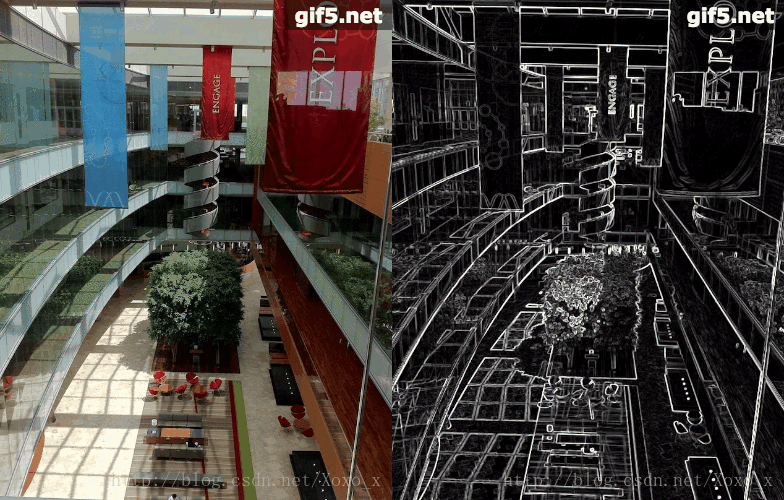
第一步:
CGRect mainScreenFrame = [[UIScreen mainScreen] applicationFrame];
GPUImageView *primaryView = [[GPUImageView alloc] initWithFrame:mainScreenFrame];
self.view = primaryView;
第二步:
 UIImage *inputImage = [UIImage imageNamed:@"WID-small.jpg"];
GPUImagePicture *sourcePicture = [[GPUImagePicture alloc] initWithImage:inputImage smoothlyScaleOutput:YES];
第三步:
GPUImageOutput *sepiaFilter = [[GPUImageSobelEdgeDetectionFilter alloc] init];
第四步:
//设置纹理尺寸[sepiaFilter forceProcessingAtSize:imageView.sizeInPixels];[sourcePicture addTarget:sepiaFilter];
[sepiaFilter addTarget:imageView];
//开始处理
[sourcePicture processImage];
如果想将图片保存下来需要使用:
- (void)useNextFrameForImageCapture;
- (UIImage *)imageFromCurrentFramebuffer;
或者使用:
- (UIImage *)imageByFilteringImage:(UIImage *)imageToFilter;即:
[sepiaFilter useNextFrameForImageCapture];UIImage *nearestNeighborImage = [sepiaFilter imageFromCurrentFramebuffer];或:
UIImage *inputImage = [UIImage imageNamed:@"Lambeau.jpg"];UIImage *nearestNeighborImage = [sepiaFilter imageByFilteringImage:inputImage];//文件写入本地
NSData *dataForPNGFile1 = UIImagePNGRepresentation(nearestNeighborImage);NSArray *paths = NSSearchPathForDirectoriesInDomains(NSDocumentDirectory, NSUserDomainMask, YES);NSString *documentsDirectory = [paths objectAtIndex:0];NSError *error = nil;if (![dataForPNGFile1 writeToFile:[documentsDirectory stringByAppendingPathComponent:@"Lambeau-Resized-fsk.png"] options:NSAtomicWrite error:&error]){return;}
图片处理分析:
一、分析GPUImageView
@interface GPUImageView : UIView
{GPUImageRotationMode inputRotation;
}
继承:UIView 并遵守GPUImageInput协议
GPUImageInput协议内容如下:
@protocol GPUImageInput
- (void)newFrameReadyAtTime:(CMTime)frameTime atIndex:(NSInteger)textureIndex;
- (void)setInputFramebuffer:(GPUImageFramebuffer *)newInputFramebuffer atIndex:(NSInteger)textureIndex;
- (NSInteger)nextAvailableTextureIndex;
- (void)setInputSize:(CGSize)newSize atIndex:(NSInteger)textureIndex;
- (void)setInputRotation:(GPUImageRotationMode)newInputRotation atIndex:(NSInteger)textureIndex;
- (CGSize)maximumOutputSize;
- (void)endProcessing;
- (BOOL)shouldIgnoreUpdatesToThisTarget;
- (BOOL)enabled;
- (BOOL)wantsMonochromeInput;
- (void)
二、分析GPUImagePicture
@interface GPUImagePicture : GPUImageOutput
{CGSize pixelSizeOfImage;BOOL hasProcessedImage;dispatch_semaphore_t imageUpdateSemaphore;
}// 初始化方法有很多
- (id)initWithURL:(NSURL *)url;
- (id)initWithImage:(UIImage *)newImageSource;
- (id)initWithCGImage:(CGImageRef)newImageSource;
- (id)initWithImage:(UIImage *)newImageSource smoothlyScaleOutput:(BOOL)smoothlyScaleOutput;
- (id)initWithCGImage:(CGImageRef)newImageSource smoothlyScaleOutput:(BOOL)smoothlyScaleOutput;
- (id)initWithImage:(UIImage *)newImageSource removePremultiplication:(BOOL)removePremultiplication;
- (id)initWithCGImage:(CGImageRef)newImageSource removePremultiplication:(BOOL)removePremultiplication;
- (id)initWithImage:(UIImage *)newImageSource smoothlyScaleOutput:(BOOL)smoothlyScaleOutput removePremultiplication:(BOOL)removePremultiplication;
- (id)initWithCGImage:(CGImageRef)newImageSource smoothlyScaleOutput:(BOOL)smoothlyScaleOutput removePremultiplication:(BOOL)removePremultiplication;// 处理和对输出图片大小进行更改
- (void)processImage;
- (CGSize)outputImageSize;/**
异步处理,回调*/
- (BOOL)processImageWithCompletionHandler:(void (^)(void))completion;
- (void)processImageUpToFilter:(GPUImageOutput *)finalFilterInChain withCompletionHandler:(void (^)(UIImage *processedImage))block;
三 、分析GPUImageSobelEdgeDetectionFilter (黑白漫画)
//起名为黑白漫画 、更好理解些
//所有的滤镜都是继承GPUImageFilter
GPUImageSobelEdgeDetectionFilter最终是继承GPUImageFilter的
@interface GPUImageFilter : GPUImageOutput <GPUImageInput>所以,我们前面写到
GPUImageOutput *sepiaFilter = [[GPUImageSobelEdgeDetectionFilter alloc] init];就是因为继承的关系。
四、分析addTaget
- (void)addTarget:(id)newTarget;
{NSInteger nextAvailableTextureIndex = [newTarget nextAvailableTextureIndex];[self addTarget:newTarget atTextureLocation:nextAvailableTextureIndex];if ([newTarget shouldIgnoreUpdatesToThisTarget]){_targetToIgnoreForUpdates = newTarget;}
}
我们可以看到addTarget 是GPUImageOutput的方法,也就是说,所有的GPUImageOutput的子类够可以使用这个函数,即继承与GPUImageOutput的类,如上面提到的GPUImageFilter。
- (void)addTarget:(id<GPUImageInput>)newTarget;此外,凡是遵守这个协议的都是newTarget对象,如我们上面提到的GPUImageFilter以及GPUImageView。
本文所涉及到的代码:
#import *sepiaFilter;} #import "SimpleImageViewController.h"@implementation SimpleImageViewController- (void)viewDidLoad{ CGRect mainScreenFrame = [[UIScreen mainScreen] applicationFrame]; GPUImageView *primaryView = [[GPUImageView alloc] initWithFrame:mainScreenFrame];self.view = primaryView;[self setupDisplayFiltering];}#pragma mark Image filtering- (void)setupDisplayFiltering;
{UIImage *inputImage = [UIImage imageNamed:@"WID-small.jpg"];sourcePicture = [[GPUImagePicture alloc] initWithImage:inputImage smoothlyScaleOutput:YES];sepiaFilter = [[GPUImageSobelEdgeDetectionFilter alloc] init];GPUImageView *imageView = (GPUImageView *)self.view;[sepiaFilter forceProcessingAtSize:imageView.sizeInPixels]; [sourcePicture addTarget:sepiaFilter];[sepiaFilter addTarget:imageView];[sourcePicture processImage];
}
本文用到的图片:

本文来自互联网用户投稿,文章观点仅代表作者本人,不代表本站立场,不承担相关法律责任。如若转载,请注明出处。 如若内容造成侵权/违法违规/事实不符,请点击【内容举报】进行投诉反馈!