文章目录 1. 商品列表展现 1.1 表设计 1.2 POJO设计 1.2.1 编辑Item表 1.2.2 编辑ItemDesc 1.3 商品页面跳转 1.4 商品列表展现 1.4.1 业务接口说明 1.4.2 编辑ItemController 1.4.3 编辑ItemService 1.4.4 编辑分页配置类 1.5 商品新增实现 1.5.1 关于商品信息说明 1.5.2 关于商品新增接口说明 1.5.3 封装ItemVO对象 1.5.4 修改表字段类型 1.5.5 页面参数传递 1.5.6 编辑ItemCatController 1.5.7 编辑ItemCatService 1.6 商品删除操作 1.6.1 商品删除业务接口 1.6.2 编辑ItemController 1.6.3 编辑ItemService 2 文件上传操作 2.1 文件上传业务说明 2.2 文件上传业务说明 2.3 ImageVO对象封装 2.4 文件上传入门案例 2.5 文件上传完整代码 2.5.1 编辑FileController 2.5.2 编辑FileService
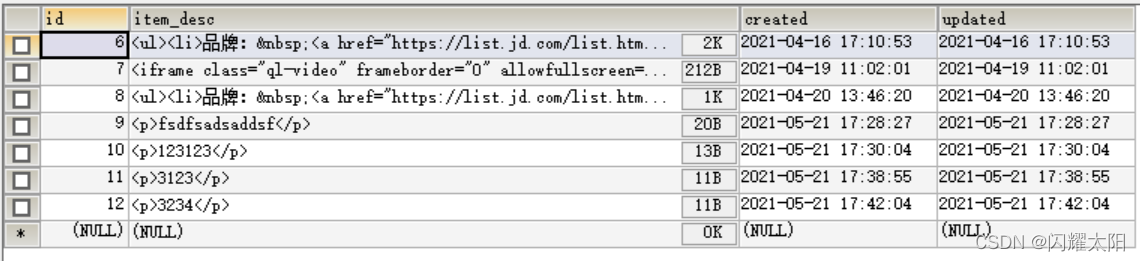
商品表设计
import Vue from 'vue'
import VueRouter from 'vue-router'
import Login from '../components/Login.vue'
import ElementUI from '../components/ElementUI.vue'
import Home from '../components/Home.vue'
import User from '../components/user/user.vue'
import ItemCat from '../components/items/ItemCat.vue'
import Item from '../components/items/Item.vue'
import AddItem from '../components/items/addItem.vue'
Vue. use ( VueRouter)
const routes = [ { path: '/' , redirect: '/login' } , { path: '/login' , component: Login} , { path: '/elementUI' , component: ElementUI} , { path: '/home' , component: Home, children: [ { path: '/user' , component: User} , { path: '/itemCat' , component: ItemCat} , { path: '/item' , component: Item} , { path: '/item/addItem' , component: AddItem} ] } ,
]
请求路径: /item/getItemList?query=&pageNum=1&pageSize=10 请求类型: get 请求参数: 使用pageResult对象接收 参数名称 参数说明 备注信息 query 用户查询的数据 可以为null pageNum 分页查询的页数 必须赋值不能为null pageSize 分页查询的条数 必须赋值不能为null
参数名称 参数说明 备注 status 状态信息 200表示服务器请求成功 201表示服务器异常 msg 服务器返回的提示信息 可以为null data 服务器返回的业务数据 商品分页对象
package com. jt. controller ; import com. jt. service. ItemService ;
import com. jt. vo. PageResult ;
import com. jt. vo. SysResult ;
import org. springframework. beans. factory. annotation. Autowired ;
import org. springframework. web. bind. annotation. * ; @RestController
@CrossOrigin
@RequestMapping ( "/item" )
public class ItemController { @Autowired private ItemService itemService; @GetMapping ( "/getItemList" ) public SysResult getItemList ( PageResult pageResult) { pageResult = itemService. getItemList ( pageResult) ; return SysResult . success ( pageResult) ; } } package com. jt. service ; import com. baomidou. mybatisplus. core. conditions. query. QueryWrapper ;
import com. baomidou. mybatisplus. core. metadata. IPage ;
import com. baomidou. mybatisplus. extension. plugins. pagination. Page ;
import com. jt. mapper. ItemDescMapper ;
import com. jt. mapper. ItemMapper ;
import com. jt. pojo. Item ;
import com. jt. vo. PageResult ;
import org. springframework. beans. factory. annotation. Autowired ;
import org. springframework. stereotype. Service ;
import org. springframework. util. StringUtils ; import java. util. List ; @Service
public class ItemServiceImpl implements ItemService { @Autowired private ItemMapper itemMapper; @Autowired private ItemDescMapper itemDescMapper; @Override public PageResult getItemList ( PageResult pageResult) { boolean flag = StringUtils . hasLength ( pageResult. getQuery ( ) ) ; QueryWrapper < Item > = new QueryWrapper < > ( ) ; queryWrapper. like ( flag, "title" , pageResult. getQuery ( ) ) ; IPage < Item > = new Page < > ( pageResult. getPageNum ( ) , pageResult. getPageSize ( ) ) ; page = itemMapper. selectPage ( page, queryWrapper) ; long total = page. getTotal ( ) ; List < Item > = page. getRecords ( ) ; return pageResult. setTotal ( total) . setRows ( rows) ; }
}
说明: MybatisPlus可以实现跨数据库. 用户操作的是对象,但是由MP动态的生成对应的Sql语句.
@Configuration
public class MybatisPlusConfig { @Bean public MybatisPlusInterceptor mybatisPlusInterceptor ( ) { MybatisPlusInterceptor interceptor = new MybatisPlusInterceptor ( ) ; interceptor. addInnerInterceptor( new PaginationInnerInterceptor ( DbType . MARIADB) ) ; return interceptor; }
}
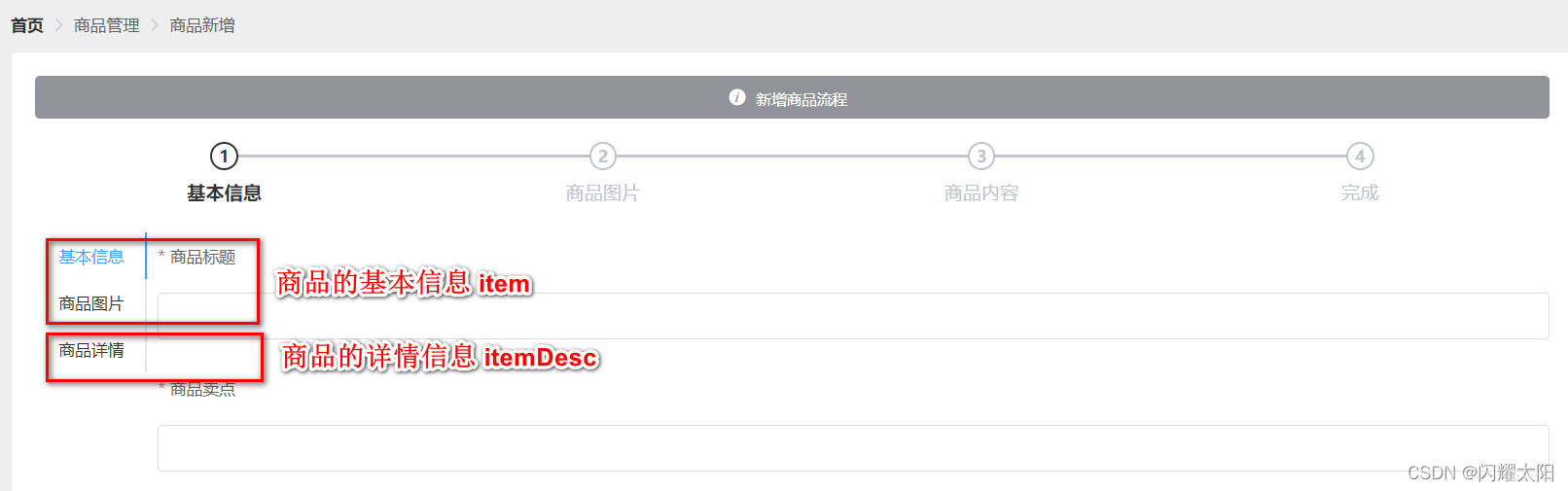
说明: item的基本信息与ItemDesc的详情信息 可以采用对象的方式进行包裹.{item: item的数据信息, itemDesc: itemDesc的数据信息}
请求路径: http://localhost:8091/item/saveItem 请求类型: post 前端传递参数分析 { item: { images: "/2021/05/20/da0c1d4781c1499399f090da8b60f359.jpg,/2021/05/20/2ac1c34776a7465887eb019655354c3c.jpg" itemCatId: 560 num: "100" price: 718800 sellPoint: "【华为官方直供,至高12期免息0首付,原装正品】送华为原装无线充+运动蓝牙耳机+蓝牙音箱+三合一多功能数据线+钢化膜等!" title: "华为P40 Pro 5G手机【12期免息可选送豪礼】全网通智能手机" } , itemDesc: { itemDesc: " 参数名称 参数类型 参数说明 备注 item Item 商品基本信息对象封装 不能为null itemDesc ItemDesc 商品详情信息 不能为null
参数名称 参数类型 参数说明 备注 title String 商品标题信息 不能为null sellPoint String 商品卖点信息 不能为null price Integer 商品价格信息 不能为null 需要将数据扩大100倍 num Integer 商品数量信息 不能为null images String 商品图片地址信息 不能为null itemCatId Integer 商品父级分类ID 不能为null status Boolean 商品状态信息 不能为null
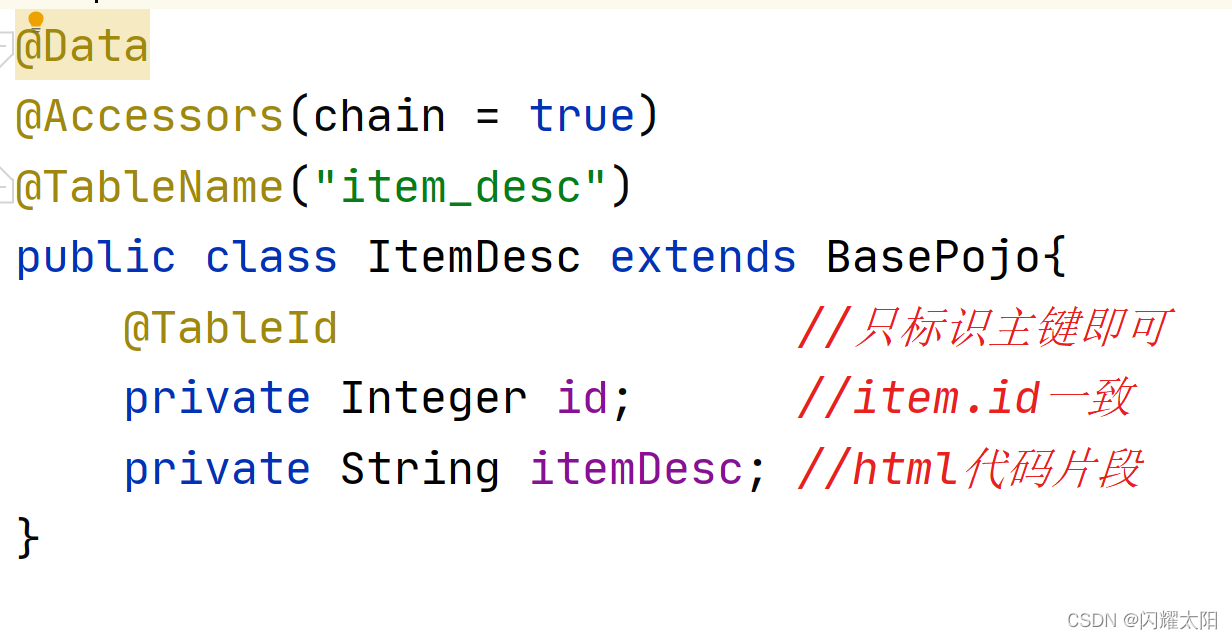
参数名称 参数类型 参数说明 备注 id Integer 商品Id信息 因为Item和ItemDesc是一对一关系 所以需要依赖Item对象的Id值 itemDesc String 商品详情信息 内部包含了大量的html语句
参数名称 参数说明 备注 status 状态信息 200表示服务器请求成功 201表示服务器异常 msg 服务器返回的提示信息 可以为null data 服务器返回的业务数据 可以为null
@Data
@Accessors ( chain = true )
public class ItemVO implements Serializable { private Item item; private ItemDesc itemDesc;
}
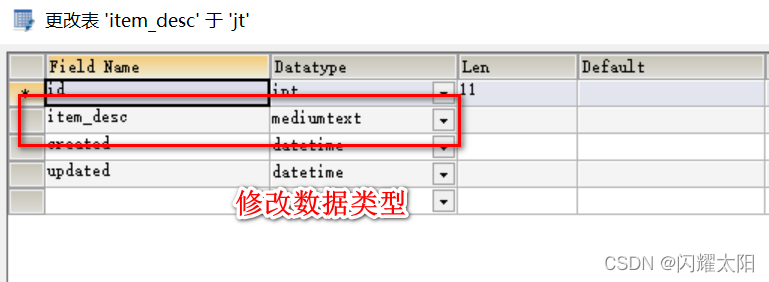
说明: 文本操作需要大量的存储空间,所以改为mediumtext
@PostMapping ( "/saveItem" ) public SysResult saveItem ( @RequestBody ItemVO itemVO) { itemService. saveItem ( itemVO) ; return SysResult . success ( ) ; }
@Override @Transactional public void saveItem ( ItemVO itemVO) { Item item = itemVO. getItem ( ) . setStatus ( true ) ; itemMapper. insert ( item) ; ItemDesc itemDesc = itemVO. getItemDesc ( ) ; itemDesc. setId ( item. getId ( ) ) ; itemDescMapper. insert ( itemDesc) ; }
请求路径: /item/deleteItemById 请求类型: delete 请求参数: 参数名称 参数说明 备注 status 状态信息 200表示服务器请求成功 201表示服务器异常 msg 服务器返回的提示信息 可以为null data 服务器返回的业务数据 可以为null
@DeleteMapping ( "/deleteItemById" ) public SysResult deleteItemById ( Integer id) { itemService. deleteItemById ( id) ; return SysResult . success ( ) ; }
@Override @Transactional public void deleteItemById ( Integer id) { itemMapper. deleteById ( id) ; itemDescMapper. deleteById ( id) ; }
说明:当用户选择多张图片时,则是一张一张的传输.
请求路径: http://localhost:8091/file/upload 请求类型: post 请求参数: 参数名称 参数说明 备注 file 文件上传的参数名称 file中携带的是二进制信息
参数名称 参数说明 备注 status 状态信息 200表示服务器请求成功 201表示服务器异常 msg 服务器返回的提示信息 可以为null data 服务器返回的业务数据 返回ImageVO对象
参数名称 参数类型 参数说明 备注 virtualPath String 图片实际路径 不包含磁盘信息 例如: 2021/11/11/a.jpg 不需要写磁盘地址 urlPath String 图片url访问地址 http://image.jt.com/2021/11/11/a.jpg 需要指定域名地址 fileName String 文件上传后的文件名称 UUID.type
package com. jt. vo ; import lombok. AllArgsConstructor ;
import lombok. Data ;
import lombok. NoArgsConstructor ;
import lombok. experimental. Accessors ; @Data
@Accessors ( chain = true )
@NoArgsConstructor
@AllArgsConstructor
public class ImageVO { private String virtualPath; private String urlPath; private String fileName;
} package com. jt. controller ; import com. jt. vo. SysResult ;
import org. springframework. web. bind. annotation. CrossOrigin ;
import org. springframework. web. bind. annotation. PostMapping ;
import org. springframework. web. bind. annotation. RequestMapping ;
import org. springframework. web. bind. annotation. RestController ;
import org. springframework. web. multipart. MultipartFile ; import java. io. File ;
import java. io. IOException ;
import java. io. InputStream ; @RestController
@CrossOrigin
@RequestMapping ( "/file" )
public class FileController { @PostMapping ( "/upload" ) public SysResult upload ( MultipartFile file) throws IOException { String fileName = file. getOriginalFilename ( ) ; String dir = "D:/project3/images" ; File dirFile = new File ( dir) ; if ( ! dirFile. exists ( ) ) { dirFile. mkdirs ( ) ; } String path = dir + "/" + fileName; file. transferTo ( new File ( path) ) ; return SysResult . success ( ) ; }
} @RestController
@CrossOrigin
@RequestMapping ( "/file" )
public class FileController { @Autowired private FileService fileService; @PostMapping ( "/upload" ) public SysResult fileUpload ( MultipartFile file) { ImageVO imageVO = fileService. upload ( file) ; if ( imageVO == null ) { return SysResult . fail ( ) ; } return SysResult . success ( imageVO) ; } }
package com. jt. service ; import com. jt. vo. ImageVO ;
import org. springframework. stereotype. Service ;
import org. springframework. web. multipart. MultipartFile ; import javax. imageio. ImageIO ;
import java. awt. image. BufferedImage ;
import java. io. IOException ; @Service
public class FileServiceImpl implements FileService { @Override public ImageVO upload ( MultipartFile file) { String fileName = file. getOriginalFilename ( ) . toLowerCase ( ) ; if ( ! fileName. matches ( "^.+\\.(jpg|png|gif)$" ) ) { return null ; } try { BufferedImage bufferedImage = ImageIO . read ( file. getInputStream ( ) ) ; int width = bufferedImage. getWidth ( ) ; int height = bufferedImage. getHeight ( ) ; if ( width == 0 || height == 0 ) { return null ; } } catch ( IOException e) { e. printStackTrace ( ) ; throw new RuntimeException ( e) ; } return null ; }
}
本文来自互联网用户投稿,文章观点仅代表作者本人,不代表本站立场,不承担相关法律责任。如若转载,请注明出处。 如若内容造成侵权/违法违规/事实不符,请点击【内容举报】 进行投诉反馈!