Layui多图上传
Layui多图上传
最近制作经销商上传附件需要实现一个多图上传的功能,前端使用的是layui框架支持多张图片上传,效果如下
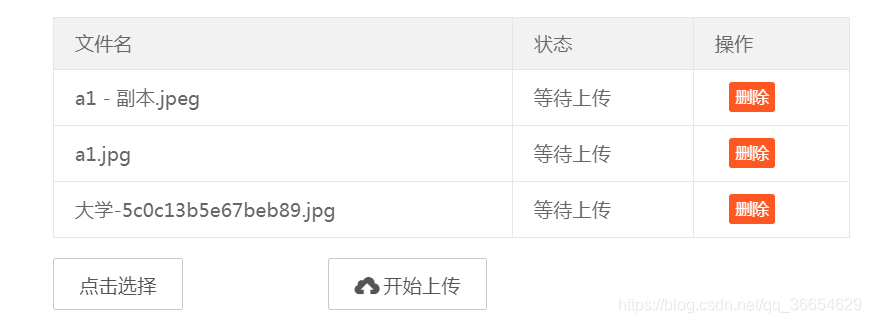
前端页面代码:
文件名 状态 操作
使用前需引入layui相关的js、css文件:
js核心代码
;layui.define(['jquery', 'table', 'form', 'layer', 'laydate', 'upload'], function (exports) {"use strict";var $ = layui.$, table = layui.table, layer = layui.layer, laydate = layui.laydate,upload = layui.upload, form = layui.form, admin = layui.admin,setter = layui.setter;//定义请求接口var path = {uploadPic: '/merchantInfo/uploadPic',img: '/readImage',};var imgList=[];var deleteList=[];//新增多文件列表示例var demoListView = $('#demoListForAdd');var uploadListIns = upload.render({elem: '#uploadForAdd' ,url: window.ptfConfig.baseUrl + path.uploadPic, //上传图片接口,可自行更换headers: { //通过 request 头传递Authorization: layui.data(setter.tableName)[setter.headers.accessTokenName]}, accept: 'file',multiple: true,auto: false,bindAction: '#uploadActionForAdd',choose: function(obj){var files = this.files = obj.pushFile(); //将每次选择的文件追加到文件队列//读取本地文件obj.preview(function(index, file, result){var tr = $(['',''+ file.name +' ','等待上传 ','','','',' ',' '].join(''));//删除tr.find('.demo-delete').on('click', function(){delete files[index]; //删除对应的文件tr.remove();uploadListIns.config.elem.next()[0].value = ''; //清空 input file 值,以免删除后出现同名文件不可选});demoListView.append(tr);});},done: function(res, index, upload){if(res.code == 200){ //上传成功//创建附件对象console.log(res.data)var attcah={};attcah.attachType=res.data[0].type;attcah.attachName=res.data[0].originalFileName;attcah.url=res.data[0].url;attcah.fileName=res.data[0].serveFileName;imgList.push(attcah);//加入数组var tr = demoListView.find('tr#upload-'+ index),tds = tr.children();tds.eq(2).html('上传成功');tds.eq(3).html(''); //清空操作return delete this.files[index]; //删除文件队列已经上传成功的文件}this.error(index, upload);},error: function(index, upload){var tr = demoListView.find('tr#upload-'+ index),tds = tr.children();tds.eq(2).html('上传失败');tds.eq(3).find('.demo-reload').removeClass('layui-hide'); //显示重传}});
后端控制层
import com.hrt.framework.web.core.Result;
import com.hrt.zxxc.fxspg.file.FileBean;
import com.hrt.zxxc.fxspg.file.FileService;
import org.springframework.beans.factory.annotation.Autowired;
import org.springframework.stereotype.Controller;
import org.springframework.web.bind.annotation.*;
import org.springframework.web.multipart.MultipartFile;
import javax.servlet.http.HttpServletRequest;
import java.util.List;
/*** MerchantInfoInfo Controller层** @author generator* @version 1.0.0* @date 2019-06-27 17:28:12*/
@Controller
@RequestMapping("merchantInfo")
public class PtfMerchantInfoController {@Autowiredprivate FileService fileService;/*** @Param [file, request]* @return com.hrt.framework.web.core.Result* @Author youjp* @Description //TODO 图片上传* @throw**/@PostMapping(value = "uploadPic")@ResponseBodypublic Result uploadPic(MultipartFile[] file, HttpServletRequest request) {List filePathList = fileService.upload(request, file);return Result.success(filePathList);}
}
FileService
package com.hrt.zxxc.fxspg.file;import org.springframework.beans.factory.annotation.Value;
import org.springframework.stereotype.Service;
import org.springframework.web.multipart.MultipartFile;import javax.servlet.ServletOutputStream;
import javax.servlet.http.HttpServletRequest;
import javax.servlet.http.HttpServletResponse;
import java.io.BufferedInputStream;
import java.io.File;
import java.io.FileInputStream;
import java.util.ArrayList;
import java.util.Calendar;
import java.util.List;/*** @program: fxspg* @description:* @author: youjp* @create: 2019-06-21 11:05**/
@Service
public class FileService {@Value("${image.uploadPath}")private String imageUploadPath;public List upload(HttpServletRequest request, MultipartFile[] files) {List filePath = new ArrayList<>();Calendar cal = Calendar.getInstance();try {for (MultipartFile file : files) {//todo 前端传递业务类型。判断能否上传String originalFilename = file.getOriginalFilename();String type = file.getOriginalFilename().substring(file.getOriginalFilename().lastIndexOf("."),file.getOriginalFilename().length());String fullFileName = System.currentTimeMillis() + type;String serveFileName = fullFileName.substring(0,fullFileName.lastIndexOf("."));String originalName = file.getOriginalFilename().substring(0, file.getOriginalFilename().lastIndexOf("."));Calendar calendar = Calendar.getInstance();int year = calendar.get(Calendar.YEAR);int month = calendar.get(Calendar.MONTH) + 1;int day = calendar.get(Calendar.DAY_OF_MONTH);String savePath = imageUploadPath + "/"+ year + "/" + month + "/"+ day + "/" + fullFileName;File target = new File(savePath);if (!target.getParentFile().exists()) {target.getParentFile().mkdirs();}file.transferTo(target);//信息封装savePath =  "/"+ year + "/" + month + "/"+ day + "/" + fullFileName;FileBean fileBean = new FileBean(serveFileName,originalName,savePath,type);//返回文件在服务器的地址filePath.add(fileBean);}} catch (Exception e) {e.printStackTrace();}return filePath;}public void readFile(String fileName, String folder, HttpServletRequest request, HttpServletResponse response) {try {response.setContentType("image/jpeg");//发头控制浏览器不要缓存response.setDateHeader("expries", -1);response.setHeader("Cache-Control", "no-cache");response.setHeader("Pragma", "no-cache");String root_path = imageUploadPath + File.separator + folder + File.separator + fileName;ServletOutputStream outputStream = response.getOutputStream();FileInputStream fileInputStream = new FileInputStream(new File(root_path));BufferedInputStream bufferedInputStream = new BufferedInputStream(fileInputStream);byte[] b = new byte[bufferedInputStream.available()];bufferedInputStream.read(b);outputStream.write(b);outputStream.close();} catch (Exception e) {e.printStackTrace();}}public void readFile(String url, HttpServletRequest request, HttpServletResponse response) {try {response.setContentType("image/jpeg");//发头控制浏览器不要缓存response.setDateHeader("expries", -1);response.setHeader("Cache-Control", "no-cache");response.setHeader("Pragma", "no-cache");String root_path = imageUploadPath + File.separator + url;ServletOutputStream outputStream = response.getOutputStream();FileInputStream fileInputStream = new FileInputStream(new File(root_path));BufferedInputStream bufferedInputStream = new BufferedInputStream(fileInputStream);byte[] b = new byte[bufferedInputStream.available()];bufferedInputStream.read(b);outputStream.write(b);outputStream.close();} catch (Exception e) {e.printStackTrace();}}
}
FileBean.java
package com.hrt.zxxc.fxspg.file;/*** @program: hrt-component2* @description:* @author: jp* @create: 2019-06-21 11:18**/
public class FileBean {private String serveFileName;private String originalFileName;private String url;private String type;public FileBean(String serveFileName, String originalFileName, String url, String type) {this.serveFileName = serveFileName;this.originalFileName = originalFileName;this.url = url;this.type = type;}public FileBean() {}public String getServeFileName() {return serveFileName;}public void setServeFileName(String serveFileName) {this.serveFileName = serveFileName;}public String getOriginalFileName() {return originalFileName;}public void setOriginalFileName(String originalFileName) {this.originalFileName = originalFileName;}public String getUrl() {return url;}public void setUrl(String url) {this.url = url;}public String getType() {return type;}public void setType(String type) {this.type = type;}
}
响应工具: Result.java
//
// Source code recreated from a .class file by IntelliJ IDEA
// (powered by Fernflower decompiler)
//package com.hrt.framework.web.core;import com.hrt.framework.commons.utils.JsonUtils;
import com.hrt.framework.web.core.enums.ResultEnum;public class Result {private int code;private String msg;private Object data;public Result() {}public Result(int code, String msg) {this.code = code;this.msg = msg;}public Result(int code, String msg, Object data) {this.code = code;this.data = data;}public int getCode() {return this.code;}public void setCode(int code) {this.code = code;}public String getMsg() {return this.msg;}public void setMsg(String msg) {this.msg = msg;}public Object getData() {return this.data;}public void setData(Object data) {this.data = data;}public static Result success() {Result result = new Result();result.setCode(ResultEnum.SUCCESS.getCode());result.setMsg(ResultEnum.SUCCESS.getMsg());return result;}public static Result success(Object data) {Result result = new Result();result.setCode(ResultEnum.SUCCESS.getCode());result.setMsg(ResultEnum.SUCCESS.getMsg());result.setData(data);return result;}public static Result fail() {Result result = new Result();result.setCode(ResultEnum.FAIL.getCode());result.setMsg(ResultEnum.FAIL.getMsg());return result;}public static Result fail(Object data) {Result result = new Result();result.setCode(ResultEnum.FAIL.getCode());result.setMsg(ResultEnum.FAIL.getMsg());result.setData(data);return result;}public static Result internalError() {Result result = new Result();result.setCode(ResultEnum.INTERNAL_ERROR.getCode());result.setMsg(ResultEnum.INTERNAL_ERROR.getMsg());return result;}public static Result internalError(Object data) {Result result = new Result();result.setCode(ResultEnum.INTERNAL_ERROR.getCode());result.setMsg(ResultEnum.INTERNAL_ERROR.getMsg());result.setData(data);return result;}public static Result illegalArguments(Object data) {Result result = new Result();result.setCode(ResultEnum.ILLEGAL_ARGUMENTS.getCode());result.setMsg(ResultEnum.ILLEGAL_ARGUMENTS.getMsg());result.setData(data);return result;}public static Result illegalArguments() {Result result = new Result();result.setCode(ResultEnum.ILLEGAL_ARGUMENTS.getCode());result.setMsg(ResultEnum.ILLEGAL_ARGUMENTS.getMsg());return result;}public static Result missingParameter(Object data) {Result result = new Result();result.setCode(ResultEnum.MISSING_PARAMETER.getCode());result.setMsg(ResultEnum.MISSING_PARAMETER.getMsg());result.setData(data);return result;}public static Result forbidden() {Result result = new Result();result.setCode(ResultEnum.FORBIDDEN.getCode());result.setMsg(ResultEnum.FORBIDDEN.getMsg());return result;}public static Result custom(int code, String msg) {Result result = new Result();result.setCode(code);result.setMsg(msg);return result;}public static Result custom(int code, String msg, Object data) {Result result = new Result();result.setCode(code);result.setMsg(msg);result.setData(data);return result;}public String toString() {return JsonUtils.toJSONString(this);}
}
jsonUtils工具类
//
// Source code recreated from a .class file by IntelliJ IDEA
// (powered by Fernflower decompiler)
//package com.hrt.framework.commons.utils;import com.alibaba.fastjson.JSON;
import java.util.List;public final class JsonUtils {private JsonUtils() {}public static  T parseObject(String text, Class clazz) {return JSON.parseObject(text, clazz);}public static  List parseArray(String text, Class clazz) {return JSON.parseArray(text, clazz);}public static String toJSONString(Object object) {return JSON.toJSONString(object);}public static String toJSONString(Object object, boolean prettyFormat) {return JSON.toJSONString(object, prettyFormat);}
}
自定义响应枚举:
//
// Source code recreated from a .class file by IntelliJ IDEA
// (powered by Fernflower decompiler)
//package com.hrt.framework.web.core.enums;public enum ResultEnum {SUCCESS(200, "SUCCESS"),FAIL(201, "FAIL"),ILLEGAL_ARGUMENTS(202, "ILLEGAL_ARGUMENTS"),MISSING_PARAMETER(203, "MISSING_PARAMETER"),FORBIDDEN(403, "FORBIDDEN"),INTERNAL_ERROR(500, "INTERNAL_ERROR");private int code;private String msg;private ResultEnum(int code, String msg) {this.code = code;this.msg = msg;}public int getCode() {return this.code;}public String getMsg() {return this.msg;}
}
启动类将MultipartResolver注入容器
import org.springframework.beans.factory.annotation.Autowired;
import org.springframework.boot.SpringApplication;
import org.springframework.boot.autoconfigure.SpringBootApplication;
import org.springframework.context.annotation.Bean;
import org.springframework.web.cors.CorsConfiguration;
import org.springframework.web.cors.UrlBasedCorsConfigurationSource;
import org.springframework.web.filter.CorsFilter;
import org.springframework.web.multipart.MultipartResolver;
import org.springframework.web.multipart.commons.CommonsMultipartResolver;
import java.util.Collections;
@SpringBootApplication
public class PlatformApplication {public static void main(String[] args) {SpringApplication.run(PlatformApplication.class, args);}//解决跨域问题private CorsConfiguration buildConfig() {CorsConfiguration corsConfiguration = new CorsConfiguration();// 1允许任何域名使用corsConfiguration.addAllowedOrigin("*");// 2允许任何头corsConfiguration.addAllowedHeader("*");// 3允许任何方法(post、get等)corsConfiguration.addAllowedMethod("*");return corsConfiguration;}@Beanpublic CorsFilter corsFilter() {UrlBasedCorsConfigurationSource source = new UrlBasedCorsConfigurationSource();source.registerCorsConfiguration("/**", buildConfig());return new CorsFilter(source);}@Beanpublic MultipartResolver multipartResolver(){CommonsMultipartResolver multipartResolver = new CommonsMultipartResolver();multipartResolver.setMaxUploadSize(10000000);return multipartResolver;}}
application.yml文件配置图片上传保存路径:
spring:
#  profiles:# active: devapplication:name: fxspg-platform-servermain:allow-bean-definition-overriding: trueautoconfigure:exclude: org.springframework.boot.autoconfigure.web.servlet.MultipartAutoConfiguration
server:port: 9001#文件上传路径
image:uploadPath: D:\fxspg\imagelogo: \logo
# 日志配置
logging:config: classpath:logback-spring.xmlpath: ./logs/${spring.application.name}lolevel:root: info
上传效果:
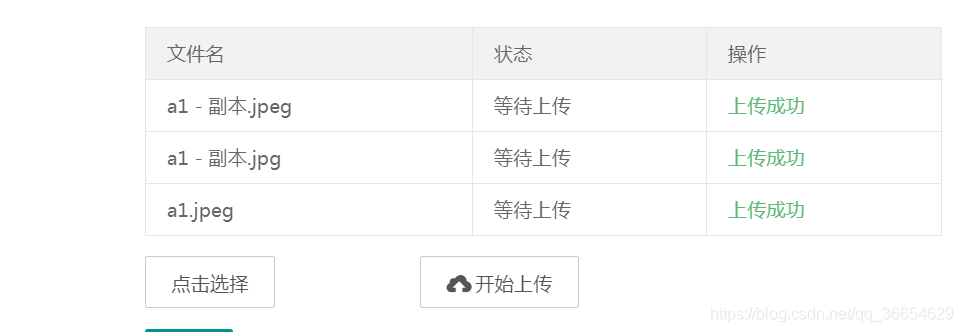
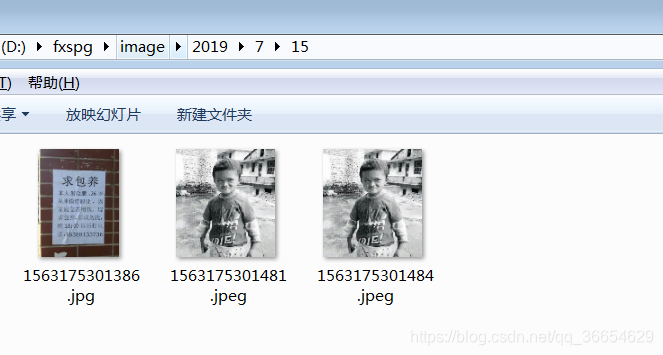
选择多张图片以后,点击开始上传。查看
D:\fxspg\image 可以看到之前选中的多张图片已经上传。
有兴趣的老爷,可以关注我的公众号【一起收破烂】,回复【006】获取2021最新java面试资料以及简历模型120套哦~

本文来自互联网用户投稿,文章观点仅代表作者本人,不代表本站立场,不承担相关法律责任。如若转载,请注明出处。 如若内容造成侵权/违法违规/事实不符,请点击【内容举报】进行投诉反馈!