Matplotlib 入门(三):多图合并
一、多合一显示
1、subplot方法:设置行、列和起始点
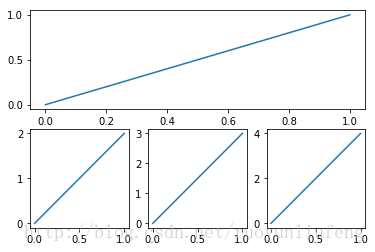
plt.subplot(2,1,1) # 分成两行一列,起始点为1
2、代码
# -*- coding: utf-8 -*-
"""
Created on Sun Sep 24 15:02:51 2017@author: ryoyun
"""# subplot 多合一显示
import matplotlib.pyplot as pltplt.figure()plt.subplot(2,1,1)      # 分成两行一列,起始点为1
plt.plot([0,1],[0,1])   # 设置xy轴范围plt.subplot(2,3,4)      # 分成两行三列,起始点位4
plt.plot([0,1],[0,2])plt.subplot(2,3,5)
plt.plot([0,1],[0,3])plt.subplot(2,3,6)
plt.plot([0,1],[0,4])plt.show()
3、效果
二、分格显示
1、代码
# -*- coding: utf-8 -*-
"""
Created on Sun Sep 24 15:11:01 2017@author: ryoyun
"""# 分格显示
import matplotlib.pyplot as plt
import matplotlib.gridspec as gridspec# method 1: subplot2grid
############################
#plt.figure()
#ax1 = plt.subplot2grid((3,3),(0,0),colspan = 3,rowspan = 1)
#ax1.plot([1,2],[1,2])
#ax1.set_title('ax1_title')#plt.figure()
#ax2 = plt.subplot2grid((3,3),(1,0),colspan = 2)
#ax3 = plt.subplot2grid((3,3),(1,2),rowspan = 2)
#ax4 = plt.subplot2grid((3,3),(2,0))
#ax5 = plt.subplot2grid((3,3),(2,1))# method 2: gridspec
###########################
#plt.figure()
#gs = gridspec.GridSpec(3,3)
#ax1 = plt.subplot(gs[0,:])
#ax2 = plt.subplot(gs[1,:2])
#ax3 = plt.subplot(gs[1:,2])
#ax4 = plt.subplot(gs[-1,0])
#ax5 = plt.subplot(gs[-1,-2])# method 3: easy to define structure
###########################
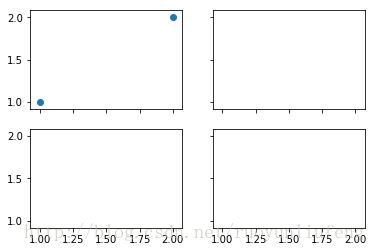
f,((ax11,ax12),(ax21,ax22)) = plt.subplots(2,2,sharex=True,sharey=True)
ax11.scatter([1,2],[1,2])plt.tick_layout()
plt.show()
2、效果
三、图中图
1、每个图的位置设定很重要
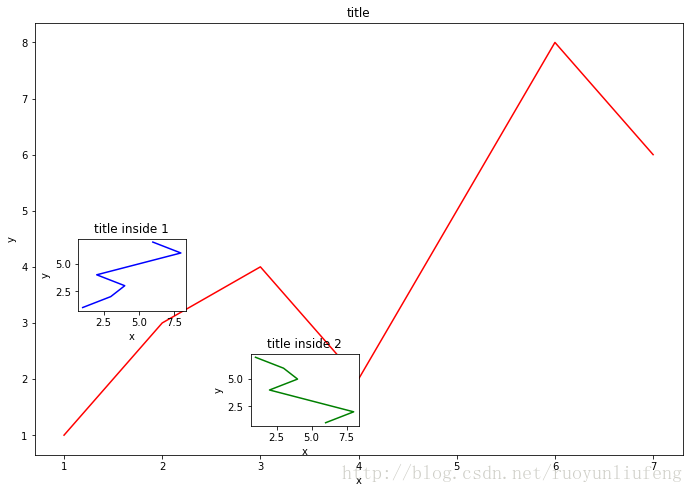
left,bottom,width,height = 0.1,0.1,0.8,0.8
ax1 = fig.add_axes([left,bottom,width,height])# 设置位置
2、代码
# -*- coding: utf-8 -*-
"""
Created on Sun Sep 24 15:32:13 2017@author: ryoyun
"""# 图中图
import matplotlib.pyplot as plt
import numpy as np  fig = plt.figure()
x = [1,2,3,4,5,6,7]
y = [1,3,4,2,5,8,6]left,bottom,width,height = 0.1,0.1,1.5,1.5
ax1 = fig.add_axes([left,bottom,width,height])# 设置位置
ax1.plot(x,y,'r')
ax1.set_xlabel('x')
ax1.set_ylabel('y')
ax1.set_title('title')left,bottom,width,height = 0.2,0.6,0.25,0.25
ax2 = fig.add_axes([left,bottom,width,height])
ax2.plot(y,x,'b')
ax2.set_xlabel('x')
ax2.set_ylabel('y')
ax2.set_title('title inside 1')plt.axes([.6,0.2,0.25,0.25])
plt.plot(y[::-1],x,'g')
plt.xlabel('x')
plt.ylabel('y')
plt.title('title inside 2')plt.show()
3、效果
四、次坐标轴(两个Y轴)
1、画几个散点一点都不难
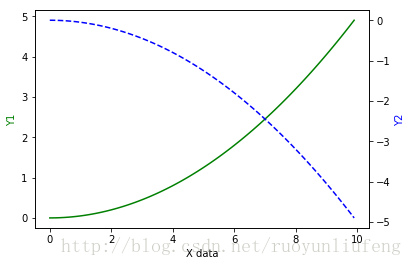
ax2 = ax1.twinx() # 做镜像处理,ax2是ax1的镜像
2、代码
# -*- coding: utf-8 -*-
"""
Created on Sun Sep 24 15:44:29 2017@author: ryoyun
"""# 次坐标轴
import matplotlib.pyplot as plt
import numpy as npx = np.arange(0,10,0.1)
y1= 0.05*x**2
y2= -1*y1fig,ax1 = plt.subplots()
ax2 = ax1.twinx()           # 做镜像处理
ax1.plot(x,y1,'g-')
ax2.plot(x,y2,'b--')ax1.set_xlabel('X data')    #设置x轴标题
ax1.set_ylabel('Y1',color = 'g')   #设置Y1轴标题
ax2.set_ylabel('Y2',color = 'b')   #设置Y2轴标题plt.show()
3、效果
五、Animation动画
1、代码
# -*- coding: utf-8 -*-
"""
Created on Sun Sep 24 15:51:25 2017@author: ryoyun
"""# animation 动画
from matplotlib import animation
import matplotlib.pyplot as plt
import numpy as npfig, ax = plt.subplots()x = np.arange(0,2*np.pi,0.01)
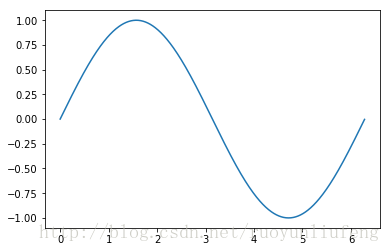
line, = ax.plot(x,np.sin(x))def animate(i):line.set_ydata(np.sin(x+i/100))return line,def init():line.set_ydata(np.sin(x))return line,ani = animation.FuncAnimation(fig =fig,func=animate,frames= 100,init_func=init,interval=20,blit=False,)plt.show()
2、效果
参考:莫烦python https://morvanzhou.github.io/tutorials/
本文来自互联网用户投稿,文章观点仅代表作者本人,不代表本站立场,不承担相关法律责任。如若转载,请注明出处。 如若内容造成侵权/违法违规/事实不符,请点击【内容举报】进行投诉反馈!