爬图片-python快捷办法
# -*- coding: utf-8 -*-#--------------------------------------- # 程序:暴走漫画的GIF趣图爬虫# 版本: 0.1# 作者:WuChong# 日期:2014-01-27# 语言:Python 3.3 # 说明:能自定义下载页数,默认全部下载,未加多线程功能#---------------------------------------import urllib.requestimport bs4,ospage_sum = 1 #设置下载页数path = os.getcwd()path = os.path.join(path,'暴走GIF')if not os.path.exists(path):os.mkdir(path) #创建文件夹url = "http://baozoumanhua.com/gif/month/page/" #url地址headers = { #伪装浏览器 'User-Agent':'Mozilla/5.0 (Windows NT 6.1; WOW64) AppleWebKit/537.36 (KHTML, like Gecko)' ' Chrome/32.0.1700.76 Safari/537.36'}for count in range(page_sum):req = urllib.request.Request( url = url+str(count+1), headers = headers) print(req.full_url)content = urllib.request.urlopen(req).read()soup = bs4.BeautifulSoup(content) # BeautifulSoupimg_content = soup.findAll('img',attrs={'style':'width:460px'})url_list = [img['src'] for img in img_content] #列表推导 urltitle_list = [img['alt'] for img in img_content] #图片名称 for i in range(url_list.__len__()) :imgurl = url_list[i]filename = path + os.sep +title_list[i] + ".gif" print(filename+":"+imgurl) #打印下载信息urllib.request.urlretrieve(imgurl,filename) #下载图片
*************************环境配置******************************
sudo apt-get install python3-pip
Download Beautiful Soup
The current release is Beautiful Soup 4.3.2 (October 2, 2013). You can install it with pip install beautifulsoup4 or easy_install beautifulsoup4. It's also available as the python-beautifulsoup4 package in recent versions of Debian, Ubuntu, and Fedora .
Beautiful Soup 4 works on both Python 2 (2.6+) and Python 3.
*******************************************************************************************
How to install python3 version of package via pip on Ubuntu?
http://stackoverflow.com/questions/10763440/how-to-install-python3-version-of-package-via-pip-on-ubuntu
I came across this and fixed this without needing the likes of wget or virtualenvs (assuming Ubuntu 12.04):
- Install package
python3-setuptools: runsudo aptitude install python3-setuptools, this will give you the commandeasy_install3. - Install pip using Python 3's setuptools: run
sudo easy_install3 pip, this will give you the commandpip-3.2like kev's solution. - Install your PyPI packages: run
sudo pip-3.2 install(installing python packages into your base system requires root, of course). - …
- Profit!
*********************************************
在Ubuntu中安装Python3
首先,通过命令行安装Python3.2,只需要在终端中通过命令行安装即可:
| sudo apt-get install python3 |
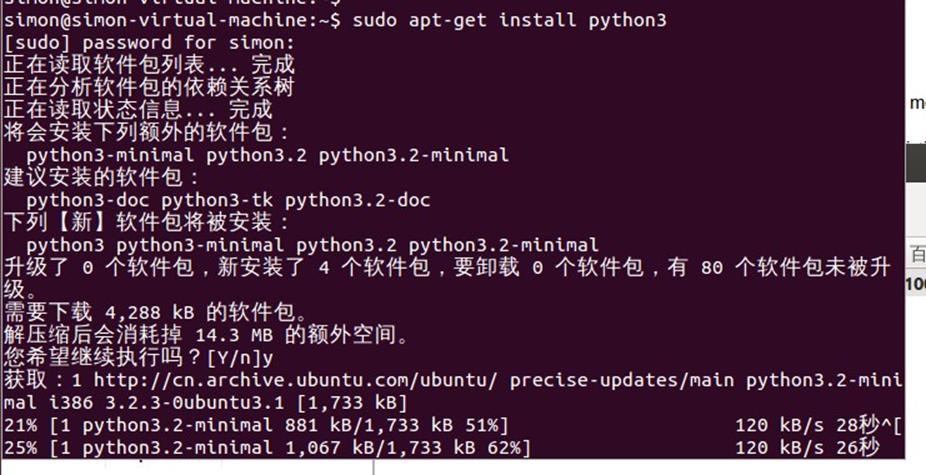
一路yes。
因为Ubuntu很多底层采用的是Python2.*,Python3和Python2是互相不兼容的,所以此时不能卸载Python2,需要将默认Python的指向Python3。
刚才的Python3是被默认安装带usr/local/lib/python3.2目录中,如下
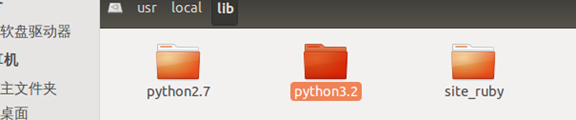
首先,删除usr/bin/目录下的默认python link文件。
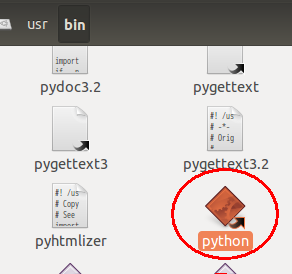
然后打开终端输入如下命令行,建立新的连接关系
| sudo ln -s /usr/bin/python3.2 /usr/bin/python |
成功

然后测试一下python版本是否正确
命令行输入 python 即可

本文来自互联网用户投稿,文章观点仅代表作者本人,不代表本站立场,不承担相关法律责任。如若转载,请注明出处。 如若内容造成侵权/违法违规/事实不符,请点击【内容举报】进行投诉反馈!