Electron-vue 关于图标的修改
electron-vue 图标
提示:图标包括:启动项目时桌面主题图标,窗口左上角图标,菜单栏图标,系统托盘图标,打包安装图标、开始菜单图标、快捷方式图标等。
文章目录
- electron-vue 图标
- 1. 启动项目默认图标与窗口左上角图标
- 2. 菜单栏图标
- 3. 系统托盘图标
- 4. 打包安装包图标
- 5. 开始菜单图标和快捷方式图标
- 6、dialog 弹框图标
- 总结
1. 启动项目默认图标与窗口左上角图标
这两个图标均由 mainWindow 的 icon 属性决定:
代码如下(示例):
mainWindow = new BrowserWindow({height: 620,width: 400,useContentSize: true,icon: path.join(__static,"./zero.ico"),webPreferences:{nodeIntegration:true,contextIsolation: false,webSecurity: false,}, })
效果如下:

另外,窗口左上角 标题 也可以自定义,修改位置如下(注意:修改完成后需重新启动运行代码才可生效):

2. 菜单栏图标
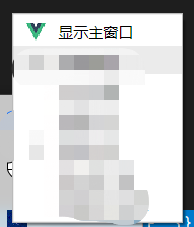
可在菜单文字表达前添加图标
代码如下(示例):
{label: "显示主窗口", icon: path.join(__static,"./logo.png"), click: function() {mainWindow.show(); } //打开相应页面},{//打开相应页面label: "检查更新",type:'checkbox',checked: true,click: function() { } },
效果如下:
3. 系统托盘图标
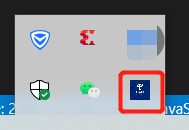
系统托盘图标可自定义设置:
代码如下(示例):
let iconPath = path.join(__static, "./zero.ico");
let appTray = new Tray(iconPath);
效果如下
4. 打包安装包图标
在 package.json 中配置:
代码如下(示例):
"win": {"icon": "build/icons/zero.ico","artifactName": "${productName}_setup_${version}.${ext}","target": [{"target": "nsis","arch": ["x64"]}]},
效果如下:

5. 开始菜单图标和快捷方式图标
在 package.json 中配置 :
其中
createDesktopShortcut表示创建快捷方式图标
createStartMenuShortcut 表示开始菜单图标
代码如下(示例):
"nsis": {"oneClick": false,"allowElevation": true,"allowToChangeInstallationDirectory": true,"installerIcon": "./build/icons/zero.ico","uninstallerIcon": "./build/icons/zero.ico","installerHeaderIcon": "./build/icons/zero.ico","createDesktopShortcut": true,"createStartMenuShortcut": true,"shortcutName": "xxxx"}
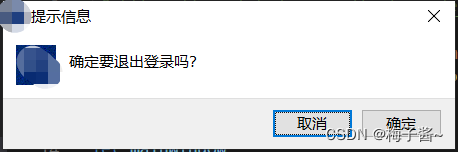
6、dialog 弹框图标
ipcMain.on('logout',(e)=>{dialog.showMessageBox({type: 'info',noLink:true, // windows 下的传统样式title: '提示信息',icon:path.join(__static,"./zero.ico"),defaultId: 0,message:"确定要退出登录吗?",buttons:['确定','取消']},(index) => {if(index === 1){// 什么都不做e.preventDefault(); // 阻止默认行为 }else{mainWindow.loadURL(winURL)mainWindow.setSize(400,400);}});})
实现效果:
总结
以上是我个人项目中使用到的图标,欢迎大家补充
本文来自互联网用户投稿,文章观点仅代表作者本人,不代表本站立场,不承担相关法律责任。如若转载,请注明出处。 如若内容造成侵权/违法违规/事实不符,请点击【内容举报】进行投诉反馈!