Java-Swing窗体实现模拟驾考小程序
一,需求分析
-
所需技术:
需要知道如何使用Swing组件创建窗体,熟悉java se的基础知识,熟悉I/O读写,简单的分层思想,和面向对象的思想。
-
具体要点:
1),使用到Java SE的SWING来设计的模拟驾考小程序的窗口。
2),采用简单的MVC分层思想,该小程序有用到MVC分层中的M以及V,Model层中主要有Dao负责数据持久化,Service负责处理业务逻辑,domain为实体对象,DB为数据存储,该程序用的是文件充当DB。SWING图形界面充当View层。
3),用户打开程序后需要一个已有账号登录考试程序,登录成功后便可以开始正式考试。
4), 用户个人账号数据存储在.txt文件内,可由开发人员手动操作修改,题库来源可有开发人员找寻,题库存在于.txt文件中,用户账号数据按行来存储,以账号-密码形式存储,题库也是按行存储在文件中,每道题都是按特定的字符拼接。
5),为提高程序性能,程序中设计有缓存功能 ,通过I/O读写文件将数据到程序的缓存中,然后使用之前进行解析字符串,构建成相应的实体对象,存储在缓存中,以便程序使用。
6),程序通过集合的特性和随机数进行随机生成一套试卷,每套题中题目个数可有开发人员设定。
二,概要设计
-
数据结构设计
实体类User中
String name; 用户账号
String password; 用户密码实体类Question中
String title; 题干信息
String answer; 题目正确答案
String picture; 题目图片的全名工具类中
HashMap questionMap; 题目信息容器
ArrayList questionList; 题目信息容器
ArrayList userList; 用户信息容器视图类中
int nowNum ; 当前题号对应在集合中的索引
int totalCount ; 总题数
int answerCount ; 已答题数
int unanswerCount ; 未答题数
String[] realAnswer ; 用户选择的答案所存的容器单例模式管理类中
HashMap
-
程序流程图
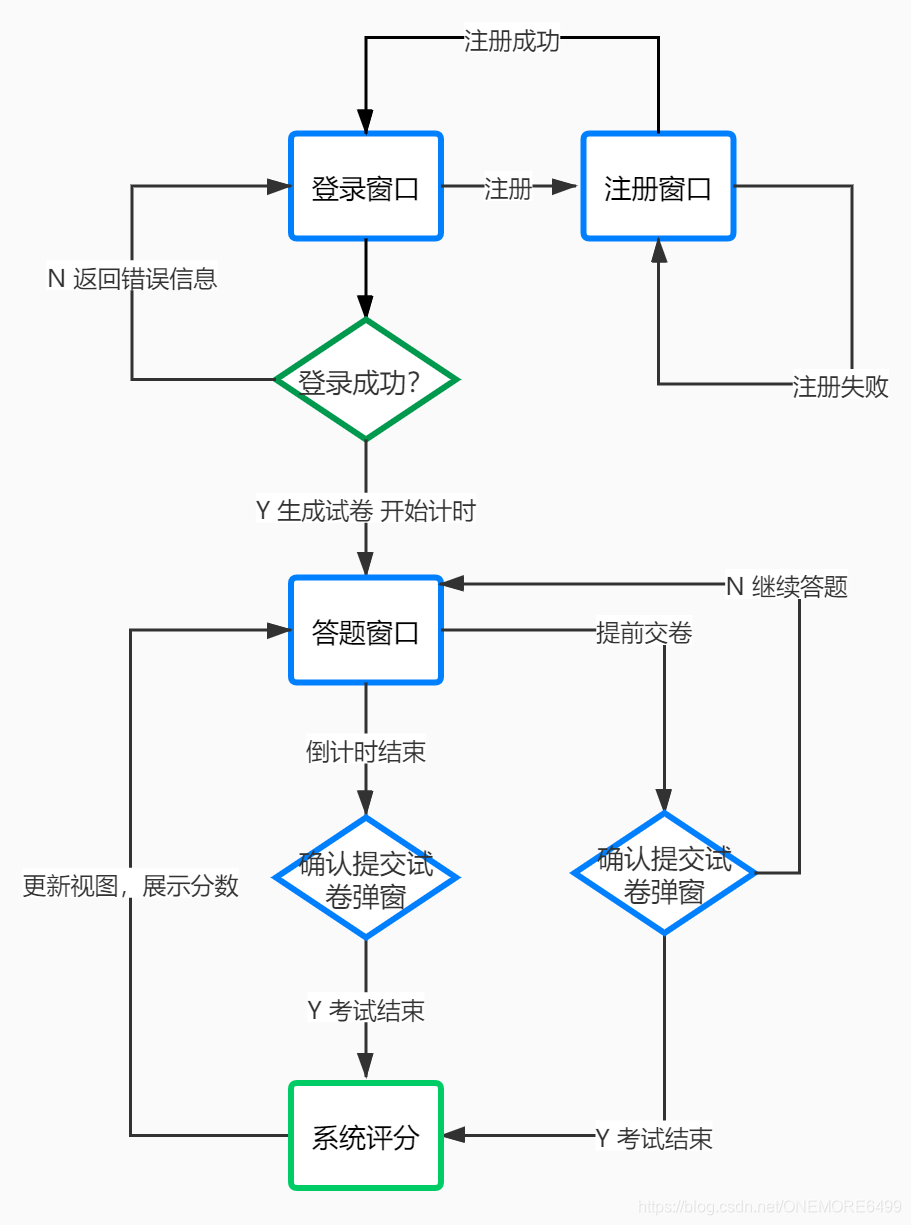
-
模块设计
-
(1)数据存储DB模块
数据模块细分为两个模块,用户账号数据和题库题目数据。
1.用户账号数据:我们在此使用的是User.txt 文件存储用户的账号和密码,以user-password一行表示一个用户信息,“值-值”的格式存入.txt文件中,读取时通过I/O流,由基础流FileReader构建高级流 BufferedReader,用readLine方法以行的形式读取每个用户信息。
2.题库题目数据:题库用Question.txt文件存储,存储格式也为一行表示一个题目信息(包括正确答案在内),我们自定义每行每个题目信息格式为“题干
A.选项内容
B.选项内容
C.选项内容
D.选项内容#正确答案[#题目对应的图片全名]”图片部分可有可无,“
”代表一个标记,在题目展示之前做字符串处理以达到换行效果,“#”也是一个标记用于拆分字符串,获取题目的各部分内容,真实图片存储在工程根目录下的img文件夹内,读取时通过I/O流,由基础流FileReader构建高级流 BufferedReader,用readLine方法以行的形式读取每个题目信息。 -
(2)实体类domain模块
我们在数据持久层中读取文件获取数据的最后都需要将相应的I/O文件流关闭,每读一次都要打开一次关闭一次,特别影响性能,但是我们要的是读取出来的每一行记录,此时我们需要借助一个容器来存储每一行记录,在考虑数组,集合,对象之后发现,一个对象的结构特别适合存储一行记录,对象里里面一个属性对应一行纪律的某个信息,也特别方便存储和取值。对于一个用户,即对应一个User实体对象,实体对象里有一个账号account属性,一个密码password属性,以及对应的set和get方法和有参无参构造方法。对于一个题目,对应一个Question实体类,该实体对象中有题干title属性,正确答案answer属性,以及题目图片全名picture属性,以及他们的set和get方法和有参无参构造方法。 -
(3)自定义工具utils模块
在获取数据的过程中,每次用的时候都需要去读取每一行记录,即每一次都要创建文件流进行读取,每使用一次数据时都要读取加载一次文件进行一次文件的读写,不仅麻烦并且在数据量大的时候特别影响性能,我们想到能不能将一次性将所有的数据都读取进来内存中只加载一次。我们发现可以设计一个单独的类用于一次性将全部数据读取到程序内存中,并且有且只有一份,做一个缓存功能的工具类。用户文件读写对应UserFileReader,题库文件对应QuestionFileReader。工具类中使用到了一个静态方法读取所有数据,每读一行记录创建一个实体对象。然后将每一个实体对象放入一个静态的HashSet中。还设计了一个静态方法用于返回这个静态的HashSet。以便Dao层调用。 -
(4)数据持久化Dao模块
Dao层的作用是用来数据持久化,调用工具类获取缓存的数据,将数据传递给Service做逻辑处理。
1.在UserDao中调用工具类获取用户数据集合Array List缓存并返回。
2.在QuestionDao中需要做的有先将缓存中HashSet的题目构建成另外一个方便获取题目的集合ArrayList。再根据需要产生题目的个数在ArrayList里面通过随机数生成索引并获取题目。由于随机产生的题目可能含有重复的,所以与此同时将获取的题目存入另外一个中间集合HashSet用于去重复,直至题目个数刚刚好并且没有重复时完成一套题目的生成。最后为了在后续的使用更容易获取每一道题,最后需要将中间的HashSet构建成ArrayList并返回。 -
(5)业务逻辑处理Service模块
Service层负责处理业务逻辑。
1.QuestionService中有一个获取试卷的方法。根据设定的试卷题目个数调用Dao层返回一套试卷所需要的题目。即一个ArrayList集合。
2.UserService定义了一个登录的方法login。Login方法根据loginFrame窗口传来的当前输入的账号和密码并调用dao获取的用户信息进行账号密码匹配,如果存在当前输入账户并且密码一致则返回字符串”登录成功”,否者返回“账号或密码错误“。 -
(6)登录视图LoginFrame模块
登录视图模块采用的时Java SE中的Swing窗体组件,我们发现每一个窗体都要做相似并且固定的流程,然后我们设计了一个抽象父类BaseFrame,然后BaseFrame继承于jdk提供的JFrame视图类,登录视图类定义为LoginFrame继承于BaseFrame实现固定流程的一系列方法,用于处理流程固定并且内容相似的一系列视图构建,Swing组件提供了很多的布局和功能组件,我们利用现有的组件在LoginFrame中构建一个登录窗口,其中使用Jalbel作为功能提示标签,使用JTextField作为账号输入框,JPassword作为密码输入框,JButton作为登录按钮并绑定登录监听事件。再点击登录按钮时触发监听事件调用业务层的登录方法处理登录信息匹配问题然后发生相应的界面跳转。 -
(7)答题视图ExamFrame模块
答题视图模块细分为5个区域,题目展示区域,答案选项区域,题目图片区域,答题状态区域,以及剩余答题时间展示区域,每个区域由相应的组件构建而成。该模块中真实的题目信息有Service层传过来,每个题目存入一个ArrayList里面,方便展示题目信息。此外定义了一个数组用于存储每个题选中的最终答案记录,用于最终的评分,定义了int型 nowNum表示当前题对应的ArrayList中的索引,初始值为0,表示第一题,定义了int型 answerCount表示已答题数,初始值为0,定义了int型totalCount表示总题数,值即为ArrayList的大小,未答题数unanswerCount,值即为(toatl-answerCount)。
1.题目展示区域:题目展示区域用的是JTextArea组件实现的,题目从ArrayList里面获取一个题目信息然后展示于此。
2.答案选项区域:答案选项区域包含有A,B,C,D选项按钮,上一题按钮,下一题按钮,交卷按钮,均通过JButton实现,答案选项按钮绑定了对应的答案,点击后选项按钮后就将对应的答案存储再记录答案的数组中的相应索引位置。上一题按钮绑定获取上一题题目信息展示事件,题号–,下一题按钮绑定获取下一题题目信息展示事件,并且题号++。交卷按钮绑定了一个弹出框提示事件,根据点击弹出框的选项做出判断,确定交卷,则调用评分方法计算总分并且将最终分数展示在题目展示区域。
3.图片展示区域:图片展示区域由JLabel实现,根据ArrayList中获取题目信息对象,判断题目对象中是否含有图片信息,如果有,根据图片全名以及图片的真实存储文件名拼接成图片全路径字符串,然后通过图片全路径传入ImageIcon中构建一张图片,然后将imageIcon添加到图片JLabel中。
4.答题状态区域:答题信息包含有当前题号,总题数,已答题数,未答题数,均通过JLabel实现的,当前题号Label中显示nowNum+1的值表示当前题号,总题数Label中显示totalCount的值,已答题数Label中显示answerCount的值,未答题数Label中显示unanswerCount的值,对应的变量值由触发的按钮监听器相应的进行更行,然后达到答题状态区域的更新。
5.剩余答题时间展示区域:剩余答题时间由JLabel实现的,在答题模块中通过创建一个内部子线程用于控制时间的展示,在run方法中使用Thread.sleep(1000)方法每睡眠1000毫秒后继续进行该线程,从而实现每隔1秒更新剩余时间并且展示在用于展示时间的Label中,总时间定义为int类型time,单位为分钟,在run方法内通过时间运算的判断以及字符串的拼接将其转化为具体的时分秒,从而构成相应的时间字符串,然后每隔1秒更新到时间展示区域。当时间变为0时。弹出考试结束,请提交试卷的窗口。 -
(8)程序入口TestMain
程序入口即登录窗口的展示。通过创建我们定义好的LoginFrame视图对象,然后就可在桌面上显示出考试小程序的登录窗口。
-
三,详细代码
User.txt :按如下格式写入用于存储用户数据文件
17364658558-12345615618564958-12321617364658559-12345615618561234-123216
Question.txt :按如下格式写入用作题库文件(下面为示例)(题库可自己去度娘搜索爬取)
驾驶机动车遇到这种桥时首先怎样办?<br>A、保持匀速通过<br>B、尽快加速通过<br>C、低速缓慢通过<br>D、停车察明水情#D#jd5YTBB98px.jpg
图中哪个报警灯亮,提示充电电路异常或故障?<br>A、图1<br>B、图2<br>C、图3<br>D、图4#D#od6a10f8ed5c1f2f6ed07fa13d034ee69.jpg
驾驶机动车在下列哪种情形下不能超越前车?<br>A、前车减速让行<br>B、前车正在左转弯<br>C、前车靠边停车<br>D、前车正在右转弯#B
机动车仪表板上(如图所示)亮表示什么?<br>A、没有系好安全带<br>B、安全带出现故障<br>C、已经系好安全带<br>D、安全带系得过松#A#jdi2SYYBpIA.jpg
这个标志是何含义?<br>A、Y型交叉路口预告<br>B、十字交叉路口预告<br>C、丁字交叉路口预告<br>D、道路分叉处预告#C#odN8VNtIgFf.jpg
红色圆圈内标线含义是什么?<br>A、临时停靠站<br>B、大客车停靠站<br>C、公交车停靠站<br>D、应急停车带#C#odNskVJRX1L.jpg
这个标志是何含义?<br>A、立体交叉直行和右转弯行驶<br>B、立体交叉直行和左转弯行驶<br>C、直行和左转弯行驶<br>D、直行和右转弯行驶#B#odN8X6Cb6Mx.jpg
这个标志是何含义?<br>A、靠道路右侧停车<br>B、只准向右转弯<br>C、右侧是下坡路段<br>D、靠右侧道路行驶#D#odN8XhkvOi1.jpg
这个标志是何含义?<br>A、旅游区类别<br>B、旅游区距离<br>C、旅游区方向<br>D、旅游区符号#C#odNsSnvu8ub.jpg
车辆因故障必须在高速公路停车时,应在车后方多少米以外设置故障警告标志?<br>A、25<br>B、150<br>C、100<br>D、50#B
这个标志是何含义?<br>A、Y型交叉口<br>B、主路让行<br>C、注意分流<br>D、注意合流#D#od5hu0iyjzd.jpg
注: 带有图片的题目将题目图片放入根目录下创建的img文件夹放入(具体路径可自己指定)
MySpring.java
public class MySpring {private static HashMap<String,Object> beanBox = new HashMap<>();public static <T>T getBean(String className){T obj = null;try {obj = (T)beanBox.get(className);if(obj == null){Class clazz = Class.forName(className);obj = (T)clazz.newInstance();beanBox.put(className,obj);}} catch (Exception e) {e.printStackTrace();}return obj;}
}
QuestionFileReader.java
public class QuestionFileReader {private static HashSet<Question> questionBox = new HashSet<>();static {FileReader fr= null;BufferedReader bf= null;try {fr = new FileReader("src//dbfile//Question.txt");bf = new BufferedReader(fr);String question = bf.readLine();while (question!=null){String[] values = question.split("#");if(values.length==2){questionBox.add(new Question(values[0], values[1]));}else if(values.length==3){questionBox.add(new Question(values[0],values[1],values[2]));}question = bf.readLine();}} catch (Exception e) {e.printStackTrace();}finally {if (fr!=null){try {fr.close();} catch (IOException e) {e.printStackTrace();}}if (bf!=null){try {bf.close();} catch (IOException e) {e.printStackTrace();}}}}public HashSet<Question> getQuestionBox() {return questionBox;}
}
UserFileReader.java
public class UserFileReader {private static HashMap<String, User> userBox = new HashMap<>();public static HashMap<String, User> getUserBox() {return userBox;}static {FileReader fileReader = null;BufferedReader bufferedReader = null;try {fileReader = new FileReader("src//dbfile//User.txt");bufferedReader= new BufferedReader(fileReader);String user = bufferedReader.readLine();while (user!=null){String[] value= user.split("-");userBox.put(value[0],new User(value[0],value[1]));user = bufferedReader.readLine();}} catch (Exception e) {e.printStackTrace();}finally {if(fileReader!=null){try {fileReader.close();} catch (Exception e) {e.printStackTrace();}}if (bufferedReader!=null){try {bufferedReader.close();} catch (IOException e) {e.printStackTrace();}}}}}
QuestionDao.java
public class QuestionDao {private QuestionFileReader fileReader = MySpring.getBean("util.QuestionFileReader");//HashSet 无get方法所以不能根据随机索引号获取题目;所以先使用ArrayList存储全部题目private  ArrayList<Question> questionPaper = new ArrayList(fileReader.getQuestionBox());public   ArrayList<Question> getPaper(int size){//由随机数获取的题目可能有重复的,用HashSet 去重复HashSet<Question> paper = new HashSet<>();while (paper.size()!=size) {Random r = new Random();int index = r.nextInt(this.questionPaper.size());paper.add(questionPaper.get(index));}//为了最后方便遍历最后再转用Arraylist 存储return new ArrayList<Question>(paper);}
}
UserDao.java
public class UserDao {public User selectOne(String acount){return UserFileReader.getUserBox().get(acount);}
}UserService.java
public class UserService {private UserDao dao = MySpring.getBean("dao.UserDao");//登陆方法public String login(String account,String password){User user = dao.selectOne(account);while (user!=null){if(account.equals(user.getAccount())&&password.equals(user.getPassword())){return "登陆成功";}}return "账号或密码错误";}
}
QuestionService.java
public class QuestionService {private QuestionDao dao = MySpring.getBean("dao.QuestionDao");public ArrayList<Question> select(){return dao.getPaper(20);}
}Question.java
//映射每一个问题
public class Question {private String title;private String answer;private String picture;public Question(){}public  Question(String title,String answer){this.title = title;this.answer = answer;}public Question(String title,String answer,String picture){this.title=title;this.answer=answer;this.picture=picture;}public void setTitle(String title) {this.title = title;}public void setAnswer(String answer) {this.answer = answer;}public void setPicture(String picture) { this.picture = picture; }public String getTitle() {return title;}public String getAnswer() {return answer;}public String getPicture() { return picture; }public boolean equals(Object obj) {if (this == (Question) obj) {return true;}if (obj instanceof Question) {if (this.title.substring(0,this.title.indexOf("
")).equals(((Question) obj).title.substring(0,this.title.indexOf("
")))) {return true;}}return  false;}public int hashCode() {return this.getTitle().hashCode();}
}
User.java
//映射每一个用户
public class User {private String account;private String password;public User(){}public User(String account, String password){this.account = account;this.password = password;}public String getAccount() {return account;}public String getPassword() {return password;}public void setAccount(String account) {this.account = account;}public void setPassword(String password) {this.password = password;}
}//模板模式
//设计一个规则 任何窗口想要画出来 执行流程固定
public abstract class BaseFrame extends JFrame {public BaseFrame(){}public BaseFrame(String title){super(title);}protected void init(){this.setFontAndSoOn();this.addElement();this.setFrameSelf();this.addListener();}//1,设置 字体颜色 背景 布局等protected abstract void setFontAndSoOn();//2,将属性添加1到窗体里protected abstract void addElement();//3,添加事件监听器protected abstract void addListener();//4,设置窗体自身protected abstract void setFrameSelf();
}ExamFrame.java
public class ExamFrame extends BaseFrame {public ExamFrame(){this.init();}public ExamFrame(String title){super(title);this.init();}private QuestionService service = MySpring.getBean("service.QuestionService");private ArrayList<Question> paper = service.select();private int nowNum = 0;private int totalCount = paper.size();private int answerCount = 0;private int unanswerCount = totalCount;String[] realAnswer = new String[paper.size()];//初始化数组方法public void setArray(){for (int i=0;i<paper.size();i++){realAnswer[i] = "0";}}//创建一个线程对象 控制时间变化private TimeControlThread timeControlThread = new TimeControlThread();//用来记录时间private int time = 10;private JPanel mainPanel = new JPanel();private JPanel messagePanel = new JPanel();private JPanel buttonPanel = new JPanel();private JTextArea examArea = new JTextArea();private  JScrollPane scrollPane = new JScrollPane(examArea);private  JLabel pictureLabel = new JLabel();private JLabel nowNumLabel = new JLabel("当前题号:");private JLabel totalCountLabel = new JLabel("题目总数:");private JLabel answerCountLabel = new JLabel("已答题数:");private  JLabel unanswerCountLabel = new JLabel("未答题数");private JTextField nowNumField = new JTextField("0");private JTextField totalCountField = new JTextField("0");private JTextField answerCountField = new JTextField("0");private JTextField unanswerCountField = new JTextField("0");private  JLabel timeLabel = new JLabel("剩余答题时间");private JLabel realTimeLabel = new JLabel("01:00:00");private JButton aButton = new JButton("A");private JButton bButton = new JButton("B");private JButton cButton = new JButton("C");private JButton dButton = new JButton("D");private JButton prevButton = new JButton("上一题");private JButton submitButton = new JButton("交 卷");private JButton nextButton = new JButton("下一题");@Overrideprotected void setFontAndSoOn() {mainPanel.setLayout(null);mainPanel.setBackground(Color.lightGray);messagePanel.setLayout(null);messagePanel.setBounds(680,10,300,550);messagePanel.setBorder(BorderFactory.createLineBorder(Color.gray));buttonPanel.setLayout(null);buttonPanel.setBounds(16,470,650,90);buttonPanel.setBorder(BorderFactory.createLineBorder(Color.gray));scrollPane.setBounds(16,10,650,450);examArea.setFont(new Font("楷体", Font.BOLD,30));examArea.setBackground(Color.GRAY);examArea.setLineWrap(true);//自动换行examArea.setEnabled(false);pictureLabel.setBounds(10,10,280,230);pictureLabel.setBorder(BorderFactory.createLineBorder(Color.gray));//pictureLabel.setIcon(null);设置图片信息nowNumLabel.setBounds(40,270,100,30);nowNumLabel.setFont(new Font("楷体",Font.PLAIN,20));nowNumField.setBounds(150,270,100,30);nowNumField.setFont(new Font("黑体",Font.BOLD,20));nowNumField.setBorder(BorderFactory.createLineBorder(Color.gray));nowNumField.setEnabled(false);nowNumField.setHorizontalAlignment(JTextField.CENTER);totalCountLabel.setBounds(40,310,100,30);totalCountLabel.setFont(new Font("楷体",Font.PLAIN,20));totalCountField.setBounds(150,310,100,30);totalCountField.setFont(new Font("黑体",Font.BOLD,20));totalCountField.setBorder(BorderFactory.createLineBorder(Color.gray));totalCountField.setEnabled(false);totalCountField.setHorizontalAlignment(JTextField.CENTER);answerCountLabel.setBounds(40,350,100,30);answerCountLabel.setFont(new Font("楷体",Font.PLAIN,20));answerCountField.setBounds(150,350,100,30);answerCountField.setFont(new Font("黑体",Font.BOLD,20));answerCountField.setBorder(BorderFactory.createLineBorder(Color.gray));answerCountField.setEnabled(false);answerCountField.setHorizontalAlignment(JTextField.CENTER);unanswerCountLabel.setBounds(40,390,100,30);unanswerCountLabel.setFont(new Font("楷体",Font.PLAIN,20));unanswerCountField.setBounds(150,390,100,30);unanswerCountField.setFont(new Font("黑体",Font.BOLD,20));unanswerCountField.setBorder(BorderFactory.createLineBorder(Color.gray));unanswerCountField.setEnabled(false);unanswerCountField.setHorizontalAlignment(JTextField.CENTER);timeLabel.setBounds(90,460,150,30);timeLabel.setFont(new Font("楷体",Font.PLAIN,20));timeLabel.setForeground(Color.blue);realTimeLabel.setBounds(70,500,180,30);realTimeLabel.setFont(new Font("行楷",Font.BOLD,40));realTimeLabel.setForeground(Color.blue);aButton.setBounds(40,10,120,30);aButton.setFont(new Font("楷体", Font.BOLD,22));aButton.setCursor(Cursor.getPredefinedCursor(Cursor.HAND_CURSOR));bButton.setBounds(190,10,120,30);bButton.setFont(new Font("楷体", Font.BOLD,22));bButton.setCursor(Cursor.getPredefinedCursor(Cursor.HAND_CURSOR));cButton.setBounds(340,10,120,30);cButton.setFont(new Font("楷体", Font.BOLD,22));cButton.setCursor(Cursor.getPredefinedCursor(Cursor.HAND_CURSOR));dButton.setBounds(490,10,120,30);dButton.setFont(new Font("楷体", Font.BOLD,22));dButton.setCursor(Cursor.getPredefinedCursor(Cursor.HAND_CURSOR));prevButton.setBounds(40,50,100,30);prevButton.setFont(new Font("楷体", Font.BOLD,18));prevButton.setCursor(Cursor.getPredefinedCursor(Cursor.HAND_CURSOR));nextButton.setBounds(510,50,100,30);nextButton.setFont(new Font("楷体", Font.BOLD,18));nowNumField.setCursor(Cursor.getPredefinedCursor(Cursor.HAND_CURSOR));submitButton.setBounds(276,50,100,30);submitButton.setFont(new Font("楷体", Font.BOLD,18));submitButton.setForeground(Color.red);submitButton.setCursor(Cursor.getPredefinedCursor(Cursor.HAND_CURSOR));this.showQuestion();nowNumField.setText(nowNum+1+"");totalCountField.setText(totalCount+"");answerCountField.setText(answerCount+"");unanswerCountField.setText(unanswerCount+"");}protected void addElement() {messagePanel.add(pictureLabel);messagePanel.add(nowNumLabel);messagePanel.add(nowNumField);messagePanel.add(totalCountLabel);messagePanel.add(totalCountField);messagePanel.add(answerCountLabel);messagePanel.add(answerCountField);messagePanel.add(unanswerCountLabel);messagePanel.add(unanswerCountField);messagePanel.add(timeLabel);messagePanel.add(realTimeLabel);buttonPanel.add(aButton);buttonPanel.add(bButton);buttonPanel.add(cButton);buttonPanel.add(dButton);buttonPanel.add(prevButton);buttonPanel.add(submitButton);buttonPanel.add(nextButton);mainPanel.add(scrollPane);mainPanel.add(messagePanel);mainPanel.add(buttonPanel);this.add(mainPanel);}boolean tag = false;//换题标签@Overrideprotected void addListener() {//绑定选项按钮事件监听器ActionListener listener = new ActionListener() {public void actionPerformed(ActionEvent e) {if(tag){answerCount--;}tag = true;ExamFrame.this.clearOptionButtonColor();JButton button =(JButton)e.getSource();button.setBackground(Color.yellow);realAnswer[nowNum] = button.getText();answerCountField.setText((++answerCount)+"");
//                System.out.println(answerCount);unanswerCountField.setText((totalCount-answerCount)+"");}};aButton.addActionListener(listener);bButton.addActionListener(listener);cButton.addActionListener(listener);dButton.addActionListener(listener);//绑定下一题按钮的事件监听器nextButton.addActionListener(new ActionListener() {@Overridepublic void actionPerformed(ActionEvent e) {ExamFrame.this.clearOptionButtonColor();nowNum++;if (nowNum==totalCount){examArea.setText("全部题目已经回答完毕\n请点击下方红色提交按钮");nextButton.setEnabled(false);ExamFrame.this.setOptionButtonEnabled(false);}else{ExamFrame.this.restormButton();ExamFrame.this.showQuestion();nowNumField.setText(nowNum+1+"");}}});//绑定上一题按钮的事件监听器,还原已选答案。prevButton.addActionListener(new ActionListener() {@Overridepublic void actionPerformed(ActionEvent e) {ExamFrame.this.clearOptionButtonColor();nowNum--;if(nowNum==0){prevButton.setEnabled(false);}nextButton.setEnabled(true);ExamFrame.this.showQuestion();ExamFrame.this.setOptionButtonEnabled(true);ExamFrame.this.restormButton();nowNumField.setText(nowNum+1+"");ExamFrame.this.restormButton();}});//绑定提交事件监听器submitButton.addActionListener(new ActionListener() {@Overridepublic void actionPerformed(ActionEvent e) {int value = JOptionPane.showConfirmDialog(ExamFrame.this,"是否确认提交试卷?");if(value==0) {//1.倒计时时间停止---线程处理timeControlThread.stopThread();//切换了线程的状态//2.所有按钮失效ExamFrame.this.setOptionButtonEnabled(false);//所有选项按钮失效prevButton.setEnabled(false);nextButton.setEnabled(false);//3.让按钮颜色回归本色ExamFrame.this.clearOptionButtonColor();//4.最终成绩的计算 展示在中间的文本域中float score = ExamFrame.this.checkPaper();examArea.setText("考试已经结束\n您最终的成绩为:" + score);submitButton.setEnabled(false);}}});}@Overrideprotected void setFrameSelf() {this.setBounds(440, 230, 1000, 600);this.setDefaultCloseOperation(JFrame.EXIT_ON_CLOSE);this.setVisible(true);this.setResizable(false);this.showQuestion();timeControlThread.start();this.setArray();}//展示题目public void showQuestion(){tag = false;Question q = paper.get(nowNum);String picture = q.getPicture();if(picture!=null){pictureLabel.setIcon(setPictureLabel("Src//img//"+picture));}else{pictureLabel.setIcon(null);}examArea.setText((nowNum+1)+"."+q.getTitle().replace("
","\n"));}//展示题目图片public ImageIcon setPictureLabel(String picPath){ImageIcon imageIcon = new ImageIcon(picPath);imageIcon.setImage(imageIcon.getImage().getScaledInstance(280,230,Image.SCALE_DEFAULT));return imageIcon;}//用来清空所有选项按钮的颜色public void clearOptionButtonColor(){aButton.setBackground(null);bButton.setBackground(null);cButton.setBackground(null);dButton.setBackground(null);}//用来使所有的选择按钮失效public void setOptionButtonEnabled(boolean key){aButton.setEnabled(key);bButton.setEnabled(key);cButton.setEnabled(key);dButton.setEnabled(key);}//实现还原上一题的答案选项public void restormButton(){String value = realAnswer[nowNum];if(value==null){return ;}switch(value){case "A":aButton.setBackground(Color.YELLOW);break;case "B":bButton.setBackground(Color.YELLOW);break;case "C":cButton.setBackground(Color.YELLOW);break;case "D":dButton.setBackground(Color.YELLOW);break;default:this.clearOptionButtonColor();break;}}//改卷public float checkPaper(){float score = 100;for (int i = 0; i < paper.size();i++){if (!realAnswer[i].equals(paper.get(i).getAnswer())){score-=(100/paper.size());}}return score;}//一个内部类子线程用来处理考试时间private class TimeControlThread extends Thread{private boolean flag = true;public void stopThread() {this.flag=false;}public void run(){int hour = time/60;int minute = time%60;int second = 0;while (flag){if(hour==0&&minute==0&&second<=59){realTimeLabel.setForeground(Color.red);}StringBuilder timeString = new StringBuilder();//处理时if(hour>=0 && hour<10){timeString.append("0");}timeString.append(hour);timeString.append(":");//处理分if(minute>=0 && minute<10){timeString.append("0");}timeString.append(minute);timeString.append(":");//处理秒if(second>=0 && second<10){timeString.append("0");}timeString.append(second);realTimeLabel.setText(timeString.toString());try{Thread.sleep(1000);}catch (InterruptedException e){e.printStackTrace();}if (second>0){second--;}else {if (minute>0){minute--;second=59;}else {if (hour>0){hour--;minute=59;}else {realTimeLabel.setForeground(Color.RED);ExamFrame.this.setOptionButtonEnabled(false);prevButton.setEnabled(false);nextButton.setEnabled(false);JOptionPane.showMessageDialog(ExamFrame.this,"考试结束,请提交试卷");break;}}}}}}
}
LoginFrame.java
public class LoginFrame extends BaseFrame {//重写构造方法public LoginFrame(){this.init();}public LoginFrame(String title){super(title);this.init();}//创建一个面板private JPanel mainPanel = new JPanel();//新建标签private JLabel titleLable = new JLabel("在 线 考 试 系 统");private JLabel acountLable = new JLabel("账 号:");private JLabel passwordLable = new JLabel("密 码:");//创建一个文本框private JTextField accountField = new JTextField();//创建一个密码框private JPasswordField passwordField = new JPasswordField( );//创建一个按钮private JButton loginButton = new JButton("登 陆");private JButton exitButton = new JButton("退 出");protected void setFontAndSoOn(){//设置panel的布局管理为自定义方式mainPanel.setLayout(null);//mainPanel.setBackground(Color.white);//设置每一个组件的位置titleLable.setBounds(120,40,340,35);//设置字体大小titleLable.setFont(new Font("黑体",Font.BOLD,34));//设置用户名label位置和字体大小acountLable.setBounds(94,124,90,30);acountLable.setFont(new Font("黑体",Font.BOLD,24));//设置用户名field位置和字体大小accountField.setBounds(204,124,260,30);accountField.setFont(new Font("黑体",Font.BOLD,24));//设置密码label位置和字体大小passwordLable.setBounds(94,174,90,30);passwordLable.setFont(new Font("黑体",Font.BOLD,24));//设置密码field位置和字体大小passwordField.setBounds(204,174,260,30);passwordField.setFont(new Font("黑体",Font.BOLD,24));//设置登陆按钮的位置和文字大小loginButton.setBounds(154,232,100,30);loginButton.setFont(new Font("黑体",Font.BOLD,24));//设置退出按钮的位置和文字大小exitButton.setBounds(304,232,100,30);exitButton.setFont(new Font("黑体",Font.BOLD,24));}//将组件添加到窗体protected void addElement(){mainPanel.add(titleLable);mainPanel.add(acountLable);mainPanel.add(accountField);mainPanel.add(passwordLable);mainPanel.add(passwordField);mainPanel.add(loginButton);mainPanel.add(exitButton);this.add(mainPanel);}//绑定事件监听器protected void addListener(){ActionListener listener = new ActionListener(){public void actionPerformed(ActionEvent e) {//1,获取用户的账号和密码//从登陆窗口上的组件内获取 文本框 密码框String account = accountField.getText();String password = new String(passwordField.getPassword());//调用之前的Service层的登陆方法UserService service = MySpring.getBean("service.UserService");String result = service.login(account,password);if (result.equals("登陆成功")){LoginFrame.this.setVisible(false);new ExamFrame("科目一模拟");}else {JOptionPane.showMessageDialog(LoginFrame.this,result);accountField.setText("");passwordField.setText("");}}};loginButton.addActionListener(listener);}//设置窗体自身属性protected void  setFrameSelf(){//设置窗体不可变化this.setResizable(false);//设置窗体可见this.setVisible(true);//设置窗体出现的位置及自身的宽高this.setBounds(600,300,560,340);//设置点击关闭按钮 窗体执行完毕this.setDefaultCloseOperation(JFrame.EXIT_ON_CLOSE);}
}Main.java
public class Main {public static void main(String[] args){new LoginFrame("登陆窗口");}
}
四,测试程序
-
登录窗口测试


-
考试窗口测试


-
-
成绩窗口测试

The end… 文章仅供学习
本文来自互联网用户投稿,文章观点仅代表作者本人,不代表本站立场,不承担相关法律责任。如若转载,请注明出处。 如若内容造成侵权/违法违规/事实不符,请点击【内容举报】进行投诉反馈!