Android应用进程防杀指南
Android应用进程防杀指南1-常用套路
我们常用的进程守护的套路无外乎以下几种,大部分内容摘录自Never-say-Never的博客
套路一.提高进程的优先级数值
对于Service被系统回收,一般做法是通过提高优先级可以解决,在AndroidManifest.xml文件中对于intent-filter可以通过android:priority = “1000”这个属性设置最高优先级,1000是最高值,如果数字越小则优先级越低。
套路二.改变进程等级
Android中的进程是托管的,当系统进程空间紧张的时候,会依照优先级自动进行进程的回收。Android将进程分为6个等级,它们按优先级顺序由高到低依次是:
1.前台进程( FOREGROUND_APP)
2.可视进程(VISIBLE_APP )
3.次要服务进程(SECONDARY_SERVER )
4.后台进程 (HIDDEN_APP)
5.内容供应节点(CONTENT_PROVIDER)
6.空进程(EMPTY_APP)
我们可以用 setForeground(true) 来设置 Service 的优先级。
1.如果service正在调用onCreate,onStartCommand或者onDestory方法,那么用于当前service的进程则变为前台进程以避免被killed。
2.如果当前service已经被启动(start),拥有它的进程则比那些用户可见的进程优先级低一些,但是比那些不可见的进程更重要,这就意味着service一般不会被killed.
3.如果客户端已经连接到service
(bindService),那么拥有Service的进程则拥有最高的优先级,可以认为service是可见的。
4.如果service可以使用startForeground(int,
Notification)方法来将service设置为前台状态,那么系统就认为是对用户可见的,并不会在内存不足时killed。
5.如果有其他的应用组件作为Service,Activity等运行在相同的进程中,那么将会增加该进程的重要性。
套路三.设置 android:persistent属性为true
<application android:name="com.test.Application" android:allowBackup="true" android:icon="@drawable/ic_launcher" android:label="@string/app_name" "color:#ff0000;"> android:persistent="true" android:theme="@style/AppTheme" >
application> - 1
- 2
- 3
- 4
- 5
- 6
- 7
- 8
这个属性设置后,的确发现优先级提高不少,或许是相当于系统级的进程,但是还是无法保证存活
套路四.onDestory方法内调用广播,重启Service
当service执行了onDestory的时候,发送一个自定义的广播,当收到广播的时候,重新启动service
@Override
public void onDestroy() { Intent sevice = new Intent(this, MainService.class); this.startService(sevice); super.onDestroy();
} - 1
- 2
- 3
- 4
- 5
- 6
但是当使用类似于360卫士和腾讯管家等第三方应用或是在setting里-应用-强制停止时,APP进程可能就直接被干掉了,onDestroy方法都进不来,所以还是无法保证存活
套路五.监听系统广播判断Service状态
通过系统的一些广播,比如:手机重启、界面唤醒、应用状态改变等等监听并捕获到,然后判断我们的Service是否还存活,记得加权限
<receiver android:name="com.dbjtech.acbxt.waiqin.BootReceiver" > <intent-filter> <action android:name="android.intent.action.BOOT_COMPLETED" /> <action android:name="android.intent.action.USER_PRESENT" /> <action android:name="android.intent.action.PACKAGE_RESTARTED" /> <action android:name="com.dbjtech.waiqin.destroy" /> intent-filter>
receiver> - 1
- 2
- 3
- 4
- 5
- 6
- 7
- 8
在BroadcastReceiver中:
@Override
public void onReceive(Context context, Intent intent) { if (Intent.ACTION_BOOT_COMPLETED.equals(intent.getAction())) { System.out.println("手机开机了...."); startUploadService(context); } if (Intent.ACTION_USER_PRESENT.equals(intent.getAction())) { startUploadService(context); }
} - 1
- 2
- 3
- 4
- 5
- 6
- 7
- 8
- 9
- 10
这个方法监听多了会导致Service很混乱,带来诸多麻烦
套路六.将APK安装到/system/app成为系统级应用
使用ROOT过的手机
1.把代码编写好后,打包导出apk,copy到手机SD卡根目录下。
2.手机连接eclipse,cmd: adb shell
3.切换root模式,输入:su (如果root过就不会有错误)
4.设置System为读写权限:mount –o remount rw /system (System默认为只读,无法写入,这一步很关键)
5.cd到sd卡跟目录下,确认是否有我们拷贝到sd卡根目录下的apk(一般都是 storage/sdcard0)
shell@android:/ # cd storage/sdcard0
6.最后,我们要把apk拷贝到 /System/app中
参考链接:http://blog.csdn.net/mad1989/article/details/22492519
Android应用进程防杀指南2-双进程守护
假设我们的APP中开启了两个Service,分别是A和B,那么:
如果A守护B,则B挂掉的同时,A就应该把B启动起来,反之亦然,也就是说A和B应该是互相守护,无论谁被杀掉,对方就把它拉起来。
既然提到了两个Service,那么这两个Service就不能让它们同处在一个进程中,否则就会被一次性双杀。这里我们很容易想到IPC技术,在Android中通常我们可以使用AIDL来实现IPC操作。废话不多说,直接撸码。
先来看下项目整体结构:
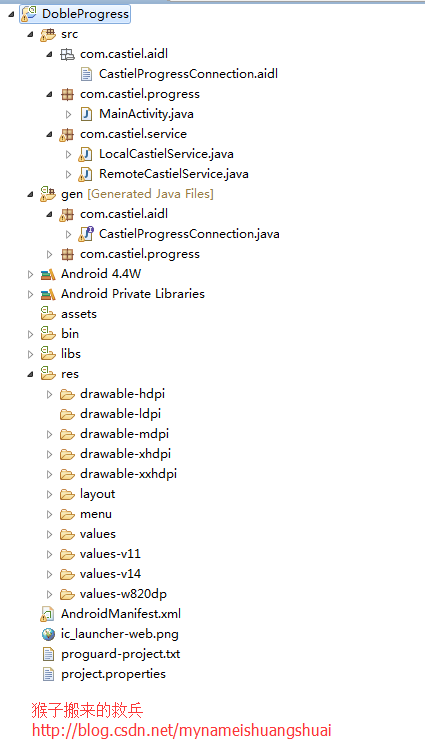
这里,我们定义两个Service,分别是LocalCastielService和RemoteCastielService,其中的RemoteCastielService我们通过属性配置android:process=”:com.castiel.remote” ,让它成为远端进程。
LocalCastielService.java
/*** @ClassName: LocalCastielService * @Description: 本地服务* @author 猴子搬来的救兵 http://blog.csdn.net/mynameishuangshuai* @version*/
public class LocalCastielService extends Service {MyBinder myBinder;private PendingIntent pintent;MyServiceConnection myServiceConnection;@Overridepublic void onCreate() {super.onCreate();if (myBinder == null) {myBinder = new MyBinder();}myServiceConnection = new MyServiceConnection();}@Overridepublic int onStartCommand(Intent intent, int flags, int startId) {this.bindService(new Intent(this, RemoteCastielService.class), myServiceConnection, Context.BIND_IMPORTANT);Notification notification = new Notification(R.drawable.ic_launcher, "猴子服务启动中", System.currentTimeMillis());pintent = PendingIntent.getService(this, 0, intent, 0);notification.setLatestEventInfo(this, "猴子服务", "防止被杀掉!", pintent);// 设置service为前台进程,避免手机休眠时系统自动杀掉该服务startForeground(startId, notification);return START_STICKY;}class MyServiceConnection implements ServiceConnection {@Overridepublic void onServiceConnected(ComponentName arg0, IBinder arg1) {Log.i("castiel", "远程服务连接成功");}@Overridepublic void onServiceDisconnected(ComponentName arg0) {// 连接出现了异常断开了,RemoteService被杀掉了Toast.makeText(LocalCastielService.this, "远程服务Remote被干掉", Toast.LENGTH_LONG).show();// 启动RemoteCastielServiceLocalCastielService.this.startService(new Intent(LocalCastielService.this, RemoteCastielService.class));LocalCastielService.this.bindService(new Intent(LocalCastielService.this, RemoteCastielService.class),myServiceConnection, Context.BIND_IMPORTANT);}}class MyBinder extends CastielProgressConnection.Stub {@Overridepublic String getProName() throws RemoteException {return "Local猴子搬来的救兵 http://blog.csdn.net/mynameishuangshuai";}}@Overridepublic IBinder onBind(Intent arg0) {return myBinder;}}- 1
- 2
- 3
- 4
- 5
- 6
- 7
- 8
- 9
- 10
- 11
- 12
- 13
- 14
- 15
- 16
- 17
- 18
- 19
- 20
- 21
- 22
- 23
- 24
- 25
- 26
- 27
- 28
- 29
- 30
- 31
- 32
- 33
- 34
- 35
- 36
- 37
- 38
- 39
- 40
- 41
- 42
- 43
- 44
- 45
- 46
- 47
- 48
- 49
- 50
- 51
- 52
- 53
- 54
- 55
- 56
- 57
- 58
- 59
- 60
- 61
- 62
- 63
- 64
- 65
- 66
- 67
RemoteCastielService.java
/*** * @ClassName: RemoteCastielService * @Description: 远程服务* @author 猴子搬来的救兵 http://blog.csdn.net/mynameishuangshuai*/
public class RemoteCastielService extends Service {MyBinder myBinder;private PendingIntent pintent;MyServiceConnection myServiceConnection;@Overridepublic void onCreate() {super.onCreate();if (myBinder == null) {myBinder = new MyBinder();}myServiceConnection = new MyServiceConnection();}@Overridepublic int onStartCommand(Intent intent, int flags, int startId) {this.bindService(new Intent(this,LocalCastielService.class), myServiceConnection, Context.BIND_IMPORTANT);Notification notification = new Notification(R.drawable.ic_launcher,"猴子服务启动中",System.currentTimeMillis());pintent=PendingIntent.getService(this, 0, intent, 0);notification.setLatestEventInfo(this, "猴子服务","防止被杀掉!", pintent);//设置service为前台进程,避免手机休眠时系统自动杀掉该服务startForeground(startId, notification);return START_STICKY;}class MyServiceConnection implements ServiceConnection {@Overridepublic void onServiceConnected(ComponentName arg0, IBinder arg1) {Log.i("castiel", "本地服务连接成功");}@Overridepublic void onServiceDisconnected(ComponentName arg0) {// 连接出现了异常断开了,LocalCastielService被杀死了Toast.makeText(RemoteCastielService.this, "本地服务Local被干掉", Toast.LENGTH_LONG).show();// 启动LocalCastielServiceRemoteCastielService.this.startService(new Intent(RemoteCastielService.this,LocalCastielService.class));RemoteCastielService.this.bindService(new Intent(RemoteCastielService.this,LocalCastielService.class), myServiceConnection, Context.BIND_IMPORTANT);}}class MyBinder extends CastielProgressConnection.Stub {@Overridepublic String getProName() throws RemoteException {return "Remote猴子搬来的救兵 http://blog.csdn.net/mynameishuangshuai";}}@Overridepublic IBinder onBind(Intent arg0) {return myBinder;}}- 1
- 2
- 3
- 4
- 5
- 6
- 7
- 8
- 9
- 10
- 11
- 12
- 13
- 14
- 15
- 16
- 17
- 18
- 19
- 20
- 21
- 22
- 23
- 24
- 25
- 26
- 27
- 28
- 29
- 30
- 31
- 32
- 33
- 34
- 35
- 36
- 37
- 38
- 39
- 40
- 41
- 42
- 43
- 44
- 45
- 46
- 47
- 48
- 49
- 50
- 51
- 52
- 53
- 54
- 55
- 56
- 57
- 58
- 59
- 60
- 61
- 62
- 63
- 64
- 65
- 66
- 67
- 68
aidl文件
package com.castiel.aidl;
interface CastielProgressConnection{String getProName();
}- 1
- 2
- 3
- 4
启动服务
public class MainActivity extends Activity {@Overrideprotected void onCreate(Bundle savedInstanceState) {super.onCreate(savedInstanceState);setContentView(R.layout.activity_main);// 启动本地服务和远程服务startService(new Intent(this, LocalCastielService.class));startService(new Intent(this, RemoteCastielService.class));}- 1
- 2
- 3
- 4
- 5
- 6
- 7
- 8
- 9
- 10
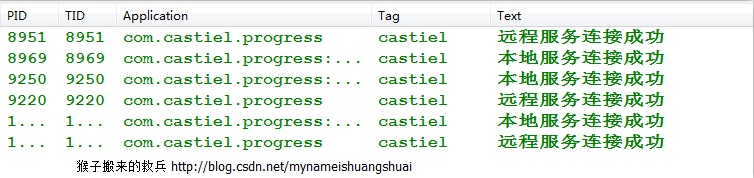
通过以上代码可以看出,双进程守护实现代码非常简单,两个服务相互连接,Local服务连接着Remote服务,Remote服务又连接着Local服务,你中有我我中有你,一旦两个服务发现对方被杀掉,另一服务立刻会启动并连接它,下面我给大家演示一下。

查看一下系统打印日志:
本文来自互联网用户投稿,文章观点仅代表作者本人,不代表本站立场,不承担相关法律责任。如若转载,请注明出处。 如若内容造成侵权/违法违规/事实不符,请点击【内容举报】进行投诉反馈!