微信小程序编辑器editor
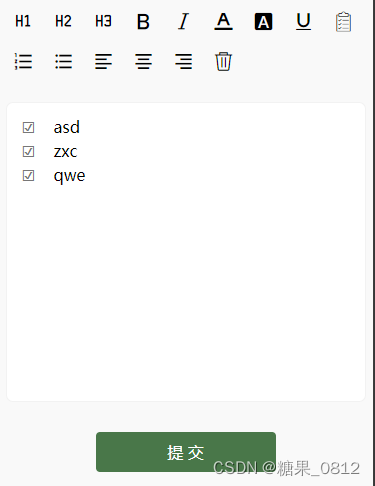
页面显示的效果图如上,
1. 页面结构
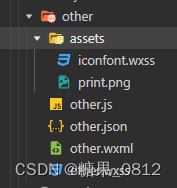
assets文件夹在官方给的示例里面有,参照 editor | 微信开放文档
2. other.js
在页面 Page 函数中,创建 onEditorReady 函数,用来获取富文本编辑器示例EditorContext
onEditorReady() {
const that = this;
wx.createSelectorQuery().select('#editor').context(function (res) {
that.editorCtx = res.context
}).exec()
},
/*** 页面的初始数据*/data: {//编辑器设置editorHeight: 300,readOnly: false,placeholder: '开始输入...'},
/*** 生命周期函数--监听页面加载*/onLoad(options) {let neirong = '- asd
- zxc
- qwe
';wx.createSelectorQuery().select('#editor').context(function (res) {this.editorCtx = res.context;//初始化编辑器---Hello!大家好啊!this.editorCtx.setContents({'html': neirong,success: function (res) {console.log(res, "res")}});}).exec();},
format(e) {let {name,value} = e.target.datasetif (!name) return// console.log('format', name, value)this.editorCtx.format(name, value);},onStatusChange(e) {const formats = e.detailthis.setData({formats})},onEditorReady() {const that = this;wx.createSelectorQuery().select('#editor').context(function (res) {that.editorCtx = res.context}).exec()},//删除clear() {this.editorCtx.clear({success: function (res) {console.log("clear success")}})},//取值getContent: function (e) {this.editorCtx.getContents({success: function (res) {console.log(res.html);}})},
3. other.wxml
富文本编辑器的图标参照官方文档:
EditorContext.format(string name, string value) | 微信开放文档
提 交 4. other.wxss
需要在other.wxss中引入 iconfont.wxss 字体图标。
@import "./assets/iconfont.wxss";page {width: 740rpx;margin: 0 auto;background-color: #f9f9f9;}.wrapper {padding: 5px;
}.ql-active {color: #22C704;
}.iconfont {display: inline-block;padding: 8px 8px;width: 24px;height: 24px;cursor: pointer;font-size: 20px;
}.toolbar {box-sizing: border-box;border-bottom: 0;font-family: 'Helvetica Neue', 'Helvetica', 'Arial', sans-serif;
}.ql-container {box-sizing: border-box;padding: 12px 15px;width: 100%;min-height: 30vh;height: auto;background: #fff;margin-top: 20px;font-size: 16px;line-height: 1.5;border: 1rpx solid #f2f2f2;border-radius: 15rpx;
}.button {width: 360rpx;height: 80rpx;line-height: 80rpx;text-align: center;margin: auto;margin-top: 50rpx;border-radius: 8rpx;font-size: 32rpx;color: white;background-color: #497749 !important;
}
参照:微信小程序实战之实现富文本编辑器_微信小程序富文本编辑器_梅花十三儿的博客-CSDN博客
本文来自互联网用户投稿,文章观点仅代表作者本人,不代表本站立场,不承担相关法律责任。如若转载,请注明出处。 如若内容造成侵权/违法违规/事实不符,请点击【内容举报】进行投诉反馈!