iOS 之iIOS11更新 导航返回按钮偏移的问题。、导航基类
iOS 11导航返回按钮偏移的问题:
参考:http://blog.csdn.net/spicyShrimp/article/details/77891717
http://blog.csdn.net/spicyShrimp/article/details/78201042
http://www.jianshu.com/p/352f101d6df1
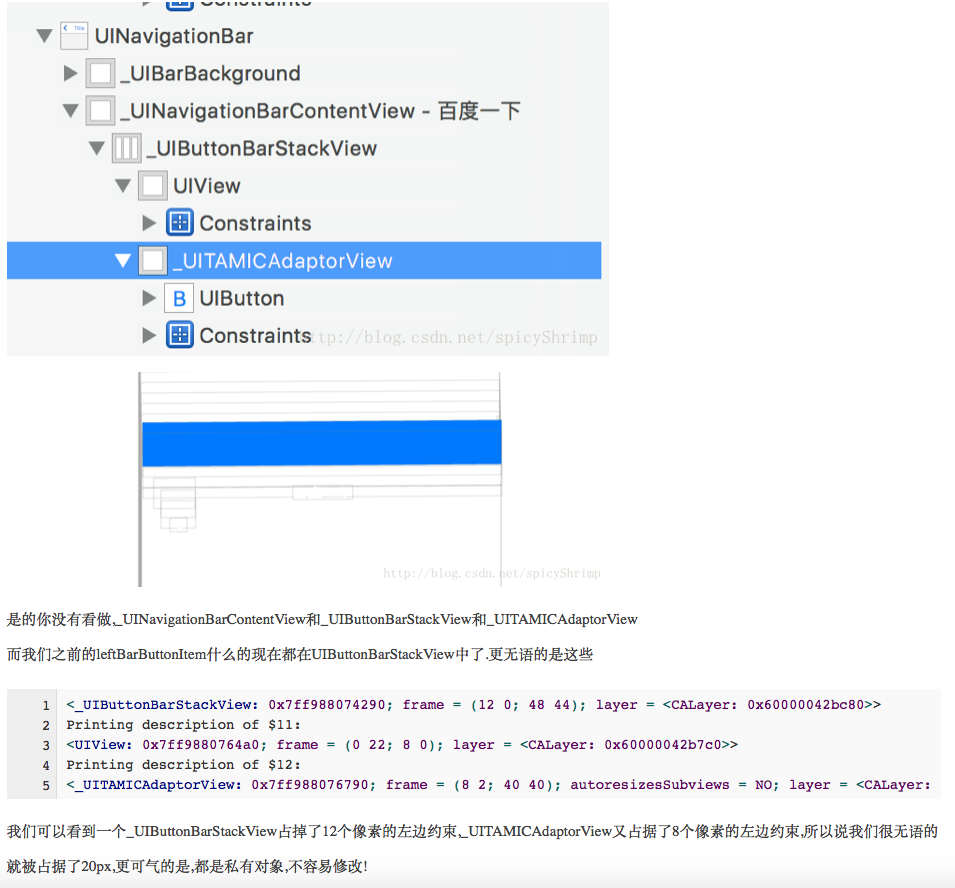
1、MJ刷新异常,上拉加载出现跳动刷新问题:
解决办法:初始化的时候增加以下代码(tableView和collectionView类似)
if (@available(iOS11.0, *)) {
_tableView.contentInsetAdjustmentBehavior =UIScrollViewContentInsetAdjustmentNever;
_tableView.contentInset =UIEdgeInsetsMake(64,0,49,0);//64和49自己看效果,是否应该改成0
_tableView.scrollIndicatorInsets =_tableView.contentInset;
}
2、tableView的section之间间距变大问题:
解决办法:初始化的时候增加以下代码
self.tableView.estimatedRowHeight =0;
self.tableView.estimatedSectionHeaderHeight =0;
self.tableView.estimatedSectionFooterHeight =0;
3、导航栏按钮偏移20像素问题
解决办法:
楼主写的分类:UIViewController+BarButton
代码如下:
//左侧一个图片按钮的情况
- (void)addLeftBarButtonWithImage:(UIImage *)image action:(SEL)action
{
UIView *view = [[UIViewalloc]initWithFrame:CGRectMake(0,0,44,44)];
view.backgroundColor = [UIColorclearColor];
UIButton *firstButton = [UIButtonbuttonWithType:UIButtonTypeCustom];
firstButton.frame = CGRectMake(0, 0, 44, 44);
[firstButton setImage:imageforState:UIControlStateNormal];
[firstButton addTarget:selfaction:actionforControlEvents:UIControlEventTouchUpInside];
if (!SYSTEM_VERSION_LESS_THAN(@"11")) {
firstButton.contentHorizontalAlignment =UIControlContentHorizontalAlignmentLeft;
[firstButton setImageEdgeInsets:UIEdgeInsetsMake(0, -5 *kScreenWidth /375.0,0,0)];
}
UIBarButtonItem *leftBarButtonItem = [[UIBarButtonItemalloc]initWithCustomView:firstButton];
self.navigationItem.leftBarButtonItem = leftBarButtonItem;
}
//右侧一个图片按钮的情况
- (void)addRightBarButtonWithFirstImage:(UIImage *)firstImage action:(SEL)action
{
UIView *view = [[UIViewalloc]initWithFrame:CGRectMake(0,0,44,44)];
view.backgroundColor = [UIColorclearColor];
UIButton *firstButton = [UIButtonbuttonWithType:UIButtonTypeCustom];
firstButton.frame = CGRectMake(0, 0, 44, 44);
[firstButton setImage:firstImageforState:UIControlStateNormal];
[firstButton addTarget:selfaction:actionforControlEvents:UIControlEventTouchUpInside];
if (!SYSTEM_VERSION_LESS_THAN(@"11")) {
firstButton.contentHorizontalAlignment =UIControlContentHorizontalAlignmentRight;
[firstButton setImageEdgeInsets:UIEdgeInsetsMake(0,0,0, -5 *kScreenWidth /375.0)];
}
UIBarButtonItem *rightBarButtonItem = [[UIBarButtonItemalloc]initWithCustomView:firstButton];
self.navigationItem.rightBarButtonItem = rightBarButtonItem;
}
//右侧为文字item的情况
- (void)addRightBarButtonItemWithTitle:(NSString *)itemTitle action:(SEL)action
{
UIButton *rightbBarButton = [[UIButtonalloc]initWithFrame:CGRectMake(0,0,88,44)];
[rightbBarButton setTitle:itemTitle forState:(UIControlStateNormal)];
[rightbBarButton setTitleColor:kDarkOneColorforState:(UIControlStateNormal)];
rightbBarButton.titleLabel.font = [UIFontsystemFontOfSize:14];
[rightbBarButton addTarget:selfaction:actionforControlEvents:(UIControlEventTouchUpInside)];
if (!SYSTEM_VERSION_LESS_THAN(@"11")) {
rightbBarButton.contentHorizontalAlignment =UIControlContentHorizontalAlignmentRight;
[rightbBarButton setTitleEdgeInsets:UIEdgeInsetsMake(0,0,0, -5 * kScreenWidth/375.0)];
}
self.navigationItem.rightBarButtonItem = [[UIBarButtonItemalloc]initWithCustomView:rightbBarButton];
}
//左侧为文字item的情况
- (void)addLeftBarButtonItemWithTitle:(NSString *)itemTitle action:(SEL)action
{
UIButton *leftbBarButton = [[UIButtonalloc]initWithFrame:CGRectMake(0,0,44,44)];
[leftbBarButton setTitle:itemTitleforState:(UIControlStateNormal)];
[leftbBarButton setTitleColor:kDarkOneColorforState:(UIControlStateNormal)];
leftbBarButton.titleLabel.font = [UIFontsystemFontOfSize:16];
[leftbBarButton addTarget:selfaction:actionforControlEvents:(UIControlEventTouchUpInside)];
if (!SYSTEM_VERSION_LESS_THAN(@"11")) {
leftbBarButton.contentHorizontalAlignment =UIControlContentHorizontalAlignmentLeft;
[leftbBarButton setTitleEdgeInsets:UIEdgeInsetsMake(0, -5 *kScreenWidth/375.0,0,0)];
}
self.navigationItem.leftBarButtonItem = [[UIBarButtonItemalloc]initWithCustomView:leftbBarButton];
}
//右侧两个图片item的情况
- (void)addRightTwoBarButtonsWithFirstImage:(UIImage *)firstImage firstAction:(SEL)firstAction secondImage:(UIImage*)secondImage secondAction:(SEL)secondAction
{
UIView *view = [[UIViewalloc]initWithFrame:CGRectMake(0,0,80,44)];
view.backgroundColor = [UIColorclearColor];
UIButton *firstButton = [UIButtonbuttonWithType:UIButtonTypeCustom];
firstButton.frame = CGRectMake(44, 6, 30, 30);
[firstButton setImage:firstImageforState:UIControlStateNormal];
[firstButton addTarget:selfaction:firstActionforControlEvents:UIControlEventTouchUpInside];
if (!SYSTEM_VERSION_LESS_THAN(@"11")) {
firstButton.contentHorizontalAlignment =UIControlContentHorizontalAlignmentRight;
[firstButton setImageEdgeInsets:UIEdgeInsetsMake(0,0,0, -5 * kScreenWidth/375.0)];
}
[view addSubview:firstButton];
UIButton *secondButton = [UIButtonbuttonWithType:UIButtonTypeCustom];
secondButton.frame = CGRectMake(6, 6, 30, 30);
[secondButton setImage:secondImageforState:UIControlStateNormal];
[secondButton addTarget:selfaction:secondActionforControlEvents:UIControlEventTouchUpInside];
if (!SYSTEM_VERSION_LESS_THAN(@"11")) {
secondButton.contentHorizontalAlignment =UIControlContentHorizontalAlignmentRight;
[secondButton setImageEdgeInsets:UIEdgeInsetsMake(0,0,0, -5 * kScreenWidth/375.0)];
}
[view addSubview:secondButton];
UIBarButtonItem *rightBarButtonItem = [[UIBarButtonItemalloc]initWithCustomView:view];
self.navigationItem.rightBarButtonItem = rightBarButtonItem;
}
在你的控制器里边,直接[self addleft...]就可以调用,如果觉得坐标有问题,可以自行处理变更
如果你的需求是三个四个item按钮,可以仿照上边两个item按钮的方法,自行处理。
===========
http://blog.csdn.net/sodaslay/article/details/78074625
2.scrollview的内容适配contentInsetAdjustmentBehavior(http://blog.csdn.net/HDFQQ188816190/article/details/78050242?locationNum=3&fps=1)
self.tab.contentInsetAdjustmentBehavior = UIScrollViewContentInsetAdjustmentNever;//UIScrollView也适用
- 1.UIScrollView的属性contentInsetAdjustmentBehavior
- 2.UIScrollView的只读属性adjustedContentInset
- 3.UIView的只读属性safeAreaInsets
==========下面是一个简单的导航按钮解决
#import
@interface UIBarButtonItem (LeftBarbutton)
/*
*添加返回按钮
*imageStr 按钮图片名称
*titleStr 按钮标题名称
*action 方法,要在调用的那个控制器中实现
*target 哪个控制器调用的
*/
+(NSArray *)backBtn:(SEL)action target:(id)target image:(NSString *)imageStr title:(NSString *)titleStr;
/*
*添加右侧按钮
*imageStr 按钮图片名称
*titleStr 按钮标题名称
*action 方法,要在调用的那个控制器中实现
*target 哪个控制器调用的
*/
+(NSArray *)addrightBtn:(SEL)action target:(id)target image:(NSString *)imageStr title:(NSString *)titleStr;
@end
********************************
#import "UIBarButtonItem+LeftBarbutton.h"
@implementation UIBarButtonItem (LeftBarbutton)
//添加导航返回按钮
+(NSArray *)backBtn:(SEL)action target:(id)target image:(NSString *)imageStr title:(NSString *)titleStr{
UIButton *backBtn=[[UIButtonalloc]initWithFrame:CGRectMake(0,0,80,44)];
[backBtn setTitleColor:[UIColorblackColor]forState:UIControlStateNormal];
backBtn.titleLabel.font=[UIFontsystemFontOfSize:12];
UIBarButtonItem *backbtn=[[UIBarButtonItemalloc]initWithCustomView:backBtn];
UIBarButtonItem *fixBtn=[[UIBarButtonItemalloc]initWithBarButtonSystemItem:UIBarButtonSystemItemFixedSpacetarget:selfaction:nil];
if(titleStr && ![titleStr isEqualToString:@""]){
[backBtn setTitle:titleStrforState:UIControlStateNormal];
}
if(imageStr && ![imageStr isEqualToString:@""]){
fixBtn.width=-30;
[backBtn setImage:[UIImageimageNamed:imageStr]forState:UIControlStateNormal];
}
if(target && action){
[backBtn addTarget:targetaction:actionforControlEvents:UIControlEventTouchUpInside];
}
//兼容IOS11
CGFloat sysv= [[[UIDevicecurrentDevice]systemVersion]floatValue];
if(sysv>=11.0){
backBtn.contentHorizontalAlignment =UIControlContentHorizontalAlignmentLeft;
[backBtn setImageEdgeInsets:UIEdgeInsetsMake(0,0,0,0)];
}
NSArray *btnArr=@[fixBtn,backbtn];
return btnArr;
}
//添加导航右侧按钮
+(NSArray *)addrightBtn:(SEL)action target:(id)target image:(NSString *)imageStr title:(NSString *)titleStr{
UIButton *rightBtn=[[UIButtonalloc]initWithFrame:CGRectMake(0,0,80,44)];
[rightBtn setTitleColor:[UIColorwhiteColor]forState:UIControlStateNormal];
[rightBtn.titleLabelsetFont:[UIFontsystemFontOfSize:14weight:UIFontWeightThin]];
UIBarButtonItem *rbtn=[[UIBarButtonItemalloc]initWithCustomView:rightBtn];
UIBarButtonItem *fixBtn=[[UIBarButtonItemalloc]initWithBarButtonSystemItem:UIBarButtonSystemItemFixedSpacetarget:nilaction:nil];
if(titleStr && ![titleStr isEqualToString:@""]){
[rightBtn setTitle:titleStrforState:UIControlStateNormal];
fixBtn.width=0;
}
if(imageStr && ![imageStr isEqualToString:@""]){
[rightBtn setImage:[UIImageimageNamed:imageStr]forState:UIControlStateNormal];
fixBtn.width=-20;
}
if(target && action){
[rightBtn addTarget:targetaction:actionforControlEvents:UIControlEventTouchUpInside];
}
//兼容IOS11
CGFloat sysv= [[[UIDevicecurrentDevice]systemVersion]floatValue];
if(sysv>=11.0){
rightBtn.contentHorizontalAlignment =UIControlContentHorizontalAlignmentRight;
[rightBtn setTitleEdgeInsets:UIEdgeInsetsMake(0,0,0,0)];
}
NSArray *rightBtnArr=@[fixBtn,rbtn];
return rightBtnArr;
}
@end
使用:
//设置导航右边按钮
-(void)addrightBtn{
self.navigationItem.rightBarButtonItems=[UIBarButtonItemaddrightBtn:@selector(addListBtn)target:selfimage:@""title:@"我的投资"];
}
-(void)addListBtn{
}
//返回按钮
-(void)addbackBtn{
self.navigationItem.leftBarButtonItems=[UIBarButtonItembackBtn:@selector(backBtn)target:selfimage:@"icon_navigation_back"title:@""];
}
-(void)backBtn{
}
==============IOS10 之后push出去后导航标题不显示的问题:
https://www.cnblogs.com/PaulpauL/p/6017817.html
原因是“iOS10在加载导航栏是总会加载系统的”。如果他说得对的话,也就是说push时系统会将自带的导航栏置顶,而隐藏后再显示只会显示自定义的导航栏。
=========
iOS10 title和leftBarButtonItem不显示
http://www.jianshu.com/p/402816df3903
=======ios11 tableview 显示偏移的问题:
http://blog.csdn.net/ycm1101743158/article/details/78086152
================导航基类==============
//导航控制器的基础类,在里面统一设置导航返回按钮#import @interface LYBNavigationController : UINavigationController
@property (nonatomic,assign) BOOL isAlwaysShadow;
@end#import "LYBNavigationController.h"
#import "UIView+Frame.h"
@interface LYBNavigationController ()
@property(nonatomic,strong)UIImage * shadowView;
@end@implementation LYBNavigationController
/**这个方法在类中的第一个方法被调用时会调用一次*/
+ (void)initialize
{UINavigationBar *bar = [UINavigationBar appearance];[bar setTitleTextAttributes:@{NSFontAttributeName : [UIFont systemFontOfSize:20],NSForegroundColorAttributeName:[UIColor blackColor]}];[bar setShadowImage:[[UIImage alloc] init]];// 设置itemUIBarButtonItem *item = [UIBarButtonItem appearance];// UIControlStateNormalNSMutableDictionary *itemAttrs = [NSMutableDictionary dictionary];itemAttrs[NSForegroundColorAttributeName] = [UIColor blackColor];itemAttrs[NSFontAttributeName] = [UIFont systemFontOfSize:17];[item setTitleTextAttributes:itemAttrs forState:UIControlStateNormal];// UIControlStateDisabledNSMutableDictionary *itemDisabledAttrs = [NSMutableDictionary dictionary];itemDisabledAttrs[NSForegroundColorAttributeName] = [UIColor lightGrayColor];[item setTitleTextAttributes:itemDisabledAttrs forState:UIControlStateDisabled];
}
- (void)viewDidLoad {[super viewDidLoad];// 如果滑动移除控制器的功能失效,清空代理(让导航控制器重新设置这个功能)[self.interactivePopGestureRecognizer setEnabled:NO];}
- (void)pushViewController:(UIViewController *)viewController animated:(BOOL)animated
{if (self.childViewControllers.count > 0) { // 如果push进来的不是第一个控制器UIButton *button = [UIButton buttonWithType:UIButtonTypeCustom];[button setImage:[UIImage imageNamed:@"fanhui"] forState:UIControlStateNormal];button.size = CGSizeMake(40, 30);// 让按钮内部的所有内容左对齐button.contentHorizontalAlignment = UIControlContentHorizontalAlignmentLeft;//        [button sizeToFit];// 让按钮的内容往左边偏移10button.contentEdgeInsets = UIEdgeInsetsMake(0, 0, 0, 0);[button setTitleColor:[UIColor blackColor] forState:UIControlStateNormal];[button setTitleColor:[UIColor whiteColor] forState:UIControlStateHighlighted];//返回按钮[button addTarget:self action:@selector(back) forControlEvents:UIControlEventTouchUpInside];// 修改导航栏左边的itemviewController.navigationItem.leftBarButtonItem = [[UIBarButtonItem alloc] initWithCustomView:button];// 隐藏tabbarviewController.hidesBottomBarWhenPushed = YES;[self.navigationBar setShadowImage:self.shadowView];}else{if(self.isAlwaysShadow){[self.navigationBar setShadowImage:self.shadowView];}else{[self.navigationBar setShadowImage:[[UIImage alloc]init]];}}// 这句super的push要放在后面, 让viewController可以覆盖上面设置的leftBarButtonItem[super pushViewController:viewController animated:animated];}
- (UIViewController *)popViewControllerAnimated:(BOOL)animated{if (self.childViewControllers.count > 2){[self.navigationBar setShadowImage:self.shadowView];}else{if(self.isAlwaysShadow){[self.navigationBar setShadowImage:self.shadowView];}else{[self.navigationBar setShadowImage:[[UIImage alloc]init]];}}return [super popViewControllerAnimated:animated];}
- (void)back
{[self popViewControllerAnimated:YES];
}@end
基础VC
#import NS_ASSUME_NONNULL_BEGIN@interface LYBBaseMainVC : UIViewController@endNS_ASSUME_NONNULL_END#import "LYBBaseMainVC.h"@interface LYBBaseMainVC ()@end@implementation LYBBaseMainVC- (void)viewDidLoad {[super viewDidLoad];self.view.backgroundColor=[UIColor whiteColor];self.edgesForExtendedLayout=UIRectEdgeNone;//修改导航栏标题文字颜色self.navigationController.navigationBar.titleTextAttributes=@{NSForegroundColorAttributeName:[UIColor redColor],NSFontAttributeName:[UIFont systemFontOfSize:12]};
}-(void)viewWillAppear:(BOOL)animated{[super viewWillAppear:animated];//设置导航栏透明
[self.navigationController.navigationBar setBackgroundImage:[UIImage new] forBarMetrics:UIBarMetricsDefault];
[self.navigationController.navigationBar setShadowImage:[UIImage new]];}-(void)viewWillDisappear:(BOOL)animated{[super viewWillDisappear:animated];//重置导航栏
[self.navigationController.navigationBar setBackgroundImage:nil forBarMetrics:UIBarMetricsDefault];
[self.navigationController.navigationBar setShadowImage:nil];}@end
本文来自互联网用户投稿,文章观点仅代表作者本人,不代表本站立场,不承担相关法律责任。如若转载,请注明出处。 如若内容造成侵权/违法违规/事实不符,请点击【内容举报】进行投诉反馈!