Angular 企业实战开发 --- Angular 深入学习
6. 管道 Pipe
管道的作用是格式化组件模板数据。
6.1 内置管道
- date 日期格式化
- currency 货币格式化
- uppercase 转大写
- lowercase 转小写
- json 格式化json 数据
{{ date | date: "yyyy-MM-dd" }}
6.2 自定义管道
需求:指定字符串不能超过规定的长度
// summary.pipe.ts
import { Pipe, PipeTransform } from '@angular/core';@Pipe({name: 'summary'
});
export class SummaryPipe implements PipeTransform {transform (value: string, limit?: number) {if (!value) return null;let actualLimit = (limit) ? limit : 50;return value.substr(0, actualLimit) + '...';}
}
// app.module.ts
import { SummaryPipe } from './summary.pipe'
@NgModule({declarations: [SummaryPipe]
});
7. 组件通讯
7.1 向组件内部传递数据
<app-favorite [isFavorite]="true">app-favorite>
// favorite.component.ts
import { Input } from '@angular/core';
export class FavoriteComponent {@Input() isFavorite: boolean = false;
}
注意:在属性的外面加 [] 表示绑定动态值,在组件内接收后是布尔类型,不加 [] 表示绑定普通值,在组件内接收后是字符串类型。
<app-favorite [is-Favorite]="true">app-favorite>
import { Input } from '@angular/core';export class FavoriteComponent {@Input("is-Favorite") isFavorite: boolean = false
}
7.2 组件向外部传递数据
需求:在子组件中通过点击按钮将数据传递给父组件
<button (click)="onClick()">clickbutton>
// 子组件类
import { EventEmitter, Output } from "@angular/core"export class FavoriteComponent {@Output() change = new EventEmitter()onClick() {this.change.emit({ name: "张三" })}
}
<app-favorite (change)="onChange($event)">app-favorite>
// 父组件类
export class AppComponent {onChange(event: { name: string }) {console.log(event)}
}
8. 组件生命周期
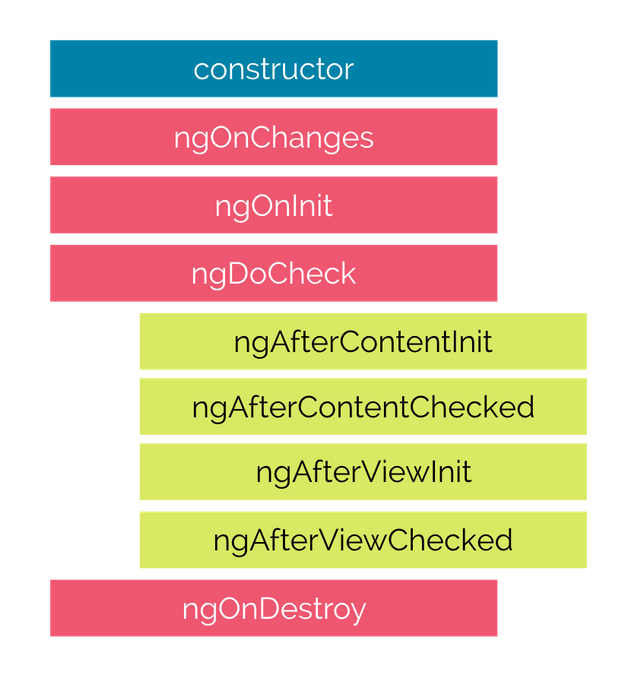
8.1 挂载阶段
挂载阶段的生命周期函数只在挂载阶段执行一次,数据更新时不再执行。
-
constructor
Angular 在实例化组件类时执行, 可以用来接收 Angular 注入的服务实例对象。
export class ChildComponent {constructor (private test: TestService) {console.log(this.test) // "test"} } -
ngOnInit
在首次接收到输入属性值后执行,在此处可以执行请求操作。
<app-child name="张三">app-child>export class ChildComponent implements OnInit {@Input("name") name: string = ""ngOnInit() {console.log(this.name) // "张三"} } -
ngAfterContentInit
当内容投影初始渲染完成后调用。
<app-child><div #box>Hello Angulardiv>
app-child>
export class ChildComponent implements AfterContentInit {@ContentChild("box") box: ElementRef<HTMLDivElement> | undefinedngAfterContentInit() {console.log(this.box) // Hello Angular} } -
ngAfterViewInit
当组件视图渲染完成后调用。
<p #p>app-child worksp>export class ChildComponent implements AfterViewInit {@ViewChild("p") p: ElementRef<HTMLParagraphElement> | undefinedngAfterViewInit () {console.log(this.p) //app-child works
} }
8.2 更新阶段
-
ngOnChanges
- 当输入属性值发生变化时执行,初始设置时也会执行一次,顺序优于 ngOnInit
- 不论多少输入属性同时变化,钩子函数只会执行一次,变化的值会同时存储在参数中
- 参数类型为 SimpleChanges,子属性类型为 SimpleChange
- 对于基本数据类型来说, 只要值发生变化就可以被检测到
- 对于引用数据类型来说, 可以检测从一个对象变成另一个对象, 但是检测不到同一个对象中属性值的变化,但是不影响组件模板更新数据。
基本数据类型值变化
<app-child [name]="name" [age]="age">app-child>
<button (click)="change()">changebutton>
export class AppComponent {name: string = "张三";age: number = 20change() {this.name = "李四"this.age = 30} }export class ChildComponent implements OnChanges {@Input("name") name: string = ""@Input("age") age: number = 0ngOnChanges(changes: SimpleChanges) {console.log("基本数据类型值变化可以被检测到")} }引用数据类型变化
<app-child [person]="person">app-child>
<button (click)="change()">changebutton>
export class AppComponent {person = { name: "张三", age: 20 }change() {this.person = { name: "李四", age: 30 }} }export class ChildComponent implements OnChanges {@Input("person") person = { name: "", age: 0 }ngOnChanges(changes: SimpleChanges) {console.log("对于引用数据类型, 只能检测到引用地址发生变化, 对象属性变化不能被检测到")} } -
ngDoCheck:主要用于调试,只要输入属性发生变化,不论是基本数据类型还是引用数据类型还是引用数据类型中的属性变化,都会执行。
-
ngAfterContentChecked:内容投影更新完成后执行。
-
ngAfterViewChecked:组件视图更新完成后执行。
8.3 卸载阶段
-
ngOnDestroy
当组件被销毁之前调用, 用于清理操作。
export class HomeComponent implements OnDestroy {ngOnDestroy() {console.log("组件被卸载")}
}
9. 依赖注入
9.1 概述
依赖注入 ( Dependency Injection ) 简称DI,是面向对象编程中的一种设计原则,用来减少代码之间的耦合度。
class MailService {constructor(APIKEY) {}
}class EmailSender {mailService: MailServiceconstructor() {this.mailService = new MailService("APIKEY1234567890")}sendMail(mail) {this.mailService.sendMail(mail)}
}const emailSender = new EmailSender()
emailSender.sendMail(mail)
EmailSender 类运行时要使用 MailService 类,EmailSender 类依赖 MailService 类,MailService 类是 EmailSender 类的依赖项。
以上写法的耦合度太高,代码并不健壮。如果 MailService 类改变了参数的传递方式,在 EmailSender 类中的写法也要跟着改变。
class EmailSender {mailService: MailServiceconstructor(mailService: MailService) {this.mailService = mailService;}
}
const mailService = new MailService("APIKEY1234567890")
const emailSender = new EmailSender(mailService)
在实例化 EmailSender 类时将它的依赖项通过 constructor 构造函数参数的形式注入到类的内部,这种写法就是依赖注入。
通过依赖注入降了代码之间的耦合度,增加了代码的可维护性。MailService 类中代码的更改再也不会影响 EmailSender 类。
9.2 DI 框架
Angular 有自己的 DI 框架,它将实现依赖注入的过程隐藏了,对于开发者来说只需使用很简单的代码就可以使用复杂的依赖注入功能。
在 Angular 的 DI 框架中有四个核心概念:
- Dependency:组件要依赖的实例对象,服务实例对象
- Token:获取服务实例对象的标识
- Injector:注入器,负责创建维护服务类的实例对象并向组件中注入服务实例对象。
- Provider:配置注入器的对象,指定创建服务实例对象的服务类和获取实例对象的标识。
9.2.1 注入器 Injectors
注入器负责创建服务类实例对象,并将服务类实例对象注入到需要的组件中。
-
创建注入器
import { ReflectiveInjector } from "@angular/core" // 服务类 class MailService {} // 创建注入器并传入服务类 const injector = ReflectiveInjector.resolveAndCreate([MailService]) -
获取注入器中的服务类实例对象
const mailService = injector.get(MailService) -
服务实例对象为单例模式,注入器在创建服务实例后会对其进行缓存
const mailService1 = injector.get(MailService) const mailService2 = injector.get(MailService)console.log(mailService1 === mailService2) // true -
不同的注入器返回不同的服务实例对象
const injector = ReflectiveInjector.resolveAndCreate([MailService]) const childInjector = injector.resolveAndCreateChild([MailService])const mailService1 = injector.get(MailService) const mailService2 = childInjector.get(MailService)console.log(mailService1 === mailService2) -
服务实例的查找类似函数作用域链,当前级别可以找到就使用当前级别,当前级别找不到去父级中查找
const injector = ReflectiveInjector.resolveAndCreate([MailService])
const childInjector = injector.resolveAndCreateChild([])const mailService1 = injector.get(MailService)
const mailService2 = childInjector.get(MailService)console.log(mailService1 === mailService2)
9.2.2 提供者 Provider
-
配置注入器的对象,指定了创建实例对象的服务类和访问服务实例对象的标识。
const injector = ReflectiveInjector.resolveAndCreate([{ provide: MailService, useClass: MailService } ]) -
访问依赖对象的标识也可以是字符串类型
const injector = ReflectiveInjector.resolveAndCreate([{ provide: "mail", useClass: MailService } ]) const mailService = injector.get("mail") -
useValue
const injector = ReflectiveInjector.resolveAndCreate([{provide: "Config",useValue: Object.freeze({APIKEY: "API1234567890",APISCRET: "500-400-300"})}
])
const Config = injector.get("Config")
将实例对象和外部的引用建立了松耦合关系,外部通过标识获取实例对象,只要标识保持不变,内部代码怎么变都不会影响到外部。
10. 服务 Service
10.1 创建服务
import { Injectable } from '@angular/core';@Injectable({providedIn: 'root'
})
export class TestService { }
export class AppComponent {constructor (private testService: TestService) {}
}
10.2 服务的作用域
使用服务可以轻松实现跨模块跨组件共享数据,这取决于服务的作用域。
-
在根注入器中注册服务,所有模块使用同一个服务实例对象。
import { Injectable } from '@angular/core';@Injectable({providedIn: 'root' })export class CarListService { } -
在模块级别注册服务,该模块中的所有组件使用同一个服务实例对象。
import { Injectable } from '@angular/core';
import { CarModule } from './car.module';@Injectable({providedIn: CarModule,
})export class CarListService {
}
import { CarListService } from './car-list.service';@NgModule({providers: [CarListService], }) export class CarModule { } -
在组件级别注册服务,该组件及其子组件使用同一个服务实例对象。
import { Component } from '@angular/core';
import { CarListService } from '../car-list.service.ts'@Component({selector:    'app-car-list',templateUrl: './car-list.component.html',providers:  [ CarListService ]
})
11. 表单
在 Angular 中,表单有两种类型,分别为模板驱动和模型驱动。
11.1 模板驱动
11.1.1 概述
表单的控制逻辑写在组件模板中,适合简单的表单类型。
11.1.2 快速上手
-
引入依赖模块 FormsModule
import { FormsModule } from "@angular/forms"@NgModule({imports: [FormsModule], }) export class AppModule {} -
将 DOM 表单转换为 ngForm
<form #f="ngForm" (submit)="onSubmit(f)">form> -
声明表单字段为 ngModel
<form #f="ngForm" (submit)="onSubmit(f)"><input type="text" name="username" ngModel /><button>提交button> form> -
获取表单字段值
import { NgForm } from "@angular/forms"export class AppComponent {onSubmit(form: NgForm) {console.log(form.value)} } -
表单分组
<form #f="ngForm" (submit)="onSubmit(f)"><div ngModelGroup="user"><input type="text" name="username" ngModel />div><div ngModelGroup="contact"><input type="text" name="phone" ngModel />div><button>提交button>
form>
11.1.3 表单验证
- required 必填字段
- minlength 字段最小长度
- maxlength 字段最大长度
- pattern 验证正则 例如:pattern="\d" 匹配一个数值
<form #f="ngForm" (submit)="onSubmit(f)"><input type="text" name="username" ngModel required pattern="\d" /><button>提交button>
form>
export class AppComponent {onSubmit(form: NgForm) {// 查看表单整体是否验证通过console.log(form.valid)}
}
<button type="submit" [disabled]="f.invalid">提交button>
在组件模板中显示表单项未通过时的错误信息。
<form #f="ngForm" (submit)="onSubmit(f)"><input #username="ngModel" /><div *ngIf="username.touched && !username.valid && username.errors"><div *ngIf="username.errors.required">请填写用户名div><div *ngIf="username.errors.pattern">不符合正则规则div>div>
form>
指定表单项未通过验证时的样式。
input.ng-touched.ng-invalid {border: 2px solid red;
}
11.2 模型驱动
11.2.1 概述
表单的控制逻辑写在组件类中,对验证逻辑拥有更多的控制权,适合复杂的表单的类型。
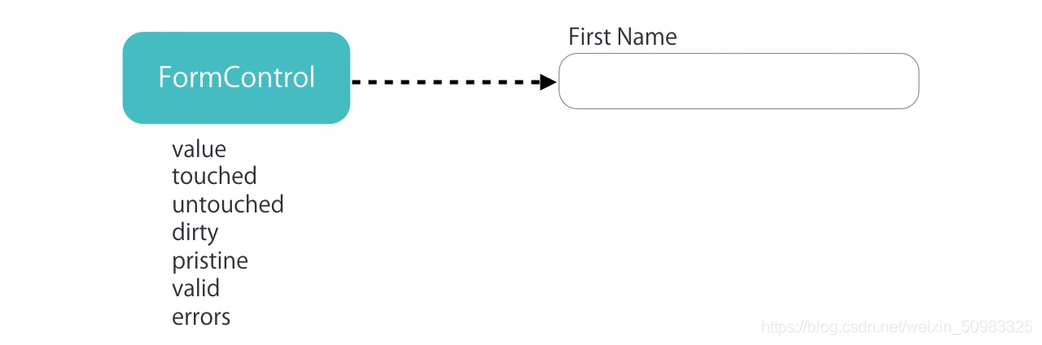
在模型驱动表单中,表单字段需要是 FormControl 类的实例,实例对象可以验证表单字段中的值,值是否被修改过等等
一组表单字段构成整个表单,整个表单需要是 FormGroup 类的实例,它可以对表单进行整体验证。
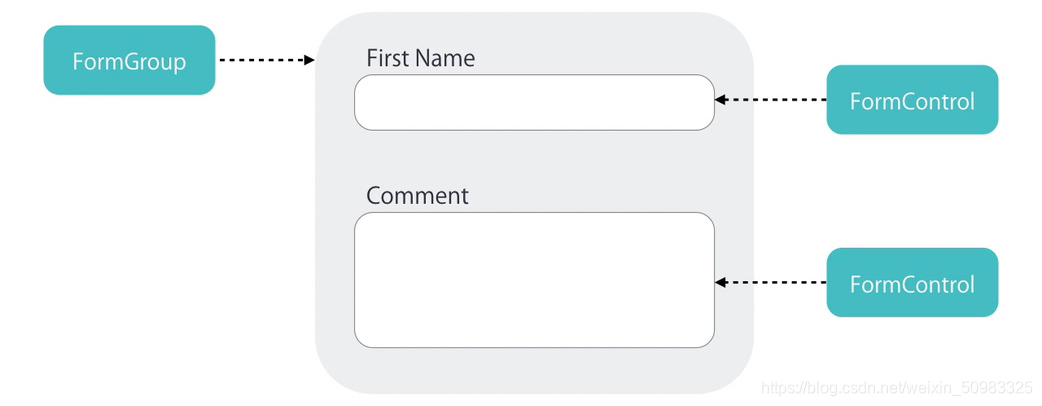
- FormControl:表单组中的一个表单项
- FormGroup:表单组,表单至少是一个 FormGroup
- FormArray:用于复杂表单,可以动态添加表单项或表单组,在表单验证时,FormArray 中有一项没通过,整体没通过。
11.2.2 快速上手
-
引入 ReactiveFormsModule
import { ReactiveFormsModule } from "@angular/forms"@NgModule({imports: [ReactiveFormsModule] }) export class AppModule {} -
在组件类中创建 FormGroup 表单控制对象
import { FormControl, FormGroup } from "@angular/forms"export class AppComponent {contactForm: FormGroup = new FormGroup({name: new FormControl(),phone: new FormControl()}) } -
关联组件模板中的表单
<form [formGroup]="contactForm" (submit)="onSubmit()"><input type="text" formControlName="name" /><input type="text" formControlName="phone" /><button>提交button> form> -
获取表单值
export class AppComponent {onSubmit() {console.log(this.contactForm.value)} } -
设置表单默认值
contactForm: FormGroup = new FormGroup({name: new FormControl("默认值"),phone: new FormControl(15888888888) }) -
表单分组
contactForm: FormGroup = new FormGroup({fullName: new FormGroup({firstName: new FormControl(),lastName: new FormControl()}),phone: new FormControl() })<form [formGroup]="contactForm" (submit)="onSubmit()"><div formGroupName="fullName"><input type="text" formControlName="firstName" /><input type="text" formControlName="lastName" />div><input type="text" formControlName="phone" /><button>提交button> form>onSubmit() {console.log(this.contactForm.value.name.username)console.log(this.contactForm.get(["name", "username"])?.value) }
11.2.3 FormArray
需求:在页面中默认显示一组联系方式,通过点击按钮可以添加更多联系方式组。
import { Component, OnInit } from "@angular/core"
import { FormArray, FormControl, FormGroup } from "@angular/forms"
@Component({selector: "app-root",templateUrl: "./app.component.html",styles: []
})
export class AppComponent implements OnInit {// 表单contactForm: FormGroup = new FormGroup({contacts: new FormArray([])})get contacts() {return this.contactForm.get("contacts") as FormArray}// 添加联系方式addContact() {// 联系方式const myContact: FormGroup = new FormGroup({name: new FormControl(),address: new FormControl(),phone: new FormControl()})// 向联系方式数组中添加联系方式this.contacts.push(myContact)}// 删除联系方式removeContact(i: number) {this.contacts.removeAt(i)}ngOnInit() {// 添加默认的联系方式this.addContact()}onSubmit() {console.log(this.contactForm.value)}
}
<form [formGroup]="contactForm" (submit)="onSubmit()"><div formArrayName="contacts"><div*ngFor="let contact of contacts.controls; let i = index"[formGroupName]="i"><input type="text" formControlName="name" /><input type="text" formControlName="address" /><input type="text" formControlName="phone" /><button (click)="removeContact(i)">删除联系方式button>div>div><button (click)="addContact()">添加联系方式button><button>提交button>
form>
11.2.4 内置表单验证器
-
使用内置验证器提供的验证规则验证表单字段
import { FormControl, FormGroup, Validators } from "@angular/forms"contactForm: FormGroup = new FormGroup({name: new FormControl("默认值", [Validators.required,Validators.minLength(2)]) }) -
获取整体表单是否验证通过
onSubmit() {console.log(this.contactForm.valid) }<button [disabled]="contactForm.invalid">提交button> -
在组件模板中显示为验证通过时的错误信息
get name() {return this.contactForm.get("name")! }<form [formGroup]="contactForm" (submit)="onSubmit()"><input type="text" formControlName="name" /><div *ngIf="name.touched && name.invalid && name.errors"><div *ngIf="name.errors.required">请填写姓名div><div *ngIf="name.errors.maxlength">姓名长度不能大于{{ name.errors.maxlength.requiredLength }} 实际填写长度为{{ name.errors.maxlength.actualLength }}div>div> form>
11.2.5 自定义同步表单验证器
- 自定义验证器的类型是 TypeScript 类
- 类中包含具体的验证方法,验证方法必须为静态方法
- 验证方法有一个参数 control,类型为 AbstractControl。其实就是 FormControl 类的实例对象的类型
- 如果验证成功,返回 null
- 如果验证失败,返回对象,对象中的属性即为验证标识,值为 true,标识该项验证失败
- 验证方法的返回值为 ValidationErrors | null
import { AbstractControl, ValidationErrors } from "@angular/forms"export class NameValidators {// 字段值中不能包含空格static cannotContainSpace(control: AbstractControl): ValidationErrors | null {// 验证未通过if (/\s/.test(control.value)) return { cannotContainSpace: true }// 验证通过return null}
}
import { NameValidators } from "./Name.validators"contactForm: FormGroup = new FormGroup({name: new FormControl("", [Validators.required,NameValidators.cannotContainSpace])
})
<div *ngIf="name.touched && name.invalid && name.errors"><div *ngIf="name.errors.cannotContainSpace">姓名中不能包含空格div>
div>
11.2.6 自定义异步表单验证器
import { AbstractControl, ValidationErrors } from "@angular/forms"
import { Observable } from "rxjs"export class NameValidators {static shouldBeUnique(control: AbstractControl): Promise<ValidationErrors | null> {return new Promise(resolve => {if (control.value == "admin") {resolve({ shouldBeUnique: true })} else {resolve(null)}})}
}
contactForm: FormGroup = new FormGroup({name: new FormControl("",[Validators.required],NameValidators.shouldBeUnique)})
<div *ngIf="name.touched && name.invalid && name.errors"><div *ngIf="name.errors.shouldBeUnique">用户名重复div>
div>
<div *ngIf="name.pending">正在检测姓名是否重复div>
11.2.7 FormBuilder
创建表单的快捷方式。
this.fb.control:表单项this.fb.group:表单组,表单至少是一个 FormGroupthis.fb.array:用于复杂表单,可以动态添加表单项或表单组,在表单验证时,FormArray 中有一项没通过,整体没通过。
import { FormBuilder, FormGroup, Validators } from "@angular/forms"export class AppComponent {contactForm: FormGroupconstructor(private fb: FormBuilder) {this.contactForm = this.fb.group({fullName: this.fb.group({firstName: ["😝", [Validators.required]],lastName: [""]}),phone: []})}
}
11.2.8 练习
-
获取一组复选框中选中的值
<form [formGroup]="form" (submit)="onSubmit()"><label *ngFor="let item of Data"><input type="checkbox" [value]="item.value" (change)="onChange($event)" />{{ item.name }}label><button>提交button>
form>
import { Component } from "@angular/core" import { FormArray, FormBuilder, FormGroup } from "@angular/forms" interface Data {name: stringvalue: string } @Component({selector: "app-checkbox",templateUrl: "./checkbox.component.html",styles: [] }) export class CheckboxComponent {Data: Array<Data> = [{ name: "Pear", value: "pear" },{ name: "Plum", value: "plum" },{ name: "Kiwi", value: "kiwi" },{ name: "Apple", value: "apple" },{ name: "Lime", value: "lime" }]form: FormGroupconstructor(private fb: FormBuilder) {this.form = this.fb.group({checkArray: this.fb.array([])})}onChange(event: Event) {const target = event.target as HTMLInputElementconst checked = target.checkedconst value = target.valueconst checkArray = this.form.get("checkArray") as FormArrayif (checked) {checkArray.push(this.fb.control(value))} else {const index = checkArray.controls.findIndex(control => control.value === value)checkArray.removeAt(index)}}onSubmit() {console.log(this.form.value)} } -
获取单选框中选中的值
export class AppComponent {form: FormGroupconstructor(public fb: FormBuilder) {this.form = this.fb.group({ gender: "" })}onSubmit() {console.log(this.form.value)} }<form [formGroup]="form" (submit)="onSubmit()"><input type="radio" value="male" formControlName="gender" /> Male<input type="radio" value="female" formControlName="gender" /> Female<button type="submit">Submitbutton> form>
11.2.9 其他
- patchValue:设置表单控件的值(可以设置全部,也可以设置其中某一个,其他不受影响)
- setValue:设置表单控件的值 (设置全部,不能排除任何一个)
- valueChanges:当表单控件的值发生变化时被触发的事件
- reset:表单内容置空
12. 路由
12.1 概述
在 Angular 中,路由是以模块为单位的,每个模块都可以有自己的路由。
12.2 快速上手
-
创建页面组件、Layout 组件以及 Navigation 组件,供路由使用
- 创建首页页面组件
ng g c pages/home - 创建关于我们页面组件
ng g c pages/about - 创建布局组件
ng g c pages/layout - 创建导航组件
ng g c pages/navigation
- 创建首页页面组件
-
创建路由规则
// app.module.ts import { Routes } from "@angular/router"const routes: Routes = [{path: "home",component: HomeComponent},{path: "about",component: AboutComponent} ] -
引入路由模块并启动
// app.module.ts import { RouterModule, Routes } from "@angular/router"@NgModule({imports: [RouterModule.forRoot(routes, { useHash: true })], }) export class AppModule {} -
添加路由插座
<router-outlet>router-outlet> -
在导航组件中定义链接
<a routerLink="/home">首页a>
<a routerLink="/about">关于我们a>
12.3 匹配规则
12.3.1 重定向
const routes: Routes = [{path: "home",component: HomeComponent},{path: "about",component: AboutComponent},{path: "",// 重定向redirectTo: "home",// 完全匹配pathMatch: "full"}
]
12.3.2 404 页面
const routes: Routes = [{path: "home",component: HomeComponent},{path: "about",component: AboutComponent},{path: "**",component: NotFoundComponent}
]
12.4 路由传参
12.4.1 查询参数
<a routerLink="/about" [queryParams]="{ name: 'kitty' }">关于我们a>
import { ActivatedRoute } from "@angular/router"export class AboutComponent implements OnInit {constructor(private route: ActivatedRoute) {}ngOnInit(): void {this.route.queryParamMap.subscribe(query => {query.get("name")})}
}
12.4.2 动态参数
const routes: Routes = [{path: "home",component: HomeComponent},{path: "about/:name",component: AboutComponent}
]
<a [routerLink]="['/about', 'zhangsan']">关于我们a>
import { ActivatedRoute } from "@angular/router"export class AboutComponent implements OnInit {constructor(private route: ActivatedRoute) {}ngOnInit(): void {this.route.paramMap.subscribe(params => {params.get("name")})}
}
12.5 路由嵌套
路由嵌套指的是如何定义子级路由。
const routes: Routes = [{path: "about",component: AboutComponent,children: [{path: "introduce",component: IntroduceComponent},{path: "history",component: HistoryComponent}]}
]
<app-layout><p>about works!p><a routerLink="/about/introduce">公司简介a><a routerLink="/about/history">发展历史a><div><router-outlet>router-outlet>div>
app-layout>
12.6 命名插座
将子级路由组件显示到不同的路由插座中。
{path: "about",component: AboutComponent,children: [{path: "introduce",component: IntroduceComponent,outlet: "left"},{path: "history",component: HistoryComponent,outlet: "right"}]
}
<app-layout><p>about works!p><router-outlet name="left">router-outlet><router-outlet name="right">router-outlet>
app-layout>
<a[routerLink]="['/about',{outlets: {left: ['introduce'],right: ['history']}}]">关于我们
a>
12.7 导航路由
<button (click)="jump()">跳转到发展历史button>
// app.component.ts
import { Router } from "@angular/router"export class HomeComponent {constructor(private router: Router) {}jump() {this.router.navigate(["/about/history"], {queryParams: {name: "Kitty"}})}
}
12.8 路由模块
将根模块中的路由配置抽象成一个单独的路由模块,称之为根路由模块,然后在根模块中引入根路由模块。
import { NgModule } from "@angular/core"import { HomeComponent } from "./pages/home/home.component"
import { NotFoundComponent } from "./pages/not-found/not-found.component"const routes: Routes = [{path: "",component: HomeComponent},{path: "**",component: NotFoundComponent}
]@NgModule({declarations: [],imports: [RouterModule.forRoot(routes, { useHash: true })],// 导出 Angular 路由功能模块,因为在根模块的根组件中使用了 RouterModule 模块中提供的路由插座组件exports: [RouterModule]
})
export class AppRoutingModule {}
import { BrowserModule } from "@angular/platform-browser"
import { NgModule } from "@angular/core"
import { AppComponent } from "./app.component"
import { AppRoutingModule } from "./app-routing.module"
import { HomeComponent } from "./pages/home/home.component"
import { NotFoundComponent } from "./pages/not-found/not-found.component"@NgModule({declarations: [AppComponent,HomeComponent, NotFoundComponent],imports: [BrowserModule, AppRoutingModule],providers: [],bootstrap: [AppComponent]
})
export class AppModule {}
12.9 路由懒加载
路由懒加载是以模块为单位的。
-
创建用户模块
ng g m user --routing=true一并创建该模块的路由模块 -
创建登录页面组件
ng g c user/pages/login -
创建注册页面组件
ng g c user/pages/register -
配置用户模块的路由规则
import { NgModule } from "@angular/core" import { Routes, RouterModule } from "@angular/router" import { LoginComponent } from "./pages/login/login.component" import { RegisterComponent } from "./pages/register/register.component"const routes: Routes = [{path: "login",component: LoginComponent},{path: "register",component: RegisterComponent} ]@NgModule({imports: [RouterModule.forChild(routes)],exports: [RouterModule] }) export class UserRoutingModule {} -
将用户路由模块关联到主路由模块
// app-routing.module.ts const routes: Routes = [{path: "user",loadChildren: () => import("./user/user.module").then(m => m.UserModule)} ] -
在导航组件中添加访问链接
<a routerLink="/user/login">登录a>
<a routerLink="/user/register">注册a>
12.10 路由守卫
路由守卫会告诉路由是否允许导航到请求的路由。
路由守方法可以返回 boolean 或 Observable
12.10.1 CanActivate
检查用户是否可以访问某一个路由。
CanActivate 为接口,路由守卫类要实现该接口,该接口规定类中需要有 canActivate 方法,方法决定是否允许访问目标路由。
路由可以应用多个守卫,所有守卫方法都允许,路由才被允许访问,有一个守卫方法不允许,则路由不允许被访问。
创建路由守卫:ng g guard guards/auth
import { Injectable } from "@angular/core"
import { CanActivate, ActivatedRouteSnapshot, RouterStateSnapshot, UrlTree, Router } from "@angular/router"
import { Observable } from "rxjs"@Injectable({providedIn: "root"
})
export class AuthGuard implements CanActivate {constructor(private router: Router) {}canActivate(): boolean | UrlTree {// 用于实现跳转return this.router.createUrlTree(["/user/login"])// 禁止访问目标路由return false// 允许访问目标路由return true}
}{path: "about",component: AboutComponent,canActivate: [AuthGuard]
}
12.10.2 CanActivateChild
检查用户是否方可访问某个子路由。
创建路由守卫:ng g guard guards/admin 注意:选择 CanActivateChild,需要将箭头移动到这个选项并且敲击空格确认选择。
import { Injectable } from "@angular/core"
import { CanActivateChild, ActivatedRouteSnapshot, RouterStateSnapshot, UrlTree } from "@angular/router"
import { Observable } from "rxjs"@Injectable({providedIn: "root"
})
export class AdminGuard implements CanActivateChild {canActivateChild(): boolean | UrlTree {return true}
}
{path: "about",component: AboutComponent,canActivateChild: [AdminGuard],children: [{path: "introduce",component: IntroduceComponent}]
}
12.10.3 CanDeactivate
检查用户是否可以退出路由。比如用户在表单中输入的内容没有保存,用户又要离开路由,此时可以调用该守卫提示用户。
import { Injectable } from "@angular/core"
import {CanDeactivate,ActivatedRouteSnapshot,RouterStateSnapshot,UrlTree
} from "@angular/router"
import { Observable } from "rxjs"export interface CanComponentLeave {canLeave: () => boolean
}@Injectable({providedIn: "root"
})
export class UnsaveGuard implements CanDeactivate<CanComponentLeave> {canDeactivate(component: CanComponentLeave): boolean {if (component.canLeave()) {return true}return false}
}
{path: "",component: HomeComponent,canDeactivate: [UnsaveGuard]
}
import { CanComponentLeave } from "src/app/guards/unsave.guard"export class HomeComponent implements CanComponentLeave {myForm: FormGroup = new FormGroup({username: new FormControl()})canLeave(): boolean {if (this.myForm.dirty) {if (window.confirm("有数据未保存, 确定要离开吗")) {return true} else {return false}}return true}12.10.4 Resolve
允许在进入路由之前先获取数据,待数据获取完成之后再进入路由。
ng g resolver
import { Injectable } from "@angular/core"
import { Resolve } from "@angular/router"type returnType = Promise<{ name: string }>@Injectable({providedIn: "root"
})
export class ResolveGuard implements Resolve<returnType> {resolve(): returnType {return new Promise(function (resolve) {setTimeout(() => {resolve({ name: "张三" })}, 2000)})}
}
{path: "",component: HomeComponent,resolve: {user: ResolveGuard}
}
export class HomeComponent {constructor(private route: ActivatedRoute) {}ngOnInit(): void {console.log(this.route.snapshot.data.user)}
}
本文来自互联网用户投稿,文章观点仅代表作者本人,不代表本站立场,不承担相关法律责任。如若转载,请注明出处。 如若内容造成侵权/违法违规/事实不符,请点击【内容举报】进行投诉反馈!