PythonStock(39)全栈股票系统:Python全栈股票系统,使用table表格实现动态字段方案,动态显示表格中数据。减少页面开发,通过配置展示股票数据。
目录
- 前言
- 1,关于element-ui的table表格
- 2,前端代码实现,循环column字段即可
- 3,后端python 动态数据
- 4,左侧动态菜单编写
- 5,动态路由参数传递
- 6,目前前端代码还有几个bug
前言
使用Python开发一个web股票项目。
【github项目地址】:
https://github.com/pythonstock/stock
全栈股票系统,前端项目代码:
https://github.com/pythonstock/stock-ui
【知乎专栏地址】:
https://zhuanlan.zhihu.com/pythonstock
【docker hub地址下载】:
https://hub.docker.com/r/pythonstock/pythonstock
【相关stock资料分类】:
http://blog.csdn.net/freewebsys/article/category/7076584
主要使用开发语言是python。
使用的lib库是pandas,tushare,TensorFlow,tornado等。
本文的原文连接是: https://blog.csdn.net/freewebsys/article/details/108191889
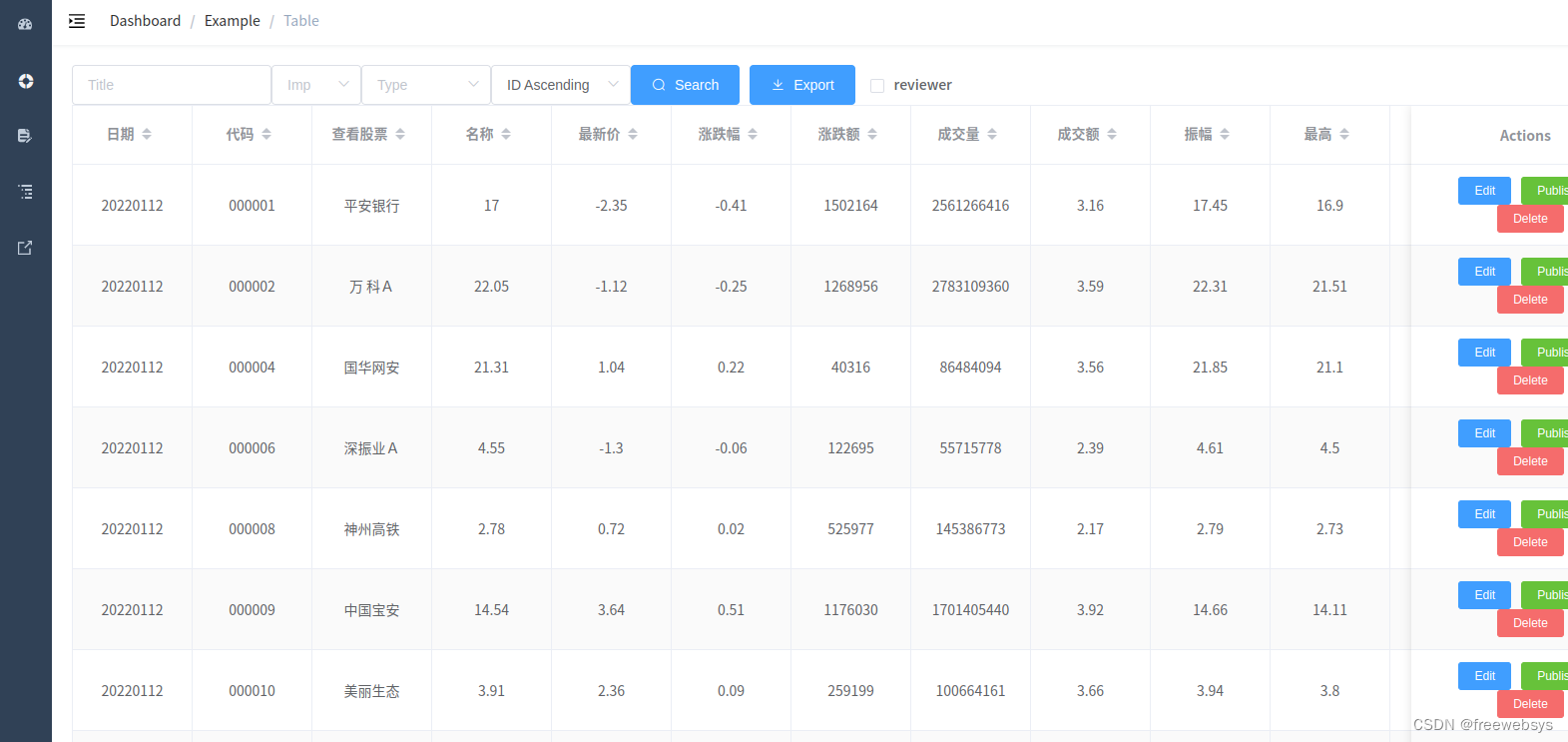
1,关于element-ui的table表格
可以使用for 循环去实现动态表格:
2,前端代码实现,循环column字段即可
<el-table:key="tableKey"v-loading="listLoading":data="list"stripeborderfitfixedhighlight-current-rowstyle="width: 100%;"@sort-change="sortChange"><el-table-column sortable v-for="column in tableColumns" :key="column.column" :label="column.columnName" :prop="column.column" align="center" width="120"/><el-table-column fixed="right" label="Actions" align="center" width="230" class-name="small-padding fixed-width"><template slot-scope="{row,$index}"><el-button type="primary" size="mini" @click="handleView(row)">view</el-button></el-table-column></el-table>
设置属性,定义 tableColumns 的list
....
data() {return {tableKey: 0,list: [],tableColumns: [],total: 0,listLoading: true,listQuery: {page: 1,limit: 20,importance: undefined,title: undefined,type: undefined,sort: '+id'},...created() {this.getList()},methods: {getList() {this.listLoading = truefetchList(this.listQuery).then(response => {this.list = response.datathis.tableColumns = response.tableColumnsthis.total = response.total// Just to simulate the time of the requestsetTimeout(() => {this.listLoading = false}, 1.5 * 1000)})},
和其他分页不一样,这个分页返回3 部分数据,一般的分页只有2部分数据。
1,response.tableColumns 动态表格的字段,根据这个字段展示数据。
2,response.data 动态表格的数据,
3,response.total 记录数,
比如数据:
{"code":20000,"message":"success","draw":0,"tableName":"\u6bcf\u65e5\u80a1\u7968\u6570\u636e-\u4e1c\u8d22","tableColumns":[{"column":"date","columnName":"\u65e5\u671f"},......}"total":158071,"data":[{"code":"000001","name":"\u5e73\u5b89\u94f6\u884c","latest_price":"17","quote_change":"-2.35","ups_downs":"-0.41","volume":"1502164","turnover":"2561266416","amplitude":"3.16","high":"17.45","low":"16.9","open":"17.41","closed":"17.41","quantity_ratio":"1.12","turnover_rate":"0.77","pe_dynamic":"8.49","pb":"1.03","date":"20220112",}]
3,后端python 动态数据
代码特别的乱,需要进行优化。
# 获得股票数据内容。
class GetStockDataHandler(webBase.BaseHandler):def get(self):logging.info("######################## GetStockDataHandler ########################")# 获得分页参数。start_param = self.get_argument("start", default=0, strip=False)length_param = self.get_argument("length", default=10, strip=False)print("page param:", length_param, start_param)name_param = self.get_argument("name", default="stock_zh_ah_name", strip=False)type_param = self.get_argument("type", default=None, strip=False)tableInfo = stock_web_dic.STOCK_WEB_DATA_MAP[name_param]# https://datatables.net/manual/server-sideself.set_header('Content-Type', 'application/json;charset=UTF-8')limit_sql = ""if int(length_param) > 0:limit_sql = " LIMIT %s , %s " % (start_param, length_param)sql = " SELECT * FROM `%s` %s %s %s " % (tableInfo.table_name, search_sql, order_by_sql, limit_sql)count_sql = " SELECT count(1) as num FROM `%s` %s " % (tableInfo.table_name, search_sql)logging.info("select sql : " + sql)logging.info("count sql : " + count_sql)stock_web_list = self.db.query(sql)for tmp_obj in (stock_web_list):logging.info("####################")if type_param == "editor":tmp_obj["DT_RowId"] = tmp_obj[tableInfo.columns[0]]# logging.info(tmp_obj)try:# 增加columns 字段中的【东方财富】logging.info("eastmoney_name : %s " % eastmoney_name)if eastmoney_name in tableInfo.column_names:tmp_idx = tableInfo.column_names.index(eastmoney_name)code_tmp = tmp_obj["code"]# 判断上海还是 深圳,东方财富 接口要求。if code_tmp.startswith("6"):code_tmp = "SH" + code_tmpelse:code_tmp = "SZ" + code_tmptmp_url = WEB_EASTMONEY_URL % (tmp_obj["code"], tmp_obj["code"], code_tmp)tmp_obj["eastmoney_url"] = tmp_urllogging.info(tmp_idx)logging.info(tmp_obj["eastmoney_url"])# logging.info(type(tmp_obj))# tmp.column_names.insert(tmp_idx, eastmoney_name)except Exception as e:print("error :", e)stock_web_size = self.db.query(count_sql)logging.info("tableInfoList size : %s " % stock_web_size)# 动态表格展示:table_columns = []try:tmp_len = len(tableInfo.columns)logging.info("ableInfo.columns tmp_len : %s " % tmp_len)# 循环数据,转换成对象,放入到数组中,方便前端 vue table 循环使用。for tmp_idx in range(0, tmp_len):logging.info(tmp_idx)column = tableInfo.columns[tmp_idx]column_name = tableInfo.column_names[tmp_idx]tpm_column_obj = {"column": column,"columnName" : column_name}table_columns.append(tpm_column_obj)except Exception as e:print("error :", e)obj = {"code": 20000,"message": "success","draw": 0,"tableName" : tableInfo.name,"tableColumns":  table_columns,"total": stock_web_size[0]["num"],"recordsTotal": stock_web_size[0]["num"],"recordsFiltered": stock_web_size[0]["num"],"data": stock_web_list}# logging.info("####################")# logging.info(obj)self.write(json.dumps(obj))
4,左侧动态菜单编写
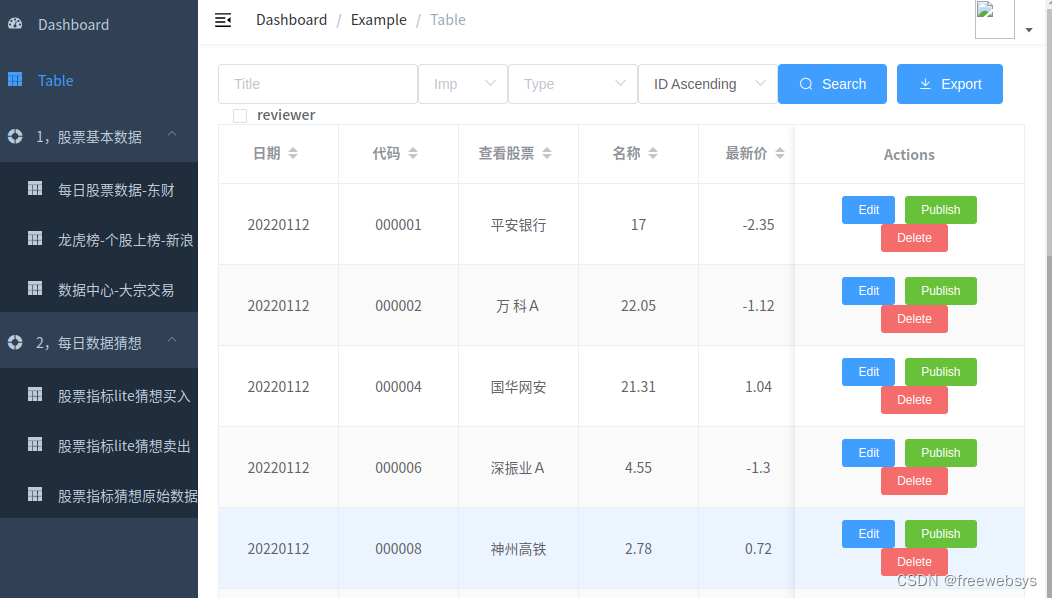
不是专业做前端的同学,没有太研究好动态路由的方法。
后台代码,用一个List转换成二级树,各种if 判断,代码不够清晰。
# 获得菜单列表数据 handler。
class MenuListHandler(webBase.BaseHandler):@gen.coroutinedef get(self):leftMenuList = stock_web_dic.STOCK_WEB_DATA_LISTout_data = []menu_name = ''menu_children = []index = 0for table_info in leftMenuList:print(table_info.name)index = index + 1# 使用 children 作为二级菜单。tmp_menu = {"name": table_info.name,"path": "/stock/table/" + table_info.table_name}menu_children.append(tmp_menu)# 使用 type作为 一级目录if menu_name != table_info.type or index == len(leftMenuList):# 进行数据循环if menu_name != '' :if index != len(leftMenuList):menu_children.pop() # 删除当前的节点信息。tmp_children = list(menu_children)tmp_menu2 = {"name": menu_name,"path": "#","children": tmp_children}# 下一个数据清空和放置。menu_children = []menu_children.append(tmp_menu)out_data.append(tmp_menu2)menu_name = table_info.typeobj = {"code": 20000,"message": "success","data": out_data}print(out_data)# self.write(json.dumps(oself.write(json.dumps(obj))
对应的前端代码,但是动态路由的代码估计还有些问题,需要优化下。因为菜单中显示的内容需要点击下才出来动态菜单。
算是一个bug吧。
fetchMenuList().then(response => {let menu_data = response.datafor (const menu of menu_data) {console.info(menu)var childrenList = []for (const childrenMenu of menu.children) {var tmpChildren =   {path: childrenMenu.path,name: childrenMenu.name,component: () => import('@/views/table/index'),meta: { title: childrenMenu.name , icon: 'table' }}childrenList.push(tmpChildren)}var tmp_menu =   {path: '/stock'+menu.name,alwaysShow: true, component: Layout,name: menu.name,redirect: '/#'+menu.name ,meta: { title: menu.name , icon: 'el-icon-s-help' },children: childrenList}constantRoutes.push(tmp_menu)constantRoutes.push( { path: '*', redirect: '/404', hidden: true })}
})
5,动态路由参数传递
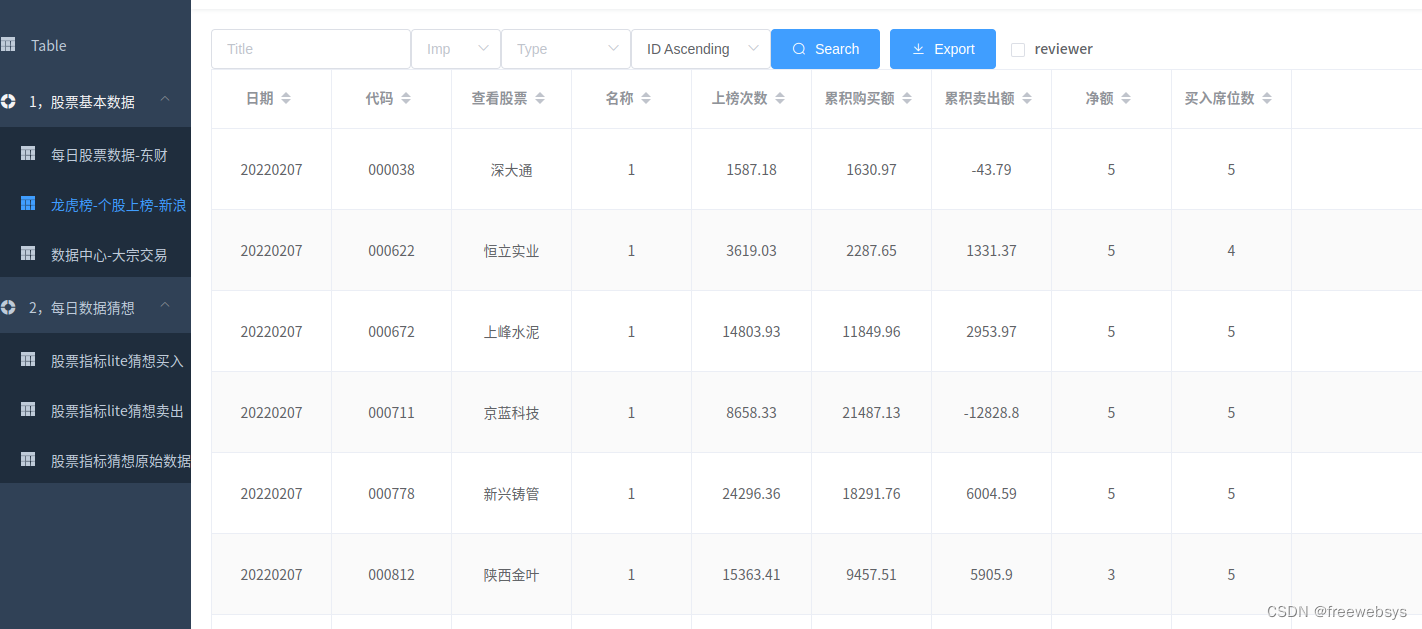
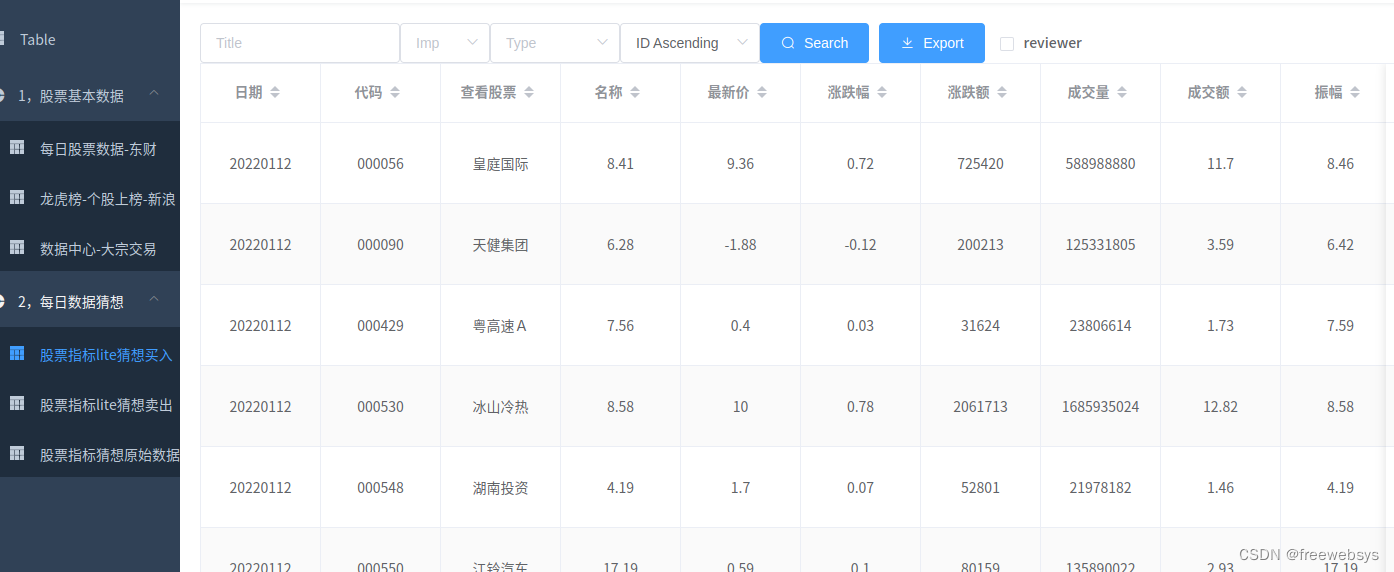
路由中可以通过url 获得相关数据,需要解析URL地址,然后获得参数即可。
直接解析
let table_name = this.$route.path.replace("/stock/table/","")// 并且替换掉 前面的路径,就可以得到 table的表名称了。然后在动态的请求参数即可。
然后就可以动态展示各种数据表了:
6,目前前端代码还有几个bug
存在样式的一个问题,不知道咋进行修复。是动态路由的使用有问题。
直接请求些到 route.js 中了,估计是渲染的啥问题。
目前还不支持,排序,搜索,的动态展示。还在迁移开发中。
本文的原文连接是:
https://blog.csdn.net/freewebsys/article/details/81665552
博主地址是:https://blog.csdn.net/freewebsys
本文来自互联网用户投稿,文章观点仅代表作者本人,不代表本站立场,不承担相关法律责任。如若转载,请注明出处。 如若内容造成侵权/违法违规/事实不符,请点击【内容举报】进行投诉反馈!