用OpenAI总结Bilibili字幕
这里写自定义目录标题
- 用OpenAI总结Bilibili字幕
- 简介
- GUI
- 结果对比
- 程序概述
- Dockerfile
- 项目源码
用OpenAI总结Bilibili字幕
简介
这是一个关于OpenAI的练习,通过调用OpenAI API实现对Bilibili视频字幕的总结。
本练习不涉及前端操作获取字幕,而是假设用户已经拿到字幕文件。 有两种方式输入字幕,一种方式是使用Restful消息将含有字幕的文件发送给程序,另一种方式是通过Gradio界面加载本地文件。
为了实现文件分割,采用了递归方法而不是依赖现有的第三方库。
程序提供了三种调用OpenAI API的方法。 在使用UI界面时,用户可以自行选择。 在远程发送消息时,默认的方法是直接调用OpenAI API。 这三种方法分别是:
- 直接调用OpenAI API。
- 使用langchain map-reduce类型的load_summarize_chain方法。
- 使用langchain refine类型的load_summarize_chain方法。
本项目还做了dockerfile, 可以用容器的方式进行部署。
GUI
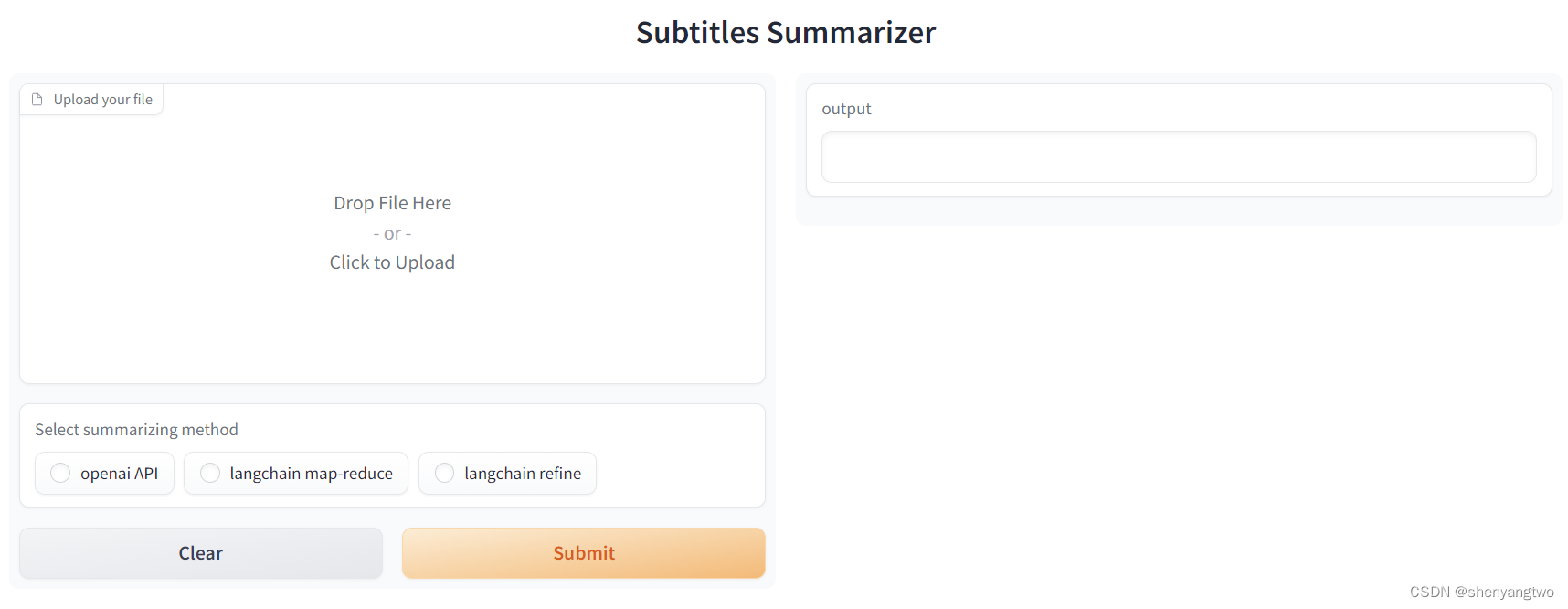
结果对比
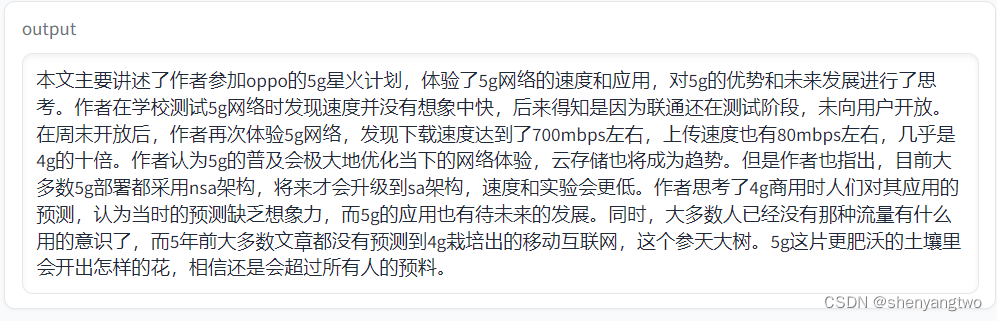
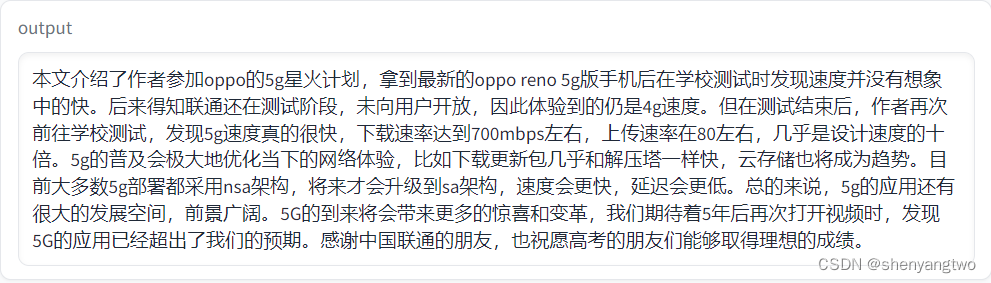
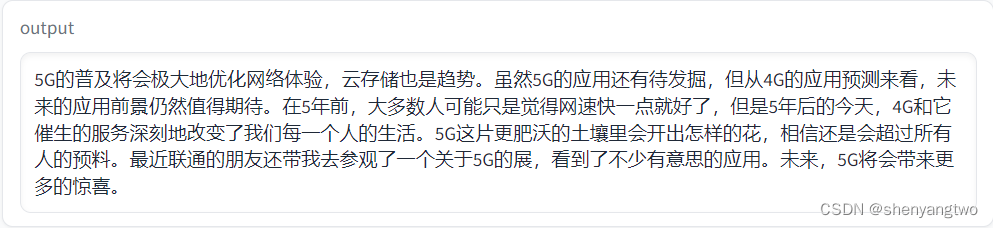
需要说明的是结果不仅和采用的方法有关,更重要的是由prompt的好坏来决定。
-
OpenAI API
-
Langchain map-reduce
-
Langchain refine
程序概述
- http_server.py
这是一个用flask写的简单http server。当接收到Restful消息时就会触发程序调用OpnAI来总结字幕。
import json
from flask import Flask, request, jsonify
from backend import fetch_summaries
app = Flask(__name__)# 指定Post类型消息, url为/summaries/bilibili
@app.route('/summaries/bilibili', methods=['POST'])
def process_summary():data = json.loads(request.data) #调用fetch_summaries方法处理字幕。summaries = fetch_summaries(data)result = {'data': summaries}return jsonify(result)
Restful消息可以用以下Curl指令进行测试。
curl --location 'http://127.0.0.1:8000/summaries/bilibili' \
--header 'Content-Type: application/json' \
--data '@/C:/work/chatgpt_subtitles/test/test1.json'
- ui.py
这是本地建立Gradio UI的程序,可以选择三种总结方法的一种。 而远程Restful消息没有类似的参数,只能采用系统默认的OpenAI的API方法。
import gradio as gr
import json
from backend import fetch_summaries, load_json_from_file
import osdef run_ui():gr.Interface(run_ui_logic,[gr.components.File(label='Upload your file'),  gr.Radio(["openai API", "langchain map-reduce", "langchain refine"], label="Select summarizing method"),],outputs =  ['text'],title='Subtitles Summarizer',allow_flagging="never").launch(server_name="0.0.0.0", share=True) def run_ui_logic(json_file, operation_type):with open(json_file.name, 'r', encoding="utf8") as file:json_str = file.read()json_data = json.loads(json_str)# 这里的operation_type 对应的Gradio中gr.radio里的值,也就是总结字幕的方法类型summaries = fetch_summaries(json_data, operation_type)return summaries
- backend.py
这一部分的程序主要做两部份工作:1. 由于openai有token长度的限制,不能一次处理超长的输入, 所以要按照给定的大小将输入进行切割。2. 调用不同的总结方法。
# 默认的调用方法为openai的原生API。
def fetch_summaries(input_subtitles, operation_type='openai API'):    _ = load_dotenv(find_dotenv()) # read local .env file # trun_size 就是切块的大小,由于openai 3.5的token长度最大为4096,而且这个长度是包含输入和输出共同的结果, 所以建议输入的长度保持在3000以内,这里设置的是2000# overlap_size 也就是不同切块之间重叠的大小,这样做的目的是保持上下文的完整。 以避免语义不完整,照成信息缺失。# sentence_delimiter Bilibili的字幕信息一般来说是没有标点符号的。 而将字母信息送给openAI时, 需要将信息合并成一个大的文本。这个参数定义了合并句子时使用的分隔符。 这里用的是空格。# 所有参数放在.env文件中,再由程序装载为环境变量。split_args = {'trunk_size': int(os.environ['TRUNK_SIZE']),'overlap_size': int(os.environ['OVERLAP_SIZE']),'sentence_delimiter': os.environ['SENTENCE_DELIMITER']}# 只提取每个信息单元的字幕,其他如序列号,时间戳等信息舍弃。input_subtitles_tmp = [item["content"] for item in input_subtitles["body"]]# 调用方法,切割字幕。converted_subtitles = reconstruct_strings(input_subtitles_tmp, **split_args)# 按照输入,调用不同的方法。if operation_type == 'openai API':      return fetch_by_openapi(converted_subtitles)if operation_type == 'langchain map-reduce': return fetch_by_langchain_mapreduce(converted_subtitles)if operation_type == 'langchain refine': return fetch_by_langchain_refine(converted_subtitles)
由于字幕文件一边来说是以一个屏幕对应的句子为单位的json数组, 所以切割的时候最好也要保留原有句子的完整性。 这样就没有采用langchain现有的分割方法,而是写了一个递归函数来处理。
def reconstruct_strings(strings, trunk_size, overlap_size, sentence_delimiter):result = []current_part = ""current_length = 0total_length = sum(len(string) for string in strings)# 如果字幕长度小于trunk_size, 不用切割,直接拼接字幕返回结果。if (total_length <= trunk_size):result.append(sentence_delimiter.join(strings)) return result start_index = -1for i in range(len(strings)):string = strings[i]# 确定下一个trunk的起始位置,也就是剩下的字符串的起始位置if start_index == -1:if current_length + len(string) + 1 > trunk_size - overlap_size:start_index = i# 确定当前trunk的结束位置, 将当前trunk的内容放入到结果列表中。 if current_length + len(string) + 1 >= trunk_size:result.append(current_part)breakcurrent_part += sentence_delimiter + stringcurrent_length = len(current_part) - 1# 对切割以后的字符串接着递归调用本方法进行切割处理,并将结果放到列表里。if start_index != -1:remaining_strings = strings[start_index + 1:]if remaining_strings:result.extend(reconstruct_strings(remaining_strings, trunk_size, overlap_size, sentence_delimiter))return result
- by_openai.py
这是参照吴恩达的openai的官方教程做的调用。这里主要是定义了两个prompt模板,类似于langchain 的refine的方法。 第一个模板是针对于第一条消息,就是简单要求openai对用户的输入进行总结。 第二个模板是针对后续的任务, 我们不仅仅会提供新字幕,还会提供以前的总结,目的是让openai在原有的总结上把新的内容合并进来。
模板里,通过对system和user不同的role的工作的描述,让openai理解任务的内容。
从测试的结果来看, prompt的好坏对结果有着决定性的影响。就像教程里说的,描述准确,任务分解成一系列任务是两个注意的点。
import os
import openaifrom dotenv import load_dotenv, find_dotenvdef get_completion_from_messages(messages, model="gpt-3.5-turbo", temperature=0, max_tokens=1000):response = openai.ChatCompletion.create(model=model,messages=messages,temperature=temperature, max_tokens=max_tokens, )print(response.usage)return response.choices[0].message["content"]def message_template_1 (user_message_1):delimiter = "####"system_message = f"""Your task is to generate an overall summary using the user's input. \The user's input will be delimited by {delimiter} characters. \The output should be a text in UTF-8 format, written in Chinese. """   messages =  [ {'role':'system', 'content': system_message}, {'role':'user','content': f"{delimiter}{user_message_1}{delimiter}"}  ] return messagesdef message_template_2 (user_message_1, user_message_2):delimiter = "####"system_message = f"""Your task is to generate an overall summary using the previous summary plus user's new input. \This is an accumulative task. \The previous summary is enclosed within {delimiter} as shown below: {delimiter}{user_message_1}{delimiter} \Summarize the user's new input and incorporate it into the existing summary as the output. \Update the output to ensure its coherence. \The user's new input will be enclosed by {delimiter} characters. \The output should be a UTF-8 encoded text written in Chinese. \"""   messages =  [ {'role':'system', 'content': system_message}, {'role':'user','content': f"{delimiter}{user_message_2}{delimiter}"}  ] return messagesdef fetch_by_openapi(converted_subtitles):openai.api_key  = os.environ['OPENAI_API_KEY']for index, subtitle in enumerate(converted_subtitles):if (index ==0):messages = message_template_1(subtitle)else:messages = message_template_2(summaries, subtitle)summaries = get_completion_from_messages(messages)return summaries
- by_langchain.py
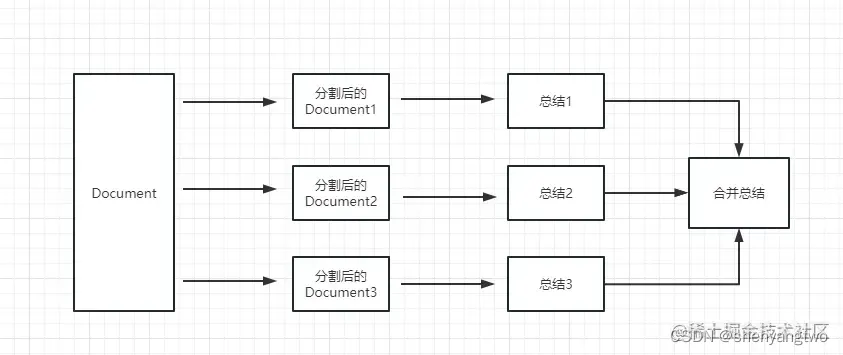
这是langchain的 map-reduce的总结方法。
import os
from langchain.chat_models import ChatOpenAI
from langchain.prompts import PromptTemplate
from langchain.chains.summarize import load_summarize_chain
from langchain.docstore.document import Documentfrom dotenv import load_dotenv, find_dotenvdef fetch_by_langchain_mapreduce(converted_subtitles):openai_api_key  = os.environ['OPENAI_API_KEY']llm = ChatOpenAI(temperature=0, model_name="gpt-3.5-turbo", openai_api_key=openai_api_key)docs = [Document(page_content=t) for t in converted_subtitles]template_str = """Your task is to generate an overall summary for the following contents:{text}The output should be a text in UTF-8 format, written in Chinese."""COMMON_PROMPT = PromptTemplate(input_variables=["text"], template=template_str)# We can define two prompt templates, one for map_prompt and another one for combine_prompt. We take the simple way for this case. chain = load_summarize_chain(llm, chain_type="map_reduce", return_intermediate_steps=True, map_prompt=COMMON_PROMPT, combine_prompt=COMMON_PROMPT,verbose=True)output_summary = chain({"input_documents": docs}, return_only_outputs=True)return output_summary['output_text']
这是在网上找到的图片很清晰地说明了map-reduce的方法。
文章地址是: https://juejin.cn/post/7234426163757301819
这是langchain的 refine的总结方法。
def fetch_by_langchain_refine(converted_subtitles):openai_api_key = os.environ['OPENAI_API_KEY']llm = ChatOpenAI(temperature=0, model_name="gpt-3.5-turbo", openai_api_key=openai_api_key)docs = [Document(page_content=t) for t in converted_subtitles]refine_template = ("Your job is to produce a final summary\n""We have provided an existing summary up to a certain point: {existing_answer}\n""We have the opportunity to refine the existing summary""(only if needed) with some more context below.\n""------------\n""{text}\n""------------\n""Given the new context, refine the original summary\n""If the context isn't useful, return the original summary.""The output should be a text in UTF-8 format, written in Chinese.")REFINE_PROMPT = PromptTemplate(input_variables=["existing_answer", "text"],template=refine_template,)prompt_template = """Your task is to generate a summary for the following contents: "{text}""The summary should be a text in UTF-8 format, written in Chinese."SUMMARY:"""PROMPT = PromptTemplate(template=prompt_template, input_variables=["text"])chain = load_summarize_chain(llm, chain_type="refine", return_intermediate_steps=True, question_prompt=PROMPT, refine_prompt=REFINE_PROMPT,verbose=True)output_summary = chain({"input_documents": docs}, return_only_outputs=True)return output_summary['output_text']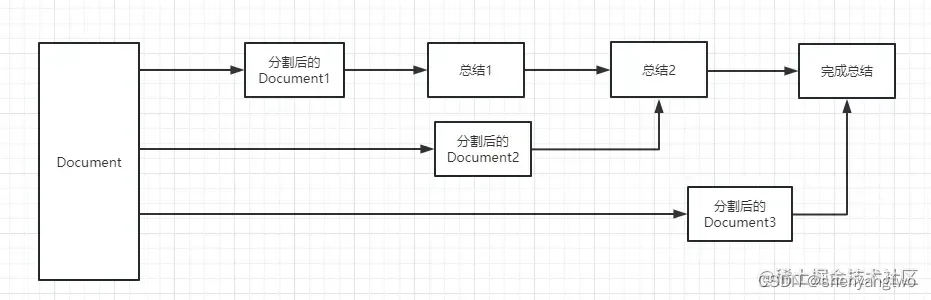
Dockerfile
# pull official base image
FROM python:3.11.3-slim-buster  # set work directory
WORKDIR /app# install dependencies
RUN pip install --upgrade pip
COPY ./requirements.txt /app/requirements.txt
RUN pip install -r requirements.txt# copy project
COPY ./src/.env ./src/*.py /app/# expose port
EXPOSE 8000 7860#start the gradio ui
CMD ["python", "ui.py"]#start the http serrver
# CMD ["python", "http_server.py"]
项目源码
项目的代码放在如下的github的库里, 供大家参考。
https://github.com/davidshen111/chatgpt_subtitles
使用之前,需要先将.env文件中的OPENAI_API_KEY的值替换成自己的openai的key值。
本文来自互联网用户投稿,文章观点仅代表作者本人,不代表本站立场,不承担相关法律责任。如若转载,请注明出处。 如若内容造成侵权/违法违规/事实不符,请点击【内容举报】进行投诉反馈!