Github 图床无法正常显示图片-解决
Github 图床无法正常显示图片-解决
前 言:此篇为上次搭建的 Typora + PicGo + Github 笔记系统续篇,解决 Github 图床无法正常显示图片问题。
方案一:补充本地的hosts文件 (此前已设置过的请看方案二)
1、打开文件: C:\Windows\System32\drivers\etc\hosts
2、在文件末尾添加:
# GitHub Start
140.82.113.3      github.com
140.82.114.20     gist.github.com151.101.184.133    assets-cdn.github.com
151.101.184.133    raw.githubusercontent.com
151.101.184.133    gist.githubusercontent.com
151.101.184.133    cloud.githubusercontent.com
151.101.184.133    camo.githubusercontent.com
151.101.184.133    avatars0.githubusercontent.com
199.232.68.133     avatars0.githubusercontent.com
199.232.28.133     avatars1.githubusercontent.com
151.101.184.133    avatars1.githubusercontent.com
151.101.184.133    avatars2.githubusercontent.com
199.232.28.133     avatars2.githubusercontent.com
151.101.184.133    avatars3.githubusercontent.com
199.232.68.133     avatars3.githubusercontent.com
151.101.184.133    avatars4.githubusercontent.com
199.232.68.133     avatars4.githubusercontent.com
151.101.184.133    avatars5.githubusercontent.com
199.232.68.133     avatars5.githubusercontent.com
151.101.184.133    avatars6.githubusercontent.com
199.232.68.133     avatars6.githubusercontent.com
151.101.184.133    avatars7.githubusercontent.com
199.232.68.133     avatars7.githubusercontent.com
151.101.184.133    avatars8.githubusercontent.com
199.232.68.133     avatars8.githubusercontent.com# GitHub End
3、保存文件,该刷新的刷新。
方案二:之前一直用好好的,突然出现的问题。具体表现为,可以成功上传 github,但无法正常加载显示,picgo日志报错 HttpError: request to [图片地址] failed, reason: read ECONNRESET。解决如下:
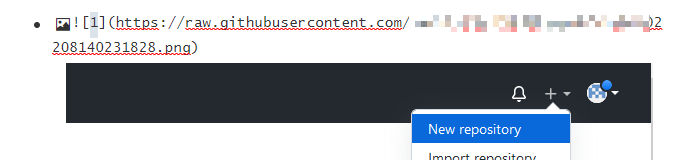
1、typora 里面任意点击一张上传成功的图片查看域名,例如本人的是 raw.githubusercontent.com
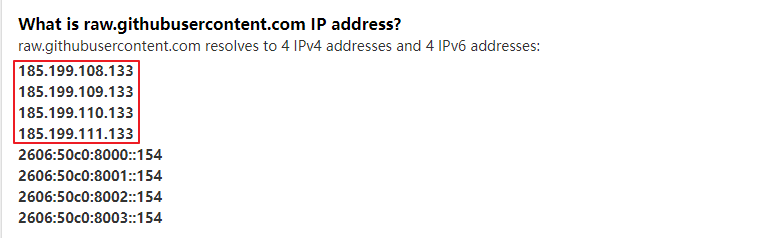
2、通过 https://www.ipaddress.com 这个网站,解析域名raw.githubusercontent.com对应的ip地址。
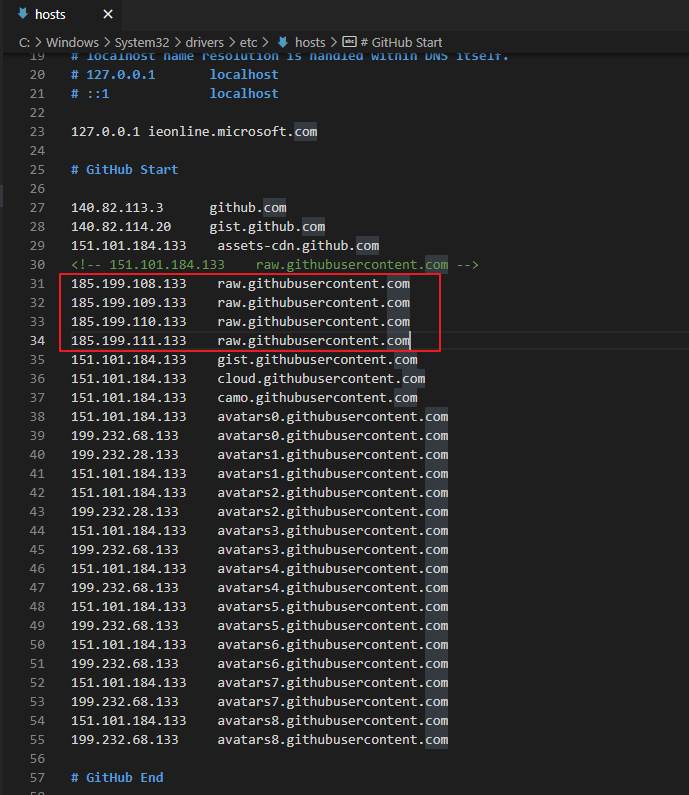
3、回到方案一,打开文件: C:\Windows\System32\drivers\etc\hosts,改动raw.githubusercontent.com 对应正确的IP。
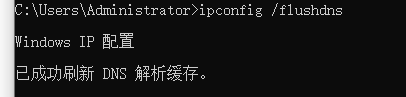
4、保存文件。打开cmd, 执行命令 ipconfig /flushdns 刷新 DNS 解析缓存。
5、重新打开 github 和 typora , 会发现图片可正常加载。
本文来自互联网用户投稿,文章观点仅代表作者本人,不代表本站立场,不承担相关法律责任。如若转载,请注明出处。 如若内容造成侵权/违法违规/事实不符,请点击【内容举报】进行投诉反馈!