使用OkHttp请求短信验证服务接口
使用OkHttp请求短信验证服务接口
最近在写比赛项目,登录,注册界面可能都会用到短信验证这个功能,其实这个功能后端并不难去实现,我们只需要满足对应服务商规定的API规则,请求接口给指定手机号发送验证码,然后再获取验证码加上手机号去请求 验证验证码的接口,就可以实现了.这里我用的是Bmob的短信验证服务
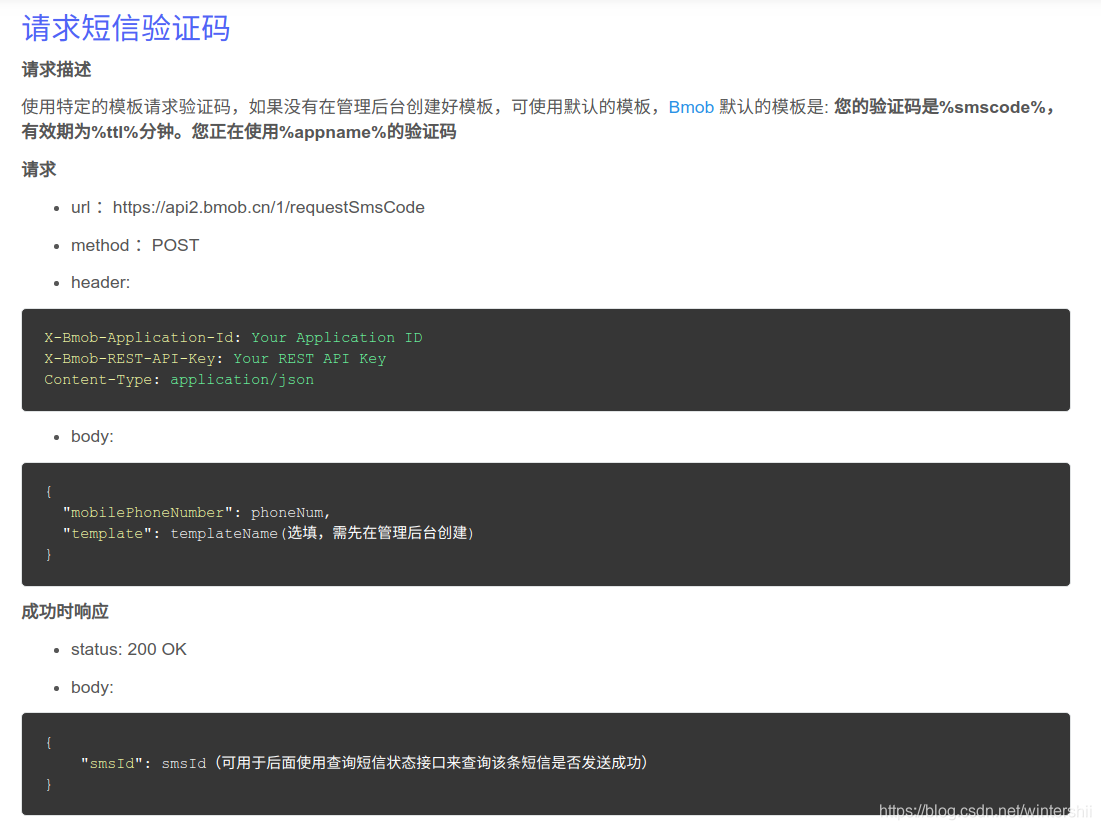
- 请求短信验证码
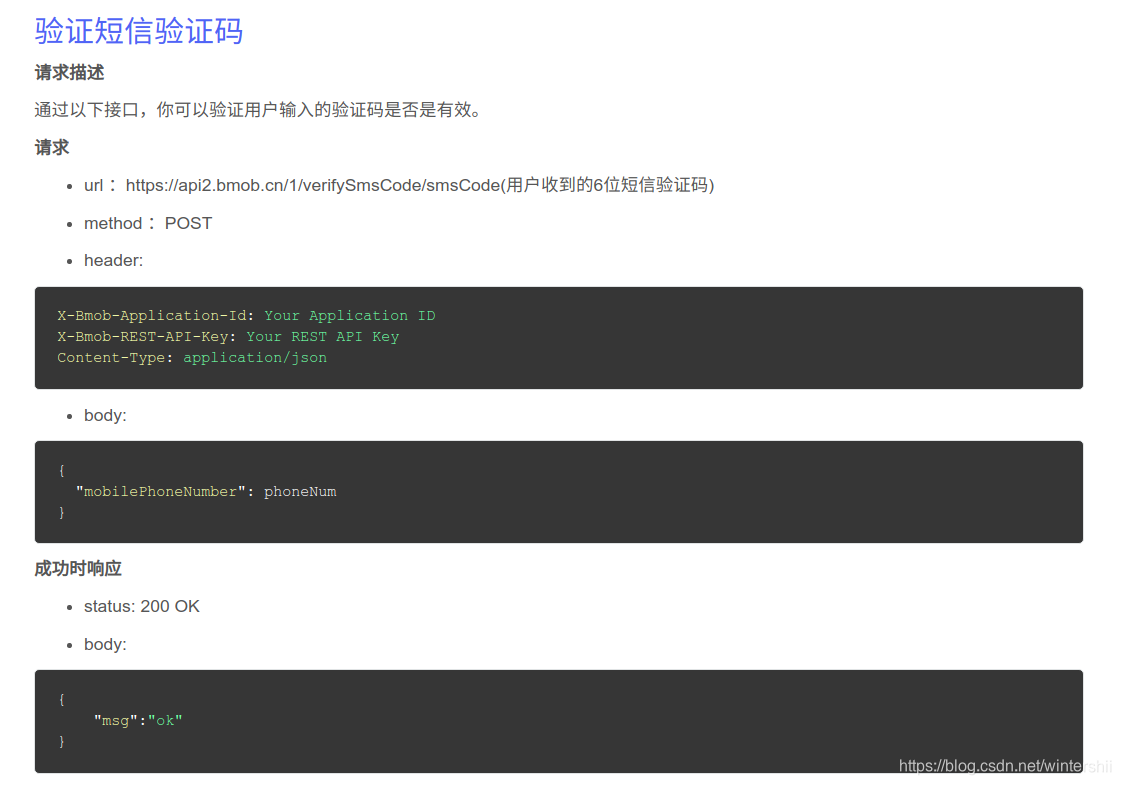
- 验证短信验证码
首先要在pom.xml中导入OkHttp和json转换相关的依赖
com.squareup.okhttp okhttp 2.5.0 com.google.code.gson gson 2.8.5 在后台创建PhoneUtil类,封装相关方法
public class PhoneUtil {private final static ObjectMapper MAPPER = new ObjectMapper();public static final MediaType JSON = MediaType.parse("application/json; charset=utf-8");/*** 获取手机验证码* @param phoneNumber* @return*/public static String getVerificationCode(String phoneNumber) {System.out.println(phoneNumber);String url = "https://api2.bmob.cn/1/requestSmsCode";OkHttpClient client = new OkHttpClient();PhoneRequest phoneRequest = new PhoneRequest(phoneNumber,"AppModel");Gson gson = new Gson();String json = gson.toJson(phoneRequest);System.out.println(json);RequestBody jsonBody = RequestBody.create(JSON,json);Request request = new Request.Builder().url(url).addHeader("X-Bmob-Application-Id","4527189a38e9393bebbaaf3940982580").addHeader("X-Bmob-REST-API-Key","6449d52f810bf605698ff865f5017929").addHeader("Content-Type","application/json").post(jsonBody).build();try {Response response = client.newCall(request).execute();String result = response.body().string();System.out.println("获取到响应:" + result);System.out.println("开始请求....");if ( !response.isSuccessful()) {System.out.println("请求失败...");return null;}System.out.println("请求成功...");System.out.println("获取到响应:" + result);return bodyToJson(result);} catch (IOException e) {e.printStackTrace();}return null;}/*** 验证用户验证码是否正确* @param code* @return*/public static boolean judgeCodeIsTrue(String code,String mobilePhoneNumber) {String url = "https://api2.bmob.cn/1/verifySmsCode/" + code;OkHttpClient client = new OkHttpClient();PhoneNumber phoneNumber = new PhoneNumber(mobilePhoneNumber);Gson gson = new Gson();String json = gson.toJson(phoneNumber);System.out.println(json);RequestBody jsonBody = RequestBody.create(JSON,json);Request request = new Request.Builder().url(url).addHeader("X-Bmob-Application-Id","4527189a38e9393bebbaaf3940982580").addHeader("X-Bmob-REST-API-Key","6449d52f810bf605698ff865f5017929").addHeader("Content-Type","application/json").post(jsonBody).build();try {Response response = client.newCall(request).execute();String result = response.body().string();System.out.println("获取到响应:" + result);System.out.println("开始请求....");if ( !response.isSuccessful()) {System.out.println("请求失败...");return false;}System.out.println("请求成功...");System.out.println("获取到响应:" + result);return true;} catch (IOException e) {e.printStackTrace();}return false;}/*** 请求体转Json* @param result* @return*/private static String bodyToJson(String result) {JsonNode root = null;try {root = MAPPER.readTree(result);} catch (IOException e) {e.printStackTrace();}JsonNode code = root.path("smsId");System.out.println("验证码:"+code);return code.toString();}}
首先这里要注意的第一个就是,文档要求请求体是application/json;格式,所以我们需要导入json转化相关的jar来将请求体中的数据转化为json格式,再发送请求.
然后就是OkHttp中 请求的发送和响应的接收了:
//新建OkHttpClient对象
OkHttpClient client = new OkHttpClient();//新建request
Request request = new Request.Builder().url(url).addHeader("X-Bmob-Application-Id","4527189a38e9393bebbaaf3940982580").addHeader("X-Bmob-REST-API-Key","6449d52f810bf605698ff865f5017929").addHeader("Content-Type","application/json").post("相关数据").build();
我们首先需要知道所请求的url,紧接着可以使用addHeader()方法去加入请求头信息,这里我们是以post方式放松的,参数中可以填上相关请求体数据(RequestBody类型).在Request对象build好之后,就可以调用OkHttpClient对象的newCall()方法,并excute().就可以获取响应了
除此之外,OkHttp还可以以Get的方式请求接口,也可以Post提交表单,字符串,流数据等.还有一些异步,同步的方式,这些以后再细看
本文来自互联网用户投稿,文章观点仅代表作者本人,不代表本站立场,不承担相关法律责任。如若转载,请注明出处。 如若内容造成侵权/违法违规/事实不符,请点击【内容举报】进行投诉反馈!