ROS系列(三):ROS架构简介
0 ROS架构
就ROS 自身实现而言,其架构分为三层:
- 文件系统
ROS文件系统级指的是在硬盘上面查看的ROS源代码的组织形式。 - 计算图
ROS 分布式系统中不同进程需要进行数据交互,计算图可以以点对点的网络形式表现数据交互过程,计算图中的重要概念: 节点(Node)、消息(message)、通信机制_主题(topic)、通信机制_服务(service)。 - 开源社区
ROS的开源社区有很多,包括ROS WIKI、ROS Answer等。
1 ROS文件系统
ROS文件系统级指的是在硬盘上ROS源代码的组织形式,其结构大致可以如下图所示:
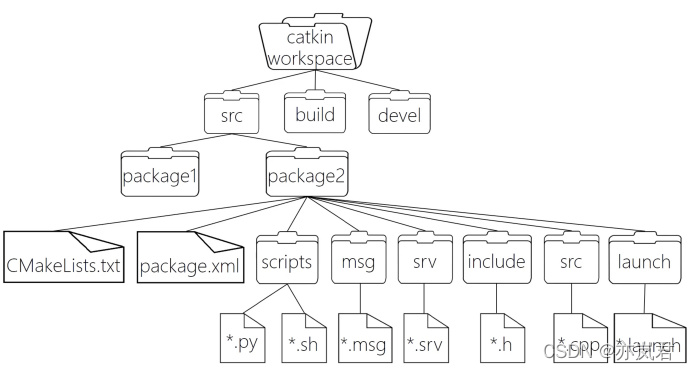
其中具体代表的含义如下:
WorkSpace --- 自定义的工作空间|--- build:编译空间,用于存放CMake和catkin的缓存信息、配置信息和其他中间文件。|--- devel:开发空间,用于存放编译后生成的目标文件,包括头文件、动态&静态链接库、可执行文件等。|--- src: 源码|-- package:功能包(ROS基本单元)包含多个节点、库与配置文件,包名所有字母小写,只能由字母、数字与下划线组成|-- CMakeLists.txt 配置编译规则,比如源文件、依赖项、目标文件|-- package.xml 包信息,比如:包名、版本、作者、依赖项...(以前版本是 manifest.xml)|-- scripts 存储python文件|-- src 存储C++源文件|-- include 头文件|-- msg 消息通信格式文件|-- srv 服务通信格式文件|-- action 动作格式文件|-- launch 可一次性运行多个节点 |-- config 配置信息|-- CMakeLists.txt: 编译的基本配置
接下来我们主要介绍package.xml 与 CMakeLists.txt 这两个配置文件。
1.1 package.xml
该文件定义有关软件包的属性,例如软件包名称,版本号,作者,维护者以及对其他catkin软件包的依赖性。
<package format="2"><name>demo01_hello_vscodename><version>0.0.0version><description>The demo01_hello_vscode packagedescription><maintainer email="xuzuo@todo.todo">xuzuomaintainer><license>TODOlicense><buildtool_depend>catkinbuildtool_depend><build_depend>roscppbuild_depend><build_depend>rospybuild_depend><build_depend>std_msgsbuild_depend><build_export_depend>roscppbuild_export_depend><build_export_depend>rospybuild_export_depend><build_export_depend>std_msgsbuild_export_depend> <exec_depend>roscppexec_depend><exec_depend>rospyexec_depend><exec_depend>std_msgsexec_depend><export>export>
package>
1.2 CMakelists.txt
文件CMakeLists.txt是CMake构建系统的输入,用于构建软件包。
cmake_minimum_required(VERSION 3.0.2) #所需 cmake 版本
project(demo01_hello_vscode) #包名称,会被 ${PROJECT_NAME} 的方式调用## Compile as C++11, supported in ROS Kinetic and newer
# add_compile_options(-std=c++11)## Find catkin macros and libraries
## if COMPONENTS list like find_package(catkin REQUIRED COMPONENTS xyz)
## is used, also find other catkin packages
#设置构建所需要的软件包
find_package(catkin REQUIRED COMPONENTSroscpprospystd_msgs
)## System dependencies are found with CMake's conventions
#默认添加系统依赖
# find_package(Boost REQUIRED COMPONENTS system)## Uncomment this if the package has a setup.py. This macro ensures
## modules and global scripts declared therein get installed
## See http://ros.org/doc/api/catkin/html/user_guide/setup_dot_py.html
# 启动 python 模块支持
# catkin_python_setup()################################################
## Declare ROS messages, services and actions ##
## 声明 ROS 消息、服务、动作... ##
################################################## To declare and build messages, services or actions from within this
## package, follow these steps:
## * Let MSG_DEP_SET be the set of packages whose message types you use in
## your messages/services/actions (e.g. std_msgs, actionlib_msgs, ...).
## * In the file package.xml:
## * add a build_depend tag for "message_generation"
## * add a build_depend and a exec_depend tag for each package in MSG_DEP_SET
## * If MSG_DEP_SET isn't empty the following dependency has been pulled in
## but can be declared for certainty nonetheless:
## * add a exec_depend tag for "message_runtime"
## * In this file (CMakeLists.txt):
## * add "message_generation" and every package in MSG_DEP_SET to
## find_package(catkin REQUIRED COMPONENTS ...)
## * add "message_runtime" and every package in MSG_DEP_SET to
## catkin_package(CATKIN_DEPENDS ...)
## * uncomment the add_*_files sections below as needed
## and list every .msg/.srv/.action file to be processed
## * uncomment the generate_messages entry below
## * add every package in MSG_DEP_SET to generate_messages(DEPENDENCIES ...)## Generate messages in the 'msg' folder
# add_message_files(
# FILES
# Message1.msg
# Message2.msg
# )## Generate services in the 'srv' folder
# add_service_files(
# FILES
# Service1.srv
# Service2.srv
# )## Generate actions in the 'action' folder
# add_action_files(
# FILES
# Action1.action
# Action2.action
# )## Generate added messages and services with any dependencies listed here
# 生成消息、服务时的依赖包
# generate_messages(
# DEPENDENCIES
# std_msgs
# )################################################
## Declare ROS dynamic reconfigure parameters ##
## 声明 ROS 动态参数配置 ##
################################################## To declare and build dynamic reconfigure parameters within this
## package, follow these steps:
## * In the file package.xml:
## * add a build_depend and a exec_depend tag for "dynamic_reconfigure"
## * In this file (CMakeLists.txt):
## * add "dynamic_reconfigure" to
## find_package(catkin REQUIRED COMPONENTS ...)
## * uncomment the "generate_dynamic_reconfigure_options" section below
## and list every .cfg file to be processed## Generate dynamic reconfigure parameters in the 'cfg' folder
# generate_dynamic_reconfigure_options(
# cfg/DynReconf1.cfg
# cfg/DynReconf2.cfg
# )###################################
## catkin specific configuration ##
## catkin 特定配置##
###################################
## The catkin_package macro generates cmake config files for your package
## Declare things to be passed to dependent projects
## INCLUDE_DIRS: uncomment this if your package contains header files
## LIBRARIES: libraries you create in this project that dependent projects also need
## CATKIN_DEPENDS: catkin_packages dependent projects also need
## DEPENDS: system dependencies of this project that dependent projects also need
# 运行时依赖
catkin_package(
# INCLUDE_DIRS include
# LIBRARIES demo01_hello_vscode
# CATKIN_DEPENDS roscpp rospy std_msgs
# DEPENDS system_lib
)###########
## Build ##
############# Specify additional locations of header files
## Your package locations should be listed before other locations
# 添加头文件路径,当前程序包的头文件路径位于其他文件路径之前
include_directories(
# include${catkin_INCLUDE_DIRS}
)## Declare a C++ library
# 声明 C++ 库
# add_library(${PROJECT_NAME}
# src/${PROJECT_NAME}/demo01_hello_vscode.cpp
# )## Add cmake target dependencies of the library
## as an example, code may need to be generated before libraries
## either from message generation or dynamic reconfigure
# 添加库的 cmake 目标依赖
# add_dependencies(${PROJECT_NAME} ${${PROJECT_NAME}_EXPORTED_TARGETS} ${catkin_EXPORTED_TARGETS})## Declare a C++ executable
## With catkin_make all packages are built within a single CMake context
## The recommended prefix ensures that target names across packages don't collide
# 声明 C++ 可执行文件
add_executable(Hello_VSCode src/Hello_VSCode.cpp)## Rename C++ executable without prefix
## The above recommended prefix causes long target names, the following renames the
## target back to the shorter version for ease of user use
## e.g. "rosrun someones_pkg node" instead of "rosrun someones_pkg someones_pkg_node"
#重命名c++可执行文件
# set_target_properties(${PROJECT_NAME}_node PROPERTIES OUTPUT_NAME node PREFIX "")## Add cmake target dependencies of the executable
## same as for the library above
#添加可执行文件的 cmake 目标依赖
add_dependencies(Hello_VSCode ${${PROJECT_NAME}_EXPORTED_TARGETS} ${catkin_EXPORTED_TARGETS})## Specify libraries to link a library or executable target against
#指定库、可执行文件的链接库
target_link_libraries(Hello_VSCode${catkin_LIBRARIES}
)#############
## Install ##
## 安装 ##
############## all install targets should use catkin DESTINATION variables
# See http://ros.org/doc/api/catkin/html/adv_user_guide/variables.html## Mark executable scripts (Python etc.) for installation
## in contrast to setup.py, you can choose the destination
#设置用于安装的可执行脚本
catkin_install_python(PROGRAMSscripts/Hi.pyDESTINATION ${CATKIN_PACKAGE_BIN_DESTINATION}
)## Mark executables for installation
## See http://docs.ros.org/melodic/api/catkin/html/howto/format1/building_executables.html
# install(TARGETS ${PROJECT_NAME}_node
# RUNTIME DESTINATION ${CATKIN_PACKAGE_BIN_DESTINATION}
# )## Mark libraries for installation
## See http://docs.ros.org/melodic/api/catkin/html/howto/format1/building_libraries.html
# install(TARGETS ${PROJECT_NAME}
# ARCHIVE DESTINATION ${CATKIN_PACKAGE_LIB_DESTINATION}
# LIBRARY DESTINATION ${CATKIN_PACKAGE_LIB_DESTINATION}
# RUNTIME DESTINATION ${CATKIN_GLOBAL_BIN_DESTINATION}
# )## Mark cpp header files for installation
# install(DIRECTORY include/${PROJECT_NAME}/
# DESTINATION ${CATKIN_PACKAGE_INCLUDE_DESTINATION}
# FILES_MATCHING PATTERN "*.h"
# PATTERN ".svn" EXCLUDE
# )## Mark other files for installation (e.g. launch and bag files, etc.)
# install(FILES
# # myfile1
# # myfile2
# DESTINATION ${CATKIN_PACKAGE_SHARE_DESTINATION}
# )#############
## Testing ##
############### Add gtest based cpp test target and link libraries
# catkin_add_gtest(${PROJECT_NAME}-test test/test_demo01_hello_vscode.cpp)
# if(TARGET ${PROJECT_NAME}-test)
# target_link_libraries(${PROJECT_NAME}-test ${PROJECT_NAME})
# endif()## Add folders to be run by python nosetests
# catkin_add_nosetests(test)
2 ROS文件系统相关命令
ROS 的文件系统本质上都还是操作系统文件,我们可以使用Linux命令来操作这些文件,不过,在ROS中为了更好的用户体验,ROS专门提供了一些类似于Linux的命令,这些命令较之于Linux原生命令,更为简介、高效。文件操作,无外乎就是增删改查与执行等操作,接下来,我们就从这五个维度,来介绍ROS文件系统的一些常用命令。
2.1 增
catkin_create_pkg 自定义包名 依赖包 === 创建新的ROS功能包
sudo apt install xxx === 安装 ROS功能包
2.2 删
sudo apt purge xxx ==== 删除某个功能包
2.3 查
rospack list === 列出所有功能包
rospack find 包名 === 查找某个功能包是否存在,如果存在返回安装路径
roscd 包名 === 进入某个功能包
rosls 包名 === 列出某个包下的文件
apt search xxx === 搜索某个功能包
2.4 改
rosed 包名 文件名 === 修改功能包文件
2.5 执行
roscore
使用roscore 将启动:ros masterros 参数服务器rosout 日志节点
rosrun
rosrun 包名 可执行文件名 === 运行指定的ROS节点
eg:rosrun turtlesim turtlesim_node
roslaunch
roslaunch 包名 launch文件名 === 执行某个包下的 launch 文件
3 ROS计算图
3.1 计算图简介
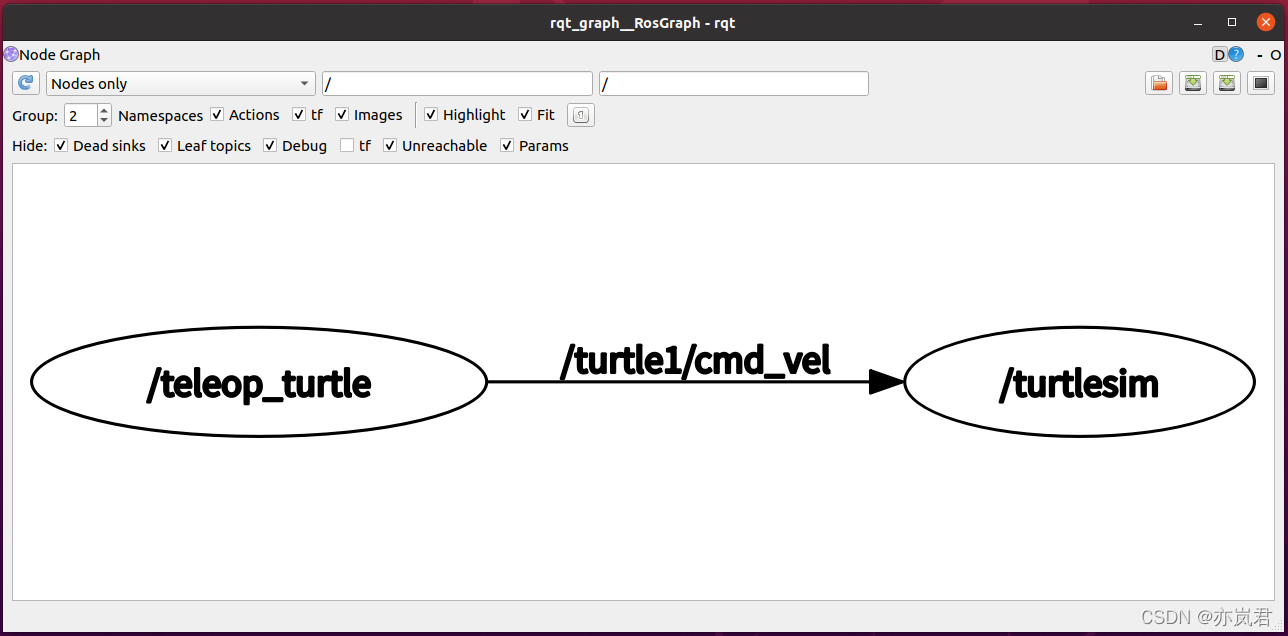
前面介绍的ROS文件结构,是磁盘上 ROS 程序的存储结构,是静态的,而 ros 程序运行之后,不同的节点之间是错综复杂的,ROS 中提供了一个实用的工具rqt_graph用来显示当前系统运行情况的动态图形。
ROS 分布式系统中不同进程需要进行数据交互,计算图可以以点对点的网络形式表现数据交互过程。rqt_graph是rqt程序包中的一部分。
3.2 计算图演示
首先启动三个终端,分别输入如下命令:
终端1键入:roscore
终端2键入:rosrun turtlesim turtlesim_node(此时会弹出图形化界面)
终端3键入:rosrun turtlesim turtle_teleop_key(在3中可以通过键盘控制2中乌龟的运动)
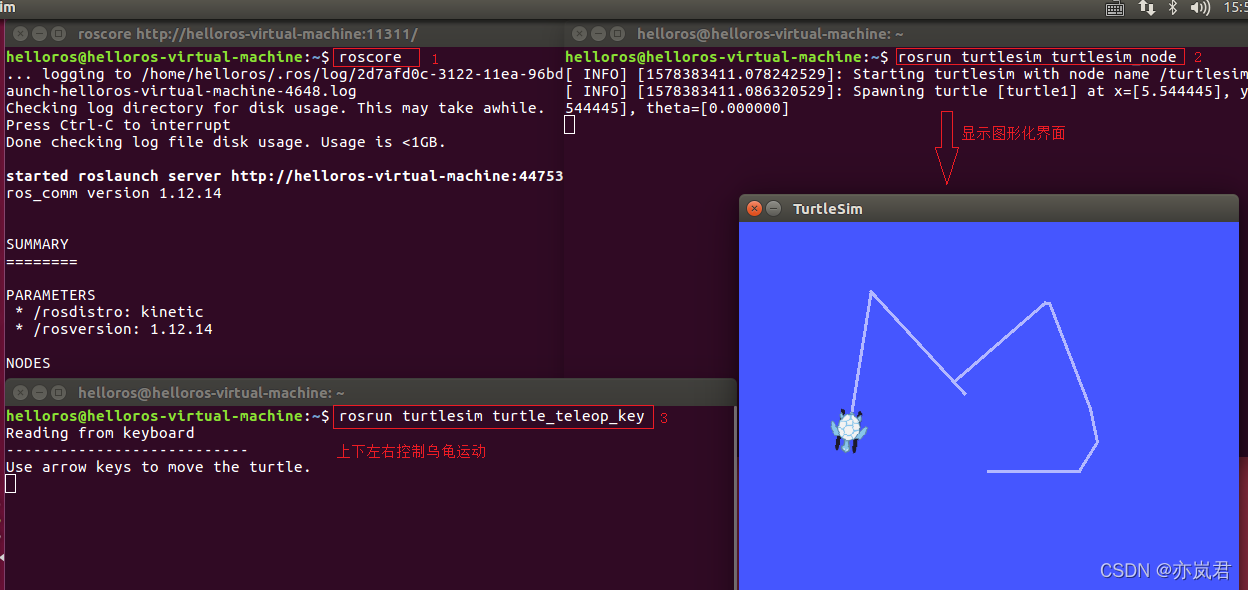
再启动一个终端,输入
rqt_graph
可以看到类似下图的网络拓扑图,该图可以显示不同节点之间的关系。
本文来自互联网用户投稿,文章观点仅代表作者本人,不代表本站立场,不承担相关法律责任。如若转载,请注明出处。 如若内容造成侵权/违法违规/事实不符,请点击【内容举报】进行投诉反馈!