oracle 认证方式
登录认证三种方式
Os、passwdfile,data dictionary方式,不过我们开始更关注os和passwdfile方式,
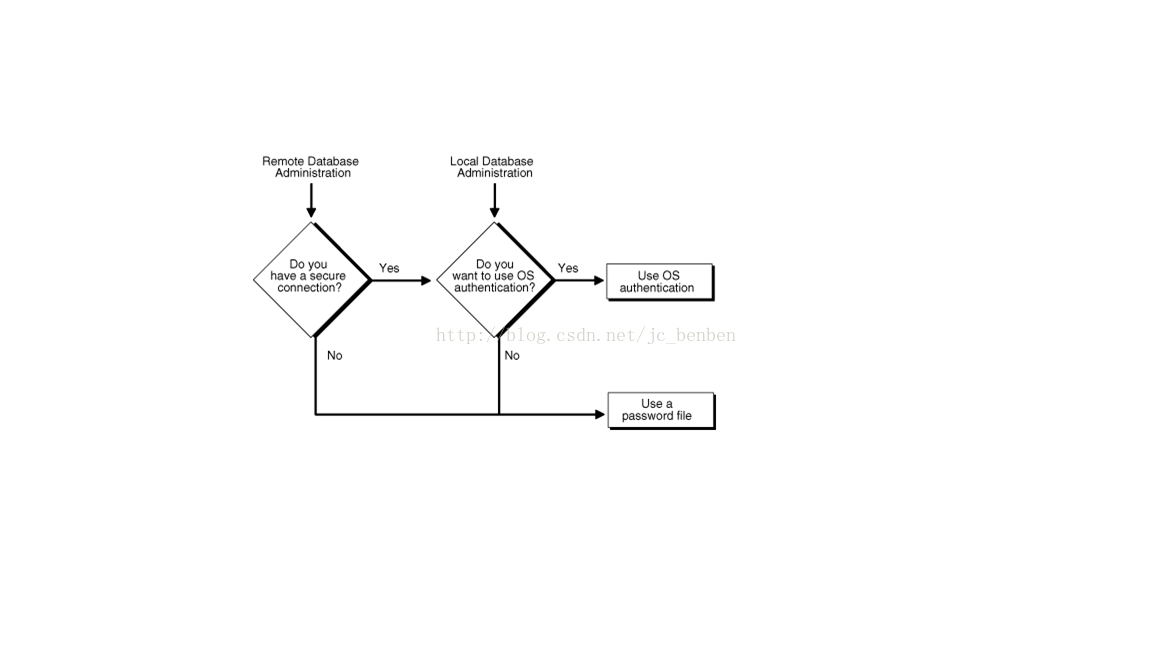
上边图片显示了认证方式的简介图片,很形象
二、两个配置地方
1) REMOTE_LOGIN_PASSWORDFILE
REMOTE_LOGIN_PASSWORDFILE specifies whether Oracle checks for a password file.也就是数据库是否开启密码文件认证
Values:
· shared
One or more databasescan use the password file. The password file can containSYS as well as non-SYS users.
· exclusive
The password file canbe used by only one database. The password file can containSYS as well as non-SYS users.
· none
Oracle ignores anypassword file. Therefore, privileged users must be authenticated by theoperating system.
2) 使用dbca安装数据库的时候默认在network中创建sqlnet.ora文件,里边登记是否开启操作系统认证方式
None
Note:
When installing thedatabase with Database Configuration Assistant (DBCA), this parameter may beset to nts in the sqlnet.ora file.
- Authentication Methods Available with Oracle Net Services:
- none for no authentication methods, including Microsoft Windows native operating system authentication. When SQLNET.AUTHENTICATION_SERVICES is set to none, a valid user name and password can be used to access the database.
- all for all authentication methods.
- nts for Microsoft Windows native operating system authentication.
- Authentication Methods Available with Oracle Advanced Security:
- kerberos5 for Kerberos authentication.
- radius for RADIUS authentication.
- tcps for SSL authentication.
- 如果两个参数都设置为了禁用,则是不会登录到数据库实例的
三、数据库安装完了至少应该有两个默认的账户sys和system
另外
- SYS (default password: CHANGE_ON_INSTALL)
- SYSTEM (default password: MANAGER)
SYS
When you create an Oracle database, theuser SYS is automatically created and granted the DBA role.
All of the base tables and views for thedatabase data dictionary are stored in the schema SYS. These base tables andviews are critical for the operation of Oracle Database. To maintain theintegrity of the data dictionary, tables in the SYS schema are manipulated onlyby the database. They should never be modified by any user or databaseadministrator, and no one should create any tables in the schema of user SYS.(However, you can change the storage parameters of the data dictionary settingsif necessary.)
Ensure that most database users are neverable to connect to Oracle Database using the SYS account.
SYSTEM
When you create an Oracle Database, theuser SYSTEM is also automatically created and granted the DBA role.
The SYSTEM user name is used to createadditional tables and views that display administrative information, andinternal tables and views used by various Oracle Database options and tools.Never use the SYSTEM schema to store tables of interest to non-administrativeusers.
数据库安装完了之后的两个默认权限
| System Privilege | Operations Authorized |
| SYSDBA |
Effectively, this system privilege allows a user to connect as user SYS. |
| SYSOPER |
This privilege allows a user to perform basic operational tasks, but without the ability to look at user data. |
另外用户使用as sysdba或者as sysoper用户登录的时候跟仅仅单独账户登录的时候不一致
CONNECT center
CREATE TABLE test(nameVARCHAR2(20));
Later, user centerissues these statements:
CONNECT center ASSYSDBA
SELECT * FROM test;
User center nowreceives the following error:
ORA-00942: tableor view does not exist
Having connectedas SYSDBA, user center now references the SYS schema, but the table was createdin the center schema.
1) 操作系统认证、:
如果
| Operating System Group | UNIX User Group | Windows User Group |
| OSDBA | dba | ORA_DBA |
| OSOPER | oper | ORA_OPER |
可以使用sqlplus/ as sysdba 或者sqlplus /nolog
然后使用conn/ as sysdba
2) 密码文件验证
这个需要在默认路径中有密码文件,如果没有的话需要创建
创建命令
Usage: orapwd file=
where
file -name of password file (required),
password- password for SYS will be prompted if not specified at command line,
entries- maximum number of distinct DBA (optional),
force -whether to overwrite existing file (optional),
ignorecase - passwords are case-insensitive (optional),
nosysdba - whether to shut out the SYSDBAlogon (optional Database Vault only).
There must be no spaces around the equal-to (=) character.
密码文件位置
| Platform | Required Name | Required Location) |
| UNIX and Linux | orapwORACLE_SID | ORACLE_HOME/dbs |
| Windows | PWDORACLE_SID.ora | ORACLE_HOME\database |
查看密码文件内容
[oracle@localhost dbs]$ strings orapwORCL
]\[Z
ORACLE Remote Password file
INTERNAL
8D81CE2BEA8C6ACC
41F238AD5AB73258
CENTER
7A295E4EB6BAA121
8jL!
最后说明下查询用户权限
SQL>select* from system_privilege_map where name like '%SYS%';
PRIVILEGE NAME PROPERTY
-------------------------------------------------- ----------
-3 ALTER SYSTEM 0
-4 AUDIT SYSTEM 0
-83 SYSDBA 0
-84 SYSOPER 0
查看在密码文件中的用户
SQL>select* from v$pwfile_users;
USERNAME SYSDBA SYSOPER SYSASM
------------------------------------ ------- ------
SYS TRUE TRUE FALSE
CENTER TRUE FALSE FALSE
本文来自互联网用户投稿,文章观点仅代表作者本人,不代表本站立场,不承担相关法律责任。如若转载,请注明出处。 如若内容造成侵权/违法违规/事实不符,请点击【内容举报】进行投诉反馈!