玩转华为ENSP模拟器系列 | 配置静态BFD检测VPWS PW示例
素材来源:华为路由器配置指南
一边学习一边整理试验笔记,并与大家分享,侵权即删,谢谢支持!
附上汇总贴:玩转华为ENSP模拟器系列 | 合集_COCOgsta的博客-CSDN博客_华为模拟器实验
目标
静态BFD检测PW,配置比较简单,报文交互比较少。
组网需求
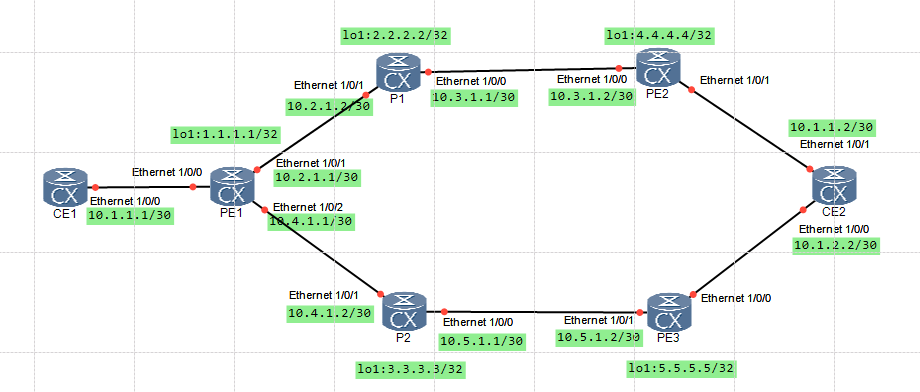
在MPLS L2VPN组网方案中:
PE1和PE2之间建立PW1(主)。
PE1和PE3之间建立PW2(备)。
如图1,要求使用BFD检测主备PW的连通性,当主PW出现故障以后,能够在50ms内将业务切换到备用PW上。
配置思路
- 配置MPLS网络。
- 在PE1的AC接口配置PW1(PE1到PE2)、PW2(PE1到PE3),形成主备PW关系。
- 配置BFD会话检测PW1和PW2。
操作步骤
- 配置CE上接入PE的接口的IP地址
配置CE1。
CE1:
interface Ethernet1/0/0ip address 10.1.1.1 255.255.255.252ip address 10.1.2.1 255.255.255.252 sub
配置CE2。
CE2:
interface Ethernet1/0/1ip address 10.1.1.2 255.255.255.252
interface Ethernet1/0/0ip address 10.1.2.2 255.255.255.252
- 在MPLS骨干网上配置IGP协议,实现骨干网PE和P的互通
配置PE1。
PE1:
interface LoopBack1ip address 1.1.1.1 255.255.255.255
interface Ethernet1/0/1ip address 10.2.1.1 255.255.255.252
interface Ethernet1/0/2ip address 10.4.1.1 255.255.255.252
ospf 1area 0.0.0.0network 1.1.1.1 0.0.0.0network 10.2.1.0 0.0.0.3network 10.4.1.0 0.0.0.3
配置P1。
P1:
interface LoopBack1ip address 2.2.2.2 255.255.255.255
interface Ethernet1/0/0ip address 10.3.1.1 255.255.255.252
interface Ethernet1/0/1ip address 10.2.1.2 255.255.255.252
ospf 1area 0.0.0.0network 2.2.2.2 0.0.0.0network 10.2.1.0 0.0.0.3network 10.3.1.0 0.0.0.3
配置P2。
P2:
interface LoopBack1ip address 3.3.3.3 255.255.255.255
interface Ethernet1/0/0ip address 10.5.1.1 255.255.255.252
interface Ethernet1/0/1ip address 10.4.1.2 255.255.255.252
ospf 1area 0.0.0.0network 3.3.3.3 0.0.0.0network 10.4.1.0 0.0.0.3network 10.5.1.0 0.0.0.3
配置PE2。
PE2:
interface LoopBack1ip address 4.4.4.4 255.255.255.255
interface Ethernet1/0/0ip address 10.3.1.2 255.255.255.252
ospf 1area 0.0.0.0network 4.4.4.4 0.0.0.0network 10.3.1.0 0.0.0.3
配置PE3。
PE3:
interface LoopBack1ip address 5.5.5.5 255.255.255.255
interface Ethernet1/0/1ip address 10.5.1.2 255.255.255.252
ospf 1area 0.0.0.0network 5.5.5.5 0.0.0.0network 10.5.1.0 0.0.0.3
配置完成后,在PE上执行display ip routing-table命令,可以看到PE1与PE2之间、PE1与PE3之间互相学到到对方Loopback1接口的路由。
以PE1的显示为例:
[~PE1]dis ip routing-table
Route Flags: R - relay, D - download to fib, T - to vpn-instance, B - black holeroute
------------------------------------------------------------------------------
Routing Table : _public_Destinations : 18       Routes : 18
Destination/Mask    Proto   Pre  Cost        Flags NextHop         Interface1.1.1.1/32  Direct  0    0             D   127.0.0.1       LoopBack12.2.2.2/32  OSPF    10   1             D   10.2.1.2        Ethernet1/0/12.2.2.9/32  Direct  0    0             D   127.0.0.1       LoopBack03.3.3.3/32  OSPF    10   1             D   10.4.1.2        Ethernet1/0/24.4.4.4/32  OSPF    10   2             D   10.2.1.2        Ethernet1/0/15.5.5.5/32  OSPF    10   2             D   10.4.1.2        Ethernet1/0/210.2.1.0/30  Direct  0    0             D   10.2.1.1        Ethernet1/0/110.2.1.1/32  Direct  0    0             D   127.0.0.1       Ethernet1/0/110.2.1.3/32  Direct  0    0             D   127.0.0.1       Ethernet1/0/110.3.1.0/30  OSPF    10   2             D   10.2.1.2        Ethernet1/0/110.4.1.0/30  Direct  0    0             D   10.4.1.1        Ethernet1/0/210.4.1.1/32  Direct  0    0             D   127.0.0.1       Ethernet1/0/210.4.1.3/32  Direct  0    0             D   127.0.0.1       Ethernet1/0/210.5.1.0/30  OSPF    10   2             D   10.4.1.2        Ethernet1/0/2127.0.0.0/8   Direct  0    0             D   127.0.0.1       InLoopBack0127.0.0.1/32  Direct  0    0             D   127.0.0.1       InLoopBack0
127.255.255.255/32  Direct  0    0             D   127.0.0.1       InLoopBack0
255.255.255.255/32  Direct  0    0             D   127.0.0.1       InLoopBack0
[~PE1]
- 在MPLS骨干网上配置MPLS基本能力
使能MPLS,指定LSR-ID为Loopback1接口的IP地址。在骨干网接口上使能MPLS和MPLS LDP。
配置PE1。
PE1:
mpls lsr-id 1.1.1.1
mpls
mpls ldp
interface Ethernet1/0/1mplsmpls ldp
interface Ethernet1/0/2mplsmpls ldp
配置PE1。
P1:
mpls lsr-id 2.2.2.2
mpls
mpls ldp
interface Ethernet1/0/1mplsmpls ldp
interface Ethernet1/0/0mplsmpls ldp
配置P2。
P2:
mpls lsr-id 3.3.3.3
mpls
mpls ldp
interface Ethernet1/0/1mplsmpls ldp
interface Ethernet1/0/0mplsmpls ldp
配置PE2。
PE2:
mpls lsr-id 4.4.4.4
mpls
mpls ldp
interface Ethernet1/0/0mplsmpls ldp
配置PE3。
PE3:
mpls lsr-id 5.5.5.5
mpls
mpls ldp
interface Ethernet1/0/1mplsmpls ldp
上述配置完成后,在PE上执行display tunnel-info all命令,PE1与PE2之间、PE1与PE3之间存在MPLS LSP隧道。
以PE1的显示为例。
[~PE1]DIS tunnel-info all
Tunnel ID            Type                Destination                            Status
--------------------------------------------------------------------------------
--------
0x0000000001004c4b43 ldp                 2.2.2.2                                UP
0x0000000001004c4b44 ldp                 3.3.3.3                                UP
0x0000000001004c4b45 ldp                 4.4.4.4                                UP
0x0000000001004c4b46 ldp                 5.5.5.5                                UP
[~PE1]
[~PE1]
在PE上执行display mpls ldp session命令可以看到PE与相邻P的LDP对等体关系的Status为“Operational”。
以PE1的显示为例:
[~PE1]dis mpls ldp session LDP Session(s) in Public NetworkCodes: LAM(Label Advertisement Mode), SsnAge Unit(DDDD:HH:MM)An asterisk (*) before a session means the session is being deleted.--------------------------------------------------------------------------PeerID             Status      LAM  SsnRole  SsnAge       KASent/Rcv--------------------------------------------------------------------------2.2.2.2:0          Operational DU   Passive  0000:00:08   34/343.3.3.3:0          Operational DU   Passive  0000:00:06   27/27--------------------------------------------------------------------------TOTAL: 2 Session(s) Found.
[~PE1]
- 在PE之间建立远端LDP会话
在配置远端LDP会话,指定的IP地址通常为LDP远端对等体的Loopback接口地址。
配置PE1。
PE1:
mpls ldp remote-peer 4.4.4.4remote-ip 4.4.4.4
mpls ldp remote-peer 5.5.5.5remote-ip 5.5.5.5
配置PE2。
PE2:
mpls ldp remote-peer 1.1.1.1remote-ip 1.1.1.1
配置PE3。
PE3:
mpls ldp remote-peer 1.1.1.1remote-ip 1.1.1.1
配置完成后,在PE上执行display mpls ldp session命令可以看到PE之间的远端LDP对等体关系的Status为“Operational”,即远端对等体关系已建立。
以PE1的显示为例:
[~PE1-mpls-ldp-remote-5.5.5.5]DIS MPLS LDP session LDP Session(s) in Public NetworkCodes: LAM(Label Advertisement Mode), SsnAge Unit(DDDD:HH:MM)An asterisk (*) before a session means the session is being deleted.--------------------------------------------------------------------------PeerID             Status      LAM  SsnRole  SsnAge       KASent/Rcv--------------------------------------------------------------------------2.2.2.2:0          Operational DU   Passive  0000:00:11   46/463.3.3.3:0          Operational DU   Passive  0000:00:09   39/394.4.4.4:0          Operational DU   Passive  0000:00:01   6/65.5.5.5:0          Operational DU   Passive  0000:00:00   4/4--------------------------------------------------------------------------TOTAL: 4 Session(s) Found.
[~PE1-mpls-ldp-remote-5.5.5.5]
- 在PE上使用PW模板配置PW
配置PE1。
PE1:
mpls l2vpn
pw-template 1to2  peer-address 4.4.4.4 control-word
pw-template 1to3  peer-address 5.5.5.5 control-word
interface Ethernet1/0/0mpls l2vc pw-template 1to2 100mpls l2vc pw-template 1to3 200 secondary
配置PE2。
PE2:
mpls l2vpn
pw-template 2to1  peer-address 1.1.1.1 control-word
interface Ethernet1/0/1mpls l2vc pw-template 2to1 100
配置PE3。
PE3:
mpls l2vpn
pw-template 3to1  peer-address 1.1.1.1 control-word
interface Ethernet1/0/0mpls l2vc pw-template 3to1 200
配置完成后,在PE上执行display pw-template命令可以看到PW模板的配置信息。
以PE1的显示为例。
[~PE1-Ethernet1/0/0]dis pw-template
Total PW template number : 2PW Template Name : 1to2PeerIP           : 4.4.4.4Tnl Policy Name  : --CtrlWord         : EnableMTU              : 1500Max Atm Cells    : 28ATM Pack Overtime: 1000Seq-Number       : DisableTransmit ATM Cells      : --TDM Encapsulation Number: 8Jitter-Buffer           : 4Jitter-Buffer-Cep       : 1000payload-compression DBA : --Idle-Code               : ffRtp-Header              : DisableVCCV Capability  : cw alert ttl lsp-ping bfd Total PW         : 1, Static PW : 0, LDP PW : 1PW Template Name : 1to3PeerIP           : 5.5.5.5Tnl Policy Name  : --CtrlWord         : EnableMTU              : 1500Max Atm Cells    : 28ATM Pack Overtime: 1000Seq-Number       : DisableTransmit ATM Cells      : --TDM Encapsulation Number: 8Jitter-Buffer           : 4Jitter-Buffer-Cep       : 1000payload-compression DBA : --Idle-Code               : ffRtp-Header              : DisableVCCV Capability  : cw alert ttl lsp-ping bfd Total PW         : 1, Static PW : 0, LDP PW : 1[~PE1-Ethernet1/0/0]
在PE上查看L2VPN连接信息,执行display mpls l2vc interface命令可以看到PW建立成功,且为Active状态。并且主备PW都没有使能BFD for PW功能。
以PE1的显示为例。
[~PE1-Ethernet1/0/0] dis mpls l2vc interface ethe 1/0/0*client interface : Ethernet1/0/0 is upAdministrator PW : no session state : upAC status : upIgnore AC state : disableVC state : upLabel state : 0Token state : 0VC ID : 100VC type : Ethernetdestination : 4.4.4.4local group ID : 0 remote group ID : 0local VC label : 48125 remote VC label : 48124local AC OAM State : uplocal PSN OAM State : uplocal forwarding state : forwardinglocal status code : 0x0 (forwarding)remote AC OAM state : upremote PSN OAM state : upremote forwarding state: forwardingremote status code : 0x0 (forwarding)ignore standby state : noBFD for PW : unavailableVCCV State : upmanual fault : not setactive state : activeforwarding entry : existOAM Protocol : --OAM Status : --OAM Fault Type : --PW APS ID : --PW APS Status : --TTL Value : 1link state : uplocal VC MTU : 1500 remote VC MTU : 1500local VCCV : cw alert ttl lsp-ping bfd remote VCCV : cw alert ttl lsp-ping bfd local control word : enable remote control word : enabletunnel policy name : --PW template name : 1to2primary or secondary : primaryload balance type : flowAccess-port : falseSwitchover Flag : falseVC tunnel info : 1 tunnelsNO.0 TNL type : ldp , TNL ID : 0x0000000001004c4b45create time : 0 days, 0 hours, 4 minutes, 53 secondsup time : 0 days, 0 hours, 3 minutes, 3 secondslast change time : 0 days, 0 hours, 3 minutes, 3 secondsVC last up time : 2020/01/09 16:21:36VC total up time : 0 days, 0 hours, 3 minutes, 3 secondsCKey : 65NKey : 16777380PW redundancy mode : frrAdminPw interface : --AdminPw link state : --Forward state : send active, receive activeDiffserv Mode : uniformService Class : --Color : --DomainId : --Domain Name : -- *client interface : Ethernet1/0/0 is upAdministrator PW : no session state : upAC status : upIgnore AC state : disableVC state : upLabel state : 0Token state : 0VC ID : 200VC type : Ethernetdestination : 5.5.5.5local group ID : 0 remote group ID : 0local VC label : 48126 remote VC label : 48125local AC OAM State : uplocal PSN OAM State : uplocal forwarding state : forwardinglocal status code : 0x0 (forwarding)remote AC OAM state : upremote PSN OAM state : upremote forwarding state: forwardingremote status code : 0x0 (forwarding)ignore standby state : noBFD for PW : unavailableVCCV State : upmanual fault : not setactive state : inactiveforwarding entry : existOAM Protocol : --OAM Status : --OAM Fault Type : --PW APS ID : --PW APS Status : --TTL Value : 1link state : uplocal VC MTU : 1500 remote VC MTU : 1500local VCCV : cw alert ttl lsp-ping bfd remote VCCV : cw alert ttl lsp-ping bfd local control word : enable remote control word : enabletunnel policy name : --PW template name : 1to3primary or secondary : secondaryload balance type : flowAccess-port : falseVC tunnel info : 1 tunnelsNO.0 TNL type : ldp , TNL ID : 0x0000000001004c4b46create time : 0 days, 0 hours, 4 minutes, 53 secondsup time : 0 days, 0 hours, 1 minutes, 35 secondslast change time : 0 days, 0 hours, 1 minutes, 35 secondsVC last up time : 2020/01/09 16:23:03VC total up time : 0 days, 0 hours, 1 minutes, 35 secondsCKey : 66NKey : 16777381PW redundancy mode : frrAdminPw interface : --AdminPw link state : --Forward state : send inactive, receive inactiveDiffserv Mode : uniformService Class : --Color : --DomainId : --Domain Name : -- reroute policy : delay 30 s, resume 10 sreason of last reroute : --time of last reroute : -- days, -- hours, -- minutes, -- secondsdelay timer ID : -- residual time :--resume timer ID : -- residual time :--[~PE1-Ethernet1/0/0]
- 在PE之间配置静态BFD检测PW功能
配置PE1。
PE1:
bfd
bfd 1to2 bind pw interface Ethernet1/0/0discriminator local 12discriminator remote 21
bfd 1to3 bind pw interface Ethernet1/0/0 secondarydiscriminator local 13discriminator remote 31
配置PE2。
PE2:
bfd
bfd 2to1 bind pw interface Ethernet1/0/1discriminator local 21discriminator remote 12
配置PE3。
PE3:
bfd
bfd 3to1 bind pw interface Ethernet1/0/0discriminator local 31discriminator remote 13
配置完成后,PE1与PE2之间,PE1与PE3之间建立BFD会话。执行display bfd session all命令,可以看到State为Up。
以PE1的显示为例。
[~PE1]DIS BFD session all
(w): State in WTR
(*): State is invalid
--------------------------------------------------------------------------------
Local      Remote     PeerIpAddr      State     Type        InterfaceName
--------------------------------------------------------------------------------
12         21         --.--.--.--     Up        S_PW(M)     Ethernet1/0/0
13         31         --.--.--.--     Up        S_PW(S)     Ethernet1/0/0
--------------------------------------------------------------------------------Total UP/DOWN Session Number : 2/0
[~PE1]
- 验证配置结果
当主PW正常工作时,CE1的主地址可以Ping通CE2的10.1.1.2地址。备用PW不工作,CE1的从地址无法Ping通CE2的10.1.2.2地址。
[~CE1]ping 10.1.1.2PING 10.1.1.2: 56  data bytes, press CTRL_C to breakReply from 10.1.1.2: bytes=56 Sequence=1 ttl=255 time=20 msReply from 10.1.1.2: bytes=56 Sequence=2 ttl=255 time=11 msReply from 10.1.1.2: bytes=56 Sequence=3 ttl=255 time=11 msReply from 10.1.1.2: bytes=56 Sequence=4 ttl=255 time=11 msReply from 10.1.1.2: bytes=56 Sequence=5 ttl=255 time=12 ms--- 10.1.1.2 ping statistics ---5 packet(s) transmitted5 packet(s) received0.00% packet lossround-trip min/avg/max = 11/13/20 ms[~CE1]ping 10.1.2.2PING 10.1.2.2: 56  data bytes, press CTRL_C to breakRequest time outRequest time outRequest time outRequest time outRequest time out--- 10.1.2.2 ping statistics ---5 packet(s) transmitted0 packet(s) received100.00% packet loss
[~CE1]
在PE上执行命令display mpls l2vc interface查看PW的状态。可以看到主备PW都使能了BFD for PW功能,且BFD state为up。
[~PE1]dis mpls l2vc interface ethe 1/0/0*client interface : Ethernet1/0/0 is upAdministrator PW : no session state : upAC status : upIgnore AC state : disableVC state : upLabel state : 0Token state : 0VC ID : 100VC type : Ethernetdestination : 4.4.4.4local group ID : 0 remote group ID : 0local VC label : 48125 remote VC label : 48124local AC OAM State : uplocal PSN OAM State : uplocal forwarding state : forwardinglocal status code : 0x0 (forwarding)remote AC OAM state : upremote PSN OAM state : upremote forwarding state: forwardingremote status code : 0x0 (forwarding)ignore standby state : noBFD for PW : availableBFD sessionIndex : 1 BFD state : upVCCV State : upmanual fault : not setactive state : activeforwarding entry : existOAM Protocol : --OAM Status : --OAM Fault Type : --PW APS ID : --PW APS Status : --TTL Value : 1link state : uplocal VC MTU : 1500 remote VC MTU : 1500local VCCV : cw alert ttl lsp-ping bfd remote VCCV : cw alert ttl lsp-ping bfd local control word : enable remote control word : enabletunnel policy name : --PW template name : 1to2primary or secondary : primaryload balance type : flowAccess-port : falseSwitchover Flag : falseVC tunnel info : 1 tunnelsNO.0 TNL type : ldp , TNL ID : 0x0000000001004c4b45create time : 0 days, 0 hours, 49 minutes, 31 secondsup time : 0 days, 0 hours, 47 minutes, 41 secondslast change time : 0 days, 0 hours, 47 minutes, 41 secondsVC last up time : 2020/01/09 16:21:36VC total up time : 0 days, 0 hours, 47 minutes, 41 secondsCKey : 65NKey : 16777380PW redundancy mode : frrAdminPw interface : --AdminPw link state : --Forward state : send active, receive activeDiffserv Mode : uniformService Class : --Color : --DomainId : --Domain Name : -- *client interface : Ethernet1/0/0 is upAdministrator PW : no session state : upAC status : upIgnore AC state : disableVC state : upLabel state : 0Token state : 0VC ID : 200VC type : Ethernetdestination : 5.5.5.5local group ID : 0 remote group ID : 0local VC label : 48126 remote VC label : 48125local AC OAM State : uplocal PSN OAM State : uplocal forwarding state : forwardinglocal status code : 0x0 (forwarding)remote AC OAM state : upremote PSN OAM state : upremote forwarding state: forwardingremote status code : 0x0 (forwarding)ignore standby state : noBFD for PW : availableBFD sessionIndex : 2 BFD state : upVCCV State : upmanual fault : not setactive state : inactiveforwarding entry : existOAM Protocol : --OAM Status : --OAM Fault Type : --PW APS ID : --PW APS Status : --TTL Value : 1link state : uplocal VC MTU : 1500 remote VC MTU : 1500local VCCV : cw alert ttl lsp-ping bfd remote VCCV : cw alert ttl lsp-ping bfd local control word : enable remote control word : enabletunnel policy name : --PW template name : 1to3primary or secondary : secondaryload balance type : flowAccess-port : falseVC tunnel info : 1 tunnelsNO.0 TNL type : ldp , TNL ID : 0x0000000001004c4b46create time : 0 days, 0 hours, 49 minutes, 31 secondsup time : 0 days, 0 hours, 46 minutes, 13 secondslast change time : 0 days, 0 hours, 46 minutes, 13 secondsVC last up time : 2020/01/09 16:23:03VC total up time : 0 days, 0 hours, 46 minutes, 13 secondsCKey : 66NKey : 16777381PW redundancy mode : frrAdminPw interface : --AdminPw link state : --Forward state : send inactive, receive inactiveDiffserv Mode : uniformService Class : --Color : --DomainId : --Domain Name : -- reroute policy : delay 30 s, resume 10 sreason of last reroute : --time of last reroute : -- days, -- hours, -- minutes, -- secondsdelay timer ID : -- residual time :--resume timer ID : -- residual time :--[~PE1]
shutdown掉PE1的GigabitEthernet0/1/1接口模拟主用PW发生故障,此时,CE1的主地址不可以Ping通CE2的10.1.1.2地址。备用PW工作,CE1的从地址可以Ping通CE2的10.1.2.2地址。
[~CE1]ping 10.1.1.2PING 10.1.1.2: 56  data bytes, press CTRL_C to breakRequest time outRequest time outRequest time outRequest time outRequest time out--- 10.1.1.2 ping statistics ---5 packet(s) transmitted0 packet(s) received100.00% packet loss
[~CE1]ping 10.1.2.2PING 10.1.2.2: 56  data bytes, press CTRL_C to breakReply from 10.1.2.2: bytes=56 Sequence=1 ttl=255 time=19 msReply from 10.1.2.2: bytes=56 Sequence=2 ttl=255 time=9 msReply from 10.1.2.2: bytes=56 Sequence=3 ttl=255 time=12 msReply from 10.1.2.2: bytes=56 Sequence=4 ttl=255 time=11 msReply from 10.1.2.2: bytes=56 Sequence=5 ttl=255 time=10 ms--- 10.1.2.2 ping statistics ---5 packet(s) transmitted5 packet(s) received0.00% packet lossround-trip min/avg/max = 9/12/19 ms[~CE1]
在PE上再次执行命令display mpls l2vc interface查看PW的状态。可以看到主用PW的VC状态是down,BFD for PW是available,但BFD state为down。备用PW的VC状态是up,BFD for PW是available,且BFD state为up。
[~PE1-Ethernet1/0/1]dis mpls l2vc int ethe 1/0/0*client interface       : Ethernet1/0/0 is upAdministrator PW       : no session state          : downAC status              : upIgnore AC state        : disableVC state               : downLabel state            : 0Token state            : 0VC ID                  : 100VC type                : Ethernetdestination            : 4.4.4.4local group ID         : 0            remote group ID      : 0local VC label         : 48125        remote VC label      : 0local AC OAM State     : uplocal PSN OAM State    : uplocal forwarding state : not forwardinglocal status code      : 0x1 (not-forwarding)BFD for PW             : availableBFD sessionIndex     : 1            BFD state : downVCCV State             : upmanual fault           : not setactive state           : inactiveforwarding entry       : not existOAM Protocol           : --OAM Status             : --OAM Fault Type         : --PW APS ID              : --PW APS Status          : --TTL Value              : 1link state             : downlocal VC MTU           : 1500         remote VC MTU        : 0local VCCV             : cw alert ttl lsp-ping bfd remote VCCV            : nonelocal control word     : enable       remote control word  : nonetunnel policy name     : --PW template name       : 1to2primary or secondary   : primaryload balance type      : flowAccess-port            : falseSwitchover Flag        : falseVC tunnel info         : 0 tunnelscreate time            : 0 days, 0 hours, 55 minutes, 23 secondsup time                : 0 days, 0 hours, 0 minutes, 0 secondslast change time       : 0 days, 0 hours, 4 minutes, 23 secondsVC last up time        : 2020/01/09 16:21:36VC total up time       : 0 days, 0 hours, 49 minutes, 10 secondsCKey                   : 65NKey                   : 16777380PW redundancy mode     : frrAdminPw interface      : --AdminPw link state     : --Forward state          : send inactive, receive inactiveDiffserv Mode          : uniformService Class          : --Color                  : --DomainId               : --Domain Name            : --  *client interface       : Ethernet1/0/0 is upAdministrator PW       : no session state          : upAC status              : upIgnore AC state        : disableVC state               : upLabel state            : 0Token state            : 0VC ID                  : 200VC type                : Ethernetdestination            : 5.5.5.5local group ID         : 0            remote group ID      : 0local VC label         : 48126        remote VC label      : 48125local AC OAM State     : uplocal PSN OAM State    : uplocal forwarding state : forwardinglocal status code      : 0x0 (forwarding)remote AC OAM state    : upremote PSN OAM state   : upremote forwarding state: forwardingremote status code     : 0x0 (forwarding)ignore standby state   : noBFD for PW             : availableBFD sessionIndex     : 2            BFD state : upVCCV State             : upmanual fault           : not setactive state           : activeforwarding entry       : existOAM Protocol           : --OAM Status             : --OAM Fault Type         : --PW APS ID              : --PW APS Status          : --TTL Value              : 1link state             : uplocal VC MTU           : 1500         remote VC MTU        : 1500local VCCV             : cw alert ttl lsp-ping bfd remote VCCV            : cw alert ttl lsp-ping bfd local control word     : enable       remote control word  : enabletunnel policy name     : --PW template name       : 1to3primary or secondary   : secondaryload balance type      : flowAccess-port            : falseVC tunnel info         : 1 tunnelsNO.0  TNL type       : ldp            , TNL ID : 0x0000000001004c4b46create time            : 0 days, 0 hours, 55 minutes, 23 secondsup time                : 0 days, 0 hours, 52 minutes, 5 secondslast change time       : 0 days, 0 hours, 52 minutes, 5 secondsVC last up time        : 2020/01/09 16:23:03VC total up time       : 0 days, 0 hours, 52 minutes, 5 secondsCKey                   : 66NKey                   : 16777381PW redundancy mode     : frrAdminPw interface      : --AdminPw link state     : --Forward state          : send active, receive activeDiffserv Mode          : uniformService Class          : --Color                  : --DomainId               : --Domain Name            : --  reroute policy          : delay 30 s, resume 10 sreason of last reroute  : --time of last reroute    : -- days, -- hours, -- minutes, -- secondsdelay timer ID          : --           residual time :--resume timer ID         : --           residual time :--[~PE1-Ethernet1/0/1]
[~PE1-Ethernet1/0/1]
[~PE1-Ethernet1/0/1]
本文来自互联网用户投稿,文章观点仅代表作者本人,不代表本站立场,不承担相关法律责任。如若转载,请注明出处。 如若内容造成侵权/违法违规/事实不符,请点击【内容举报】进行投诉反馈!