uniapp打包成window
安装electron
cnpm install electron -g安装electron-packager
cnpm install electron-packager -g
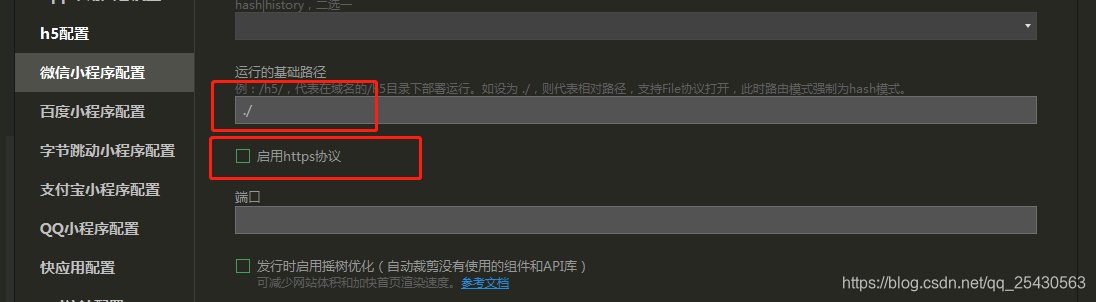
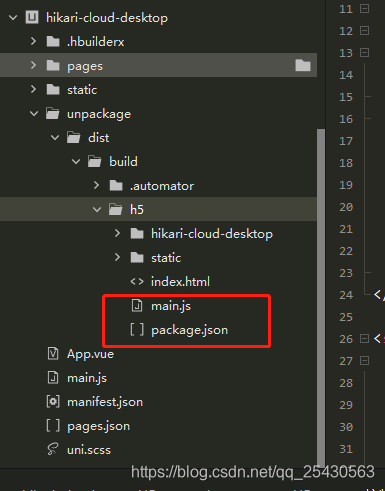
main.js
const {app, BrowserWindow} = require('electron')
const path = require('path')
const url = require('url')// Keep a global reference of the window object, if you don't, the window will
// be closed automatically when the JavaScript object is garbage collected.
let winfunction createWindow () {// Create the browser window.// win = new BrowserWindow({width: 800, height: 600})win = new BrowserWindow({fullscreen: true})// and load the index.html of the app.win.loadURL(url.format({pathname: path.join(__dirname, 'index.html'),protocol: 'file:',slashes: true}))// Open the DevTools.// win.webContents.openDevTools()// Emitted when the window is closed.win.on('closed', () => {// Dereference the window object, usually you would store windows// in an array if your app supports multi windows, this is the time// when you should delete the corresponding element.win = null})
}// This method will be called when Electron has finished
// initialization and is ready to create browser windows.
// Some APIs can only be used after this event occurs.
app.on('ready', createWindow)// Quit when all windows are closed.
app.on('window-all-closed', () => {// On macOS it is common for applications and their menu bar// to stay active until the user quits explicitly with Cmd + Qif (process.platform !== 'darwin') {app.quit()}
})app.on('activate', () => {// On macOS it's common to re-create a window in the app when the// dock icon is clicked and there are no other windows open.if (win === null) {createWindow()}
})// In this file you can include the rest of your app's specific main process
// code. You can also put them in separate files and require them here.
package.json
{"name"    : "app-name","version" : "0.1.0","main"    : "main.js"
}

electron-packager . hikari-cloud-desktop --win --out hikari-cloud-desktop --arch=x64 --electron-version 1.4.14 --overwrite --ignore=node_modules本文来自互联网用户投稿,文章观点仅代表作者本人,不代表本站立场,不承担相关法律责任。如若转载,请注明出处。 如若内容造成侵权/违法违规/事实不符,请点击【内容举报】进行投诉反馈!