Android 客服聊天简单实现
目前第三方的客服系统基本都开始收费了,但有些APP又离不开客服功能,就只能自己实现了,上一篇文章《Android Socket通信简单使用》就是为了实现客服功能做的准备,这里简单记录一下客服功能的实现。
一、主要功能
1、实现WebSocket通信保持长链接
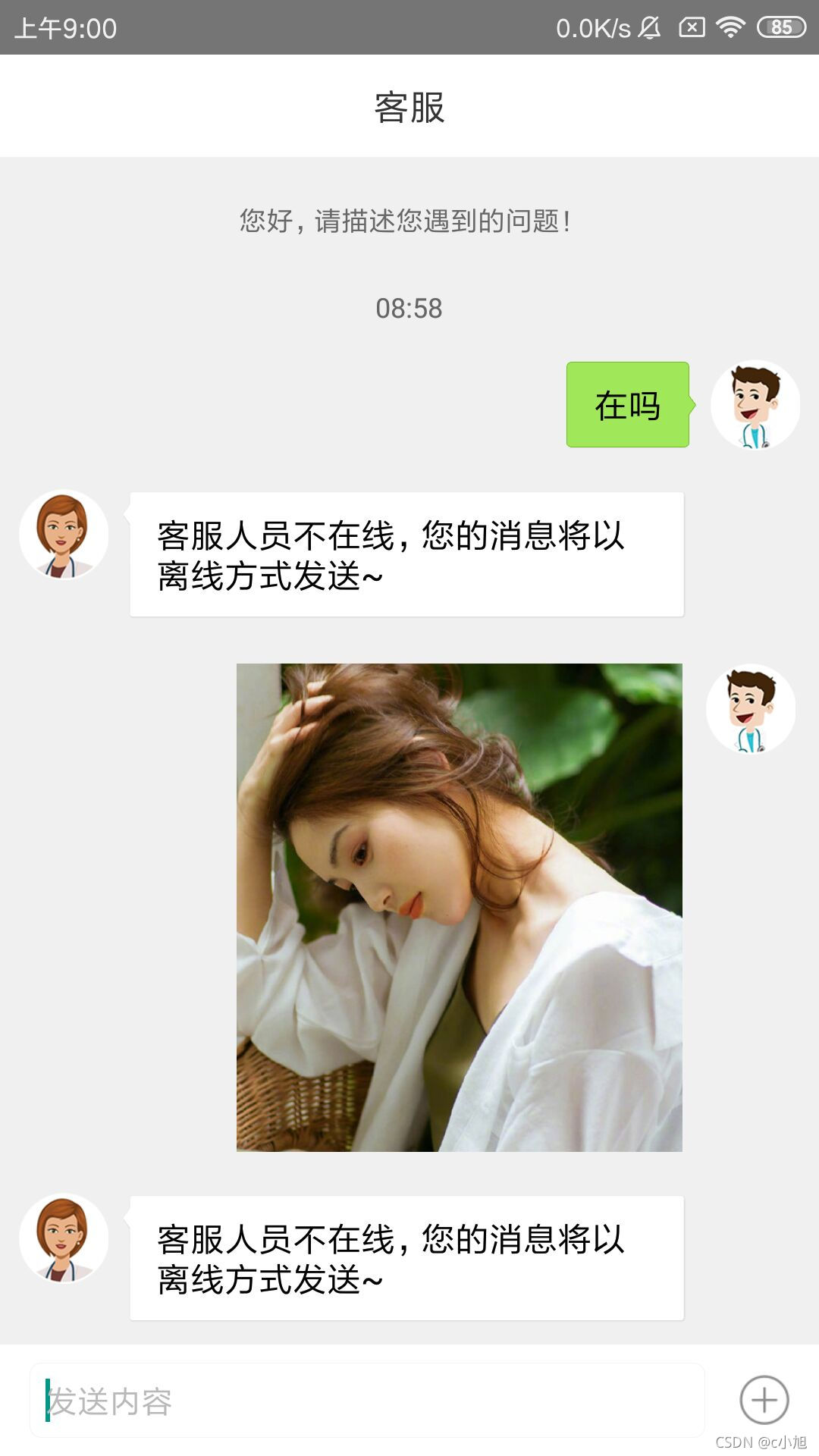
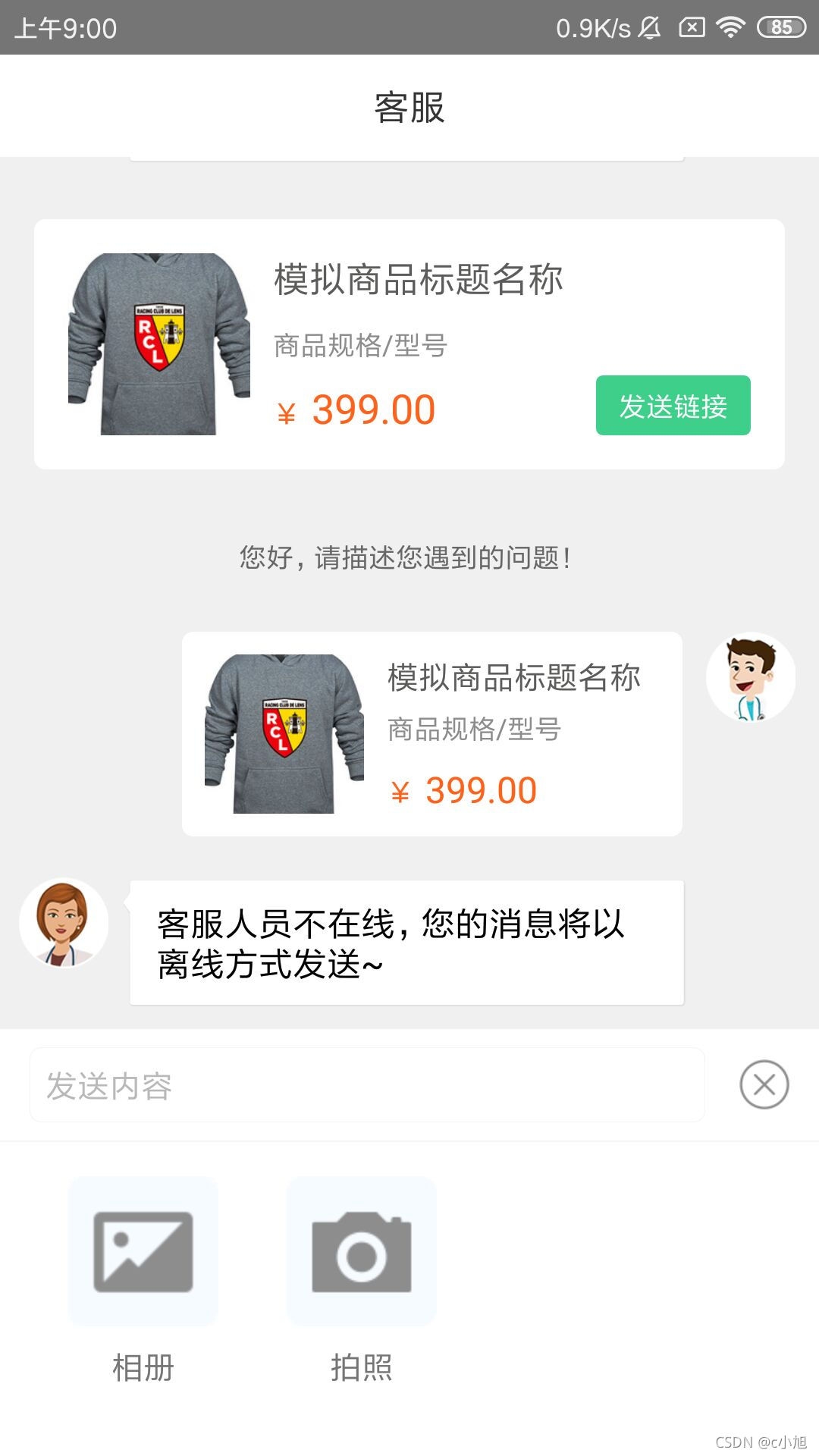
2、能够发送文字、图片、商品等信息
3、显示消息发送时间、提示信息等
4、本地存储历史消息(Room实现本地数据库)
二、功能实现
基本功能的实现大多在代码中进行注释,就不过多介绍了。
1、主页面布局
这里就是简单的聊天页面,能够发送文字消息、图片和商品信息,并展示发送和收到的消息信息。
2、主页面代码
主要功能的实现都在这里,实现消息发送和接受功能,以及消息的展示等。
package com.app.socketdemo;import android.annotation.SuppressLint;
import android.os.Bundle;
import android.os.Handler;
import android.os.Message;
import android.os.SystemClock;
import android.text.Editable;
import android.text.TextUtils;
import android.text.TextWatcher;
import android.view.KeyEvent;
import android.view.View;
import android.widget.EditText;
import android.widget.LinearLayout;
import android.widget.TextView;
import android.widget.Toast;import org.java_websocket.client.WebSocketClient;
import org.java_websocket.handshake.ServerHandshake;
import org.json.JSONException;
import org.json.JSONObject;import java.net.URI;
import java.util.ArrayList;
import java.util.List;import androidx.annotation.Nullable;
import androidx.appcompat.app.AppCompatActivity;
import androidx.recyclerview.widget.LinearLayoutManager;
import androidx.recyclerview.widget.RecyclerView;
import androidx.room.Room;
import androidx.swiperefreshlayout.widget.SwipeRefreshLayout;
import butterknife.BindView;
import butterknife.ButterKnife;
import butterknife.OnClick;public class KefuActivity extends AppCompatActivity {@BindView(R.id.rv_content)RecyclerView rvContent;@BindView(R.id.et_input)EditText etInput;@BindView(R.id.tv_send)TextView tvSend;@BindView(R.id.tv_more)TextView tvMore;@BindView(R.id.tv_album)TextView tvAlbum;@BindView(R.id.tv_photograph)TextView tvPhotograph;@BindView(R.id.ll_more)LinearLayout llMore;@BindView(R.id.swipeRefresh)SwipeRefreshLayout swipeRefresh;private AppDatabase db;private int mLimit = 2;//历史消息页数private MsgAdapter adapter;private List mList = new ArrayList<>();private WebSocketClient client;private final int MESSAGE_ERROR = 0; //错误信息private final int MESSAGE_SUCCEED = 1; //连接成功private final int MESSAGE_RECEIVE = 2; //收到消息private final int MESSAGE_FINISH = 3;  //会话结束private final int MESSAGE_REFRESH = 4; //初始化消息private final int MESSAGE_HISTORY = 5; //更多历史数据@Overrideprotected void onCreate(@Nullable Bundle savedInstanceState) {super.onCreate(savedInstanceState);setContentView(R.layout.activity_kefu);ButterKnife.bind(this);LinearLayoutManager linearLayoutManager = new LinearLayoutManager(this);linearLayoutManager.setOrientation(LinearLayoutManager.VERTICAL);rvContent.setLayoutManager(linearLayoutManager);//下拉加载更多数据swipeRefresh.setOnRefreshListener(new SwipeRefreshLayout.OnRefreshListener() {@Overridepublic void onRefresh() {new Thread(new Runnable() {@Overridepublic void run() {//数据库查询userId=134的用户消息List dbList = db.msgDao().getUserMsg(mLimit, "134");mList.addAll(0, dbList); //消息放到列表顶部setMessage(dbList.size() + "", MESSAGE_HISTORY);}}).start();}});//监听消息发送框etInput.addTextChangedListener(new TextWatcher() {@Overridepublic void beforeTextChanged(CharSequence s, int start, int count, int after) {}@Overridepublic void onTextChanged(CharSequence s, int start, int before, int count) {tvMore.setVisibility(View.VISIBLE);tvSend.setVisibility(View.GONE);}@Overridepublic void afterTextChanged(Editable s) {if (TextUtils.isEmpty(s.toString())) {tvMore.setVisibility(View.VISIBLE);tvSend.setVisibility(View.GONE);} else {tvMore.setVisibility(View.GONE);tvSend.setVisibility(View.VISIBLE);}}});//加载历史消息第一页数据new Thread(new Runnable() {@Overridepublic void run() {db = Room.databaseBuilder(getApplicationContext(),AppDatabase.class, "message.db").build();mList.addAll(db.msgDao().getUserMsg(1, "134"));//获取第一页数据setMessage("", MESSAGE_REFRESH);}}).start();}/*** 初始化并连接服务* 注意:WebSocketClient不能重复初始化*/private void initSocketClient() {//修改为自己的服务器地址URI uri = URI.create("ws://39.102.143.88:9090");client = new WebSocketClient(uri) {@Overridepublic void onOpen(ServerHandshake handshakedata) {setMessage("您好,请描述您遇到的问题!", MESSAGE_SUCCEED);}@Overridepublic void onMessage(String message) {setMessage(message, MESSAGE_RECEIVE);}@Overridepublic void onClose(int code, String reason, boolean remote) {setMessage("会话结束", MESSAGE_FINISH);}@Overridepublic void onError(Exception ex) {setMessage("客服连接异常,请稍后再试", MESSAGE_ERROR);}};try {client.connectBlocking();//连接服务} catch (InterruptedException e) {e.printStackTrace();}}/*** 消息处理*/private void setMessage(String obj, int arg1) {Message message = new Message();message.arg1 = arg1;message.obj = obj;handler.sendMessage(message);}@SuppressLint("HandlerLeak")private Handler handler = new Handler() {@Overridepublic void handleMessage(Message msg) {MsgBean bean = new MsgBean();switch (msg.arg1) {case MESSAGE_SUCCEED://连接成功bean.setData(MsgBean.SYSTEM_MSG, (String) msg.obj);mList.add(bean);adapter.notifyItemInserted(mList.size() - 1);rvContent.scrollToPosition(mList.size() - 1);try {JSONObject jsonObject = new JSONObject();jsonObject.put("userId", "134");client.send(jsonObject.toString());} catch (Exception e) {e.getMessage();}break;case MESSAGE_RECEIVE: //收到消息bean.setData(MsgBean.RECEIVE_MSG, (String) msg.obj);mList.add(bean);adapter.notifyItemInserted(mList.size() - 1);rvContent.scrollToPosition(mList.size() - 1);insertData(bean);break;case MESSAGE_ERROR: //异常消息case MESSAGE_FINISH: //会话结束bean.setData(MsgBean.SYSTEM_MSG, (String) msg.obj);mList.add(bean);adapter.notifyItemInserted(mList.size() - 1);rvContent.scrollToPosition(mList.size() - 1);break;case MESSAGE_REFRESH: //初始化消息
//                String content = getIntent().getStringExtra("content");//模拟是否从商品页进入String content = getGoodsData();if (!TextUtils.isEmpty(content)) {bean = new MsgBean();bean.setData(MsgBean.SYSTEM_GOODS, content);mList.add(bean);}adapter = new MsgAdapter(KefuActivity.this, mList);rvContent.setAdapter(adapter);initSocketClient();break;case MESSAGE_HISTORY: //更多历史数据mLimit++;swipeRefresh.setRefreshing(false);adapter.notifyDataSetChanged();rvContent.scrollToPosition(Integer.valueOf((String) msg.obj));LinearLayoutManager mLayoutManager =(LinearLayoutManager) rvContent.getLayoutManager();mLayoutManager.scrollToPositionWithOffset(Integer.valueOf((String) msg.obj), 0);break;default:break;}}};/*** 模拟商品详情页进入*/private String getGoodsData() {JSONObject jsonObject = new JSONObject();try {jsonObject.put("id", "1");jsonObject.put("title", "模拟商品标题名称");jsonObject.put("desc", "商品规格/型号");jsonObject.put("price", "399.00");jsonObject.put("imgurl", "https://s3.bmp.ovh/imgs/2021/10/30f369d8980bd070_thumb.jpg");} catch (JSONException e) {e.printStackTrace();}return jsonObject.toString();}@OnClick({R.id.tv_send, R.id.tv_more, R.id.tv_album, R.id.tv_photograph})public void onViewClicked(View view) {switch (view.getId()) {case R.id.tv_send:if (TextUtils.isEmpty(etInput.getText().toString())) {Toast.makeText(this, "消息不能为空", Toast.LENGTH_SHORT).show();return;}sendMessage(MsgBean.SEND_MSG, etInput.getText().toString());break;case R.id.tv_more:if (tvMore.isSelected()) {tvMore.setSelected(false);llMore.setVisibility(View.GONE);} else {tvMore.setSelected(true);llMore.setVisibility(View.VISIBLE);}break;case R.id.tv_album://调用相册,这里模拟发送图片sendMessage(MsgBean.SEND_PIC, "https://s3.bmp.ovh/imgs/2021/10/df0c80c09a29cead.jpeg");tvMore.setSelected(false);llMore.setVisibility(View.GONE);break;case R.id.tv_photograph://调用拍照,这里模拟收到图片sendMessage(MsgBean.RECEIVE_PIC, "https://ftp.bmp.ovh/imgs/2020/02/85414fc7ade712f1.jpg");tvMore.setSelected(false);llMore.setVisibility(View.GONE);break;}}/*** 数据库插入消息*/private void insertData(MsgBean bean) {new Thread(new Runnable() {@Overridepublic void run() {db.msgDao().insertAll(bean);}}).start();}/*** 发送消息*/public void sendMessage(int type, String msg) {if (client != null && client.isOpen()) {try {JSONObject jsonObject = new JSONObject();jsonObject.put("nickname", "cx");jsonObject.put("userId", "134");jsonObject.put("content", msg.trim());client.send(jsonObject.toString());MsgBean bean = new MsgBean();bean.setData(type, msg);mList.add(bean);adapter.notifyItemInserted(mList.size() - 1);rvContent.scrollToPosition(mList.size() - 1);etInput.setText("");insertData(bean);} catch (Exception e) {e.getMessage();}} else {setMessage("客服连接异常,请稍后再试", MESSAGE_ERROR);}}/*** 关闭服务*/private void downServer() {try {if (null != client) {client.close();}} catch (Exception e) {e.printStackTrace();} finally {client = null;}}@Overrideprotected void onDestroy() {super.onDestroy();downServer();}private long p = 0; // 连续点击两次退出@Overridepublic boolean onKeyDown(int keyCode, KeyEvent event) {if (keyCode == KeyEvent.KEYCODE_BACK) {long timeMillis = SystemClock.uptimeMillis();if (timeMillis - p < 1500) {this.finish();return true;}p = SystemClock.uptimeMillis();Toast.makeText(this, "再按退出客服", Toast.LENGTH_SHORT).show();return true;}return super.onKeyDown(keyCode, event);}
}
3、Adapter代码
用来实现消息列表的展示,包括发送信息、接收信息、提示信息和商品信息的展示。
package com.app.socketdemo;import android.content.Context;
import android.graphics.Bitmap;
import android.graphics.drawable.Drawable;
import android.util.DisplayMetrics;
import android.view.LayoutInflater;
import android.view.View;
import android.view.ViewGroup;
import android.widget.ImageView;
import android.widget.LinearLayout;
import android.widget.TextView;import com.bumptech.glide.Glide;
import com.bumptech.glide.request.target.CustomTarget;
import com.bumptech.glide.request.transition.Transition;import org.json.JSONObject;import java.text.SimpleDateFormat;
import java.util.Date;
import java.util.List;import androidx.annotation.NonNull;
import androidx.annotation.Nullable;
import androidx.recyclerview.widget.RecyclerView;public class MsgAdapter extends RecyclerView.Adapter {private Context mContext;private List mDatas;private String currentDate;//当前日期private String beforeDate;//昨天public MsgAdapter(Context context, List datas) {mContext = context;mDatas = datas;SimpleDateFormat formatter= new SimpleDateFormat("yyyy-MM-dd");Date date = new Date(System.currentTimeMillis());currentDate = formatter.format(date);date = new Date(System.currentTimeMillis() - 86400000);beforeDate = formatter.format(date);}@Overridepublic int getItemViewType(int position) {return mDatas.get(position).getType();}@NonNull@Overridepublic RecyclerView.ViewHolder onCreateViewHolder(@NonNull ViewGroup parent, int viewType) {if (viewType == MsgBean.SYSTEM_MSG){ //系统消息View itemView = LayoutInflater.from(mContext).inflate(R.layout.item_msg_centre, parent, false);return new CentreHolder(itemView);}else if (viewType == MsgBean.RECEIVE_MSG){ //收到消息View itemView = LayoutInflater.from(mContext).inflate(R.layout.item_msg_left, parent, false);return new LeftHolder(itemView);}else if (viewType == MsgBean.SEND_MSG){ //发送消息View itemView = LayoutInflater.from(mContext).inflate(R.layout.item_msg_right, parent, false);return new RightHolder(itemView);}else if (viewType == MsgBean.RECEIVE_PIC){ //收到图片View itemView = LayoutInflater.from(mContext).inflate(R.layout.item_picture_left, parent, false);return new PicLeftHolder(itemView);}else if (viewType == MsgBean.SEND_PIC){ //发送图片View itemView = LayoutInflater.from(mContext).inflate(R.layout.item_picture_right, parent, false);return new PicRightHolder(itemView);}else if (viewType == MsgBean.SYSTEM_GOODS){ //展示商品View itemView = LayoutInflater.from(mContext).inflate(R.layout.item_goods_centre, parent, false);return new GoodsCentreHolder(itemView);}else if (viewType == MsgBean.SEND_GOODS){ //发送商品View itemView = LayoutInflater.from(mContext).inflate(R.layout.item_goods_right, parent, false);return new GoodsRightHolder(itemView);}return null;}@Overridepublic void onBindViewHolder(@NonNull RecyclerView.ViewHolder holder, int position) {if (holder instanceof CentreHolder){((CentreHolder) holder).tvMsgcentre.setText(mDatas.get(position).getMsg());}else if (holder instanceof LeftHolder){setTime(((LeftHolder) holder).tvTime, position);((LeftHolder) holder).tvMsgleft.setText(mDatas.get(position).getMsg());}else if (holder instanceof RightHolder){setTime(((RightHolder) holder).tvTime, position);((RightHolder) holder).tvMsgRight.setText(mDatas.get(position).getMsg());}else if (holder instanceof PicLeftHolder){
//            ((PicLeftHolder) holder).ivPicLeft.showImage(((PicLeftHolder) holder).ivPicLeft, mDatas.get(position).getMsg());}else if (holder instanceof PicRightHolder){
//            ((PicRightHolder) holder).ivPicRightshowImage(((PicRightHolder) holder).ivPicRight, mDatas.get(position).getMsg());}else if (holder instanceof GoodsCentreHolder){try {JSONObject obj = new JSONObject(mDatas.get(position).getMsg());((GoodsCentreHolder) holder).tvTitle.setText(obj.optString("title"));((GoodsCentreHolder) holder).tvType.setText(obj.optString("desc"));((GoodsCentreHolder) holder).tvPrice.setText(obj.optString("price"));Glide.with(mContext).load(obj.optString("imgurl")).into(((GoodsCentreHolder) holder).ivPicture);((GoodsCentreHolder) holder).tvSend.setOnClickListener(new View.OnClickListener() {@Overridepublic void onClick(View v) {((KefuActivity)mContext).sendMessage(MsgBean.SEND_GOODS, mDatas.get(position).getMsg());}});} catch (Exception e) {e.getMessage();}}else if (holder instanceof GoodsRightHolder){try {JSONObject obj = new JSONObject(mDatas.get(position).getMsg());((GoodsRightHolder) holder).tvTitle.setText(obj.optString("title"));((GoodsRightHolder) holder).tvType.setText(obj.optString("desc"));((GoodsRightHolder) holder).tvPrice.setText(obj.optString("price"));Glide.with(mContext).load(obj.optString("imgurl")).into(((GoodsRightHolder) holder).ivPicture);((GoodsRightHolder) holder).itemView.setOnClickListener(new View.OnClickListener() {@Overridepublic void onClick(View v) {//根据商品id跳转详情页;obj.optString("id")}});} catch (Exception e) {e.getMessage();}}}@Overridepublic int getItemCount() {return mDatas == null ? 0 : mDatas.size();}/*** 处理展示图片大小,这里有待优化* @param iv 图片显示控件* @param url 图片url*/private void showImage(ImageView iv, String url){Glide.with(mContext).asBitmap().load(url).into(new CustomTarget() {@Overridepublic void onResourceReady(@NonNull Bitmap resource, @Nullable Transition transition) {int maxWidth = resource.getWidth();int maxHeight = resource.getHeight();DisplayMetrics dm = new DisplayMetrics();dm = mContext.getResources().getDisplayMetrics();int width = dm.widthPixels;LinearLayout.LayoutParams viewParams;if(maxWidth >= maxHeight){if (maxWidth < DensityUtil.dip2px(230)){viewParams = new LinearLayout.LayoutParams(ViewGroup.LayoutParams.WRAP_CONTENT,ViewGroup.LayoutParams.WRAP_CONTENT);}else {viewParams = new LinearLayout.LayoutParams(DensityUtil.dip2px(230),maxHeight * DensityUtil.dip2px(230) / maxWidth);}}else{if (maxHeight < DensityUtil.dip2px(230)){viewParams = new LinearLayout.LayoutParams(ViewGroup.LayoutParams.WRAP_CONTENT,ViewGroup.LayoutParams.WRAP_CONTENT);}else {viewParams = new LinearLayout.LayoutParams(maxWidth * DensityUtil.dip2px(230) / maxHeight,DensityUtil.dip2px(230));}}iv.setLayoutParams(viewParams);iv.setImageBitmap(resource);}@Overridepublic void onLoadCleared(@Nullable Drawable placeholder) {}});}/*** 显示消息时间* 这里只做了文字消息的时间展示,其他消息同理* @param tv 显示时间控件* @param position 位置*/private void setTime(TextView tv, int position){tv.setVisibility(View.GONE);long time = mDatas.get(position).getTime();if (position == 0){showTime(tv, time);}else{long time1 = mDatas.get(position - 1).getTime();if (time - time1 > 120000){ //两条消息间隔超过2分钟显示时间showTime(tv, time);}}}/*** 展示时间*/private void showTime(TextView tv, long time){tv.setVisibility(View.VISIBLE);SimpleDateFormat dateFormat = new SimpleDateFormat("yyyy-MM-dd");Date date = new Date(time);String msgDate = dateFormat.format(date);SimpleDateFormat formatter = new SimpleDateFormat("HH:mm");if (msgDate.equals(currentDate)){tv.setText(formatter.format(date));}else if(msgDate.equals(beforeDate)){tv.setText("昨天 " + formatter.format(date));}else{tv.setText(msgDate + " " + formatter.format(date));}}/*** 系统消息ViewHolder*/class CentreHolder extends RecyclerView.ViewHolder {public TextView tvMsgcentre;public CentreHolder(@NonNull View itemView) {super(itemView);tvMsgcentre = itemView.findViewById(R.id.tv_msgcentre);}}/*** 收到消息ViewHolder*/class LeftHolder extends RecyclerView.ViewHolder {public TextView tvTime;public TextView tvMsgleft;public LeftHolder(@NonNull View itemView) {super(itemView);tvTime = itemView.findViewById(R.id.tv_time);tvMsgleft = itemView.findViewById(R.id.tv_msgleft);}}/*** 发送消息ViewHolder*/class RightHolder extends RecyclerView.ViewHolder {public TextView tvTime;public TextView tvMsgRight;public RightHolder(@NonNull View itemView) {super(itemView);tvTime = itemView.findViewById(R.id.tv_time);tvMsgRight = itemView.findViewById(R.id.tv_msgright);}}/*** 收到图片ViewHolder*/class PicLeftHolder extends RecyclerView.ViewHolder {public ImageView ivPicLeft;public PicLeftHolder(@NonNull View itemView) {super(itemView);ivPicLeft = itemView.findViewById(R.id.iv_picleft);}}/*** 发送图片ViewHolder*/class PicRightHolder extends RecyclerView.ViewHolder {public ImageView ivPicRight;public PicRightHolder(@NonNull View itemView) {super(itemView);ivPicRight = itemView.findViewById(R.id.iv_picright);}}/*** 展示商品ViewHolder*/class GoodsCentreHolder extends RecyclerView.ViewHolder {public ImageView ivPicture;public TextView tvTitle;public TextView tvType;public TextView tvPrice;public TextView tvSend;public GoodsCentreHolder(@NonNull View itemView) {super(itemView);ivPicture = itemView.findViewById(R.id.iv_picture);tvTitle = itemView.findViewById(R.id.tv_title);tvType = itemView.findViewById(R.id.tv_type);tvPrice = itemView.findViewById(R.id.tv_price);tvSend = itemView.findViewById(R.id.tv_send);}}/*** 发送商品ViewHolder*/class GoodsRightHolder extends RecyclerView.ViewHolder {public ImageView ivPicture;public TextView tvTitle;public TextView tvType;public TextView tvPrice;public GoodsRightHolder(@NonNull View itemView) {super(itemView);ivPicture = itemView.findViewById(R.id.iv_picture);tvTitle = itemView.findViewById(R.id.tv_title);tvType = itemView.findViewById(R.id.tv_type);tvPrice = itemView.findViewById(R.id.tv_price);}}
}
4、消息布局
实现发送、接收、提示和商品等信息的布局。
(1)item_msg_centre.xml
(2)item_msg_left.xml
(3)item_msg_right.xml
(4)item_goods_centre.xml
(5)item_goods_right.xml
省略了两个图片布局,比较简单就不粘贴了
5、数据库功能实现
用于存储消息历史数据。
(1)MsgBean
package com.app.socketdemo;import androidx.room.ColumnInfo;
import androidx.room.Entity;
import androidx.room.PrimaryKey;@Entity
public class MsgBean {public static final int SYSTEM_MSG = 0; //系统消息public static final int RECEIVE_MSG = 1; //收到消息public static final int SEND_MSG = 2; //发送消息public static final int RECEIVE_PIC = 3; //收到图片public static final int SEND_PIC = 4; //发送图片public static final int SYSTEM_GOODS = 5; //展示商品public static final int SEND_GOODS = 6; //发送商品@PrimaryKey(autoGenerate = true)private int id; //主键ID@ColumnInfo(name = "userId")private String userId = "134"; //根据用户显示历史消息,这里默认@ColumnInfo(name = "type")private int type;//0:系统消息;1:收到消息;2:发送消息;3:收到图片;4:发送图片;5:展示商品;6:发送商品@ColumnInfo(name = "msg")private String msg; //消息内容@ColumnInfo(name = "time")private long time = System.currentTimeMillis(); //消息时间public int getId() {return id;}public void setId(int id) {this.id = id;}public String getUserId() {return userId;}public void setUserId(String userId) {this.userId = userId;}public int getType() {return type;}public void setType(int type) {this.type = type;}public String getMsg() {return msg;}public void setMsg(String msg) {this.msg = msg;}public void setTime(long time) {this.time = time;}public long getTime() {return time;}public void setData(int type, String msg){this.type = type;this.msg = msg;}
}
(2)AppDatabase
package com.app.socketdemo;import androidx.room.Database;
import androidx.room.RoomDatabase;@Database(entities = {MsgBean.class}, version = 2, exportSchema=false)
public abstract class AppDatabase extends RoomDatabase {public abstract MessageDao msgDao();
}
(3)MessageDao
package com.app.socketdemo;import java.util.List;import androidx.room.Dao;
import androidx.room.Delete;
import androidx.room.Insert;
import androidx.room.Query;@Dao
public interface MessageDao {//查询全部数据@Query("SELECT * FROM MsgBean")List getAll();//指定userId,分页查询数据@Query("SELECT * FROM (SELECT * FROM MsgBean WHERE userId = (:userId) ORDER BY id DESC LIMIT ((:limit) - 1) * 10, (:limit) * 10) ORDER BY id")List getUserMsg(int limit, String userId);//插入数据@Insertvoid insertAll(MsgBean... msg);//删除数据@Deletevoid delete(MsgBean msg); //删除单条数据@Query("delete from MsgBean") //删除全部信息void deletAll();
}
6、引入依赖
//懒人框架
implementation 'com.jakewharton:butterknife:10.2.3'
annotationProcessor 'com.jakewharton:butterknife-compiler:10.2.3'
//图片框架
implementation 'com.github.bumptech.glide:glide:4.11.0'
annotationProcessor 'com.github.bumptech.glide:compiler:4.11.0'
//RecyclerView
implementation 'androidx.recyclerview:recyclerview:1.1.0'
//WebSocket
implementation "org.java-websocket:Java-WebSocket:1.5.1"
//Room
implementation "android.arch.persistence.room:runtime:1.1.1"
annotationProcessor "android.arch.persistence.room:compiler:1.1.1"
7、工具类
package com.app.socketdemo;public class DensityUtil {/*** dp转px*/public static int dip2px(float dpValue) {final float scale = MyApp.getInstance().mContext.getResources().getDisplayMetrics().density;return (int) (dpValue * scale + 0.5f);}
}
运行效果:
源码下载
本文来自互联网用户投稿,文章观点仅代表作者本人,不代表本站立场,不承担相关法律责任。如若转载,请注明出处。 如若内容造成侵权/违法违规/事实不符,请点击【内容举报】进行投诉反馈!