使用系统光盘搭建 yum 本地仓库
1.0 系统光盘 yum仓库
1.1查看自己的centos版本
cat /etc/redhat-release
[root@centos7 ~]#cat /etc/redhat-release
CentOS Linux release 7.9.2009 (Core)#是centos7.9版本
我使用的是centos7.9的系统,centos6 操作和centos7差不多
2.0在虚拟机上添加磁盘
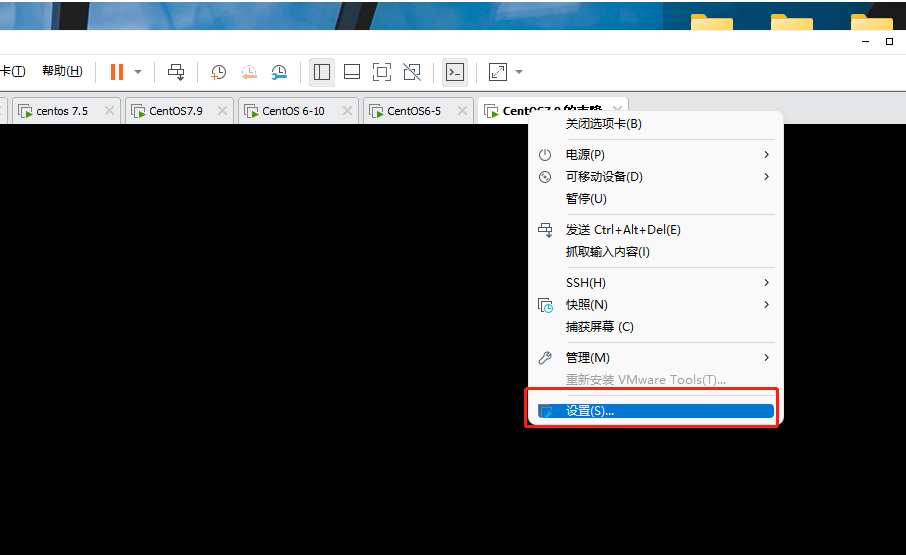
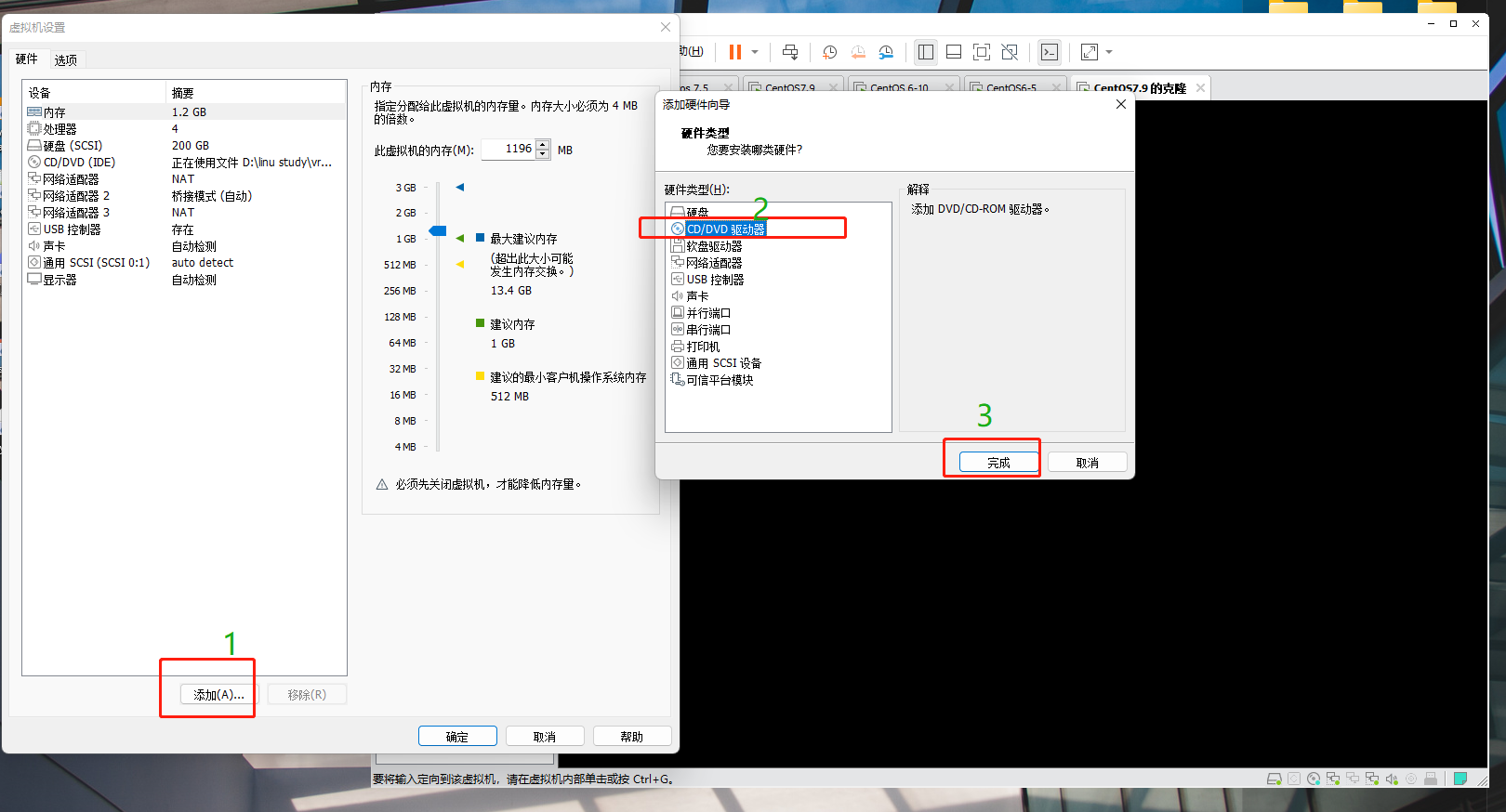
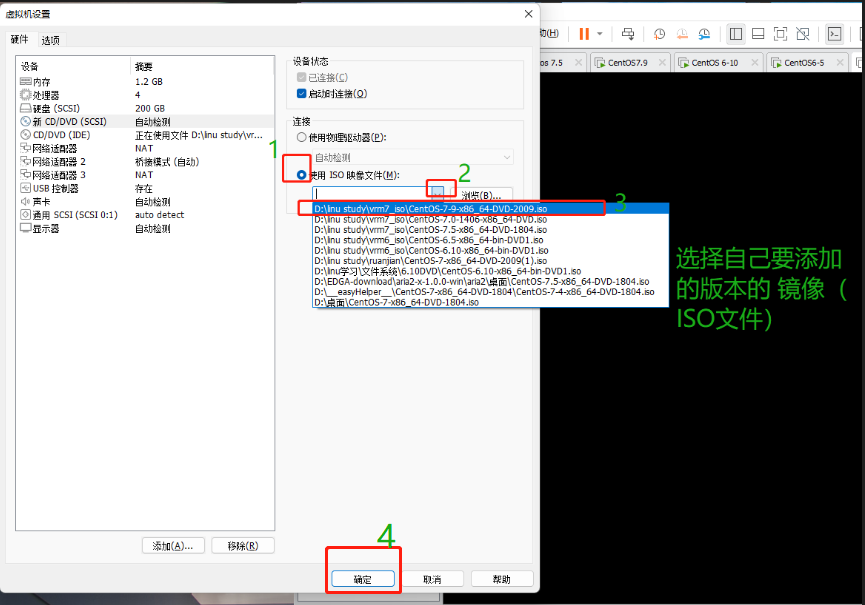
重启虚拟机 或者 输入命令
alias scandisk='echo - - - > /sys/class/scsi_host/host2/scan效果是一样的,目的是 让网卡被读取显示出来
进入虚拟机
查看光盘挂载目录lsblk
 [root@centos7 ~]#lsblk
NAME   MAJ:MIN RM  SIZE RO TYPE MOUNTPOINT
sda      8:0    0  200G  0 disk
├─sda1   8:1    0    1G  0 part /boot
├─sda2   8:2    0   50G  0 part /
├─sda3   8:3    0   30G  0 part /date
├─sda4   8:4    0    1K  0 part
└─sda5   8:5    0    4G  0 part [SWAP]
sr0     11:0    1  3.9G  0 rom
sr1     11:1    1  3.9G  0 rom  #光盘还没有挂载,如果已经挂载使用这个挂载目录也可以,实验使用   sr0   这个系统光盘挂载
3.0下载 autofs 工具
目的是 可以使用 cd /cd/misc 进入光盘
先查看是否安装过这个软件,如果安装就不需要操作2,表示已经安装,查看命令
rpm -qa |grep autofs
root@centos7 ~]#rpm -qa |grep autofs
autofs-5.0.7-116.el7_9.x86_64
出现这个就不需要安装
安装 yum install -y autofs
 [root@centos7 ~]#yum install  -y autofs
Loaded plugins: fastestmirror, langpacks
Loading mirror speeds from cached hostfile* base: mirrors.nju.edu.cn* extras: mirrors.bfsu.edu.cn* updates: mirrors.nju.edu.cn
Resolving Dependencies
--> Running transaction check
---> Package autofs.x86_64 1:5.0.7-116.el7_9 will be installed
--> Processing Dependency: libhesiod.so.0()(64bit) for package: 1:autofs-5.0.7-116.el7_9.x86_64
--> Running transaction check
---> Package hesiod.x86_64 0:3.2.1-3.el7 will be installed
--> Finished Dependency ResolutionDependencies Resolved==================================================================================================================Package                Arch                   Version                              Repository               Size
==================================================================================================================
Installing:autofs                 x86_64                 1:5.0.7-116.el7_9                    updates                 834 k
Installing for dependencies:
=============省略很多
Installed:autofs.x86_64 1:5.0.7-116.el7_9                                                                                 Dependency Installed:hesiod.x86_64 0:3.2.1-3.el7                                                       #出现 Complete!  表示安装成功
Complete!
4.0 找到光盘的 ==repo==源位置并记录
#进入光盘目录 [root@centos7 ~]#cd /misc/cd #查看是否有  repodata  文件[root@centos7 /misc/cd]#ll
total 607
-rw-r--r--. 1  500  502     14 Jul  5  2014 CentOS_BuildTag
drwxr-xr-x. 3  500  502   2048 Jul  4  2014 EFI
-rw-r--r--. 1  500  502    611 Jul  5  2014 EULA
-rw-r--r--. 1  500  502  18009 Jul  5  2014 GPL
drwxr-xr-x. 3  500  502   2048 Jul  4  2014 images
drwxr-xr-x. 2  500  502   2048 Jul  4  2014 isolinux
drwxr-xr-x. 2  500  502   2048 Jul  4  2014 LiveOS
drwxr-xr-x. 2  500  502 581632 Jul  5  2014 Packages
drwxr-xr-x. 2 root root   4096 Jul  5  2014 repodata   #在这里
-rw-r--r--. 1  500  502   1690 Jul  5  2014 RPM-GPG-KEY-CentOS-7
-rw-r--r--. 1  500  502   1690 Jul  5  2014 RPM-GPG-KEY-CentOS-Testing-7
-r--r--r--. 1 root root   2883 Jul  7  2014 TRANS.TBL
#查看位置
[root@centos7 /misc/cd]#pwd
#记录备用
/misc/cd#退出
5.0创建配置文件
#进入光盘目录   【又成神奇目录】
[root@centos7 ~]#cd /misc/cd
#查看是否有  repodata  文件[root@centos7 /misc/cd]#ll
total 696
-rw-r--r--.  3 root root     14 Oct 30  2020 CentOS_BuildTag
drwxr-xr-x.  3 root root   2048 Oct 27  2020 EFI
-rw-rw-r--. 21 root root    227 Aug 30  2017 EULA
-rw-rw-r--. 21 root root  18009 Dec 10  2015 GPL
drwxr-xr-x.  3 root root   2048 Oct 27  2020 images
drwxr-xr-x.  2 root root   2048 Nov  3  2020 isolinux
drwxr-xr-x.  2 root root   2048 Oct 27  2020 LiveOS
drwxr-xr-x.  2 root root 673792 Nov  4  2020 Packages
drwxr-xr-x.  2 root root   4096 Nov  4  2020 repodata   #在这里
-rw-rw-r--. 21 root root   1690 Dec 10  2015 RPM-GPG-KEY-CentOS-7
-rw-rw-r--. 21 root root   1690 Dec 10  2015 RPM-GPG-KEY-CentOS-Testing-7
-r--r--r--.  1 root root   2883 Nov  4  2020 TRANS.TBL#转入根目录[root@centos7 /misc/cd]#cd#查看一下此时 sr0(也就是光盘)已经自动挂载到 /misc/cd中了[root@centos7 ~]#lsblk
NAME   MAJ:MIN RM  SIZE RO TYPE MOUNTPOINT
sda      8:0    0  200G  0 disk
├─sda1   8:1    0    1G  0 part /boot
├─sda2   8:2    0   50G  0 part /
├─sda3   8:3    0   30G  0 part /date
├─sda4   8:4    0    1K  0 part
└─sda5   8:5    0    4G  0 part [SWAP]
sr0     11:0    1  4.4G  0 rom  /misc/cd  #是这里
#进入yum的仓库文件[root@centos7 ~]#cd /etc/yum.repos.d/
#查看一下文件(有很多,万一这里任意一个源出现问题,都会导致今后要安装的软件失败,为了保险起见,把这些文件移动到其他目录上)[root@centos7 /etc/yum.repos.d]#ll
total 40
-rw-r--r--. 1 root root 1664 Oct 23  2020 CentOS-Base.repo
-rw-r--r--. 1 root root 1309 Oct 23  2020 CentOS-CR.repo
-rw-r--r--. 1 root root  649 Oct 23  2020 CentOS-Debuginfo.repo
-rw-r--r--. 1 root root  314 Oct 23  2020 CentOS-fasttrack.repo
-rw-r--r--. 1 root root  630 Oct 23  2020 CentOS-Media.repo
-rw-r--r--. 1 root root 1331 Oct 23  2020 CentOS-Sources.repo
-rw-r--r--. 1 root root 8515 Oct 23  2020 CentOS-Vault.repo
-rw-r--r--. 1 root root  616 Oct 23  2020 CentOS-x86_64-kernel.repo
#创建目录[root@centos7 /etc/yum.repos.d]#mkdir bak#移动所有的   .repo 文件到上一步骤创建的  bak   文件中[root@centos7 /etc/yum.repos.d]#mv *.repo bak #查看一下当前目录并记录输出结果 (repo 文件的目标地址,一会要用)[root@centos7 /etc/yum.repos.d]#pwd
/etc/yum.repos.d
#查看一下是否移动[root@centos7 /etc/yum.repos.d]#ls
bak
#创建一个   .repo   结尾的目录  [root@centos7 /etc/yum.repos.d]#vim base.repo #返回到根目录[root@centos7 /etc/yum.repos.d]#cd
#查看一下是否配置好了repo仓库  ,下面的输出结果是配置好了的
[root@centos7 ~]#yum repolist
Loaded plugins: fastestmirror, langpacks
Loading mirror speeds from cached hostfile
repo id                                                repo name                                            status
base                                                   base                                                 10,072
repolist: 10,072
#删除原来的缓存[root@centos7 ~]#yum clean  all
Loaded plugins: fastestmirror, langpacks
Cleaning repos: base
Cleaning up list of fastest mirrors
Other repos take up 140 M of disk space (use --verbose for details)
#重新构建缓存[root@centos7 ~]#yum makecache
Loaded plugins: fastestmirror, langpacks
Determining fastest mirrors
base                                                                                       | 3.6 kB  00:00:00
(1/4): base/group_gz                                                                       | 153 kB  00:00:00
(2/4): base/filelists_db                                                                   | 3.3 MB  00:00:00
(3/4): base/primary_db                                                                     | 3.3 MB  00:00:00
(4/4): base/other_db                                                                       | 1.3 MB  00:00:00
Metadata Cache Created
6.0测试一下
[root@centos7 ~]#yum -y  install httpd
Loaded plugins: fastestmirror, langpacks
Loading mirror speeds from cached hostfile
Resolving Dependencies
--> Running transaction check
---> Package httpd.x86_64 0:2.4.6-95.el7.centos will be installed
--> Processing Dependency: httpd-tools = 2.4.6-95.el7.centos for package: httpd-2.4.6-95.el7.centos.x86_64
--> Processing Dependency: /etc/mime.types for package: httpd-2.4.6-95.el7.centos.x86_64
--> Processing Dependency: libaprutil-1.so.0()(64bit) for package: httpd-2.4.6-95.el7.centos.x86_64
--> Processing Dependency: libapr-1.so.0()(64bit) for package: httpd-2.4.6-95.el7.centos.x86_64
--> Running transaction check
---> Package apr.x86_64 0:1.4.8-7.el7 will be installed
---> Package apr-util.x86_64 0:1.5.2-6.el7 will be installed
---> Package httpd-tools.x86_64 0:2.4.6-95.el7.centos will be installed
---> Package mailcap.noarch 0:2.1.41-2.el7 will be installed
--> Finished Dependency ResolutionDependencies Resolved==================================================================================================================Package                    Arch                  Version                               Repository           Size
==================================================================================================================
Installing:httpd                      x86_64                2.4.6-95.el7.centos                   base                2.7 M
Installing for dependencies:apr                        x86_64                1.4.8-7.el7                           base                104 kapr-util                   x86_64                1.5.2-6.el7                           base                 92 khttpd-tools                x86_64                2.4.6-95.el7.centos
本文来自互联网用户投稿,文章观点仅代表作者本人,不代表本站立场,不承担相关法律责任。如若转载,请注明出处。 如若内容造成侵权/违法违规/事实不符,请点击【内容举报】进行投诉反馈!