百度api文字识别
项目结构
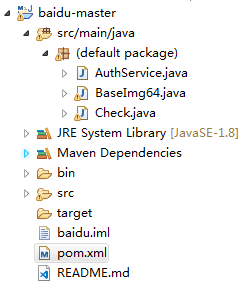
pom依赖
4.0.0 com.wsk baidu 1.0-SNAPSHOT jar com.alibaba fastjson 1.2.46 org.apache.httpcomponents httpclient 4.5.5 commons-codec commons-codec 1.12 ROOT org.apache.maven.plugins maven-compiler-plugin 2.3.2 1.8 1.8
AuthService类
import com.alibaba.fastjson.JSONObject;import java.io.BufferedReader;
import java.io.InputStreamReader;
import java.net.HttpURLConnection;
import java.net.URL;
import java.util.List;
import java.util.Map;/*** @author wll* @description 描述*/
public class AuthService {/*** 获取权限token** @return 返回示例: { "access_token":*         "24.460da4889caad24cccdb1fea17221975.2592000.1491995545.282335-1234567",*         "expires_in": 2592000 }*/public static String getAuth() {// 官网获取的 API Key 更新为你注册的String clientId = "*****";// 官网获取的 Secret Key 更新为你注册的String clientSecret = "*****";return getAuth(clientId, clientSecret);}/*** 获取API访问token 该token有一定的有效期,需要自行管理,当失效时需重新获取.** @param ak*            - 百度云官网获取的 API Key* @param sk*            - 百度云官网获取的 Securet Key* @return assess_token 示例:*         "24.460da4889caad24cccdb1fea17221975.2592000.1491995545.282335-1234567"*/private static String getAuth(String ak, String sk) {// 获取token地址String authHost = "https://aip.baidubce.com/oauth/2.0/token?";String getAccessTokenUrl = authHost// 1. grant_type为固定参数+ "grant_type=client_credentials"// 2. 官网获取的 API Key+ "&client_id=" + ak// 3. 官网获取的 Secret Key+ "&client_secret=" + sk;try {URL realUrl = new URL(getAccessTokenUrl);// 打开和URL之间的连接HttpURLConnection connection = (HttpURLConnection) realUrl.openConnection();connection.setRequestMethod("GET");connection.connect();// 获取所有响应头字段Map> map = connection.getHeaderFields();// 遍历所有的响应头字段for (String key : map.keySet()) {System.err.println(key + "--->" + map.get(key));}// 定义 BufferedReader输入流来读取URL的响应BufferedReader in = new BufferedReader(new InputStreamReader(connection.getInputStream()));StringBuilder result = new StringBuilder();String line;while ((line = in.readLine()) != null) {result.append(line);}/*** 返回结果示例*/System.err.println("result:" + result);JSONObject jsonObject = JSONObject.parseObject(result.toString());return jsonObject.getString("access_token");} catch (Exception e) {System.err.printf("获取token失败!");e.printStackTrace(System.err);}return null;}public static void main(String[] args) {getAuth();}}
BaseImg64
import org.apache.commons.codec.binary.Base64;import java.io.FileInputStream;
import java.io.IOException;
import java.io.InputStream;
import java.net.URLEncoder;/*** @author wll* @description 图片转化base64后再UrlEncode结果*/
public class BaseImg64 {/*** 将一张本地图片转化成Base64字符串** @param imgPath 本地图片地址* @return 图片转化base64后再UrlEncode结果*/public static String getImageStrFromPath(String imgPath) {InputStream in;byte[] data = null;// 读取图片字节数组try {in = new FileInputStream(imgPath);data = new byte[in.available()];in.read(data);in.close();} catch (IOException e) {e.printStackTrace();}// 对字节数组Base64编码Base64 base64 = new Base64();// 返回Base64编码过再URLEncode的字节数组字符串return URLEncoder.encode(base64.encodeToString(data));}
}
Check
import org.apache.http.HttpResponse;
import org.apache.http.client.HttpClient;
import org.apache.http.client.methods.HttpPost;
import org.apache.http.entity.StringEntity;
import org.apache.http.impl.client.DefaultHttpClient;
import org.apache.http.util.EntityUtils;import java.io.File;
import java.io.IOException;
import java.net.URI;
import java.net.URISyntaxException;/*** 图像文字识别** @Author : wll* @Date :2019/5/20 10:25*/public class Check {//营业执照接口private static final String POST_URL = "https://aip.baidubce.com/rest/2.0/ocr/v1/business_license?access_token=" + AuthService.getAuth();/*** 识别本地图片的文字** @param path 本地图片地址* @return 识别结果,为json格式* @throws URISyntaxException URI打开异常* @throws IOException        io流异常*/public static String checkFile(String path) throws URISyntaxException, IOException {File file = new File(path);if (!file.exists()) {throw new NullPointerException("图片不存在");}String image = BaseImg64.getImageStrFromPath(path);String param = "image=" + image;return post(param);}/*** @param url 图片url* @return 识别结果,为json格式*/public static String checkUrl(String url) throws IOException, URISyntaxException {String param = "url=" + url;return post(param);}/*** 通过传递参数:url和image进行文字识别** @param param 区分是url还是image识别* @return 识别结果* @throws URISyntaxException URI打开异常* @throws IOException        IO流异常*/private static String post(String param) throws URISyntaxException, IOException {//开始搭建post请求HttpClient httpClient = new DefaultHttpClient();HttpPost post = new HttpPost();URI url = new URI(POST_URL);post.setURI(url);//设置请求头,请求头必须为application/x-www-form-urlencoded,因为是传递一个很长的字符串,不能分段发送post.setHeader("Content-Type", "application/x-www-form-urlencoded");StringEntity entity = new StringEntity(param);post.setEntity(entity);HttpResponse response = httpClient.execute(post);System.out.println(response.toString());if (response.getStatusLine().getStatusCode() == 200) {String str;try {/*读取服务器返回过来的json字符串数据*/str = EntityUtils.toString(response.getEntity());System.out.println(str);return str;} catch (Exception e) {e.printStackTrace();return null;}}return null;}public static void main(String[] args) {//C:\Users\Administrator\Desktop\timg.jpgString path = "C:\\Users\\Administrator\\Desktop\\timg.jpg";try {long now = System.currentTimeMillis();checkFile(path);
//            checkUrl(path);System.out.println("耗时:" + (System.currentTimeMillis() - now) / 1000 + "s");} catch (URISyntaxException | IOException e) {e.printStackTrace();}}
}
百度智能云获取 API Key和Secret Key
本文来自互联网用户投稿,文章观点仅代表作者本人,不代表本站立场,不承担相关法律责任。如若转载,请注明出处。 如若内容造成侵权/违法违规/事实不符,请点击【内容举报】进行投诉反馈!