在linux系统下使用madplay制作音乐播放器
目的
制作一个可以在Linux环境下运行的MP3播放器。要求实现的MP3主要功能包括:播放、暂停、继续、停止、循环播放、上一曲、下一曲、退出、歌曲显示等功能。
本设计是基于madplay库实现的,程序运行时会显示一个字符界面,在该字符界面下输入相应的提示字符即可实现音乐的播放、暂停、继续、停止、上一曲、下一曲、歌词的显示等功能,也可以加入额外的一些功能。编写一个MakeFile文件,make命令来实现程序的编译。
环境搭建
Madplay是一个开源mp3解码库,对mp3解码算法做了很多优化。常用的安装环境步骤如下
创建依赖库->解压工具软件包->move可执行文件->设置环境变量
Ubuntu环境下直接执行sudo apt-get install madplay可以直接在线安装
抽象数据类型定义
1 音乐文件的存储采用双向链表的结构体music表示,列表单由music_list表示。
2 音乐文件的本机读取通过readFileList函数实现,定义char类型数组musicFilePath存放文件路径。
3 通过musicFind()函数返回音乐所在位置,在主函数的getMusicDir()有所应用,定义控制指针*pos实现上下首的播放切换。
4 使用madplay命令基础操作,定义进程pid控制。
5 定义arg[]数组存放指令的参数,定义command字符变量(char类型)来存放控制指令。
详细设计
封装madplay功能
int play(char *name)
{pid_t pid;int status;if((pid = fork()) < 0){perror("Fork error\n");return 0;}else if(0 == pid){waitpid(getppid(), &status, 0); // 等待父进程结束execlp("madplay", "madplay","-q", name, (char*)0);return 0;}else{return pid;    }
}int suspend(pid_t pid)
{kill(pid, SIGSTOP);return 0;
}int continuePlay(pid_t pid)
{kill(pid, SIGCONT);return 0;
}int end(pid_t pid)
{kill(pid, SIGINT);return 0;
}
歌曲列表
music_list * createMusicList()
{music_list *mList;mList = (music_list *)malloc(sizeof(music_list));if(NULL == mList){perror("fail\n");exit(1);}mList->length = 0;mList->mHead = NULL;return mList;
}
//歌单显示函数
int musicListDisplay(music_list *mList)
{music *tmp;tmp = mList->mHead;printf("%s\n", tmp->name);int i;for(i = 1; i < mList->length; ++i){tmp = tmp->next;printf("%s\n", tmp->name);}printf("\n\n");return 0;
}
从目录中寻找mp3文件插入到音乐列表中
int readFileList(const char *basePath, music_list *mList)
{DIR *dir;struct dirent *ptr;  if((dir = opendir(basePath)) == NULL){perror("error.\n");exit(1);}while((ptr = readdir(dir)) != NULL){if(8 == ptr->d_type) // 文件{int i = 0;int flag = 0;while('\0' != ptr->d_name[i]){if('.' == ptr->d_name[i]){if(0 != flag)flag = 0;++flag;}else if(1 == flag && 'm' == ptr->d_name[i])++flag;else if(2 == flag && 'p' == ptr->d_name[i])++flag;else if(3 == flag && '3' == ptr->d_name[i]){if('\0' ==  ptr->d_name[i + 1]) // 是mp3文件{musicListInsert(mList, ptr->d_name);break;}flag = 0;}else if(0 != flag)flag = 0;++i;}}}closedir(dir);return 0;
}
获取音乐文件路径函数
int getMusicDir(music_list *mList, char *name, int *pos, int nextLast)
{if(0 == nextLast) // 由name指定的歌{   *pos = musicFind(mList, name); // 文件在链表中位置if(-1 == *pos) // 文件不存在return -1;}    else{music *tmp;tmp = locateMusic(mList, *pos); // 指向当前播放的歌曲if(1 == nextLast) // 下一首{strcpy(name, tmp->next->name);++(*pos);}else // 上一首{strcpy(name, tmp->prev->name);--(*pos);}}char path[256] = "./music/";strcat(path, name);strcpy(name, path);return 0;
}
读指令函数
char getCommand(char *arg)
{char res = '0'; // 指令char input[256];printf("请进行操作: ");fgets(input, 256, stdin);input[strlen(input) - 1] = '\0';int i = 0;while(' ' == input[i]) // 去除前空格++i;if('\0' != input[i]) // fget会在字符串尾加'\n'res = input[i];  // 获得第一各有效字符    if('s' == res || 'S' == res){strcpy(arg, "\0");if(' ' != input[++i] || '\0' == input[i]) // 为非空格或无参数return 'E';++i;strcat(arg, &input[i]);}else // 无参数指令,检测指令是否有错{while('\0' != input[++i]){if(' ' != input[i]){res = 'E';break;}}}return res;
}
指令执行函数
int execCommand(char command, char *arg, pid_t *pid, music_list *mList, int *pos, int *quit)
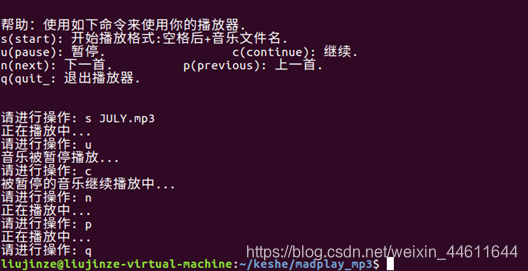
{   switch(command){case 's':if(sCommand(arg, pid, mList, pos) == -1)printf("播放失败!\n");break;case 'u':if(uCommand(pid, mList, pos) == -1)printf("没有音乐正在播放!\n");break;case 'n':nCommand(pid, mList, pos);break;case 'c':cCommand(pid);break;case 'p':pCommand(pid, mList, pos);break;case 'q':qCommand(pid, pos, quit);break;default:printf("无效的命令!\n");}  return 0;
}
重写的播放暂停等功能函数
int sCommand(char *arg, pid_t *pid, music_list *mList, int *pos)
{getMusicDir(mList, arg, pos, 0); // arg为音乐文件路径if(-1 == *pos) // 文件不存在{printf("文件不存在!\n");return -1;}else{*pid = play(arg);printf("正在播放中...\n");return 0;}
}
int uCommand(pid_t *pid, music_list *mList, int *pos)
{if(-1 == *pos) // 无音乐播放return -1;else{printf("音乐被暂停播放...\n");suspend(*pid);return 0;}
}
int cCommand(pid_t *pid)
{printf("被暂停的音乐继续播放中...\n");continuePlay(*pid);return 0;
}
int nCommand(pid_t *pid, music_list *mList, int *pos)
{if(-1 != *pid)end(*pid);char name[256];getMusicDir(mList, name, pos, 1);*pid = play(name);printf("正在播放中...\n");return 0;
}
int pCommand(pid_t *pid, music_list *mList, int *pos)
{if(-1 != *pos) // 结束未结束的播放end(*pid);char name[256];getMusicDir(mList, name, pos, 2);*pid = play(name);printf("正在播放中...\n");return 0;
}
int qCommand(pid_t *pid, int *pos, int *quit)
{if(-1 != *pos) // 结束未结束的播放end(*pid);*quit = 1;return 0;
}
主函数
int main()
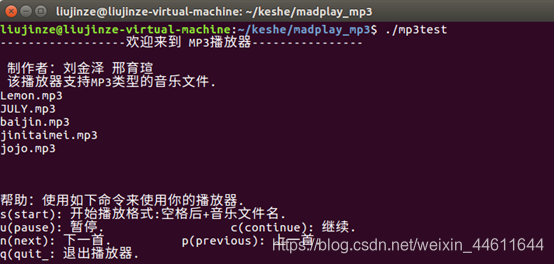
{char command;         char arg[256];            char musicFilePath[256]; music_list *mList;        int *pos;             // 当前播放的音乐在链表中的位置pos = (int *)malloc(sizeof(int));*pos = -1;pid_t *pid;                // 音乐进程pidpid = (pid_t *)malloc(sizeof(pid_t));int *quit;quit = (int *)malloc(sizeof(int));*quit = 0;mList = createMusicList();      getMusicFileDir(musicFilePath);    readFileList(musicFilePath, mList); printf("------------------欢迎来到 MP3播放器----------------\n\n");printf(" 制作者:刘金泽 邢育瑄         \n");printf(" 该播放器支持MP3类型的音乐文件.\n");musicListDisplay(mList);printf("\n");displayHelp();printf("\n");while(0 == *quit){command = getCommand(arg);         // 读指令execCommand(command, arg, pid, mList, pos, quit);  // 执行指令}return 0;
}
make之后运行可执行文件
演示效果如下
本文来自互联网用户投稿,文章观点仅代表作者本人,不代表本站立场,不承担相关法律责任。如若转载,请注明出处。 如若内容造成侵权/违法违规/事实不符,请点击【内容举报】进行投诉反馈!