uni-app中的分类页面(仿京东分类页面)(scroll-view的使用)
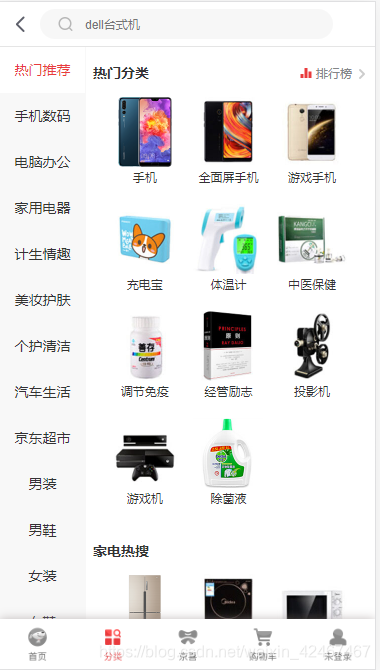
京东效果图:
代码效果图:
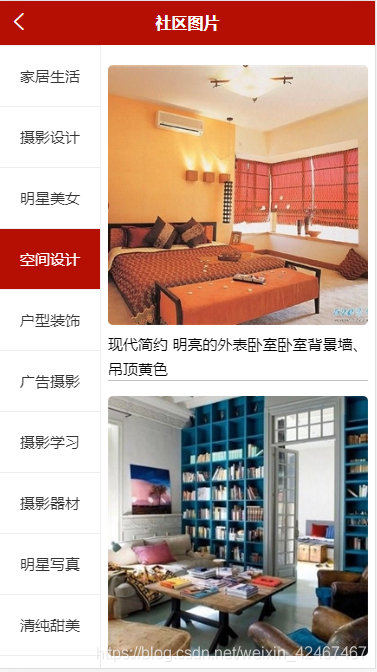
说明:
实现图中所示的的左侧标签栏可上下滑动,右侧区域为对应左侧标签展开的图片文字详情说明,也具备上下滑动的功能
scroll-view
可滚动试图区域
本文着重使用”scroll-y“即纵向滑动
<template><view class="classify"><!-- 左侧标签区域 --><scroll-view class="left" scroll-y><!-- 定义一个acitves为0,与index的索引绑定,若相等赋予类名,不相等为空 --><view :class="actives === index ? 'active' : ''"  v-for="(item, index) in cates" :key="item.id"@click="leftClickHandle(index, item.id)">{{ item.title }}</view></scroll-view><!-- 右侧图片区域 --><scroll-view class="right" scroll-y><view class="item" v-for="item in secondData" :key="item.id"><image @click="previewImg(item.img_url)" :src="item.img_url"></image><text>{{item.title}}</text></view><text class="none" v-if="secondData.length === 0">暂无数据,请浏览其他页面!</text></scroll-view></view>
</template><script>export default {data() {return {// 左侧页面数据cates: [],// 设置高亮标签actives: 0,// 右侧图片数据secondData: []}},onLoad () {this.getPicsCate()},methods: {// 发送请求获取左侧页面数据async getPicsCate () {const res = await this.$myRequest({url: '/api/getimgcategory'})this.cates = res.data.messagethis.leftClickHandle(0, this.cates[0].id)},// 点击时获取标签索引用于高亮显示及id用于获取右侧图片数据async leftClickHandle (index, id) {this.actives = index// 获取右侧的数据const res = await this.$myRequest({url: '/api/getimages/' + id})this.secondData = res.data.message},// 预览图片previewImg (current) {// 用map方法将全部的图片url放入定义的数组中const urls = this.secondData.map(item=>{return item.img_url})// current为将点击的设为第一张预览图uni.previewImage({current,urls,indicator: 'default'})}}}
</script><style lang="scss">
page {height: 100%;
}
.classify {height: 100%;display: flex;.left {width: 200rpx;height: 100%;border-right: 1px solid #eee;view {height: 60px;line-height: 60px;color: #333;text-align: center;font-size: 30rpx;border-top: 1px solid #eee;}.active {background: $shop-color;color: #fff;}}.right{height: 100%;width: 520rpx;margin: 10rpx auto;.item{margin-top: 30rpx;border-bottom: 1px solid #C0C0C0;image{width: 520rpx;height: 520rpx;border-radius: 5px;}text{font-size: 30rpx;line-height: 35rpx;}}.none {color: $shop-color;}}
}
</style>
案例二:双联动
<view class="ld">// 左侧区域<view class="left"><view v-for="(item,index) in list" :key="index" // 设定点击事件,触发后给选中的标签动态绑定样式@click="setId(index)":class="{active:index===currentNum}">{{item.title}}</view></view>// 右侧区域<view class="right"><scroll-view :scroll-y="true" style="white-space: nowrap;height:200px;"// uni的方法,值为某子元素id即拿到左侧传的index:scroll-into-view="clickId"// uni方法,过渡动画scroll-with-animation// uni方法,滚动时触发,触底@scroll="scroll"@scrolltolower="scrolltolower"><view v-for="(item,index) in list" :key="index"><view class="title" :id="'po'+index">{{item.title}}</view><view v-for="(it,idx) in item.list" :key="idx">{{it}}</view></view> </scroll-view> </view></view>
// mock 数据data() {return {list:[{title:"中餐",list:["盖饭","扒饭","咖喱饭","鸡排饭"]},{title:"西餐",list:["牛排","意面","芝士","汉堡"]},{title:"法餐",list:["辣子鸡丁","xxx","肥仔快乐水","填缝隙"]},{title:"快餐",list:["薯条","丸子","粥","饮料"]},],clickId:"",currentNum:0,}},
// 点击后触发的方法setId(index){this.clickId="po"+index;this.currentNum=index;},scroll(e){let scrollTop=e.target.scrollTop;for(let i=0;i<this.topList.length;i++){let h1=this.topList[i];let h2=this.topList[i+1];if(scrollTop>=h1&&scrollTop<h2){this.currentNum=i;}}},scrolltolower(){setTimeout(()=>{this.currentNum=3;}, 80);},getNodesInfo(){const query = uni.createSelectorQuery().in(this);query.selectAll('.title').boundingClientRect().exec((res)=>{let nodes=res[0];let rel=[];nodes.map(item=>{rel.push(item.top)})this.topList=rel;});}
.box1{width:100px;height:100px;background: red;
}
.box2{width:200upx;height:200upx;background: yellow;
}
.ld{display: flex;.left{width:100px;border:1px solid red;}.right{flex: 1;border:1px solid red;.title{font-size: 20px;font-weight: bold;background:pink;}}
}
// 高亮样式
.active{background:red;
}
本文来自互联网用户投稿,文章观点仅代表作者本人,不代表本站立场,不承担相关法律责任。如若转载,请注明出处。 如若内容造成侵权/违法违规/事实不符,请点击【内容举报】进行投诉反馈!