C# 控制台彩色打印
前言
平时C#控制台打印,都是黑白的,不是很好看。这里使用彩色打印来在控制台上面打印。
NuGet包引入
Colorful.Console
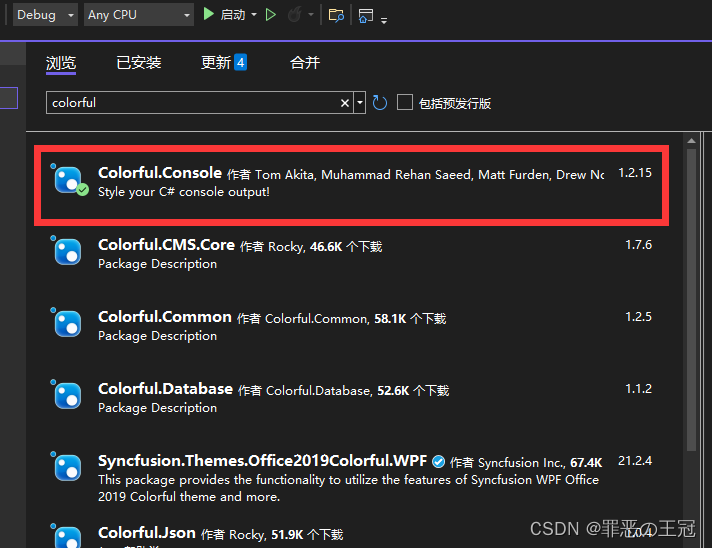
新建工具类
using System;
using System.Collections.Generic;
using System.Linq;
using System.Text;
using System.Threading.Tasks;
using Console = Colorful.Console;//这个是重点
using System.Drawing;namespace WeatherApi.Utils
{public static class LogHelper{public static void Debug(object res){Console.WriteLine(res);}public static void Info(object res){Console.WriteLine(res, Color.LightGreen);}public static void Error(object res){Console.WriteLine(res,Color.Red);}public static void Warning(object res){Console.WriteLine(res,Color.Yellow);}}
}
主程序打印
using System;
using System.Collections.Generic;
using System.Linq;
using System.Text;
using System.Threading.Tasks;
using WeatherApi.Utils;namespace WeatherApiProgram
{internal class Program{static void Main(string[] args){LogHelper.Debug("我是Debug");LogHelper.Info("我是Info");LogHelper.Warning("我是Warning");LogHelper.Error("我是Error");}}
}
扩展:
- Colorful.console更高级用法
- 配套Nlog日志管理
本文来自互联网用户投稿,文章观点仅代表作者本人,不代表本站立场,不承担相关法律责任。如若转载,请注明出处。 如若内容造成侵权/违法违规/事实不符,请点击【内容举报】进行投诉反馈!