社区养老|社区管理|SpringBoot+Vue实现社区空巢老人健康管理系统
作者主页:编程指南针
作者简介:Java领域优质创作者、CSDN博客专家 、掘金特邀作者、多年架构师设计经验、腾讯课堂常驻讲师
主要内容:Java项目、毕业设计、简历模板、学习资料、面试题库、技术互助
文末获取源码
项目编号:BS-XX-108
一,环境介绍
语言环境:Java: jdk1.8
数据库:Mysql: mysql5.7
应用服务器:Tomcat: tomcat8.5.31
开发工具:IDEA或eclipse
前端开发:VUE+HTML
后台开发:Springboot+Mybatis
二,项目简介
对于目前的中国来讲,人口老龄化日益严重,目前最新统计数据表明,60岁以上老人所占的人口比例已达到接近20%。这给我们国家带来了严重的养老压力,同时也严重削弱了我们人力大国的人力优势。对于这些老年人来讲,老有所居是每个的梦想,特别是对于老年人的健康关爱,越来越多的家庭出现空巢老人的现象,年轻人出外打工,老年人留守家里,政府和社会怎么样关爱这个群体,是一个严峻的问题。
本次所设计的这套社区空巢老人健康管理系统,旨在通过信息化的技术手段,有效的帮助社区关爱和帮助这些曾经为社会奉献过的老人们,通过这个系统记录老人们相关的一个健康情况,以便于及时发现相关的疾病和隐患,及时治疗。此系统旨在提高空巢老人的健康状况和预防高危疾病的复发,以及对患有疾病老人健康状况的预测和应对办法,让用户可以足不出户就能关注到自己的身体状态。信息化健康管理对中国的健康发展有着重要的意义。
社区空巢老人健康管理系统分为前端和后端两个部分,后端开发主要使用 Java 语言,技术选型上主要采用了 SpringBoot 开发框架,然后整合持久层的 Mybatis 对象关系映射框架来进行对接 Mysql 数据库实现数据的持久化存储。前端使用基于组件的 JavaScript 框架 Vue 进行界面开发;并且使用BootStrap 组件库使得 UI 更加美观、开发更加高效。系统前端和后端交互主要基于异步请求的方式来实现,数据传送格式为JSON的数据格式,这种数据格式表达数据更加灵活方便,可以表示较为复杂的数据类型。
三,系统展示
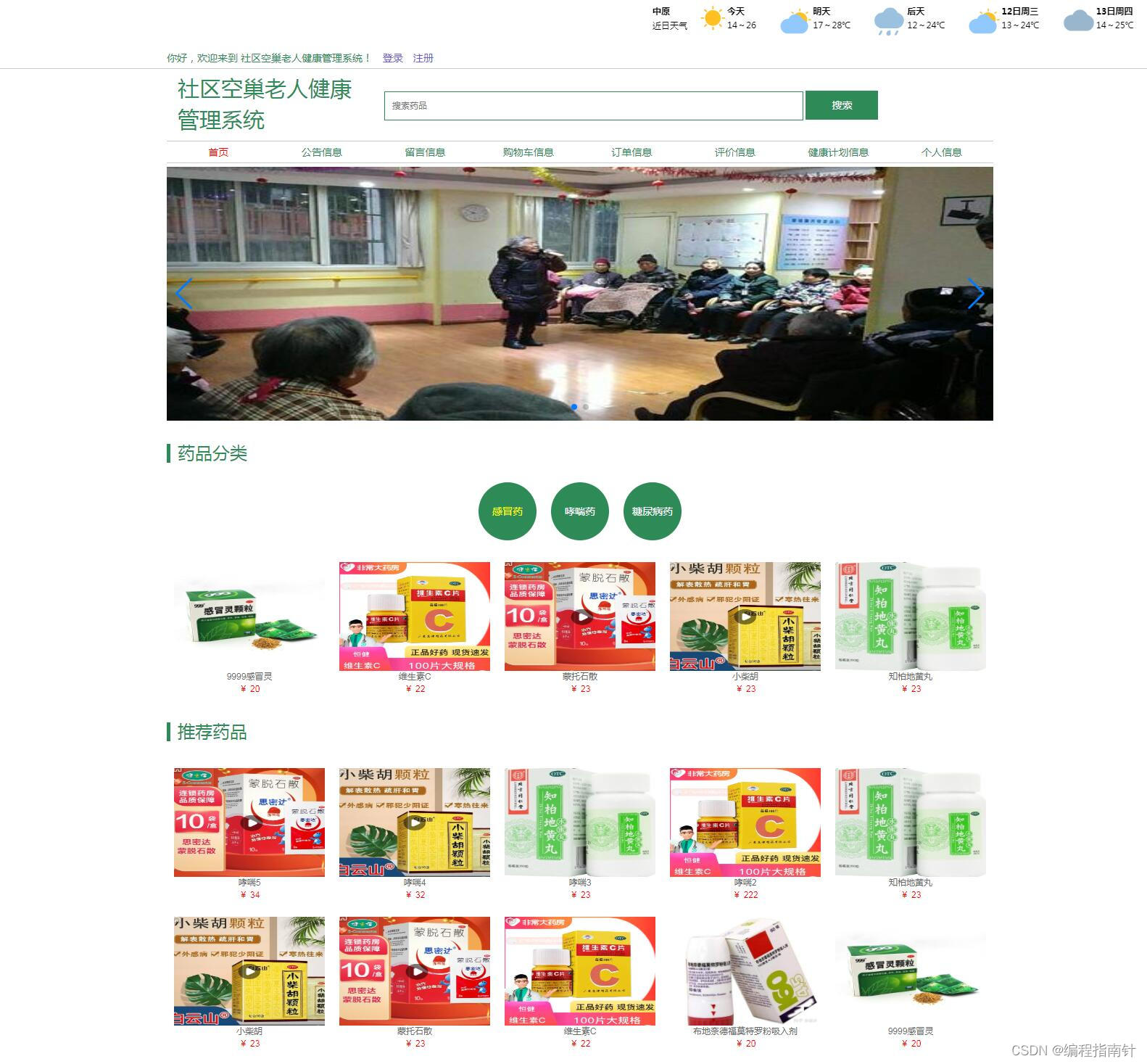
前台管理界面
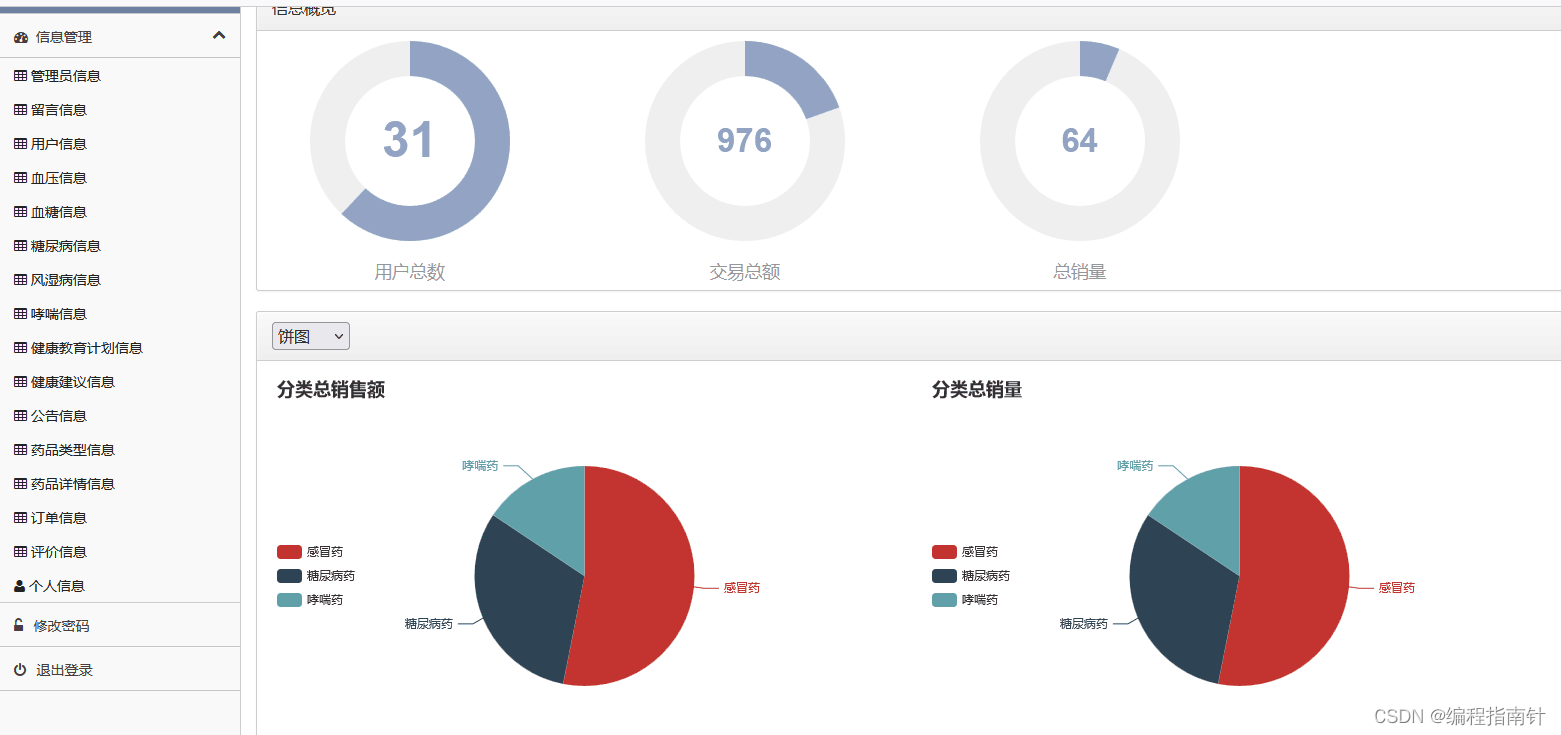
后台管理总界面
3.1 前端用户功能设计与实现
3.1.1 前端用户注册
前端用户可以在网站首页进行注册信息操作,填写相关信息后注册成功即可登陆系统。具体如下图3-1所示:
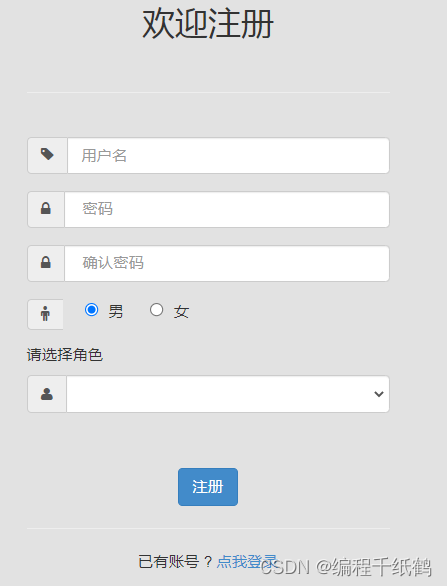
图3-1 用户注册操作页面
3.1.2 前端用户登陆
前端用户可以注册成功后即可跳转到登陆页面进行登陆操作,输入账户密码并选择登陆身份为用户即可。具体如下图5-3所示:
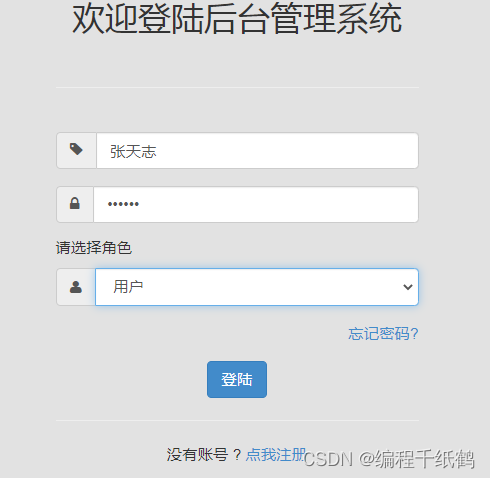
图3-2 用户登陆操作页面
用户登陆信息填写完表后提交到后台程序接受用户提交数据,首先根据用户的权限级别进行判断,从而调用不同的业务接口方法完成对用户账户和密码的认证操作。
3.1.3 购买药品
前端用户登陆后可以在系统网站首页进行药品购买操作。具体如下图5-5所示:
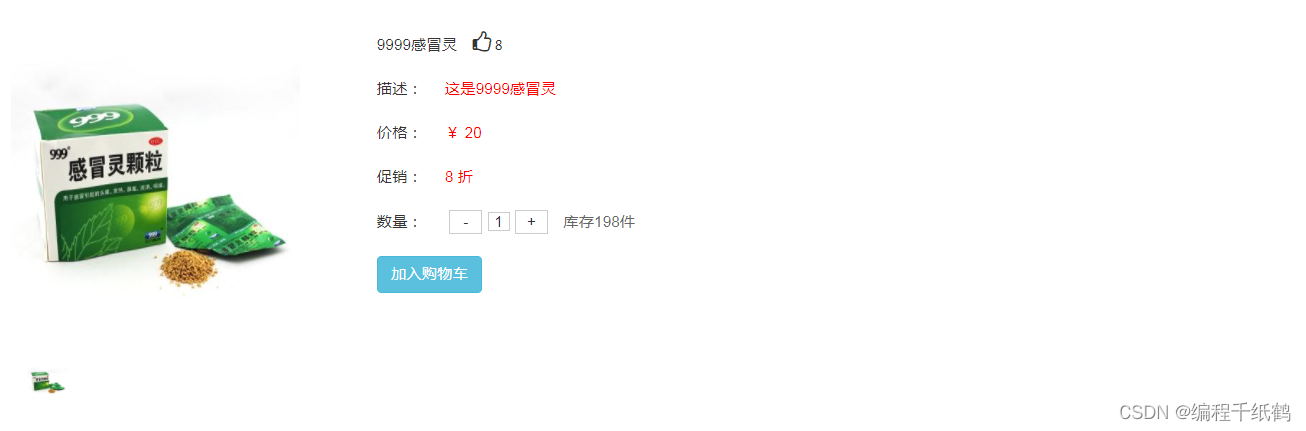
图5-5 用户购买药品页面
购买药品是先把药品添加到购物车内。
添加购物车时,先查询购物车中有没有此类药品,如果有执行更新操作,如果没有,执行购物信息新增操作,数据是直接存储在MYSQL数据库中的,操作的是cart_info表。
3.1.4 订单信息
前端用户登陆后可以在系统网站首页查看自己购物的订单操作。具体如下图3-7所示:
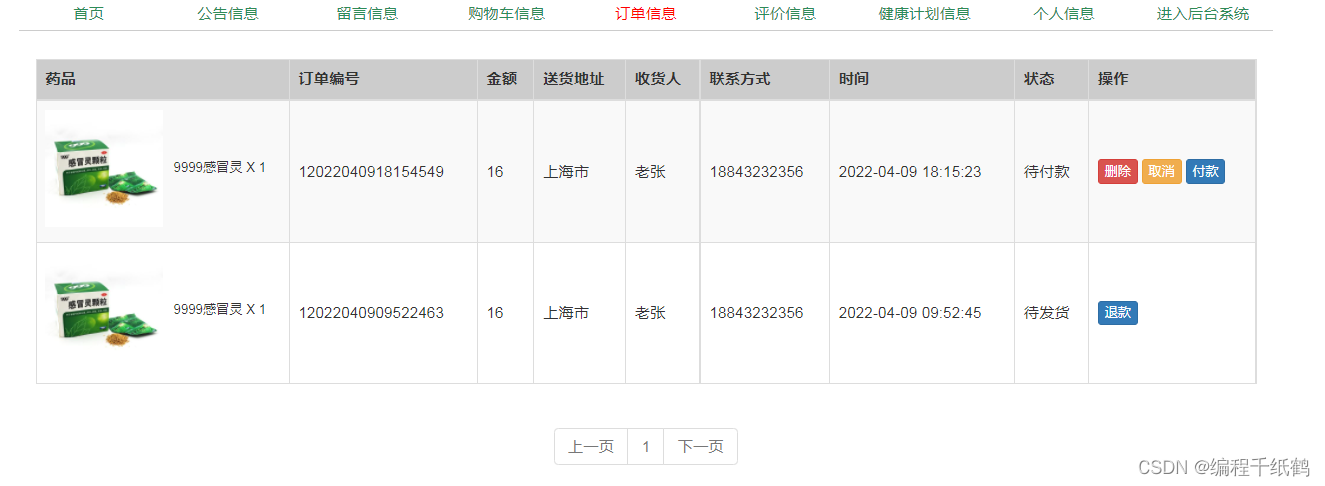
图3-7 用户订单页面
购买药品是先把药品添加到购物车内,然后提交订单,此时会生成订单信息,百订单列表中可以对订单信息进行维护和付款
3.1.5 个人健康信息管理
前端用户登陆后可以在个人的管理后台来管理个人的健康信息,比如血压情况、血糖情况、糖尿病情况、风湿病情况等,功能实现都差不多,主要包含新增、导入编辑和预测警报等功能模块,下面就以糖尿病为例进行展示。具体如下图3-9所示:
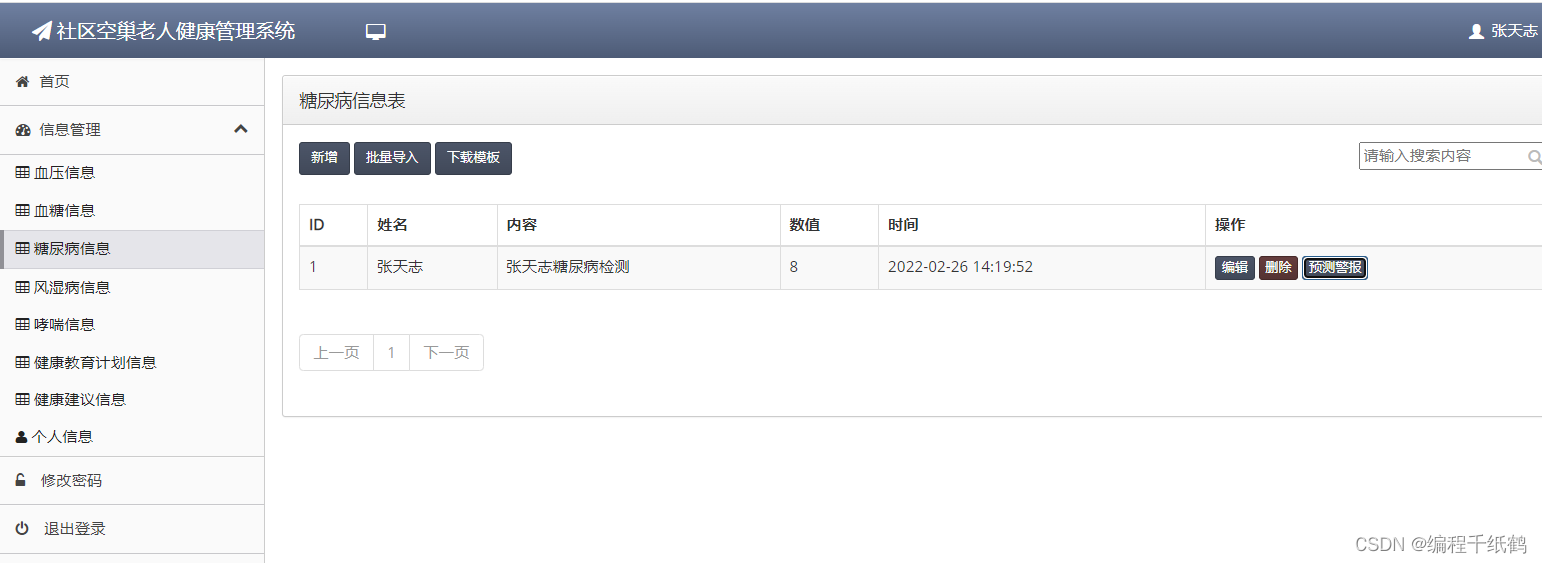
图3-9 健康信息管理页面
3.2 管理员功能设计与实现
3.2.1 用户管理功能
在此模块主要是管理前端注册的用户信息,主要实现的就是批量导入、新增、编辑、删除等操作。具体如下图3-11所示:
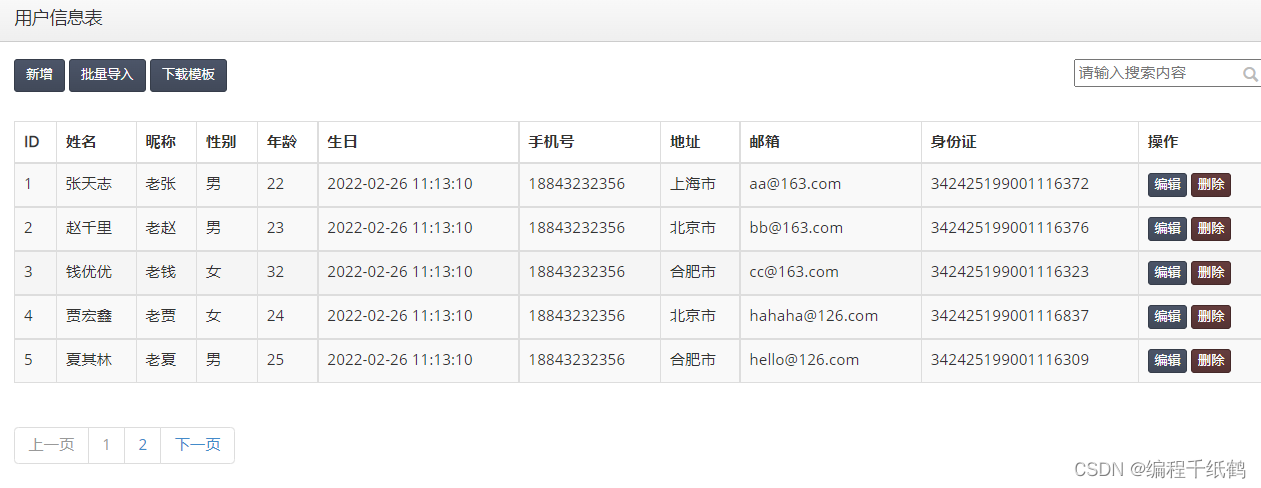
图3-11 用户管理页面
3.2.2 药品分类管理功能
管理员进入后台后,可以对药品的分类信息进行管理操作。具体如下图3-13所示:
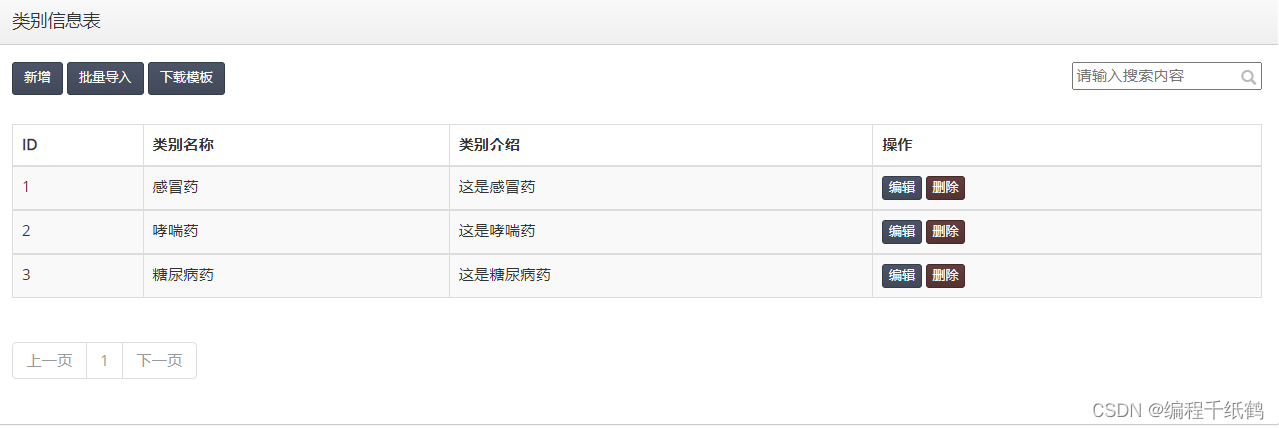
图3-13 药品分类管理页面
3.2.3 药品管理功能
管理员进入后台后,可以对药品的详情信息进行管理操作。具体如下图3-15所示:
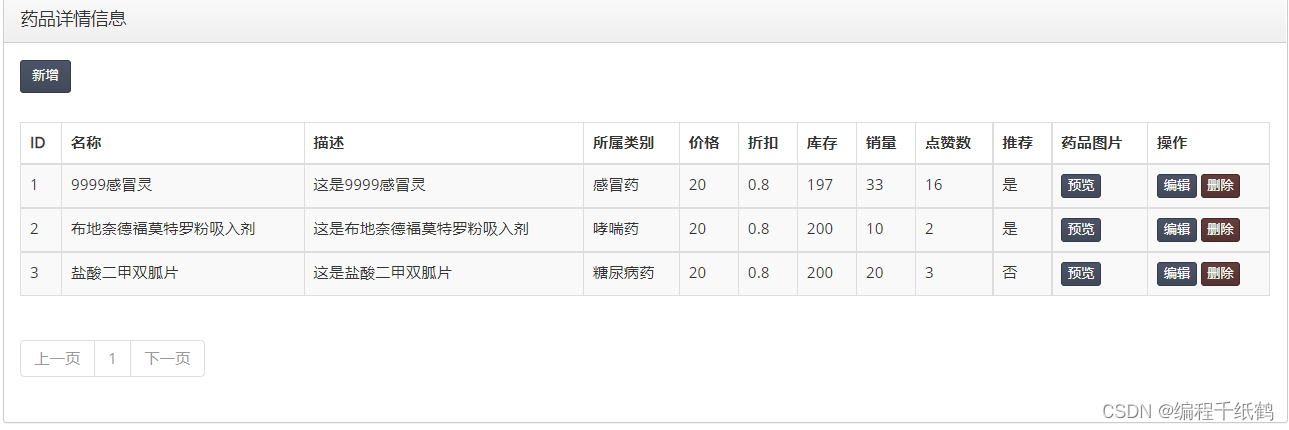
图3-15药品详情管理页面
四,核心代码展示
package com.example.controller;import cn.hutool.core.util.StrUtil;
import cn.hutool.crypto.SecureUtil;
import cn.hutool.json.JSONArray;
import cn.hutool.json.JSONObject;
import com.example.common.Result;
import com.example.common.ResultCode;
import com.example.entity.Account;
import com.example.entity.AuthorityInfo;
import com.example.exception.CustomException;
import com.example.entity.AdminInfo;
import com.example.entity.UserInfo;
import com.example.entity.ShequInfo;import com.example.service.AdminInfoService;
import com.example.service.UserInfoService;
import com.example.service.ShequInfoService;import org.springframework.web.bind.annotation.*;
import org.springframework.beans.BeanUtils;
import org.springframework.beans.factory.annotation.Value;import javax.annotation.Resource;
import javax.servlet.http.HttpServletRequest;
import cn.hutool.json.JSONUtil;import java.util.*;
import java.util.stream.Collectors;@RestController
public class AccountController {@Value("${authority.info}")private String authorityStr;@Resourceprivate AdminInfoService adminInfoService;@Resourceprivate UserInfoService userInfoService;@Resourceprivate ShequInfoService shequInfoService;@PostMapping("/login")public Result login(@RequestBody Account account, HttpServletRequest request) {if (StrUtil.isBlank(account.getName()) || StrUtil.isBlank(account.getPassword()) || account.getLevel() == null) {throw new CustomException(ResultCode.PARAM_LOST_ERROR);}Integer level = account.getLevel();Account login = new Account();if (1 == level) {login = adminInfoService.login(account.getName(), account.getPassword());}if (2 == level) {login = userInfoService.login(account.getName(), account.getPassword());}if (3 == level) {login = shequInfoService.login(account.getName(), account.getPassword());}request.getSession().setAttribute("user", login);return Result.success(login);}@PostMapping("/register")public Result register(@RequestBody Account account) {Integer level = account.getLevel();Account login = new Account();if (1 == level) {AdminInfo info = new AdminInfo();BeanUtils.copyProperties(account, info);login = adminInfoService.add(info);}if (2 == level) {UserInfo info = new UserInfo();BeanUtils.copyProperties(account, info);login = userInfoService.add(info);}if (3 == level) {ShequInfo info = new ShequInfo();BeanUtils.copyProperties(account, info);login = shequInfoService.add(info);}return Result.success(login);}@GetMapping("/logout")public Result logout(HttpServletRequest request) {request.getSession().setAttribute("user", null);return Result.success();}@GetMapping("/auth")public Result getAuth(HttpServletRequest request) {Object user = request.getSession().getAttribute("user");if(user == null) {return Result.error("401", "未登录");}return Result.success(user);}@GetMapping("/getAccountInfo")public Result package com.example.controller;import cn.hutool.core.collection.CollUtil;
import cn.hutool.core.collection.CollectionUtil;
import cn.hutool.core.io.IoUtil;
import cn.hutool.core.util.ObjectUtil;
import cn.hutool.core.util.StrUtil;
import cn.hutool.poi.excel.ExcelUtil;
import cn.hutool.poi.excel.ExcelWriter;
import com.example.common.Result;
import com.example.common.ResultCode;
import com.example.entity.AdminInfo;
import com.example.service.AdminInfoService;
import com.example.exception.CustomException;
import com.example.common.ResultCode;
import com.example.vo.AdminInfoVo;import com.github.pagehelper.PageHelper;
import com.github.pagehelper.PageInfo;
import com.example.service.*;
import org.springframework.web.bind.annotation.*;
import org.springframework.beans.factory.annotation.Value;
import cn.hutool.core.util.StrUtil;
import org.springframework.web.multipart.MultipartFile;import javax.annotation.Resource;
import javax.servlet.ServletOutputStream;
import javax.servlet.http.HttpServletRequest;
import javax.servlet.http.HttpServletResponse;
import java.io.IOException;
import java.util.LinkedHashMap;
import java.util.List;
import java.util.Map;
import java.util.stream.Collectors;@RestController
@RequestMapping(value = "/adminInfo")
public class AdminInfoController {@Resourceprivate AdminInfoService adminInfoService;@PostMappingpublic Result add(@RequestBody AdminInfoVo adminInfo) {adminInfoService.add(adminInfo);return Result.success(adminInfo);}@DeleteMapping("/{id}")public Result delete(@PathVariable Long id) {adminInfoService.delete(id);return Result.success();}@PutMappingpublic Result update(@RequestBody AdminInfoVo adminInfo) {adminInfoService.update(adminInfo);return Result.success();}@GetMapping("/{id}")public Result detail(@PathVariable Long id) {AdminInfo adminInfo = adminInfoService.findById(id);return Result.success(adminInfo);}@GetMappingpublic Result> all() {return Result.success(adminInfoService.findAll());}@GetMapping("/page/{name}")public Result> page(@PathVariable String name,@RequestParam(defaultValue = "1") Integer pageNum,@RequestParam(defaultValue = "5") Integer pageSize,HttpServletRequest request) {return Result.success(adminInfoService.findPage(name, pageNum, pageSize, request));}@PostMapping("/register")public Result register(@RequestBody AdminInfo adminInfo) {if (StrUtil.isBlank(adminInfo.getName()) || StrUtil.isBlank(adminInfo.getPassword())) {throw new CustomException(ResultCode.PARAM_ERROR);}return Result.success(adminInfoService.add(adminInfo));}/*** 批量通过excel添加信息* @param file excel文件* @throws IOException*/@PostMapping("/upload")public Result upload(MultipartFile file) throws IOException {List infoList = ExcelUtil.getReader(file.getInputStream()).readAll(AdminInfo.class);if (!CollectionUtil.isEmpty(infoList)) {// 处理一下空数据List resultList = infoList.stream().filter(x -> ObjectUtil.isNotEmpty(x.getName())).collect(Collectors.toList());for (AdminInfo info : resultList) {adminInfoService.add(info);}}return Result.success();}@GetMapping("/getExcelModel")public void getExcelModel(HttpServletResponse response) throws IOException {// 1. 生成excelMap row = new LinkedHashMap<>();row.put("name", "admin");row.put("password", "123456");row.put("nickName", "管理员");row.put("sex", "男");row.put("age", 22);row.put("birthday", "TIME");row.put("phone", "18843232356");row.put("address", "上海市");row.put("code", "111");row.put("email", "aa@163.com");row.put("cardId", "342425199001116372");row.put("level", 1);List> list = CollUtil.newArrayList(row);// 2. 写excelExcelWriter writer = ExcelUtil.getWriter(true);writer.write(list, true);response.setContentType("application/vnd.openxmlformats-officedocument.spreadsheetml.sheet;charset=utf-8");response.setHeader("Content-Disposition","attachment;filename=adminInfoModel.xlsx");ServletOutputStream out = response.getOutputStream();writer.flush(out, true);writer.close();IoUtil.close(System.out);}
}
package com.example.controller;import com.example.common.Result;
import com.example.common.ResultCode;
import com.example.entity.CartInfo;
import com.example.entity.GoodsInfo;
import com.example.exception.CustomException;
import com.example.service.CartInfoService;
import com.github.pagehelper.PageHelper;
import com.github.pagehelper.PageInfo;
import org.springframework.web.bind.annotation.*;import javax.annotation.Resource;
import javax.servlet.http.HttpServletRequest;
import java.util.List;@RestController
@RequestMapping(value = "/cartInfo")
public class CartInfoController {@Resourceprivate CartInfoService cartInfoService;/*** 查询所有购物车(不分页)** @return 购物车list*/@GetMappingpublic Result> findAll(@RequestParam("userId") Long userId,@RequestParam("level") Integer level) {return Result.success(cartInfoService.findAll(userId, level));}/*** 查询所有购物车(分页)** @return 购物车list*/@GetMapping("/page")public Result> findAll(@RequestParam(required = false, defaultValue = "1") Integer pageNum,@RequestParam(required = false, defaultValue = "10") Integer pageSize,HttpServletRequest request) {return Result.success(cartInfoService.findPageDetails(pageNum, pageSize, request));}/*** 根据id获取购物车** @param id 购物车id* @return 购物车信息*/@GetMapping("/{id}")public Result findById(@PathVariable Long id) {return Result.success(cartInfoService.findById(id));}/*** 添加购物车** @param detailInfo 购物车信息* @return 购物车信息*/@PostMappingpublic Result add(@RequestBody CartInfo detailInfo) {return Result.success(cartInfoService.add(detailInfo));}/*** 更新购物车详情** @param detailInfo 药品购物车信息* @return 药品购物车信息*/@PutMappingpublic Result update(@RequestBody CartInfo detailInfo) {if (detailInfo.getId() == null) {throw new CustomException(ResultCode.PARAM_ERROR);}return Result.success(cartInfoService.update(detailInfo));}/*** 删除购物车** @param id 药品id* @return result*/@DeleteMapping("/{id}")public Result delete(@PathVariable Long id) {cartInfoService.delete(id);return Result.success();}/*** 删除购物车** @param userId 用户* @param goodsId 药品id* @return result*/@DeleteMapping("/goods/{userId}/{level}/{goodsId}")public Result deleteGoods(@PathVariable Long userId, @PathVariable Integer level, @PathVariable Long goodsId) {cartInfoService.deleteGoods(userId, level, goodsId);return Result.success();}/*** 删除购物车** @param userId 用户id* @return result*/@DeleteMapping("/empty/{userId}/{level}")public Result empty(@PathVariable Long userId, @PathVariable Integer level) {cartInfoService.empty(userId, level);return Result.success();}
}
五,项目总结
本系统用户共有二种:普通用户、管理员用户。
普通用户注册登陆后可以访问本系统前端,实现信息查看、在线购物、个人信息管理、个人健康信息管理等功能
管理员用户拥有普通用户的所有功能,另外可以管理药品信息、所有用户的订单信息、评价信息、留言信息、公告信息、用户信息、管理员信息等
本文来自互联网用户投稿,文章观点仅代表作者本人,不代表本站立场,不承担相关法律责任。如若转载,请注明出处。 如若内容造成侵权/违法违规/事实不符,请点击【内容举报】进行投诉反馈!