安卓 —— 图灵机器人+讯飞语音设计实现
前言:
本文主要介绍一下之前学习的安卓平台下 “图灵机器人的设计”,希望能给爱学习的你到来更多的启发和兴趣。当然,随着时间的推延,技术的优化和进步,难免出现新技术的更迭,所以要经常充电学习...
安卓开发:android4.2-5.0
【注:2017-12-12】
今天在同事手机上安装了一下试试,发现红米手机可支持,并且没有使用讯飞输入法也可以完成。
毕竟代码编辑久远,当初的代码是在 android4.2 - 5.0 版本下开发的,如今的安卓版本更新换代快,终究会出现兼容问题,此外两年多没有碰安卓代码了,可能很难给以参考的伙伴以有价值的建议,希望多多进步咯 ...
一.前期准备:
1.代码编写之前,在此提供 前辈大牛的视频讲解 ,其中涉及到了图灵账号的注册和效果实现
2.其中注册网址为 图灵机器人官网 ,具体操作可看官方文档和之前的视频链接
3.在此补充一个感觉很好的 参考博文 ,编写之前也参考了他的很多,主要还是学习众家所长嘛
4.代码使用了讯飞语音,个人认为如果使用的讯飞输入法,同时下载了其语音,在编辑的同时即可使用,而此代码表示需要在联网状态进行语音的输入转化。
二.代码编写:
①. 权限设置
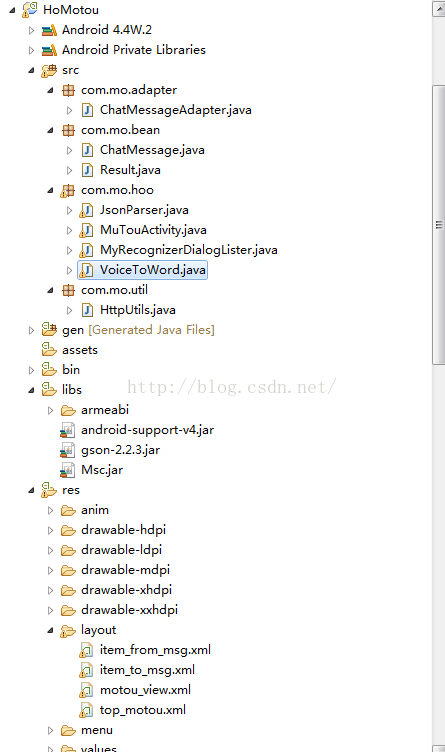
②. 项目展开状况如下所示
注意对应的jar包使用,之后会附上源码下载地址作为参考
③. 布局文件
(1). /HoMotou/res/layout/motou_view.xml 源码
(2). /HoMotou/res/layout/item_from_msg.xml 源码
(3). /HoMotou/res/layout/item_to_msg.xml 源码
(4)./HoMotou/res/layout/top_motou.xml 源码
④. 适配器设计代码如下
(/HoMotou/src/com/mo/adapter/ChatMessageAdapter.java)
package com.mo.adapter;import java.text.SimpleDateFormat;
import java.util.List;
import com.mo.bean.ChatMessage;
import com.mo.bean.ChatMessage.Type;
import com.mo.hoo.R;import android.content.Context;
import android.view.LayoutInflater;
import android.view.View;
import android.view.ViewGroup;
import android.widget.BaseAdapter;
import android.widget.TextView;public class ChatMessageAdapter extends BaseAdapter
{private LayoutInflater mInflater;private List mDatas;public ChatMessageAdapter(Context context, List mDatas){mInflater = LayoutInflater.from(context);this.mDatas = mDatas;}@Overridepublic int getCount(){return mDatas.size();}@Overridepublic Object getItem(int position){return mDatas.get(position);}@Overridepublic long getItemId(int position){return position;}@Overridepublic int getItemViewType(int position){ChatMessage chatMessage = mDatas.get(position);if (chatMessage.getType() == Type.INCOMING){return 0;}return 1;}@Overridepublic int getViewTypeCount(){return 2;}@Overridepublic View getView(int position, View convertView, ViewGroup parent){ChatMessage chatMessage = mDatas.get(position);ViewHolder viewHolder = null;if (convertView == null){// 通过ItemType设置不同的布局if (getItemViewType(position) == 0){convertView = mInflater.inflate(R.layout.item_from_msg, parent,false);viewHolder = new ViewHolder();viewHolder.mDate = (TextView) convertView.findViewById(R.id.id_form_msg_date);viewHolder.mMsg = (TextView) convertView.findViewById(R.id.id_from_msg_info);} else{convertView = mInflater.inflate(R.layout.item_to_msg, parent,false);viewHolder = new ViewHolder();viewHolder.mDate = (TextView) convertView.findViewById(R.id.id_to_msg_date);viewHolder.mMsg = (TextView) convertView.findViewById(R.id.id_to_msg_info);}convertView.setTag(viewHolder);} else{viewHolder = (ViewHolder) convertView.getTag();}// 设置数据SimpleDateFormat df = new SimpleDateFormat("yyyy-MM-dd HH:mm:ss");viewHolder.mDate.setText(df.format(chatMessage.getDate()));viewHolder.mMsg.setText(chatMessage.getMsg());return convertView;}private final class ViewHolder{TextView mDate;TextView mMsg;}}
⑤. 实现消息发送与接收的工具类设计
(/HoMotou/src/com/mo/util/HttpUtils.java)
package com.mo.util;import java.io.ByteArrayOutputStream;
import java.io.IOException;
import java.io.InputStream;
import java.io.UnsupportedEncodingException;
import java.net.HttpURLConnection;
import java.net.MalformedURLException;
import java.net.URLEncoder;
import java.util.Date;import com.google.gson.Gson;
import com.mo.bean.ChatMessage;
import com.mo.bean.ChatMessage.Type;
import com.mo.bean.Result;public class HttpUtils
{private static final String URL = "http://www.tuling123.com/openapi/api";//"请自行申请apikey"private static final String API_KEY = "0905b3be27b638a58362d682529e2a3b";/*** 发送一个消息,得到返回的消息* @param msg* @return*/public static ChatMessage sendMessage(String msg){ChatMessage chatMessage = new ChatMessage();String jsonRes = doGet(msg);Gson gson = new Gson();Result result = null;try{result = gson.fromJson(jsonRes, Result.class);chatMessage.setMsg(result.getText());} catch (Exception e){chatMessage.setMsg("服务器繁忙,请稍候再试");}chatMessage.setDate(new Date());chatMessage.setType(Type.INCOMING);return chatMessage;}public static String doGet(String msg){String result = "";String url = setParams(msg);ByteArrayOutputStream baos = null;InputStream is = null;try{java.net.URL urlNet = new java.net.URL(url);HttpURLConnection conn = (HttpURLConnection) urlNet.openConnection();conn.setReadTimeout(5 * 1000);conn.setConnectTimeout(5 * 1000);conn.setRequestMethod("GET");is = conn.getInputStream();int len = -1;byte[] buf = new byte[128];baos = new ByteArrayOutputStream();while ((len = is.read(buf)) != -1){baos.write(buf, 0, len);}baos.flush();result = new String(baos.toByteArray());} catch (MalformedURLException e){e.printStackTrace();} catch (Exception e){e.printStackTrace();} finally{try{if (baos != null)baos.close();} catch (IOException e){e.printStackTrace();}try{if (is != null){is.close();}} catch (IOException e){e.printStackTrace();}}return result;}private static String setParams(String msg){String url = "";try{url = URL + "?key=" + API_KEY + "&info="+ URLEncoder.encode(msg, "UTF-8");} catch (UnsupportedEncodingException e){e.printStackTrace();}return url;}}
⑥. 主体Activity设计
(/HoMotou/src/com/mo/hoo/MuTouActivity.java)
package com.mo.hoo;import java.util.ArrayList;
import java.util.Date;
import java.util.List;import com.mo.adapter.ChatMessageAdapter;
import com.mo.bean.ChatMessage;
import com.mo.bean.ChatMessage.Type;
import com.mo.util.HttpUtils;import android.app.Activity;
import android.os.Bundle;
import android.os.Handler;
import android.os.Message;
import android.text.TextUtils;
import android.util.Log;
import android.view.View;
import android.view.Window;
import android.view.View.OnClickListener;
import android.widget.Button;
import android.widget.EditText;
import android.widget.ImageView;
import android.widget.ListView;
import android.widget.TextView;
import android.widget.Toast;public class MuTouActivity extends Activity {public static String toMsg="";private ListView mMsgs;private ChatMessageAdapter mAdapter;private List mDatas;private TextView tv_back;public static EditText mInputMsg;private Button mSendMsg;private Button iv_voice;private Handler mHandler = new Handler(){public void handleMessage(android.os.Message msg){// 等待接收,子线程完成数据的返回ChatMessage fromMessge = (ChatMessage) msg.obj;mDatas.add(fromMessge);mAdapter.notifyDataSetChanged();mMsgs.setSelection(mDatas.size()-1);};};@Overrideprotected void onCreate(Bundle savedInstanceState){super.onCreate(savedInstanceState);overridePendingTransition(R.anim.push_right_in,R.anim.hold);requestWindowFeature(Window.FEATURE_NO_TITLE);setContentView(R.layout.motou_view);initView();initDatas();// 初始化事件initListener();}private void initListener(){mSendMsg.setOnClickListener(new OnClickListener(){@Overridepublic void onClick(View v){toMsg = mInputMsg.getText().toString();if (TextUtils.isEmpty(toMsg)){Toast.makeText(MuTouActivity.this, "发送消息不能为空!",Toast.LENGTH_SHORT).show();return;}ChatMessage toMessage = new ChatMessage();toMessage.setDate(new Date());toMessage.setMsg(toMsg);toMessage.setType(Type.OUTCOMING);mDatas.add(toMessage);mAdapter.notifyDataSetChanged();mMsgs.setSelection(mDatas.size()-1);mInputMsg.setText("");new Thread(){public void run(){ChatMessage fromMessage = HttpUtils.sendMessage(toMsg);Message m = Message.obtain();m.obj = fromMessage;mHandler.sendMessage(m);};}.start();}});tv_back.setOnClickListener(new OnClickListener() {@Overridepublic void onClick(View v) {finish();overridePendingTransition(R.anim.hold,R.anim.push_right_out);}});}private void initDatas(){mDatas = new ArrayList();mDatas.add(new ChatMessage("笨蛋,找我干嘛啊?", Type.INCOMING, new Date()));mAdapter = new ChatMessageAdapter(this, mDatas);mMsgs.setAdapter(mAdapter);iv_voice.setOnClickListener(new OnClickListener() {@Overridepublic void onClick(View v) {// 初始化,再加载//MyRecognizerDialogLister.text="";VoiceToWord voice = new VoiceToWord(MuTouActivity.this,"534e3fe2");voice.GetWordFromVoice();}});}private void initView(){mMsgs = (ListView) findViewById(R.id.id_listview_msgs);mInputMsg = (EditText) findViewById(R.id.id_input_msg);mSendMsg = (Button) findViewById(R.id.id_send_msg);tv_back=(TextView) findViewById(R.id.tv_back);iv_voice=(Button) findViewById(R.id.iv_voice);}}
⑦. 用于实现讯飞语音输入的JSON解析类
package com.mo.hoo;import org.json.JSONArray;
import org.json.JSONObject;
import org.json.JSONTokener;import android.text.TextUtils;//import com.iflytek.speech.ErrorCode;
//import com.iflytek.speech.SpeechError;
/*** 对云端返回的Json结果进行解析* @author iFlytek* @since 20131211*/
public class JsonParser {/*** 听写结果的Json格式解析* @param json* @return*/private static boolean isTag;public static String parseIatResult(String json) {if(TextUtils.isEmpty(json))return "";StringBuffer ret = new StringBuffer();try {JSONTokener tokener = new JSONTokener(json);JSONObject joResult = new JSONObject(tokener);JSONArray words = joResult.getJSONArray("ws");for (int i = 0; i < words.length(); i++) {// 听写结果词,默认使用第一个结果JSONArray items = words.getJSONObject(i).getJSONArray("cw");JSONObject obj = items.getJSONObject(0);ret.append(obj.getString("w"));
//				如果需要多候选结果,解析数组其他字段
//				for(int j = 0; j < items.length(); j++)
//				{
//					JSONObject obj = items.getJSONObject(j);
//					ret.append(obj.getString("w"));
//				}}} catch (Exception e) {e.printStackTrace();} return ret.toString();}/*** 识别结果的Json格式解析* @param json* @return*/public static String parseGrammarResult(String json) {StringBuffer ret = new StringBuffer();try {JSONTokener tokener = new JSONTokener(json);JSONObject joResult = new JSONObject(tokener);JSONArray words = joResult.getJSONArray("ws");for (int i = 0; i < words.length(); i++) {JSONArray items = words.getJSONObject(i).getJSONArray("cw");for(int j = 0; j < items.length(); j++){JSONObject obj = items.getJSONObject(j);if(obj.getString("w").contains("nomatch")){ret.append("没有匹配结果.");return ret.toString();}ret.append("【结果】" + obj.getString("w"));ret.append("【置信度】" + obj.getInt("sc"));ret.append("\n");}}} catch (Exception e) {e.printStackTrace();ret.append("没有匹配结果.");} return ret.toString();}/*** 语义结果的Json格式解析* @param json* @return*/public static String parseUnderstandResult(String json) {StringBuffer ret = new StringBuffer();try {JSONTokener tokener = new JSONTokener(json);JSONObject joResult = new JSONObject(tokener);ret.append("【应答码】" + joResult.getString("rc") + "\n");ret.append("【转写结果】" + joResult.getString("text") + "\n");ret.append("【服务名称】" + joResult.getString("service") + "\n");ret.append("【操作名称】" + joResult.getString("operation") + "\n");ret.append("【完整结果】" + json);} catch (Exception e) {e.printStackTrace();ret.append("没有匹配结果.");} return ret.toString();}
}
⑧. 语音转化为文字的实现类
package com.mo.hoo;import com.iflytek.cloud.speech.SpeechConstant;
import com.iflytek.cloud.speech.SpeechError;
import com.iflytek.cloud.speech.SpeechListener;
import com.iflytek.cloud.speech.SpeechRecognizer;
import com.iflytek.cloud.speech.SpeechUser;
import com.iflytek.cloud.ui.RecognizerDialog;
import com.iflytek.cloud.ui.RecognizerDialogListener;import android.app.Activity;
import android.content.Context;
import android.content.SharedPreferences;
import android.os.Bundle;
import android.text.TextUtils;
import android.widget.Toast;public class VoiceToWord extends Activity{private Context context;private Toast mToast;//识别窗口private RecognizerDialog iatDialog;//识别对象private SpeechRecognizer iatRecognizer;//缓存,保存当前的引擎参数到下一次启动应用程序使用.private SharedPreferences mSharedPreferences;private RecognizerDialogListener recognizerDialogListener = null;public VoiceToWord(Context context,String APP_ID) {// TODO Auto-generated constructor stub//用户登录this.context = context;SpeechUser.getUser().login(context, null, null, "appid=" + APP_ID, listener);//初始化听写Dialog,如果只使用有UI听写功能,无需创建SpeechRecognizeriatDialog =new RecognizerDialog(context);mToast = Toast.makeText(context, "", Toast.LENGTH_LONG);//初始化听写Dialog,如果只使用有UI听写功能,无需创建SpeechRecognizeriatDialog =new RecognizerDialog(context);//初始化缓存对象.mSharedPreferences = context.getSharedPreferences(context.getPackageName(),MODE_PRIVATE);}public VoiceToWord(Context context,String APP_ID,RecognizerDialogListener recognizerDialogListener){this.context = context;SpeechUser.getUser().login(context, null, null, "appid=" + APP_ID, listener);//初始化听写Dialog,如果只使用有UI听写功能,无需创建SpeechRecognizeriatDialog =new RecognizerDialog(context);mToast = Toast.makeText(context, "", Toast.LENGTH_LONG);//初始化听写Dialog,如果只使用有UI听写功能,无需创建SpeechRecognizeriatDialog =new RecognizerDialog(context);//初始化缓存对象.mSharedPreferences = context.getSharedPreferences(context.getPackageName(),MODE_PRIVATE);this.recognizerDialogListener = recognizerDialogListener;}public void GetWordFromVoice(){boolean isShowDialog = mSharedPreferences.getBoolean("iat_show",true);if (isShowDialog) {//显示语音听写Dialog.showIatDialog();} else {if(null == iatRecognizer) {iatRecognizer=SpeechRecognizer.createRecognizer(this);}if(iatRecognizer.isListening()) {iatRecognizer.stopListening();
//				((Button) findViewById(android.R.id.button1)).setEnabled(false);} else {}}}private void showTip1(String str){if(!TextUtils.isEmpty(str)){mToast.setText(str);mToast.show();}}/*** 显示听写对话框.* @param*/public void showIatDialog(){if(null == iatDialog) {//初始化听写Dialog	iatDialog =new RecognizerDialog(this);}//获取引擎参数String engine = mSharedPreferences.getString("iat_engine","iat");//清空Grammar_ID,防止识别后进行听写时Grammar_ID的干扰iatDialog.setParameter(SpeechConstant.CLOUD_GRAMMAR, null);//设置听写Dialog的引擎iatDialog.setParameter(SpeechConstant.DOMAIN, engine);//设置采样率参数,支持8K和16K String rate = mSharedPreferences.getString("sf","sf");if(rate.equals("rate8k")){iatDialog.setParameter(SpeechConstant.SAMPLE_RATE, "8000");}else {iatDialog.setParameter(SpeechConstant.SAMPLE_RATE, "16000");}if(recognizerDialogListener == null){getRecognizerDialogListener();}//显示听写对话框iatDialog.setListener(recognizerDialogListener);iatDialog.show();}private void getRecognizerDialogListener(){/*** 识别回调监听器*/recognizerDialogListener=new MyRecognizerDialogLister(context);}/*** 用户登录回调监听器.*/private SpeechListener listener = new SpeechListener(){@Overridepublic void onData(byte[] arg0) {}@Overridepublic void onCompleted(SpeechError error) {if(error != null) {System.out.println("user login success");}			}@Overridepublic void onEvent(int arg0, Bundle arg1) {}		};
}
⑨. 项目运行截图

⑩. 附录
源码下载,仅供参考 >>>
【声明】如有转载,请注明信息来源,欢迎学习,指点 ...
本文来自互联网用户投稿,文章观点仅代表作者本人,不代表本站立场,不承担相关法律责任。如若转载,请注明出处。 如若内容造成侵权/违法违规/事实不符,请点击【内容举报】进行投诉反馈!