采用python完成用户的登录、增删改查功能
采用python完成用户的登录、增删改查功能
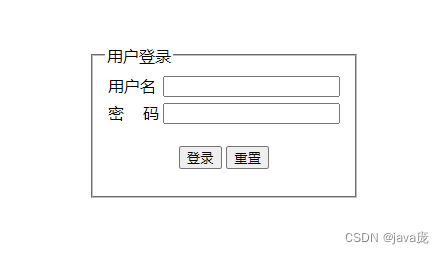
- 总体功能如下图
- 创建项目
- 数据库脚本如下
- 下面直接上代码
总体功能如下图
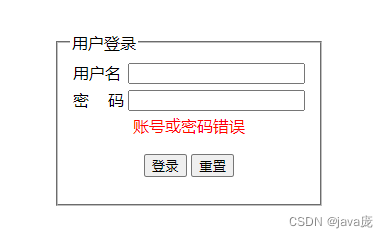
账号或密码错误,点击“登录”提示
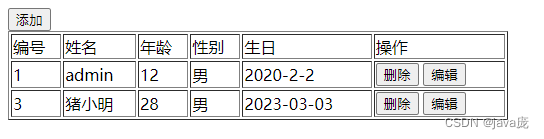
登录成功后,跳转到列表页面
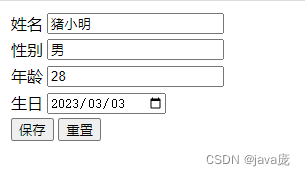
点击“编辑按钮”
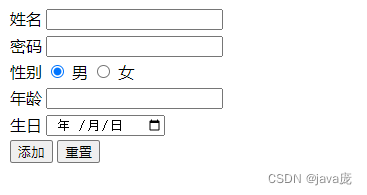
点击“添加”按钮
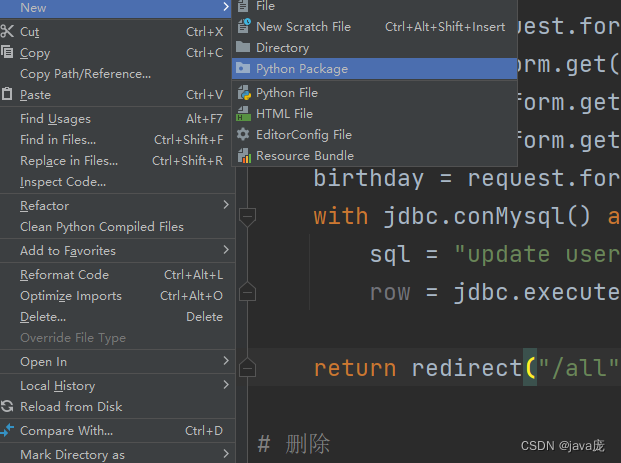
创建项目
第一步,创建项目包
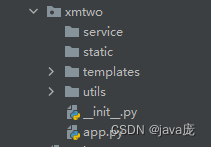
第二步,在项目包下创建文件夹如下图所示
分别创建4个文件夹,service 存放业务逻辑代码,static存放静态资源(如css,js文件),templates存放html页面,utils存放工具类(如连接数据库的jdbc)
数据库脚本如下
SET NAMES utf8mb4;
SET FOREIGN_KEY_CHECKS = 0;-- ----------------------------
-- Table structure for user
-- ----------------------------
DROP TABLE IF EXISTS `user`;
CREATE TABLE `user`  (`id` int(11) NOT NULL AUTO_INCREMENT,`name` varchar(255) CHARACTER SET utf8 COLLATE utf8_general_ci NULL DEFAULT NULL,`pwd` varchar(255) CHARACTER SET utf8 COLLATE utf8_general_ci NULL DEFAULT NULL,`sex` varchar(255) CHARACTER SET utf8 COLLATE utf8_general_ci NULL DEFAULT NULL,`age` int(11) NULL DEFAULT NULL,`birthday` varchar(255) CHARACTER SET utf8 COLLATE utf8_general_ci NULL DEFAULT NULL,PRIMARY KEY (`id`) USING BTREE
) ENGINE = InnoDB AUTO_INCREMENT = 5 CHARACTER SET = utf8 COLLATE = utf8_general_ci ROW_FORMAT = Compact;-- ----------------------------
-- Records of user
-- ----------------------------
INSERT INTO `user` VALUES (1, 'admin', '123', '男', 12, '2020-2-2');
INSERT INTO `user` VALUES (3, '猪小明', '321', '男', 28, '2023-03-03');SET FOREIGN_KEY_CHECKS = 1;
下面直接上代码
首先先下载安装对应得模块Flask和pymysql
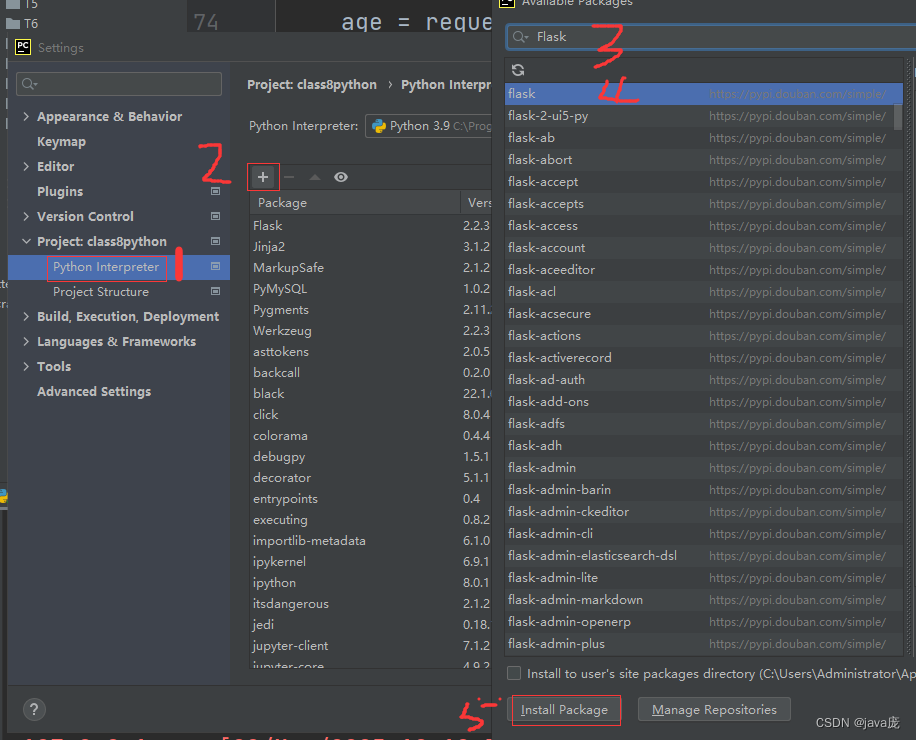
第二,在utils中创建DBHelper模块链接数据库
import contextlibimport pymysql as mysqlclass JDBC:@contextlib.contextmanagerdef conMysql(self):try:con = mysql.connect(host="localhost",port=3306,user="root",passwd="12345678",db="pythondb",charset="utf8")# 获取游标cs = con.cursor(mysql.cursors.DictCursor)#返回游标yield cscon.commit()except Exception as e:print(e)con.rollback()finally:cs.close()con.close()# 查询方法def findAll(self,cursor,sql,params=None):cursor.execute(sql,params)return cursor.fetchall()# 添加,删除,修改def executeSQL(self,cursor,sql,params=None):return cursor.execute(sql,params)jdbc = JDBC()
if __name__ == '__main__':with jdbc.conMysql() as cs:print(cs)
在项目包下创建一个app模块
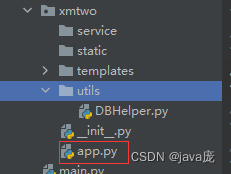
这里的代码就不做过多解析了,不懂的我们可以再交流
from flask import Flask,request,redirect,render_template# 创建APP应用
from demo1.xmtwo.utils.DBHelper import JDBCapp = Flask(__name__,template_folder="./templates")# 创建连接数据库的对象jdbc = JDBC()# 登录界面
@app.route("/")
def index():return render_template("login.html")# 登录
@app.route("/login",methods=["POST","GET"])
def login():# 根据name属性值获取账号和密码username = request.form.get("username")pwd = request.form.get("pwd")with jdbc.conMysql() as cs:sql = "select * from user where name=%s and pwd = %s"row = jdbc.executeSQL(cs,sql,(username,pwd))if row > 0:return redirect("/all")else:return render_template("login.html",error_msg="账号或密码错误")
# 查询列表
@app.route("/all")
def userlist():with jdbc.conMysql() as cs:sql = "select * from user"result = jdbc.findAll(cs,sql)return render_template("main.html",users = result)# 添加==》跳转到添加页码
@app.route("/add")
def add():return render_template("add.html")
# 添加==》保存数据
@app.route("/addUser",methods=["POST","GET"])
def addUser():# 根据表单中的name属性值获取信息username = request.form.get("username")pwd = request.form.get("pwd")sex = request.form.get("sex")age = request.form.get("age")birthday = request.form.get("birthday")with jdbc.conMysql() as cs:sql = "insert into user(name,sex,age,birthday,pwd) values(%s,%s,%s,%s,%s)"row = jdbc.executeSQL(cs,sql,(username,sex,age,birthday,pwd))if row > 0:return redirect("/all")else:return redirect("/add")# 编辑=》根据ID查询用户跳转到编辑页面
@app.route("/edit/" )
def editUser(userid):with jdbc.conMysql() as cs:sql = "select * from user where id=%s"result = jdbc.findAll(cs,sql,userid)return render_template("edit.html",user=result[0])
# 编辑=》保存数据
@app.route("/saveUser",methods=["POST","GET"])
def saveUser():username = request.form.get("username")id = request.form.get("id")sex = request.form.get("sex")age = request.form.get("age")birthday = request.form.get("birthday")with jdbc.conMysql() as cs:sql = "update user set name=%s,sex=%s,age=%s,birthday=%s where id=%s"row = jdbc.executeSQL(cs,sql,(username,sex,age,birthday,id))return redirect("/all")# 删除
@app.route("/del/" )
def deleteByid(userid):with jdbc.conMysql() as cs:sql = "delete from user where id = %s"jdbc.executeSQL(cs,sql,userid)return redirect("/all")# student(stuid,stuname,stuage,stusex(单选)) 增,删,改,查if __name__ == '__main__':app.run()
然后在templates创建对应的html页面
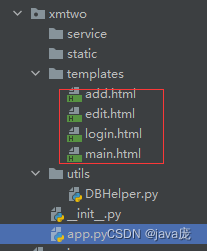
add.html的代码
<!DOCTYPE html>
<html lang="en">
<head><meta charset="UTF-8"><title>添加页面</title>
</head>
<body><div><form action="addUser" method="post"><table ><tr><td>姓名</td><td><input name="username"></td></tr><tr><td>密码</td><td><input type="password" name="pwd"></td></tr><tr><td>性别</td><td><input type="radio" name="sex" value="男" checked> 男<input type="radio" name="sex" value="女" > 女</td></tr><tr><td>年龄</td><td><input name="age"></td></tr><tr><td>生日</td><td><input type="date" name="birthday"></td></tr><tr><td colspan="2"><input type="submit" value="添加"><input type="reset" value="重置"></td></tr></table></form></div>
</body>
</html>
edit.html
<!DOCTYPE html>
<html lang="en">
<head><meta charset="UTF-8"><title>修改</title>
</head>
<body><div><form action="/saveUser" method="post">
<!--            id隐藏域--><input type="hidden" name="id" value="{{user.id}}"><table><tr><td>姓名</td><td><input name="username" value="{{user.name}}"></td></tr><tr><td>性别</td><td><input name="sex" value="{{user.sex}}"></td></tr><tr><td>年龄</td><td><input name="age" value="{{user.age}}"></td></tr><tr><td>生日</td><td><input type="date" name="birthday" value="{{user.birthday}}"></td></tr><tr><td colspan="2"><input type="submit" value="保存"><input type="reset" value="重置"></td></tr></table></form></div>
</body>
</html>
login.html
<!DOCTYPE html>
<html lang="en">
<head><meta charset="UTF-8"><meta http-equiv="X-UA-Compatible" content="IE=edge"><meta name="viewport" content="width=device-width, initial-scale=1.0"><title>登录</title><style>#login{width: 270px;margin: 0 auto;margin-top: 15%;}.lgbt{text-align: center;padding: 15px;}</style>
</head>
<body><div id="login"><fieldset><legend>用户登录</legend><form action="login" method="post"><table><tr><td>用户名</td><td><input name="username"></td></tr><tr><td>密 码</td><td><input type="password" name="pwd"></td></tr>{% if error_msg != "" %}<tr><td colspan="2" style="color:red;text-align: center;">{{error_msg}}</td></tr>{% endif %}<tr><td colspan="2" class="lgbt"><input type="submit" value="登录"><input type="reset" value="重置"></td></tr></table></form></fieldset></div>
</body>
</html>
main.html
<!DOCTYPE html>
<html lang="en">
<head><meta charset="UTF-8"><title>Title</title>
</head>
<body><div><a href="add"><button>添加</button></a><table border="1" width="500px"><tr><td>编号</td><td>姓名</td><td>年龄</td><td>性别</td><td>生日</td><td>操作</td></tr>{% for user in users %}<tr><td>{{user.id}}</td><td>{{user.name}}</td><td>{{user.age}}</td><td>{{user.sex}}</td><td>{{user.birthday}}</td><td><a href="del/{{user.id}}"><button>删除</button></a><a href="edit/{{user.id}}"><button>编辑</button></a></td></tr>{% endfor %}</table></div>
</body>
</html>
本文来自互联网用户投稿,文章观点仅代表作者本人,不代表本站立场,不承担相关法律责任。如若转载,请注明出处。 如若内容造成侵权/违法违规/事实不符,请点击【内容举报】进行投诉反馈!